
Technical SEO for B2B Websites: A Practical Guide
How search engines crawl, render and index a B2B website, what can go wrong at each step, and the order in which to fix it.

Technical SEO is the work that lets search engines crawl, render, index and understand a website: server responses, robots.txt, XML sitemaps, canonical tags, redirects, HTTPS, site structure, structured data and how JavaScript content loads. On a B2B website it comes before content and authority work because Google can only show pages it has indexed and only judge content it could crawl, so every article, product page and link you invest in depends on it.
A B2B website asks a lot of a few pages: product and application pages, datasheets, industry pages and language versions that have to reach buyers searching for specific problems. When those pages are missing from Google, the cause is often not the writing. A Disallow: / rule left over from the staging site, a product filter that creates thousands of duplicate URLs or a redesign that dropped its redirects can keep good pages out of search until someone notices.
This guide explains what technical SEO is, how it differs from on-page and off-page work, why it comes first and what to check. It opens our series on technical SEO foundations; you can find all SEO & AI Search articles on the category page.
What is technical SEO?
Technical SEO covers everything that decides whether search engines can reach your pages, read them and store the right version. It is less about what a page says than about how the site delivers it: the server, the code, the URLs and the signals that tell Google which version counts.
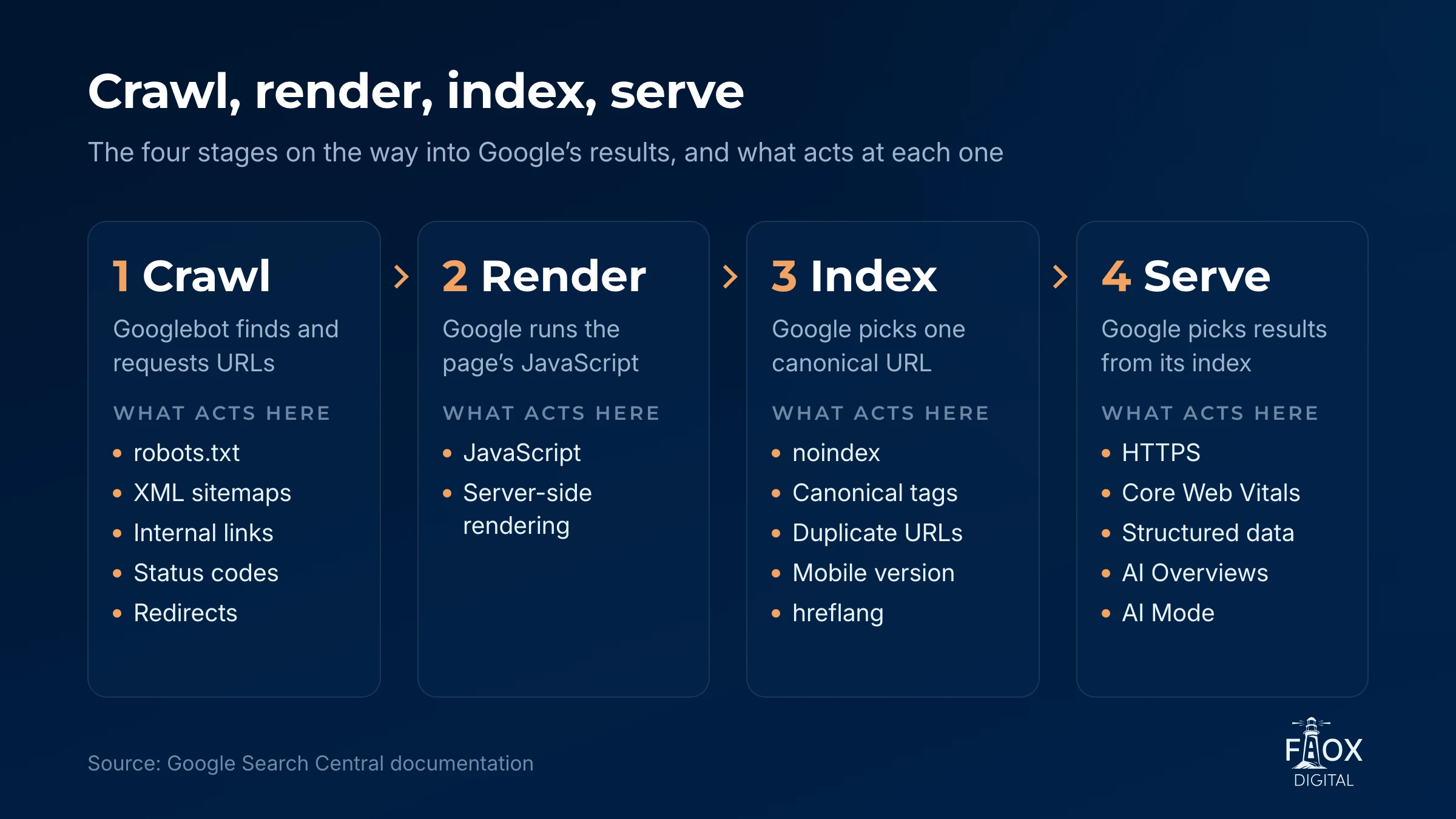
Google describes three stages: crawling, indexing and serving results. Sites that load content with JavaScript add a step between the first two, rendering:
- Crawl. Googlebot finds URLs through links on pages it already knows and through your sitemaps, then requests them. robots.txt, XML sitemaps, internal links, status codes and redirects decide what it reaches.
- Render. Google runs the page’s JavaScript in a recent version of Chrome to see content that loads later. Pages can wait in a queue first, which is one reason server-side rendering helps.
- Index. Google analyzes the content, groups duplicates and picks one canonical URL per group, the version that may appear in results.
noindex, canonical tags, duplicate URLs, the mobile version and hreflang act here. - Serve. Google picks results from its index. Relevance and content quality do most of the work; HTTPS, Core Web Vitals and structured data play a smaller part. AI Overviews and AI Mode rest on the same foundation: a page must be indexed and eligible for a snippet to appear in them.
Google is explicit that meeting its guidelines does not mean a page will be crawled, indexed or shown. Technical SEO removes obstacles; it does not create relevance or demand.
Technical SEO vs on-page SEO vs off-page SEO
SEO work falls into three groups that depend on each other. The clearest way to tell them apart is the question each one answers.
| Type | Question it answers | Typical work | Usually done by |
|---|---|---|---|
| Technical SEO | Can search engines reach, read and index the page? | Crawl access, indexing, redirects, canonical tags, site structure, structured data, rendering, speed | Developer or technical SEO specialist |
| On-page SEO | Does the page answer the search it targets? | Topic and keyword choice, titles, headings, copy, internal link text, images | Marketing, writers, product experts |
| Off-page SEO | Do other websites treat you as a credible source? | Links from other sites, digital PR, mentions in trade media | Marketing, PR, leadership |
The lines blur. Internal links are technical when they decide whether Google can reach a page, and on-page when their wording describes the target. Titles are written by marketing but often generated by a CMS template, so a duplicated title across hundreds of product pages is a technical fault.
A B2B site can have gaps in all three: filter URLs that duplicate the catalog, product pages that list specifications but never say what problem the product solves, and a respected company that few websites link to. On-page work starts with keyword research for B2B; technical SEO makes sure the pages built from it can be found.
Crawling: robots.txt, XML sitemaps and crawl budget
Crawling is the first gate, and three tools shape it.
robots.txt is a text file at the root of each host, such as https://www.example.com/robots.txt, and applies only to that host, protocol and port. It tells crawlers which paths they may request. It manages crawler traffic; it does not hide pages. A blocked URL can still be indexed without its content if other pages link to it, and then appears without a description. To keep a page out of Google, use noindex or password protection. Two details catch sites out: Google reads only the first 500 KiB of the file, and if robots.txt returns a server error, Google stops crawling the whole site for the first 12 hours while it keeps retrying.
An XML sitemap lists the URLs you want in search results: only canonical, indexable pages that return a 200 status. Keep lastmod accurate, since Google uses it only when it reflects real changes, and skip priority and changefreq, which Google ignores. One sitemap holds up to 50,000 URLs or 50 MB uncompressed; larger sites split it. Submit it in Search Console and reference it in robots.txt.
Crawl budget is the set of URLs Google can and wants to crawl on your site, shaped by your server’s capacity and Google’s demand for your pages. Google writes its crawl budget guidance for sites with more than a million unique pages that change weekly, or more than 10,000 that change daily. For other sites, Google says a current sitemap and a regular look at the Page indexing report are enough.
The B2B exception is the product catalog. Filters for material, size, standard and sort order combine into thousands of URL variations, and Google notes that combinable filters make the number of URLs explode. Decide which filter pages deserve to be indexed and keep crawlers away from the rest, for example with robots.txt rules, as Google suggests. Our article on sitemaps and robots.txt goes into the detail.
Site architecture: URLs, internal links, redirects and HTTPS
Site architecture is how pages are organized and linked. It decides how easily crawlers and buyers reach each page.
URL structure. Google recommends readable words rather than long ID numbers, hyphens rather than underscores, and no unnecessary parameters. Paths are case sensitive, so /Valves and /valves are two URLs. Avoid session IDs in URLs; Google suggests cookies instead. For several markets, choose a structure that makes the target clear, such as country domains or subdirectories, and keep it consistent.
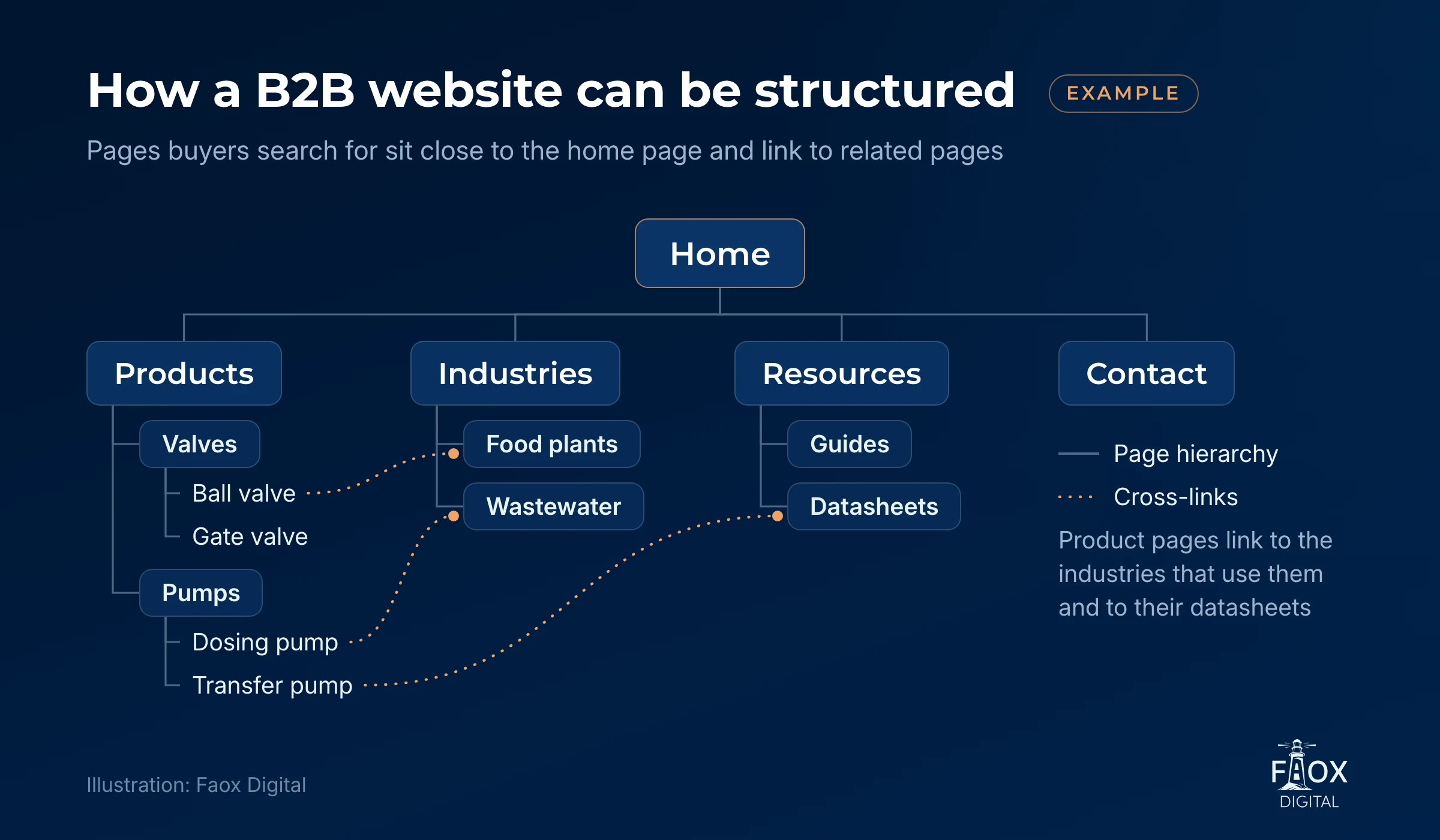
Internal links. Google reliably follows <a> elements with an href attribute; menus that navigate only through JavaScript click events may not be followed. Every page you care about should be linked from at least one other page, with descriptive anchor text. A manufacturer might link from the home page to product categories, industry pages and resources, from each category to its products, between products and the industries that use them, and from each product to its datasheet. Orphan pages, which no other page links to, are hard for crawlers and buyers to find.
Redirects. Permanent server-side redirects, usually 301 redirects, tell Google the new address should become canonical; temporary ones (302, 307) do not. JavaScript redirects are a last resort because Google may never see them. Point each old URL straight to its final destination: Googlebot follows up to 10 redirect hops, and each hop is another request.
HTTPS. Google announced HTTPS as a ranking signal in 2014, calling it very lightweight and affecting fewer than 1% of global queries. It also matters for canonicalization, because Google prefers HTTPS pages over their HTTP equivalents. Serve every page over HTTPS, redirect HTTP to HTTPS in one step, and use HTTPS addresses in canonical tags, sitemaps and internal links.
Structured data and JavaScript-rendered pages
Structured data describes a page in a machine-readable format, usually with the schema.org vocabulary, and Google recommends JSON-LD where your setup allows it. Types that often fit B2B sites include Organization, BreadcrumbList, Article and, where you publish product details, Product. Markup makes a page eligible for enhanced results, but Google says it does not ensure they appear, and features change: in August 2023 Google limited FAQ rich results to government and health websites, later stopped showing HowTo rich results, and since May 7, 2026 has not shown FAQ rich results. Mark up only content readers can see, and test it with the Rich Results Test. Our schema markup guide covers which types to use and how to add them.
JavaScript rendering. Google processes JavaScript sites in three phases (crawling, rendering and indexing), and a page can wait in the render queue for a few seconds or longer. Google discovers links only when they are <a> elements with an href in the rendered HTML, and it notes that not all bots can run JavaScript. A December 2024 study by Vercel and MERJ found that the AI crawlers of OpenAI, Anthropic, Meta, ByteDance and Perplexity did not render JavaScript, while Google’s Gemini, which uses Googlebot’s infrastructure, did. If product descriptions or specifications load only in the browser, deliver them in the initial HTML through server-side rendering or pre-rendering, as Google recommends.
AI crawlers: who can read your site for AI answers
AI search brings new visitors to your server logs. Some crawl for search features, some collect training data, and some fetch a page when a user asks. Most have their own robots.txt token, so you can allow one and block another. At the time of writing (October 2026), the main ones are:
| robots.txt token | Company | What it does |
|---|---|---|
| Googlebot | Crawls for Google Search, including AI Overviews and AI Mode | |
| Google-Extended | A token, not a crawler: controls use of content for Gemini training and grounding, with no effect on Google Search | |
| OAI-SearchBot | OpenAI | Finds pages for ChatGPT search answers |
| GPTBot | OpenAI | Collects content that may be used to train OpenAI’s models |
| ChatGPT-User | OpenAI | Visits pages for ChatGPT users; robots.txt may not apply |
| Claude-SearchBot | Anthropic | Indexes content for search results in Claude |
| ClaudeBot | Anthropic | Collects content that may be used for training |
| Claude-User | Anthropic | Fetches pages when a Claude user asks a question |
For a B2B company that wants to appear in AI answers, the search crawlers matter most. OpenAI says sites that block OAI-SearchBot are not shown in ChatGPT search answers, except as navigational links, and that GPTBot is controlled separately. Blocking training crawlers is a separate business decision. Google needs nothing extra: AI Overviews and AI Mode have no requirements beyond indexing and snippet eligibility, and no special files or markup. To limit what Google shows, use nosnippet, data-nosnippet, max-snippet or noindex. Since August 31, 2026, Search Console has also had a Search generative AI setting that excludes a whole site from these features; sites are included by default.
Check two places: robots.txt, and your CDN or firewall. Services such as Cloudflare let site owners block bots classified as AI training, search or agent crawlers at the network level, separately from robots.txt, so a security setting chosen by IT can block crawlers that marketing wants. Agree on one policy and apply it in both places. Our guide to SEO for AI search covers the content side of AI visibility.
Page speed, Core Web Vitals and hreflang
Two more topics belong to the technical foundation but have their own guides, so we only outline them here.
Core Web Vitals measure loading (Largest Contentful Paint, LCP), responsiveness (Interaction to Next Paint, INP) and visual stability (Cumulative Layout Shift, CLS). Google says good scores, together with other page experience aspects, align with what its core ranking systems seek to reward, and the Core Web Vitals report in Search Console shows how your pages perform. The fixes, from images and hosting to caching and scripts, usually sit with development; see our guide to page speed and performance.
hreflang tells Google which language and regional versions of a page belong together, which matters for exporters. It can go in the HTML, in HTTP headers or in the sitemap. Each version must list itself and all the others; if two pages do not point to each other, Google ignores the tags. An x-default value covers visitors whose language matches no version. Google does not use hreflang to detect a page’s language, so each version must be fully written in its own language. Our article on hreflang tags covers implementation and common errors.
How to check technical SEO: Search Console and server logs
Google Search Console is a free Google service that shows how Google sees your site. Verify a Domain property, which covers all subdomains and both HTTP and HTTPS. At the time of writing (October 2026), four parts of it do most of the technical work:
- Page indexing report: which URLs are indexed and why others are not, for example "URL blocked by robots.txt", "URL marked ‘noindex’", "Soft 404" or "Duplicate without user-selected canonical".
- URL Inspection: for one URL, whether it is on Google, when it was last crawled, whether robots.txt allows crawling, and the canonical Google chose compared with the one you declared. A live test shows the rendered page.
- Sitemaps report: where you submit your sitemaps.
- Core Web Vitals report: how your pages perform on the three measures above.
Log file analysis fills the gaps. Server access logs record every request crawlers make: which sections Googlebot visits, which important pages it rarely reaches, and how many requests end in redirects or errors. They also show which AI crawlers visit. Because anyone can claim to be Googlebot, verify requests with a reverse DNS lookup or against the IP ranges Google publishes.
Search Console and logs show what happens; a crawler tool that scans the site the way a search engine does shows why, by listing status codes, canonical tags, redirects and unlinked pages. Combining the three is the core of a technical SEO audit, which our step-by-step checklist walks through.
Site migrations: when technical SEO matters most
A redesign or new CMS that changes URLs, a move to HTTPS, a domain change, a merger of language sites: in every such site migration, each old URL has to pass its signals to a new one. Google’s guidance for moves with URL changes comes down to these steps:
- Map every old URL to its closest new equivalent before launch.
- Use permanent server-side 301 redirects from each old URL.
- Update internal links, canonical tags, hreflang annotations and sitemaps to the new URLs.
- Submit the new sitemap in Search Console; for a new domain, also use the Change of Address tool.
- Keep the redirects as long as possible, generally for at least a year.
Expect rankings to fluctuate. Google says most pages of a small or medium-sized site can take a few weeks to move, and larger sites take longer. Our website migration SEO checklist covers planning, launch and the weeks after.
How to improve technical SEO: a practical order
Most technical problems come from a template, a CMS setting or a server rule rather than a single page, so fix them there. This is the order we recommend for a B2B website:
- Set up Search Console and submit your sitemap. Verifying the Domain property needs a DNS record, so involve IT early.
- List the pages that matter. Note the product, service, industry and contact pages that bring in enquiries, in every language, and check each one with URL Inspection.
- Remove what blocks crawling and indexing. Look for leftover
Disallowrules, straynoindextags, pages behind logins and navigation that only works with JavaScript. - Fix status codes and redirects. Repair internal links to 404 pages, collapse redirect chains into single hops, and send HTTP and other host variants to one HTTPS version.
- Consolidate duplicates. Point canonical tags, redirects, sitemaps and internal links at one URL per page, and stop filter and tracking parameters from creating indexable copies.
- Strengthen the structure. Link important pages from the navigation and from related pages, and give orphan pages a place or remove them.
- Add the enhancements. Add structured data, put key content in the initial HTML, review AI crawler access in robots.txt and the CDN, and pass speed issues to development.
- Monitor after every release. Recheck Search Console after deployments, migrations and CMS updates, and review server logs regularly.
- Every page you want found returns 200, has internal links and is not blocked by robots.txt or
noindex - HTTP, host and parameter variants of each page redirect or point to one URL
- The XML sitemap lists only canonical, indexable URLs
- Main content and
<a href>links are in the HTML, not only added by JavaScript - Mobile pages carry the same content and structured data as desktop pages
- Each language version lists itself and its alternates with hreflang
- robots.txt and CDN settings match your decision on AI crawlers
Many of these checks need no budget: a marketer with Search Console access and some developer time can clear many blockers. Outside help is worth considering for migrations, large catalogs, JavaScript frameworks and multilingual setups; our article on technical SEO audit services explains what a good audit should deliver.
How Faox Digital approaches technical SEO
At Faox Digital, every SEO project starts with an audit and baseline: we check what the site ranks for, who it competes with and whether search engines and AI tools can read it. The fixes to architecture, speed, structured data and crawler access come next, as the groundwork for content and authority. You see the priorities and the reasons before any work begins.
Key takeaways
- Technical SEO decides whether Google can crawl, render and index your pages; content and links only pay off on pages that pass those steps.
- robots.txt controls crawling, not indexing. Use
noindexto keep a page out of results, and never block anoindexpage in robots.txt. - Give every page one canonical URL, and make redirects, canonical tags, sitemaps and internal links agree on it.
- AI answers rest on the same foundation: indexing for Google’s AI features, and crawler access for ChatGPT, Claude and other assistants.
- Fix problems at their source, in templates, CMS settings and server rules, and recheck Search Console after every release.
Frequently asked questions
How do I check my website’s technical SEO?
Start in Google Search Console: the Page indexing report shows which pages are indexed and why others are not, and URL Inspection shows how Google sees a single URL. Then run a crawler tool over the site to find broken links, redirect chains and conflicting canonical tags, and compare the results with the pages that matter to your business.
How do I fix technical SEO issues, and which come first?
First fix what keeps important pages out of the index: crawl blocks, stray noindex rules, server errors and broken redirects. Then consolidate duplicates and improve internal linking, and leave structured data and speed for last. Fix each issue where it starts, in a template, setting or server rule, and confirm the change with URL Inspection.
Can I do technical SEO myself, or do I need an agency?
Many basics can be done in-house: setting up Search Console, submitting a sitemap, fixing broken links and removing stray noindex tags. Specialist help is worth considering for migrations, large catalogs, JavaScript frameworks and multilingual sites. Ask any provider for a prioritized fix list tied to your key pages and backed by Search Console or log data, and be wary of anyone who promises rankings.
How can I learn technical SEO?
Start with Google Search Central’s documentation, the primary source for most of this guide. Practice in Search Console on your own site, learn basic HTML and HTTP status codes, and read your server logs to see how crawlers behave. The other articles in this series take each topic further.
Sources
- Google Search Central: How Google Search works, 2025
- OpenAI: Overview of OpenAI crawlers, accessed October 2026
- Cloudflare Docs: Block AI bots, 2026
- Search Console Help: Page indexing report, accessed October 2026
Let’s talk
Where do you want to be found?
Tell us the searches that matter to your business. We will review your site and tell you plainly what to fix first, including what you can do yourself.