
Hreflang Tags: How to Implement Them and Avoid Common Errors
Hreflang tags tell search engines which version of a page to show. Here is how to set them up, which errors break them and how to check them.

Hreflang tags tell search engines which language or regional version of a page to show each searcher. To implement them, give every version its own URL, list all versions on each page with valid language and region codes, make sure every pair points back, add x-default as a fallback, and use one method per type of content: HTML, HTTP headers or an XML sitemap. The errors that break them are mostly missing return links, wrong codes and URLs that redirect or are not canonical, so check the tags with a crawler after launch and whenever pages change.
A buyer in Vienna searches for your product and lands on your German page, with a Hamburg sales contact and delivery terms for Germany, even though you have an Austrian page. Nothing looks broken in your reports. Hreflang tags exist to close this gap between having the right page and showing it to the right person. They look like a few lines of code, but they connect every version of every page, so they can fail without anyone noticing.
This article covers the codes, the ways to add the tags, the errors that break them and how to check them. For the wider work, see our international SEO guide.
What is hreflang in SEO?
The hreflang attribute labels a link with the language, and optionally the region, that a page is written for. A set of these labels tells search engines that several URLs are versions of the same content. Here is one tag:
<link rel="alternate" hreflang="de-AT" href="https://example.com/at/" />
It marks this address as the German version for people in Austria. Google uses these sets to point each searcher to the most suitable version. Three things the tags do not do:
- They do not change rankings. Asked in 2022 whether rankings could rise after adding them, Google’s John Mueller replied, "Hreflang does not change ranking." He has described the effect as a swap: if your German page already ranks in Austria, Google can show the Austrian URL in its place. If nothing ranks there, there is nothing to swap, so pages still have to match what people search for in each market. That is the job of international keyword research.
- They do not set the language. Google says it works out a page’s language with its own algorithms, not from hreflang or the
langattribute, so the visible text must be in that language. - They do not redirect anyone or fix the result. Google decides what to show, and it says geotargeting is not an exact science. Keep visible links between versions so that people who land on the wrong one can switch.
Language and region codes
An hreflang value has one or two parts joined by a dash: a language code from ISO 639-1, then an optional region code from ISO 3166-1 Alpha 2. Google accepts upper or lower case, although capitals for the region (en-GB) are the convention. The language always comes first, and a country code alone is not allowed.
Use the language alone, such as de, unless the page really differs by country: other prices, certificates, stock or a local contact. Then add the region, as in de-AT. If you have several regional pages in one language, Google suggests adding a catch-all for other speakers of that language, which can be one of those regional pages.
These language and region codes are where small slips creep in:
| You want | Use | Not | Why |
|---|---|---|---|
| English for the UK | en-GB | en-UK | UK is a reserved code, and Google ignores it |
| Greek, Swedish, Ukrainian | el, sv, uk | gr, se, ua | These are country codes; as a language, se means Northern Sami |
| French in Belgium | fr-BE | be | be means Belarusian |
| German in Germany | de-DE | de_DE | The parts take a dash, even if your CMS writes locales with an underscore |
| Spanish in Latin America | es, or es-MX per country | es-419 | Google says it does not support this code |
| Buyers across the EU | en, or one code per country | en-EU | EU has no effect in Google Search |
For Chinese, you can also state the script: zh-Hans for Simplified and zh-Hant for Traditional.
The rules every set of hreflang tags must follow
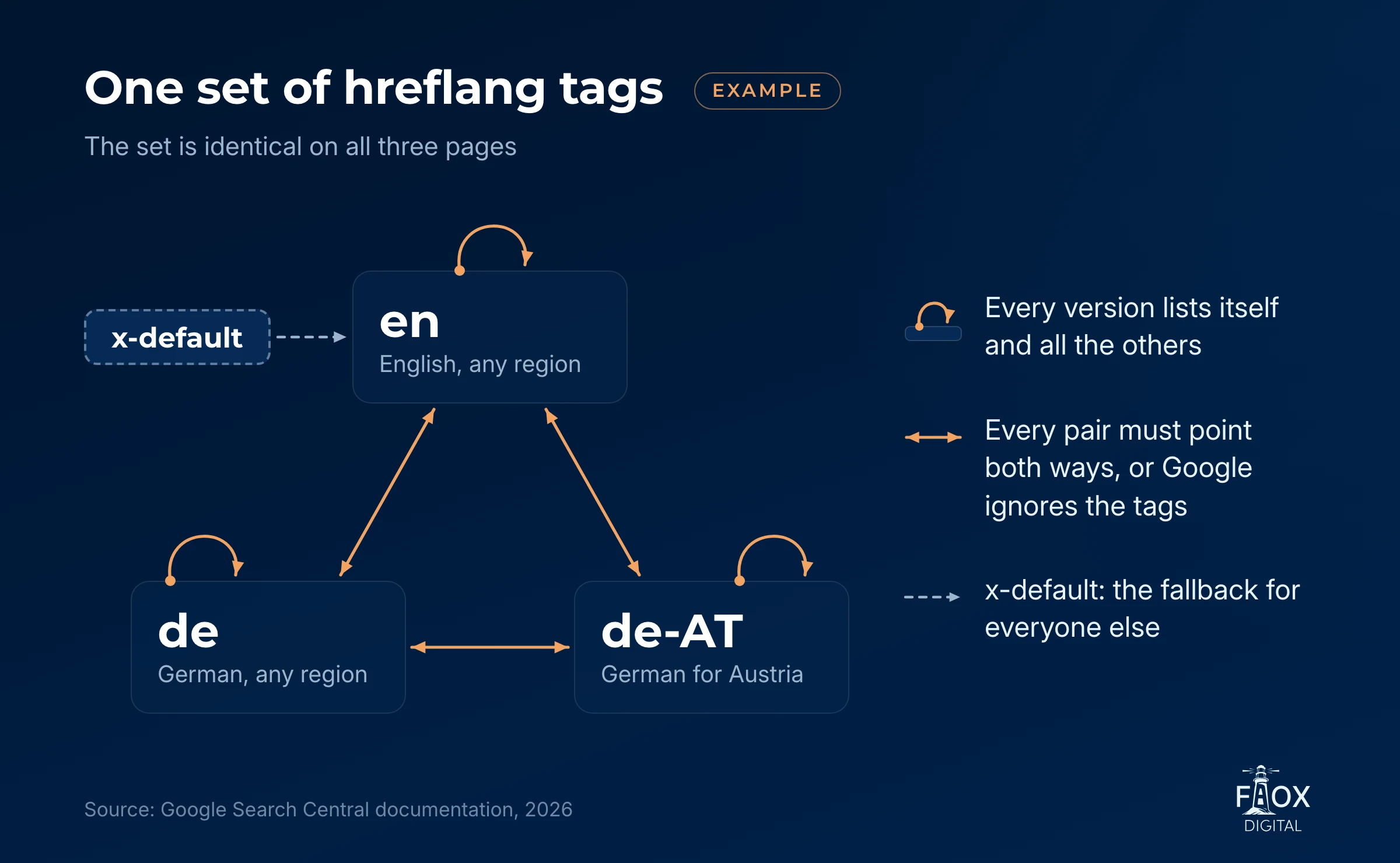
Take a site with three versions of each page. These rules apply to the whole set:
| Version | Code | Path on example.com |
|---|---|---|
| English, any region | en | / |
| German, any region | de | /de/ |
| German for Austria | de-AT | /at/ |
- Each version lists itself and every other version. The set is identical on all three pages.
- Every pair points both ways. If two pages do not both point to each other, Google ignores the tags. These return links, also called return tags, are easy to break: change one page, and its partners stop matching.
- URLs are complete. Write
https://example.com/de/, not/de/. - URLs are final. List the canonical URL of each version, one that returns 200 and does not redirect. A redirected or missing page cannot point back.
- Only true equivalents belong together. A German product page lists the English and Austrian versions of that product, not their home pages. If a product has no Austrian page, leave
de-ATout of its set.
Large catalogs get some relief. If complete sets become too hard to maintain, Google says you can leave some languages out on some pages, and it still processes the pairs that point to each other. Link newer versions with your original version first.
Hreflang x-default: the fallback for everyone else
x-default is a reserved value for searchers whose language settings match none of your versions. In the example above, a French-speaking buyer would match nothing, so Google can use this page instead. Google recommends it, but it is not required. Add it as one more line in every set, with no language code.
Google says it was designed for language selector pages and works best there, though it can point to any page. So point it at:
- Your language or country selector, if you have one.
- A home page that redirects by language, if yours works that way. This is the one place where a redirecting URL belongs in a set.
- The version most unmatched buyers can read, if you have neither. For many exporters that is English.
Hreflang in a CMS or plugin
Most sites do not write these tags by hand. At the time of writing (November 2026), these systems say they create them for you:
| Platform | What its documentation says |
|---|---|
| WordPress with WPML | Inserts the tags and updates them as the site changes |
| WordPress with Polylang | Adds the tags, but x-default only on the home page unless you add a code snippet |
| Shopify Markets | Adds the tags, including x-default, once markets are configured |
| HubSpot CMS | Adds alternate links between the pages of a multi-language group |
Automatic does not mean correct. View the source of a few pages and check the region codes, the pages with no translation, the canonical tags, and whether a theme or a second plugin prints another set. Choosing a platform is a separate decision, part of the wider project of building a multilingual website.
Common hreflang errors and how to fix them
Ahrefs’ 2023 study of 374,756 domains using hreflang found at least one issue on 67% of them. This is one vendor’s data, and not every issue matters equally, so we list them from what breaks the tags to what is only untidy:
| Error | Domains (Ahrefs, 2023) | Why it matters | Fix |
|---|---|---|---|
| Missing return links | 15.3% | Google ignores pairs that do not point to each other | Generate every set from one source |
| Tags point to redirected or broken pages | 16.9% | The target cannot point back | Use final URLs that return 200 |
| Tags point to non-canonical URLs | 8% | Hreflang and the canonical give different answers | List each version’s canonical URL |
| Invalid codes | 4.6% | Google ignores codes it cannot use, such as UK | Check them against the two standards |
| More than one page for one code | 2.5% | Google has to choose; often page tags and a sitemap disagree | One URL per code, one method |
lang and hreflang disagree | 3.2% | Google ignores lang, but a mismatch can reveal a wrong label | Check the language on the page |
| Missing self-reference | 18% | Google’s rules ask each version to list itself | Print the same full set on every version |
Missing x-default | 56.3% | Recommended, not required | Add it if you have a sensible fallback |
One more error sits outside that study: a broken <head>. HTTP Archive’s 2025 Web Almanac found invalid elements in the <head> of 10.1% of desktop pages and 10.3% of mobile pages, and it warns that hreflang tags below such an element end up in the <body>, where they have no effect. If in doubt, Google suggests pasting the rendered code into an HTML validator.
How Faox Digital sets up language versions
At Faox Digital, each language of a site gets its own structure, set up to rank and read in its own market, and hreflang belongs to the foundations step of an SEO project. We treat localization and translation as two different jobs, so each version is written for its market rather than copied from another.
Key takeaways
- Hreflang tags connect the versions of a page so search engines can show the right one. They do not change rankings.
- Each version lists itself and all the others, and every pair must point both ways, or Google ignores the tags.
- Codes take the language first, then an optional region.
UK,EUandes-419have no effect in Google Search. - Use one method per type of content, keep canonical tags in the same language and list only final, canonical URLs.
- Search Console has no hreflang report, so use a crawler and watch which pages get impressions in each country.
Frequently asked questions
How do I add hreflang tags in WordPress?
The usual route is a multilingual plugin. WPML and Polylang both add the tags automatically once pages are connected as translations. Then view the source of a few pages to check the codes, x-default and canonical tags, and make sure no other plugin prints a second set.
How do I check hreflang tags?
For one page, read the source or use a testing tool such as Merkle’s. For a whole site, run a crawler. Then use Search Console’s Performance report to see which pages get impressions in each country.
Do other search engines use hreflang?
Yandex does. It recommends hreflang markup on the page and says it no longer supports sitemaps for language versions. Bing is less clear: Fabrice Canel, then at Bing, said in 2020 that hreflang counts for far less there than content-language, and we found no newer statement. Check each engine’s current guidance if it matters in your market.
How do you pronounce hreflang?
We found no official pronunciation. The word joins two HTML terms, href and lang, so "h-ref-lang" is the natural way to say it.
Sources
Let’s talk
Where do you want to be found?
Tell us the searches that matter to your business. We will review your site and tell you plainly what to fix first, including what you can do yourself.