
Building a Multilingual Website: Structure, Translation and Localization
How to structure a multilingual website, translate and localize it, choose a CMS and keep every language version current, so that each one reads naturally in its market.
A multilingual website offers your company in several languages, with its own URL for each language version, a visible language switcher and content that is translated and adapted for each market. Building one takes four decisions: how languages map to URLs, which CMS manages the versions, how translation and localization work, and who keeps the versions in step. Done well, each version reads as if it were written for its market.
Adding a language can look easy: install a plugin and press translate. The problems show up later. The menu is in German but the form is in English. A long German word breaks a button. A product changes on the English page and nobody updates the other five. A buyer who reads your site in their own language notices all of this, and it affects what they think of you.
Language does matter in B2B. In CSA Research’s 2020 survey of B2B buyers of technology products, respondents rated their written English highly, yet a strong majority still preferred to use products and websites in their own language. This guide explains how to build a multilingual website that holds up, from structure to upkeep. It opens our series on multilingual sites and localization; you can find all Websites & Apps articles on the category page.
What is a multilingual website?
A multilingual website presents the same company in more than one language, with each language treated as a real version of the site. How you get there matters:
| Approach | How it works | What goes wrong |
|---|---|---|
| Translation widget | Translates the page in the browser | No separate pages to find, and no control over quality |
| One URL, with language set by a cookie or browser setting | One address shows different languages | Google may not find the other versions |
| Automatic redirect by location | Sends visitors to a guessed version | People and search engines may not see every version |
| Separate URL for each language | Each version has its own address, and visitors choose | Takes more work to set up, but it is what Google recommends |
Keep language and market apart in your mind. Germany and Austria share a language but may need different contact details or certificates. Switzerland is one market with several languages. Decide which you are serving, because it changes the structure.
Plan languages and pages first
Language versions are expensive to create and to maintain, so choose them from evidence: where enquiries, distributors and existing search impressions come from, and where you can actually answer a buyer in that language. A language version that nobody at your company can support soon becomes a liability.
You do not need to translate everything at once. Start with the pages that do the selling: key product families, application pages, certificates, the about page and the quote form. Our B2B website design guide sets out what each page type does.
Before anyone translates a word, list everything a visitor sees in that language:
- Pages, menus and footers
- Forms, error messages and confirmation emails
- Data sheets, manuals and other downloads
- Text inside images and diagrams
- Page titles, descriptions and image alt text
- Legal pages and cookie notices
This list usually turns out longer than expected, and it is the real scope of the project.
URL structure for each language
URL structure comes first. Google recommends different URLs for each language version, not a single URL that changes with cookies or browser settings. It describes the main options like this:
| Structure | Example | Advantages | Drawbacks |
|---|---|---|---|
| Subdirectory | example.com/de/ | Easy to set up and maintain on one host | Single server location, harder to separate later |
| Subdomain | de.example.com | Easy to set up, allows different server locations | Users may not know whether "de" means a language or a country |
| Country domain | example.de | Clear signal of the target country | Costly, needs more infrastructure, one country only |
| URL parameter | example.com?loc=de | None worth having | Google does not recommend it |
For most B2B companies, subdirectories are the sensible start, because they keep one site to run. Translating the page names in your URLs, such as /de/produkte/, is a matter of choice: it is friendlier to readers but takes more work to manage. Whichever you pick, apply it everywhere.
Two technical details are easy to mix up. Set the lang attribute on each page, because browsers and assistive tools use it for things like fonts and speech. Google, however, says it works out a page’s language from the visible content and not from lang or the URL, so the text itself has to be in that language. Search engines also need to know how the versions relate, which is the job of hreflang. That part, along with the search side of domain choice and keyword research by market, is covered in our guide to multi-language SEO.
The language switcher
A language switcher lets people reach the version they want. Most of the advice comes down to a few rules, and the U.S. Web Design System sets them out well:
- Write each language in its own language. A German reader looks for "Deutsch", not "German".
- Do not use flags. Flags stand for countries, not languages, and Arabic alone is spoken in many countries.
- Put it where people look. The top corner is standard: top right for left-to-right pages and top left for right-to-left pages.
- Keep them on the same page. Switching on a product page should lead to that product in the other language, not to the home page.
- Do not redirect automatically. Google advises linking to the other versions and letting people choose, because redirects can hide versions from users and from search engines.
Give the switcher real links, so that crawlers can follow them as well. If you want to help visitors who land on the wrong version, a small suggestion banner does that without taking the choice away. Our article on multilingual website design goes into more detail.
Translation and localization
Translation changes the language. Localization changes whatever else a buyer in that market needs to see. Our article on what localization adds explores the difference. On a B2B site it often looks like this:
| Element | Translated only | Localized |
|---|---|---|
| Product terms | A correct dictionary word | The term buyers in that trade use |
| Units and standards | Your home units and norms | The units and norms purchasers there work with |
| Certificates | A translated list | What applies in that market, with proof |
| Commercial details | Your home currency and terms | Local currency, delivery terms and distributors |
| Contact | A head office number | A person or partner who can answer in that language |
| Proof | References from your home market | References a buyer there can relate to |
Treat this as the difference between a site that can be read and one that can be trusted. You do not need to localize everything equally: spend the effort where a buying decision depends on it. If you need outside help, our guide to choosing a localization provider covers what to look for.
Local formats and layout
Local formats cause many small errors that make a site feel foreign:
- Dates: the W3C notes that much of Europe writes dates as day, month, year, the United States as month, day, year and Japan as year, month, day. So 03/04/02 can mean three different days. Where confusion is possible, write the month as a word and use a four-digit year.
- Numbers: one number can appear as 123,456.79 in US English and 123.456,79 in German. In a specification table, that is more than a matter of style.
- Units, currency, addresses and phone numbers: show what the market uses, and let forms accept local input.
Design for text that changes length as well. IBM figures quoted by the W3C show strings of up to 10 English characters growing to 200 to 300% of their original length on average when translated into European languages, and longer text by less. German and Finnish also form long compound words that will not wrap. So avoid fixed-width buttons, and do not put text inside images where you can avoid it. Test real translations in the layout, because placeholder text will not show these problems.
Right-to-left languages
Right-to-left languages such as Arabic and Hebrew affect the whole layout, so decide early if they are on your list. The W3C advises setting dir="rtl" on the page’s html element, and not setting base direction in CSS. Writing styles with logical properties, which refer to the start and end of a line in place of left and right, means the layout can mirror without a second set of styles.
Then check what should not simply mirror. Latin product codes, part numbers and many numerals still run left to right inside right-to-left text, and fonts may need more line height. Icons that suggest direction, such as arrows, usually need to flip, while logos do not. Have a native reader test the result on real pages, because mirrored mistakes are easy to miss for anyone who does not read the script.
Choosing a multilingual CMS
A multilingual CMS is what keeps all of this manageable. At the time of writing (November 2026), the options differ considerably:
| Option | Multilingual support | Watch for |
|---|---|---|
| WordPress | Not out of the box; community plugins add it, or a separate site for each language | Plugin choice shapes your URLs and workflow, and separate sites add overhead |
| Drupal | Built into core through its language and translation modules | Needs developers who know the system |
| Custom or headless build | Whatever you build | You own the workflow, and every missing feature is your cost |
Whichever you consider, test it against what you actually need. It should give each language its own URL, link the versions of each page, translate menus, forms and metadata as well as body text, output hreflang, export content for translators and show which translations are out of date. If you are using WordPress, our comparison of multilingual WordPress plugins covers the common setups.
Content mapping: link the versions
Content mapping records which pages are versions of each other. In a good CMS, this is a relationship between pages; on a smaller site, it can start as a spreadsheet.
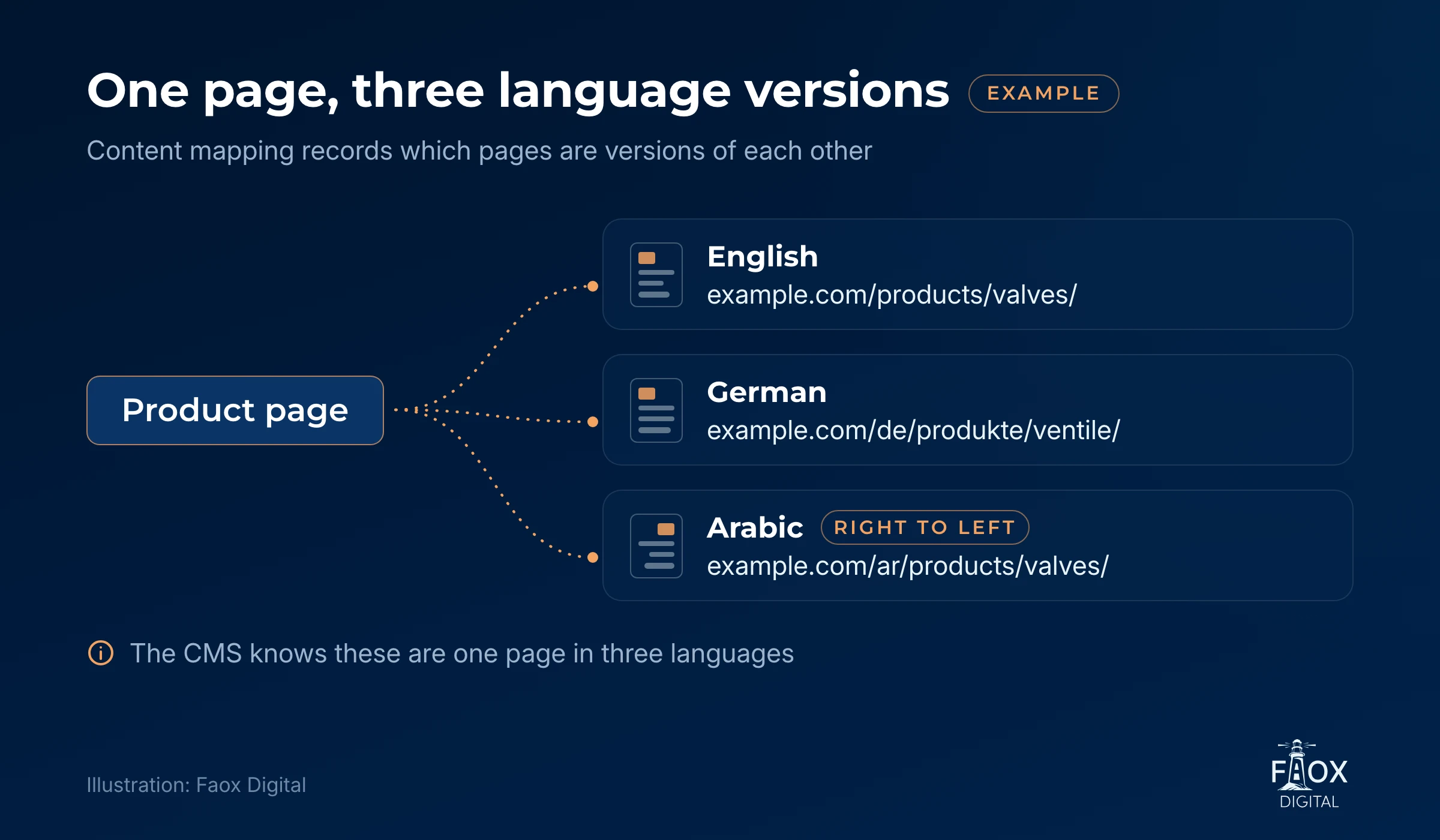
A lot depends on this map. The language switcher uses it to send people to the same page. Hreflang needs it to name the alternatives. And your team needs it to see what must change when a page changes.
Not every page has to exist in every language. A blog post for one market may have no counterpart, and that is fine. Decide what the switcher does in those cases: send people to the closest equivalent page, and avoid dead ends.
Translation workflow
A translation workflow turns a one-off effort into something you can repeat:
- Settle the source text. Translating text that is still changing wastes money, so finish the source pages first.
- Research the terms. Find out how buyers in that market search and talk, with someone who knows the trade.
- Build a glossary. Record approved product terms for each language, and start from manuals your engineers have already checked.
- Translate. Use a professional translator, or machine translation with human post-editing, according to how much each page matters.
- Review. Have a second person check the language, and a subject expert check the technical content.
- Check it in place. Look at each page in the layout, including forms, tables and downloads.
- Publish and link. Connect the versions, and update the map.
Two ISO standards are useful reference points. ISO 17100 sets requirements for translation services, and ISO 18587 covers full human post-editing of machine translation, which ISO 17100 leaves out of its scope. Both are being revised. Neither is an SEO standard, so research on search terms remains a separate job.
AI tools have made drafts cheap, but the checking still costs what it did. Google’s spam policies treat generating many pages with AI tools, without adding value for users, as scaled content abuse. Our guide to website translation with AI sets out a workflow that keeps quality under control. For the research step, outside help can pay off, and our article on choosing international SEO help lists what to ask.
Keeping language versions in step
The launch is the easy part. Language versions drift apart as products, prices and people change, and buyers notice old information quickly. Plan for this from the start:
- Name an owner for each language, with time set aside to do the work.
- Log changes to the source pages, so that translators know what to update.
- Decide what must change at once. Prices, certificates and specifications cannot wait; a blog post can.
- Check each version on a schedule, including forms and confirmation emails.
- Retire what you cannot maintain. One accurate language is better than a neglected second one.
This work belongs in your regular upkeep, so include it when you plan what website maintenance includes.
What drives the effort
There is no standard price, because the scope varies so much. These factors decide most of the effort:
- Number of languages: each one multiplies translation, review and every future update.
- Pages and documents in scope: a large catalog with data sheets costs far more than a set of key pages.
- Depth of localization: adapting terms, proof and contacts takes more than translating text.
- Scripts and direction: right-to-left layouts and new fonts add design and testing.
- The platform: a CMS that handles languages well saves time on every update.
Treat it as a running cost, not a one-off. Each language you add makes every later change a little more expensive.
How to tell whether a language is working
Measure each language on its own, because a total can hide a version nobody uses. With language folders, your analytics tool can report on each folder separately. Search Console’s Performance report can group data by country but not by language, so add each folder as its own property or filter by page. Then look at enquiries from each language in your CRM, along with who answered them and how quickly.
If a language brings steady interest, invest in deeper localization. If it brings nothing after a fair trial, ask whether the research, the content or the market is the problem before you spend more.
Common mistakes
| Mistake | What it causes | Better approach |
|---|---|---|
| Translating the pages but not the forms | The buyer gets stuck at the last step | Translate the whole path, including confirmation emails |
| Offering a language nobody can answer in | Enquiries go unanswered | Agree who replies before the language goes live |
| Putting text inside images | It cannot be translated or read easily | Keep text in the page |
| Leaving downloads in one language | The page promises more than it delivers | Translate key documents, or say which language they are in |
| Working without a glossary | One product gets several names | Agree the terms before translation starts |
| Skipping a native review | Errors reach buyers | Have a native reader check real pages |
How to make a multilingual website
- Choose languages from evidence. Start with the markets you can really serve.
- List the scope. Include pages, forms, emails, downloads and images.
- Decide the URL structure. Apply one pattern to the whole site.
- Choose the CMS. Test it against your list of requirements.
- Design for variation. Allow for longer text, local formats and right-to-left layouts if needed.
- Set up the workflow. Agree the glossary, translators, reviewers and the map of pages.
- Translate and check in place. Have native readers test real pages.
- Launch, then maintain. Name an owner for each language and keep the versions in step.
Multilingual website checklist
- Each language has its own URL, in one consistent pattern
- There are no automatic redirects by language or location
- The switcher uses language names and leads to the same page
- Menus, forms, errors, emails, downloads and metadata are all translated
- Terms come from an approved glossary for each language
- Dates, numbers, units and currency follow local habits
- Layouts hold up with longer text and real translations
- Right-to-left pages set
dirand are tested by a native reader - The CMS records which pages are versions of each other
- Each language has a named owner and a schedule for checks
How Faox Digital builds multilingual websites
At Faox Digital, each language gets its own structure rather than a translate button, and the pages are designed language by language. The multilingual structure is part of the build and is tested in every language before launch.
Key takeaways
- Give each language its own URL, and let visitors choose with real links instead of automatic redirects.
- Translation changes the language; localization adds the terms, units, certificates and contacts buyers need.
- List everything a visitor sees before you start, including forms, emails and downloads.
- Choose a CMS that links page versions and shows which translations are out of date.
- Plan the upkeep from the start, and retire any language you cannot maintain.
Frequently asked questions
What is a multilingual website?
It is a website that presents the same company in more than one language, with each language treated as a real version of the site. Each version has its own URL, its own translated content and interface, and a way for visitors to switch languages. A translation widget added to one set of pages is not the same thing.
How do you make a multilingual website?
Choose your languages from evidence, list everything that needs translating and decide on one URL pattern. Pick a CMS that links page versions, design for longer text and local formats, and set up a translation workflow with a glossary and reviewers. After launch, name an owner for each language.
How do you create a multi-language website in HTML?
Create a separate page for each language at its own URL, for example in a language folder. Set the lang attribute on each page’s html element, and dir="rtl" for right-to-left languages. Link the versions with ordinary links, add hreflang and avoid swapping the text with JavaScript on one URL.
How do you create a multilingual website in WordPress?
WordPress does not support this out of the box, so you need a community plugin, or a separate site for each language, often through WordPress Multisite. The choice affects your URLs and your translation workflow, so settle those requirements first. Separate sites add management work.
How do you create a multilingual website in React?
Give each language its own URL through your routing, keep translated text in translation files and make sure each URL delivers its language in the page’s content. Avoid switching language with a cookie or browser setting on a single URL, because Google may not find those versions.
Sources
- CSA Research: Do B2B buyers value localization?, 2022
- Google Search Central: Managing multi-regional and multilingual sites, accessed November 2026
- W3C: Why use the language attribute?, accessed November 2026
- ISO 17100:2015: Translation services, accessed November 2026
Let’s talk
Planning a new website or a fix?
Send us your current site and what you need it to do. We will tell you whether it needs a rebuild or a few focused changes.