
Multilingual WordPress Plugins Compared: Which Setup Fits a Business Site?
How the main ways of running WordPress in several languages store translations, build URLs and charge, and how to test one before you commit.
A multilingual WordPress plugin adds what WordPress lacks out of the box: a version of each page in every language, a URL for each language and a place to manage translations. The common setups work in three ways: WPML and Polylang store each translation as its own post, TranslatePress and Weglot translate the finished page, and WordPress Multisite gives each language a site of its own. Choose by where translations are stored, how URLs are built, how translators will work and whether your theme and plugins are supported, then test on a copy of the site.
Adding languages to a WordPress site starts with a decision that is hard to reverse: which plugin, or which structure, will hold the translations. It decides your URLs, how translators work, what you pay each year and what happens if you stop paying. This comparison covers four plugins, WPML, Polylang, TranslatePress and Weglot, plus WordPress Multisite, using each vendor’s documentation and WordPress’s own handbook, read in November 2026. None of them is the right answer for every site. For the wider picture, from site structure to localization, see our multilingual website guide.
Why WordPress needs a multilingual plugin
WordPress’s Advanced Administration Handbook, updated in October 2026, says WordPress does not support a multilingual site out of the box and that community plugins fill the gap. Core support is planned for the fourth and last phase of the Gutenberg project, but WordPress’s roadmap shows the third phase, collaboration, still under way in 2026. For now, a business site needs a plugin or a network of sites.
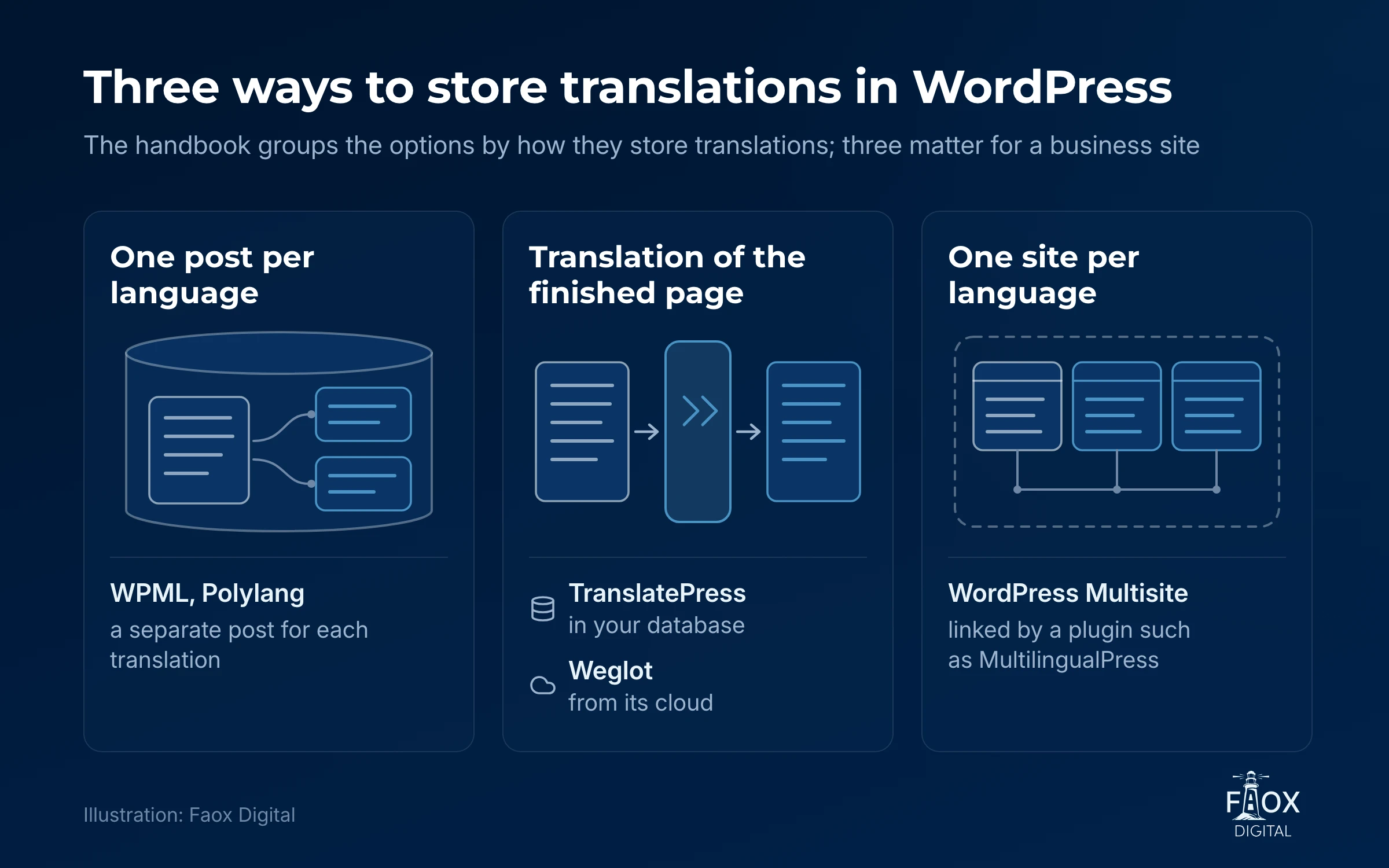
The handbook groups the options by how they store translations. Three matter for a business site:
- One post per language. Each translation is a separate post, linked to the original. WPML and Polylang work this way.
- Translation of the finished page. The plugin translates the HTML that WordPress produces. TranslatePress keeps the translations in your database; Weglot serves them from its cloud.
- One site per language. Each language is its own site in a WordPress Multisite network, linked by a plugin such as MultilingualPress.
A fourth type, a widget that passes pages to an online machine translator, creates no language versions of its own, and the handbook notes that it limits your control over quality.
Multilingual WordPress plugins compared
The table shows how each option works and what it cost at the time of writing, November 2026. Prices are list prices as each vendor’s site showed them: Polylang and Weglot quote theirs before VAT, MultilingualPress with VAT. They change often, so check them before you buy.
| How it stores translations | Language URLs | Price, November 2026 | If you stop paying | |
|---|---|---|---|---|
| WPML | A separate post for each translation, linked in WPML’s own table | Directories, a domain or subdomain per language, or a parameter | €39, €99 or €199 a year; page builders, WooCommerce and translation management from €99 | Translations keep showing; no more updates |
| Polylang | A separate post for each translation, using WordPress taxonomies | Language code in the URL, or a subdomain or domain per language | Free; Pro from €99 a year; with WooCommerce from €139 a year | The plugin keeps working; no updates or support |
| TranslatePress | In your own database, applied to the finished page | Subdirectories; a domain per language from €199 a year | Free for one extra language; €99, €199 or €349 a year | Translations stay; AI translation and updates end |
| Weglot | In Weglot’s cloud, applied to the finished page | Subdirectories or subdomains | Free up to 2,000 words; €15 to €699 a month by words and languages | Translations stop showing; the project is deleted after three months |
| Multisite with MultilingualPress | Each language is a normal WordPress site | A subdomain or path per site, or mapped domains | MultilingualPress from €149 a year, VAT included | Each site keeps its content |
What each option is built around
WPML is sold only as a paid plugin. Its Multilingual CMS plan adds a side-by-side translation editor, translation of theme and plugin text, translation management for teams and agencies, page builder and WooCommerce support, and 22,500 AI translation words; the Multilingual Blog plan covers content in the standard editor only.
Polylang is free, with no limit on languages, and translates posts, pages, media, categories, custom post types, menus and widgets. Polylang Pro adds translated URL slugs, content duplication and synchronisation, DeepL machine translation with your own API key and XLIFF export for professional translators. WooCommerce needs a separate add-on.
TranslatePress works on the front end: you translate in a visual editor that shows the page as visitors see it, including text from forms and page builders. The free version handles one extra language; paid plans add more languages, an SEO pack for slugs and metadata, translator accounts and DeepL.
Weglot is a subscription service that detects the text on each page, translates it with AI and lets you edit the result in a dashboard or visual editor. Plans are priced by words and languages; on its pricing page, translated URLs start with the Pro plan at €79 a month, and export and import with the Advanced plan.
WordPress Multisite suits companies whose markets need different content or separate teams. WordPress’s handbook warns that separate sites mean more management, and that a network needs good knowledge of server administration.
One URL per language
Google recommends a different URL for each language version rather than cookies or browser settings, and calls URL parameters such as ?lang=de not recommended. In practice that means directories (example.com/de/), subdomains or separate domains, which every option above supports in some form. Check two more things: whether the plugin translates URL slugs, a paid feature in some products, and whether it outputs hreflang tags that tell search engines which page serves which language.
Translation management: who translates, and where
Translation management decides how text moves from the original to a published page. Compare the options on four questions:
- Where does the translator work? In the WordPress editor (WPML, Polylang), on the live page (TranslatePress) or in a dashboard and visual editor outside WordPress (Weglot).
- Can work leave WordPress? WPML connects to translation services, Polylang Pro exports XLIFF files, and Weglot lists export and import on its Advanced plan.
- Which machine translation? WPML offers its own engine plus DeepL, Google and Microsoft; Polylang Pro connects DeepL; TranslatePress has its own AI and Google, with DeepL on higher plans; Weglot uses its own AI model.
- What about text outside posts? Menus, forms, theme and plugin strings, emails and metadata need translating too.
Whatever the tool, quality comes from the workflow around it: a glossary, a human review and a rule for updates.
Performance impact
Every option adds work, either to the database or to each page view. WordPress’s handbook warns that the one-post-per-language model can make the database grow and slow the site, with the example of a WooCommerce shop of 100,000 products that ends up with 500,000 records in five languages. Plugins that translate the finished page do their work as pages are served: Weglot says serving translations from its cloud keeps your database light, and its pricing page counts translation requests as roughly the number of translated page views. TranslatePress notes that automatic translation, whether with its own AI service or with Google or DeepL, can be triggered by front-end page visits.
Rather than rely on any vendor’s claim, measure the performance impact yourself: copy the site to a staging server, add one language with real pages, and compare page speed and server load before and after, with your caching in place.
Plugin compatibility: theme, page builder, shop and forms
Plugin compatibility decides how much of the site a plugin can actually translate. List every plugin your site depends on, then check each vendor’s compatibility information:
- Shop. WPML covers WooCommerce from its CMS plan, through a free add-on; Polylang needs its WooCommerce add-on; TranslatePress and Weglot say they work with WooCommerce.
- Page builder. WPML lists Elementor and other builders from its CMS plan; Weglot and TranslatePress say they translate page-builder output; Polylang’s pricing page notes that its DeepL feature does not yet work with Elementor.
- Custom fields. Product data often sits in custom fields; Polylang Pro lists an integration with ACF Pro, so ask any vendor how it handles the fields you use.
- Forms, emails and search. Test them in every language, because their text sits outside the page editor.
How to create a multilingual website in WordPress, step by step
- Decide languages, markets and URLs. Choose directories, subdomains or domains before you install anything.
- List what must be translated. Pages, products, menus, forms, emails, documents and metadata, and which plugins hold them.
- Pick the approach. One post per language, a translation layer on the finished page, or one site per language.
- Work on a copy. WordPress’s handbook advises a test site and a database backup, because multilingual plugins change the database significantly.
- Configure languages, URLs and the switcher. Set slugs and hreflang before the first translation.
- Translate with a defined workflow. A machine draft if you like, then a human review and a shared glossary.
- Test every language. Forms, emails, search, checkout, speed and the mobile layout.
- Launch and monitor. Watch each language in Search Console and fix what breaks.
Where the plugin stops and the rest of the work begins
A plugin moves text between languages; it does not decide how the pages read or look. Our guide to the website translation workflow covers review, glossaries and updates. Language switchers, local formats and right-to-left layouts are design work a plugin will not do for you. And if your products live in PDF brochures, a searchable product catalog turns them into pages that can be translated one by one.
If you would rather hand the translation itself to specialists, the next question is who should do it. Our guide to choosing a localization provider sets out what to compare.
How Faox Digital approaches multilingual websites
Faox Digital, a digital growth partner for B2B companies in complex and international markets, gives each language its own structure rather than a translate button. The multilingual structure is built and tested in every language and on every device before anyone outside sees it.
Key takeaways
- WordPress has no built-in multilingual support, so the plugin or network you choose shapes your URLs, workflow and yearly cost.
- WPML and Polylang store translations as posts, TranslatePress and Weglot translate the finished page, and Multisite gives each language a site of its own.
- Check what happens to your translations if you stop paying: plugins that store them on your server keep them, while a cloud service stops showing them.
- Give every language its own URL with hreflang, and measure performance with real pages.
- Test your theme, page builder, shop, forms and emails on a copy before you choose.
Frequently asked questions
Which multilingual WordPress plugin is the best?
None is best for every site. Choose by where you want translations stored, the URL structure your markets need, how your translators work, your yearly budget and what the rest of the site runs on. Test a shortlist on a copy of the site with real pages before you decide.
Is there a free multilingual WordPress plugin?
Yes. Polylang is free with no limit on languages, TranslatePress has a free version for one extra language, and Weglot’s free plan covers 2,000 words in one language. Features such as translated URL slugs or WooCommerce support are paid in some products, so compare the free limits with your site.
Can you build a multilingual WordPress site without a plugin?
Only partly. WordPress Multisite can run one site per language, but something still has to link the versions of each page and output hreflang, which is what plugins such as MultilingualPress do. Separate WordPress installations work too, at the cost of managing each one.
Do multilingual plugins work with Elementor?
Mostly, but check the detail. WPML lists Elementor support in its Multilingual CMS plan, and Weglot and TranslatePress say they translate page-builder output. Polylang’s pricing page notes that its DeepL feature does not yet work with Elementor. Test your own templates on a copy before you commit.
Sources
Let’s talk
Planning a new website or a fix?
Send us your current site and what you need it to do. We will tell you whether it needs a rebuild or a few focused changes.