
Website Migration SEO: A Checklist to Protect Your Search Traffic
The steps that protect search traffic when a B2B site moves to a new domain, platform or URL structure, from the first URL list to the checks after launch.
Website migration SEO is the work that keeps your search traffic when a site moves to a new domain, platform or URL structure. List every old URL, map each one to its closest new page with a server-side 301 redirect, test the new site without letting Google index it, update internal links, canonical tags, hreflang and sitemaps, then compare results after launch. Expect some fluctuation even when the move goes well: careful work limits the risk, but no one can promise zero loss.
A B2B website holds years of search value in its URLs: product pages that rank for exact part names, datasheets that engineers have bookmarked, links from trade publications. A migration can break all of that in a day if the old addresses stop working. The usual causes are well known, and Google lists many of them: missing or wrong redirects, forgotten noindex rules and outdated sitemaps. This checklist covers the technical side, from the first URL list to the checks after launch. For the wider foundation, see our technical SEO basics.
Website migration SEO starts with the type of move
Not every move carries the same risk or needs the same steps. At the time of writing (November 2026), Google’s guidance works out like this:
| Type of move | What changes | Redirects | Change of Address tool |
|---|---|---|---|
| Domain | example.com to example.net, or merged domains | Every URL | Yes |
| HTTP to HTTPS | The protocol | Every URL | No |
| URL structure | Paths on the same domain | Changed URLs | No |
| Platform or CMS | Templates and code; URLs may change too | Only if URLs change | Only if the domain changes |
| Hosting or CDN | Servers and DNS, no visible URL change | None | No |
| Design | Layout and content; URLs may change too | Only if URLs change | Only if the domain changes |
Change one thing at a time. Google advises moving to the new domain first and changing the layout afterwards. Its Change of Address help warns that combining a move with a redesign of content and URL structure will probably cost some traffic, because Google may need to reassess each page. If you are still deciding what a new site should change, see our guide to redesign without losing SEO. This article picks up once those decisions are made.
Merging sites needs patience. Groups often fold country or brand sites into one domain. Google advises against moving several sites to one location at once: move them one at a time and let traffic settle in between.
Hosting moves are simpler. Google has a separate guide for them: lower your DNS TTL at least a week ahead, and check that a firewall or DoS protection on the new host does not block Googlebot.
How long a migration takes
Google says most pages of a small or medium site can take a few weeks to move, larger sites take longer, and rankings may fluctuate in the meantime. It also says 301 and other permanent redirects do not cause a loss in PageRank. Traffic can take far longer to recover than indexing does, especially after a domain change. A study published by Search Engine Journal in January 2025 used third-party estimates to follow 892 domain migrations:
Read those figures as a warning, not a forecast. They are outside estimates, they cover domain changes only, and traffic moves for many reasons over two years. They do show why a domain change needs a strong business reason, and why a promise of no traffic loss deserves suspicion.
Build the URL inventory and your baseline
Start this work months before launch, not weeks. Your URL inventory is the list of every address that has search value, and no single source holds all of it:
- Sitemaps and CMS exports for the pages you know about.
- Server logs and analytics for URLs that still get visits, over a period long enough to catch seasonal demand.
- The Links report in Search Console for pages with internal and external links.
- A crawl of the live site for status codes, canonical tags and internal links.
- Files. Google says images, videos and downloads such as PDF documents should move too. Datasheets often rank and get links in their own right.
- Offline references. URLs printed in catalogs, on packaging and in QR codes keep working for years, and only your own team knows about them.
Save a baseline at the same time, because you cannot recreate it later. Export clicks and impressions by page and by query from Search Console, the indexed page count, enquiries by landing page from your analytics or CRM, and a full crawl with titles, headings, canonical tags and structured data. Mark the pages that bring in enquiries, so you check those first.
The 301 redirect mapping: where each old URL should go
A 301 redirect mapping is a table with one row per old URL. It is the most important document in the project, and it needs someone who knows the products, not only someone who knows the server.
| Old URL | New URL | Response | Reason |
|---|---|---|---|
/products.php?id=118 | /valves/ball-valve/ | 301 | Same product, new address |
/pdf/ball-valve-en.pdf | /datasheets/ball-valve.pdf | 301 | Same file; printed QR codes point here |
/valves/series-a/ | /valves/series-b/ | 301 | Replaced by a close successor |
/news/2019/trade-fair/ | None | 410 | Removed, with no replacement |
Follow these rules when you fill it in:
- Choose the closest equivalent. Google warns that sending many old URLs to one irrelevant page, such as the home page, can confuse users and may be treated as a soft 404. Sending several old pages to one page that merged their content is fine.
- Let deleted pages go. If content has no successor, return 404 or 410 on the new site.
- Use server-side permanent redirects. Google recommends 301 or 308, and client-side redirects only as a last resort.
- Avoid chains. Googlebot can follow up to 10 hops, but Google advises redirecting straight to the final page, or at most keeping chains under 5. Redirects left from earlier redesigns must also be updated to point to the new address.
- Use patterns where you can. A simple domain change may need only a wildcard rule. Add exceptions above it for pages whose paths change.
Prepare the new site in a test environment
A test environment should stay out of search until launch. Password protection or IP restriction does this most reliably. If your team uses noindex rules or a robots.txt block during development, write down exactly what must change at launch: Google names forgotten blocks as a common migration mistake.
Before launch, update everything that names a URL:
- Internal links. Use the mapping to point menus, body links and buttons at new URLs, so visitors and crawlers do not pass through redirects.
- Canonical tags. Each new page needs a self-referencing tag with the new address, not the test site’s. See our guide to canonical tags.
- hreflang. Update every language version. Google ignores the annotations if two pages do not point to each other, so one missed language breaks its links to the others.
- XML sitemap. Prepare a file with the new URLs only, and keep a list of the old ones.
- Page content. Compare key pages with your baseline crawl: titles, headings, specification tables, downloads and structured data often go missing in new templates.
- Tracking and access. Check analytics, forms and Search Console verification, and tell your host. Google says it will crawl the new site more heavily than usual after a move, so the server needs spare capacity.
Then crawl the test site as you would a live one. Our technical SEO audit checklist lists what to look for.
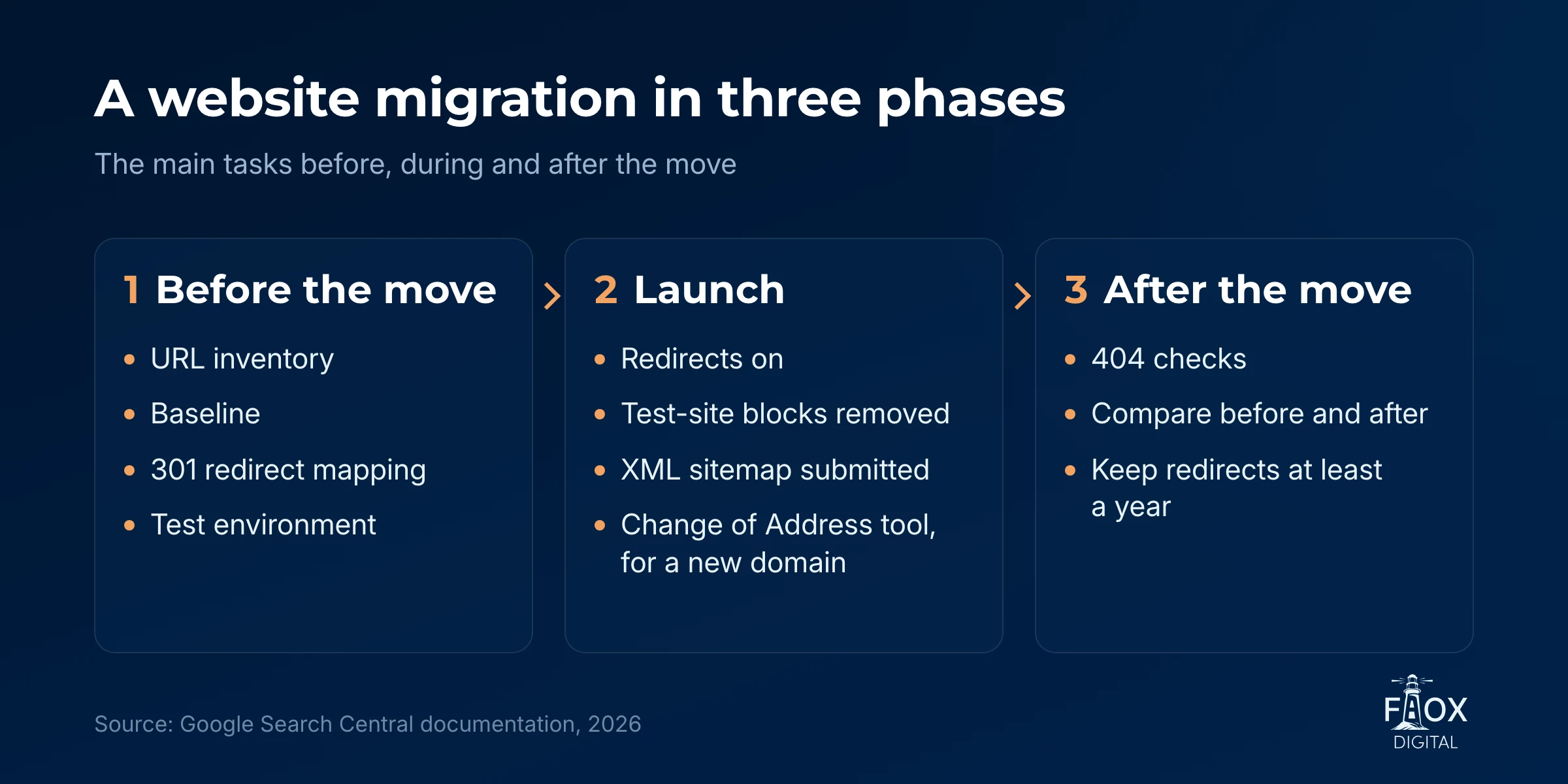
Site migration checklist for launch day
Google suggests timing a move for a seasonal or weekly dip in traffic, so choose a quiet period rather than the weeks before a trade fair. It recommends moving small and medium sites all at once. Large sites can move in sections, starting with one that changes rarely as a test.
- Turn on the 301 redirects and test a sample of old URLs, including PDF files
- Remove
noindexrules and test-site robots.txt blocks - Confirm that canonical tags, hreflang and internal links use the new URLs
- Submit the new XML sitemap in Search Console
- File the Change of Address request, if the domain changed
- Check key pages with URL Inspection
- Update ad campaigns, social profiles and email templates to the new URLs
- Ask the sites behind your most valuable links to update them
Domain migration SEO: the Change of Address tool
The Change of Address tool in Search Console is only for moves from one domain or subdomain to another. Use it after the redirects are live. You must own both properties under the same Google account, and the old home page must redirect to the new one.
Check three points before you rely on it:
- Every variant counts. The tool does not move subdomains, including
www. Google added guidance in June 2026 to file it for all variants of the old domain, even ones you do not actively use, and to verify each of them. - It runs for 180 days. After that, Google no longer recognizes a relationship between the two sites, so the redirects must do the work on their own.
- Keep the old domain. Google’s site move guide says to keep redirects generally for at least a year, and from a user’s view to consider keeping them indefinitely. Its help also recommends paying for the old domain for at least a year, so that no one else can buy it. Printed catalogs are a reason to keep both for longer.
If you bought the new domain, check the Manual Actions report and any URL removals left by the previous owner. Bing has its own Site Move tool, which a 2020 guide on the Bing Webmaster Blog says to use once redirects are in place and the site is verified.
After launch: compare before and after
Compare results with your baseline on a fixed schedule, starting the day after launch.
| What to compare | Where to look | What a problem looks like |
|---|---|---|
| Indexing of old and new URLs | Sitemaps and Page indexing reports | New URLs not rising, or old ones not falling |
| Status codes | Your old URL list, crawled again | Chains, loops, wrong targets, unexpected 404s |
| Clicks and impressions by page | Performance report | Key pages falling further while others recover |
| Queries | Performance report | Product or brand searches dropping |
| Enquiries | Analytics and CRM | Fewer quote requests from organic search |
| Crawling | Server logs | Errors or timeouts on Googlebot requests |
404 checks come first. Google says it often sees sites redirecting to wrong or non-existent new URLs. Crawl your old URL list again: each one should end on a page returning 200 in a single hop, or return the 404 or 410 you intended. Fix 404s on URLs with links or traffic, and leave the rest if the page was removed on purpose.
Google’s guide also suggests submitting sitemaps of both old and new URLs for a while. The indexed count for old URLs should fall towards zero as the new one rises, and warnings about redirects in the old sitemap are normal. Our guide to indexing issues explains the other statuses you will see.
Then give it time. Google says a move is complete only when Googlebot has visited every old and new URL at least once, and fluctuation during that period is normal. Fix errors at once, but do not undo a move because of a difficult first week. If key pages stay down and you cannot find the cause, the next question is who can review the move; our article on technical SEO audit services explains what to expect from one.
How Faox Digital approaches a site migration
At Faox Digital, a site migration starts with the same audit and baseline as any SEO project, so we know what the site ranks for before anything moves. After launch, our reports compare rankings and organic traffic with that baseline, so you can see what changed.
Key takeaways
- Identify the type of move first, and change one thing at a time where you can.
- Build the URL inventory and baseline early, including PDF files and URLs printed offline.
- Redirect each old URL to its closest equivalent with a server-side 301, in one hop.
- For a domain change, file Change of Address for every variant and keep redirects for at least a year.
- Compare results with the baseline after launch, and treat any promise of no traffic loss with suspicion.
Frequently asked questions
How do I check technical SEO after a migration?
Crawl the old URL list and the new site, then look at the Page indexing and Sitemaps reports in Search Console. Use URL Inspection on key pages to confirm the status, canonical and indexing fields. Compare everything with the baseline you saved before launch.
How do I fix technical SEO issues if traffic drops after a migration?
Start with the redirects, then check for leftover noindex rules, robots.txt blocks and canonical tags pointing to old or test URLs. Next, compare key pages with the baseline for lost content. A dip in the first weeks is normal, so look at which pages fell and why before you change anything.
How long should I keep 301 redirects after a migration?
Google’s guidance is generally at least a year, and it suggests considering indefinite redirects for users. Keep them longer if the old URLs still get traffic or appear in printed material.
Can I change domain, platform and design at the same time?
You can, but Google advises against it. If traffic drops, you will not know which change caused it, and Google warns that combining a move with a redesign will probably cost some traffic. Where possible, move first and redesign later.
Sources
Let’s talk
Where do you want to be found?
Tell us the searches that matter to your business. We will review your site and tell you plainly what to fix first, including what you can do yourself.