
Canonical Tags: How to Fix Duplicate Pages on a B2B Website
What canonical tags do, how to write them correctly and how to fix the duplicate product, filter and category pages a B2B catalog creates.

Canonical tags are a line of HTML (rel=canonical) that tells Google which URL is the main version when the same or very similar content sits at several addresses. On a B2B website they stop product variants, filter URLs and other duplicate content from splitting signals across many URLs. They are a strong hint, not a command, so fix duplicate pages by making your tags, redirects, sitemaps and internal links agree on one URL.
A B2B catalog can publish one product under many addresses: with a tracking code, through a filter, with or without a slash, over HTTP and HTTPS. Google then chooses one URL to show, and it may not be the one you would pick. This article explains how canonical tags work, where duplicates come from on a B2B site and how to fix them. For how this fits with crawling and indexing, start with our technical SEO basics.
Where duplicate pages come from on a B2B website
Most duplicates come from a few patterns, and a tag is not always the best fix. The examples assume the main URL is https://example.com/ball-valve/.
| Source | Example | Best fix |
|---|---|---|
| Product variants | /ball-valve/?size=dn50 | Canonical to the URL without the parameter |
| URL parameters | /ball-valve/?utm_source=newsletter | Canonical to the clean URL |
| Filter and sort pages | /valves/?material=steel&sort=price | Canonical to the unfiltered category, or a robots.txt rule |
| HTTP and HTTPS | The http:// version | 301 redirect to HTTPS |
| www versions | The version with www | 301 redirect to one host |
| Trailing slash | /ball-valve | 301 redirect to one form |
| Pagination | /valves/?page=2 | Its own self-referencing canonical |
| Print versions | /ball-valve/print/ | Canonical to the main page |
| PDF versions | /datasheets/ball-valve.pdf | HTTP header, if the page has the same content |
Product variants need a decision. If a size or finish changes only a value on the page, keep one product page and point the variant URLs to it; Google’s ecommerce guidance (2025) says to use the URL without the optional parameter as the canonical, and to include the canonical product URL on variant pages that have their own URLs. If a variant is a different product to the buyer, such as a stainless version with its own standards and datasheet, we would give it a page with its own content and a self-referencing canonical.
URL parameters for tracking, sessions or campaigns create copies without anyone noticing. Tag those URLs and link internally only to the clean one, because Google says consistent internal links help it understand your preference.
Filter and sort pages are a crawling problem as much as a duplicate one. Google’s faceted navigation guide (2025) says a canonical may reduce crawling of filter URLs over time, but is generally less effective in the long term than robots.txt rules or URL fragments. Google cannot read a tag on a URL it may not crawl, so choose one method for each URL pattern.
Pagination catches many sites. Page 2 of a category lists other products, so it is not a duplicate of page 1. Google says not to use the first page of a sequence as the canonical and to give each page its own.
HTTP, www and slash versions are better removed than tagged. Google’s 2010 note on trailing slashes says it treats the two forms as separate URLs, and its 2019 announcement retired the preferred domain setting in Search Console, so redirects do this job. Google prefers HTTPS pages as canonical unless something conflicts, such as an invalid certificate or a redirect back to HTTP.
PDF and print versions are duplicates when they repeat a page. A print page can carry a normal tag, but the link element works only in HTML, so a PDF needs an HTTP header: Link: <https://example.com/ball-valve/>; rel="canonical". Use it only if the web page has the same content. A datasheet with details found nowhere else should stay its own document.
Canonical tag or 301 redirect: which to use
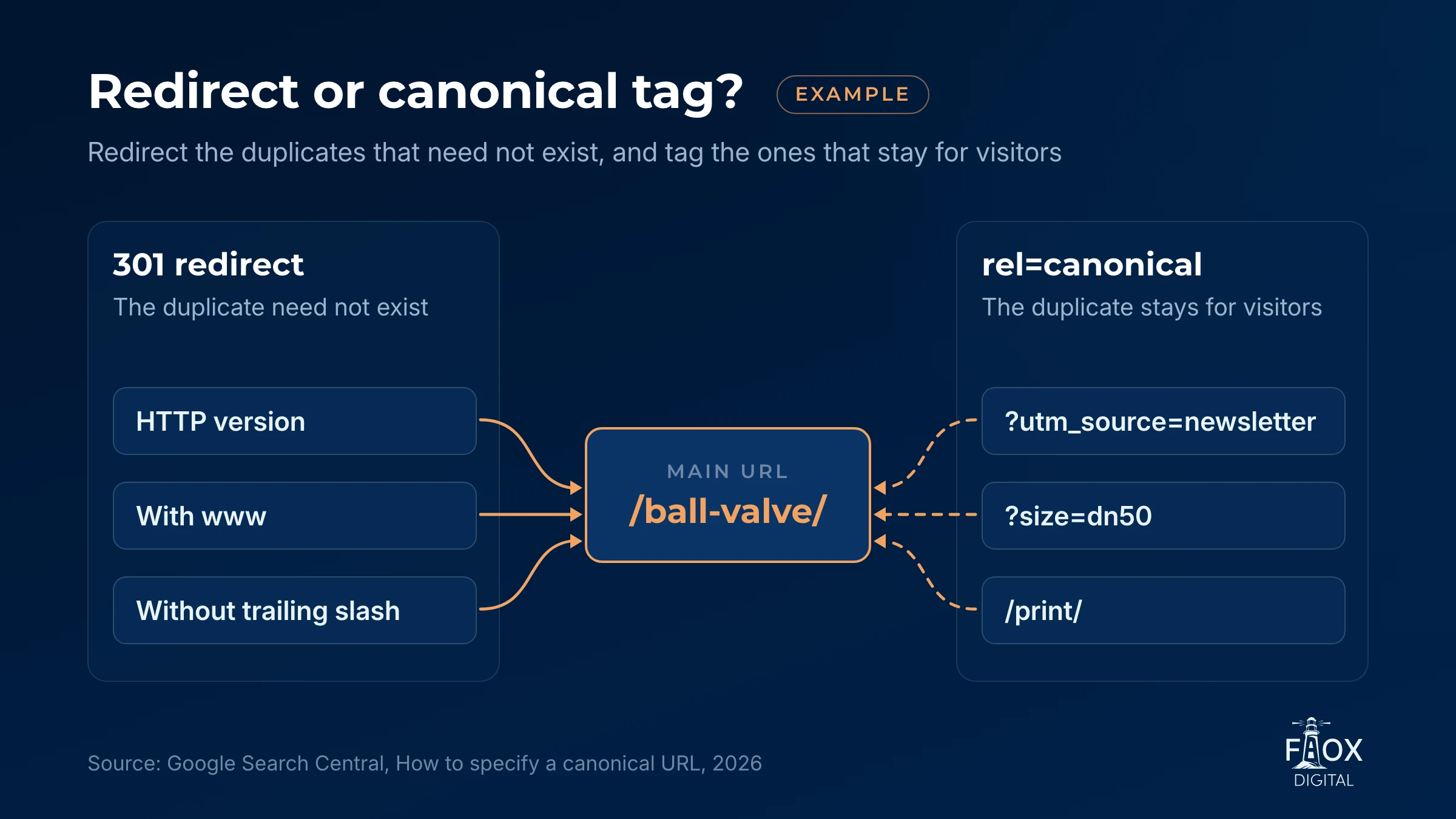
The difference is what happens to the visitor. A 301 redirect sends people and Google to the new URL, so the old address stops being a page. A canonical tag leaves both URLs open and only states a preference. Google’s documentation (2026) ranks redirects and rel="canonical" as strong signals and sitemap inclusion as a weak one, and says they work better combined.
| Method | What happens | Use it when |
|---|---|---|
| 301 redirect | Visitors and Google go to the target | The duplicate need not exist: HTTP, www, slash and retired URLs |
rel="canonical" | Both URLs stay open; one is preferred | The duplicate stays for visitors: tracking, variants, print |
| Sitemap | Listed URLs are suggested as canonicals | As support on large sites |
noindex | The page leaves Search completely | Not for choosing a canonical |
| robots.txt | Crawling stops; the URL can still be indexed without its content | Not for choosing a canonical |
During a redesign, redirects do the main work; our guide to website migration SEO covers the mapping.
How to check the Google-selected canonical
Your tag is a request, so check the answer. In Search Console, URL Inspection shows the User-declared canonical and the Google-selected canonical of an indexed URL; the live test cannot predict the choice. If the two differ, Google’s troubleshooting guide (2026) points to these causes:
- Wrong tags from a CMS or plugin. Check the HTML in your browser’s developer tools.
- Pages that are too alike. Google says the fix comes down to making clustered pages sufficiently different.
- Server misconfiguration. A server may return another domain’s content for a URL.
- Hacked pages. Injected code can add a redirect or a canonical to a spam site.
The Page indexing report groups such URLs under its duplicate reasons, which our guide to indexing issues explains.
Tags do not solve copies on other companies’ sites. If distributors republish your product text, Google does not recommend the tag for syndicated content and says the most effective fix is for partners to block indexing of it.
How to fix duplicate pages step by step
- List the URLs. Crawl the site and export each URL with its status code and canonical tag.
- Group them by cause. Use the table above and compare with the duplicate reasons in the Page indexing report.
- Choose one URL per page. Use HTTPS, one host, one slash form and no tracking parameters.
- Redirect what need not exist. Send HTTP, host and slash variants to the chosen URL in one step.
- Tag what must stay. Add canonical tags at template level, including the self-referencing ones.
- Align the other signals. Use the chosen URL in internal links, sitemaps and hreflang annotations.
- Check with URL Inspection. Compare the two canonical fields on key pages after Google recrawls them.
These checks belong in any technical SEO audit checklist. If the duplicates come from a catalog system or CMS your team cannot change alone, the next question is what outside help should deliver; our article on technical SEO audit services explains it.
How Faox Digital deals with duplicate pages
In a Faox Digital SEO project, duplicate pages come up in the audit and baseline, and the fix belongs to the foundations and on-page step, together with architecture, structured data and crawler access. On multilingual sites, each language gets its own structure, so canonical tags and language versions are planned together.
Key takeaways
- Canonical tags state your preferred URL among duplicates; Google treats them as a strong hint, not a command.
- Redirect duplicates that need not exist, and tag those that must stay for visitors.
- Never point page 2 of a category at page 1, or a translated page at another language.
- Make tags, redirects, sitemaps, hreflang and internal links agree on one URL.
- Use URL Inspection to compare your canonical with the Google-selected canonical.
Frequently asked questions
What is a canonical tag in SEO?
It is a rel="canonical" link element that names the main URL for content available at several addresses. Google uses it, with other signals, to choose which URL to show and to consolidate signals such as links.
Should every page have a canonical tag?
Google says stating a canonical is not required, but its ecommerce guidance (2025) recommends a self-referencing tag on all indexable pages. It costs little and protects a page from stray parameters.
How do I check a page’s canonical tag?
View the page source and search for rel="canonical", and look at the HTTP headers for PDF files. To see whether Google accepted it, use URL Inspection. For a whole site, a crawler tool lists every URL with its tag, so conflicts stand out.
Can Google ignore a canonical tag?
Yes. Google says it may choose a different canonical because of content quality or technical signals. This is more likely when the pages are not really similar or when your redirects, sitemaps and internal links point elsewhere.
Sources
Let’s talk
Where do you want to be found?
Tell us the searches that matter to your business. We will review your site and tell you plainly what to fix first, including what you can do yourself.