
B2B Keyword Research: Finding What Your Buyers Actually Search For
A practical method for finding the searches your buying group uses, judging them by intent and fit, and turning them into a keyword map.
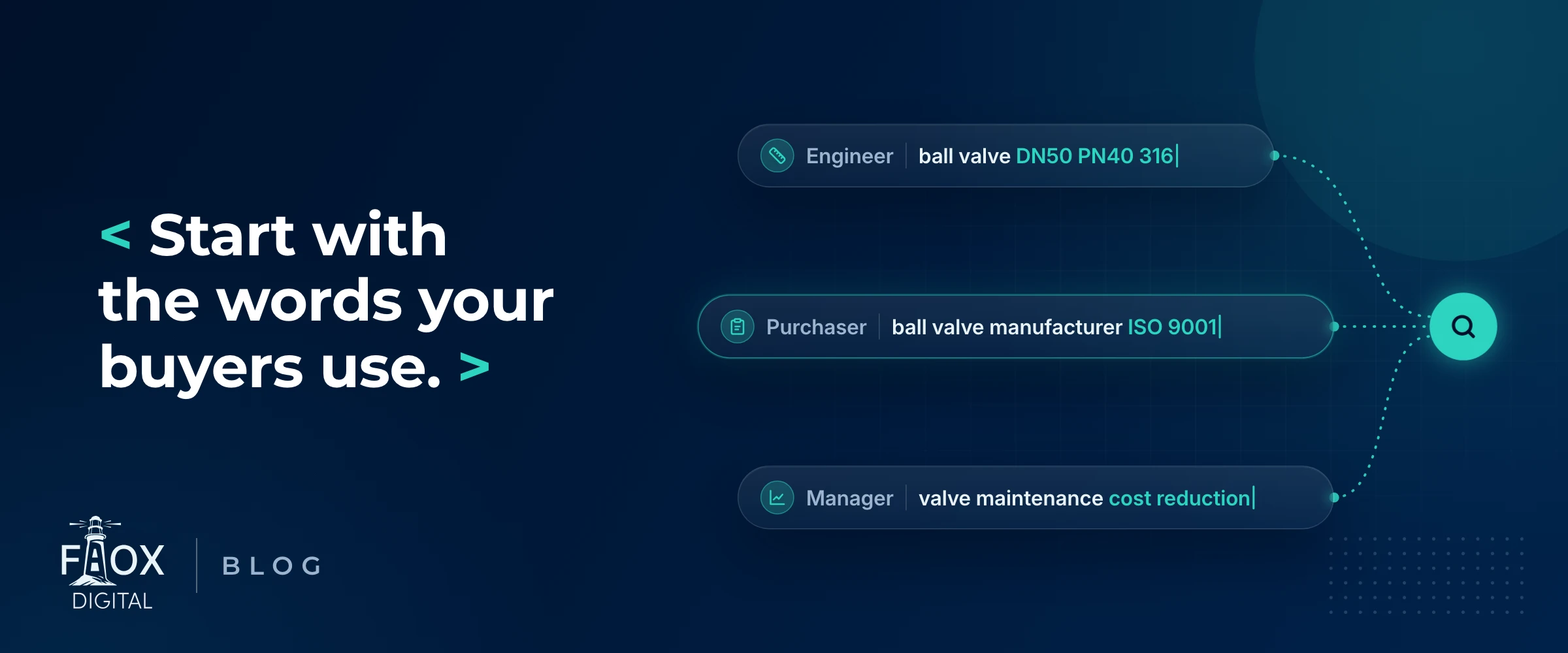
B2B keyword research is the process of finding the words and questions your buyers type into Google, and increasingly into AI tools, when they look for a solution, a supplier or a specification. For a B2B company it starts with the people in the buying group and the vocabulary they use, checks that vocabulary against real search data, and judges each search by intent and fit rather than by search volume alone.
Keyword research for a B2B company rarely looks like the examples in SEO tutorials. The searches that lead to the best enquiries are often so specific that keyword tools report almost no volume for them. Engineers search with standards and material grades, purchasers search for suppliers and certifications, and managers search for the business problem. A list built only from the highest-volume terms misses most of them.
This guide explains what keyword research is, why it works differently in B2B, where to find the searches your buyers actually use and how to turn them into a plan for your pages. It opens our series on keyword and intent strategy; you can find all SEO & AI Search articles on the category page.
What is keyword research in SEO?
A keyword is the word or phrase someone types into a search engine. In practice it is usually a whole query, such as "stainless steel ball valve DN50" or "how to size a control valve". Keyword research is the work of finding the queries that matter to your business, understanding what each searcher wants, and deciding which page on your site should answer each one.
The output is not a list of popular words. It is a set of decisions: which topics your site needs to cover, which existing page should target which search, and which pages are missing. Keywords guide the writing, but they do not need to be repeated: Google’s SEO starter guide says keyword stuffing is against its spam policies, and Google’s language systems match pages to searches that use different words.
Good research answers three questions for every search: who is searching, what they want at that moment, and whether your company can give them the best answer.
Why B2B keyword research is different
Four features set B2B searches apart:
- Small numbers. A niche industrial product may be searched only a handful of times a month, yet one of those searches can start a large order. Volume says little about value.
- Several searchers per purchase. A B2B purchase usually involves a buying group: the engineer who specifies, the purchaser who compares suppliers, the manager who approves the budget and the people who will use the product. Each of them searches differently.
- Expert vocabulary. Buyers often know their application better than your marketing team does, and they search with the technical terms of their trade.
- Long buying cycles. The same buyer searches at different stages over months, from understanding a problem to shortlisting suppliers.
Google’s SEO starter guide makes the same point about expertise: people who know a lot about a topic search with different words than people who are new to it. In a buying group, that difference shows up in every role:
| Role in the buying group | What they look for | Example search | Page that answers it |
|---|---|---|---|
| Engineer or designer | Specifications, standards, fit for the application | "ball valve PN40 DN50 stainless 316 datasheet" | Product page with technical data and downloads |
| Purchaser | Qualified suppliers, certifications, lead times | "ball valve manufacturer ISO 9001" | Category page, quality and certification page |
| Manager | Cost, risk and business outcome | "valve maintenance cost reduction" | Guide or cost comparison article |
| User or maintenance team | Installation, faults and spare parts | "ball valve stem leak repair" | Support article, spare parts page |
The examples come from a hypothetical valve manufacturer; replace them with the language of your own products and buyers.
Search volume and its limits
Search volume is the estimated number of times a query is searched each month. It is useful for comparing topics, and misleading as a measure of B2B demand, for four reasons:
- Low-volume searches disappear. Google’s Keyword Planner is built for advertisers and needs a Google Ads account with billing details. Google states that keywords with very low search volumes are not discoverable or forecastable in it.
- Trends is relative. Google Trends scales interest from 0 to 100 within the chosen time and place. It compares topics but gives no search counts, and it shows low-volume terms as 0.
- Your own data hides rare queries. Search Console anonymizes queries that are not issued by more than a few dozen users over two to three months. Their clicks and impressions count in the totals, but the queries themselves are not shown, and many specific B2B searches fall into this group.
- Third-party tools estimate. Commercial SEO tools publish their own volume estimates. Use them to compare topics, not as exact counts.
The practical conclusion: use volume to choose between topics of similar value, never to rule out the specific searches your best customers use.
Search intent: informational, commercial and transactional
Search intent is what the searcher wants to achieve. The same product appears in searches with very different intents, and each needs a different kind of page:
| Intent | What the searcher wants | B2B example | Page type |
|---|---|---|---|
| Informational | To understand a problem or a concept | "what causes cavitation in control valves" | Guide or article |
| Commercial | To compare options, products or suppliers | "ball valve vs butterfly valve for slurry" | Comparison guide, category page |
| Transactional | To request a quote, a sample or a price | "stainless ball valve quote" | Product page with a quote form |
| Navigational | To reach a known company or page | "[company name] product catalog" | Home page, catalog, contact page |
Check the current results before you decide. If Google shows mostly guides for a query, searchers probably want a guide, and a product page is unlikely to satisfy them. Our article on search intent explains how to read intent from the results page.
For enquiries, searches with commercial intent matter most: those that compare suppliers or ask for specifications, quotes and lead times. Our guide to commercial search intent covers how to find them. Informational intent still has a role, because it reaches buyers earlier and can earn their trust before they compare suppliers.
Long-tail searches: why low-volume queries matter
Long-tail searches are longer, more specific queries with few searches each. In B2B they are often the most valuable. "PTFE seat ball valve for chlorine service" is searched far less often than "ball valve", but the person typing it knows what they need and is close to a decision. Together, many specific searches like this can bring more qualified visits than one broad term, and fewer pages compete to answer each of them precisely.
Volume tools often show these searches as zero, so find them in your own material instead: enquiry emails, RFQ documents, sales call notes and support tickets are full of them. Our guide to low-volume searches explains how to judge and target them.
Technical terms, synonyms and the words buyers use
B2B buyers rarely use the words in your brochure. Marketing writes "flow control solutions"; engineers search for "ball valve", the standard it meets or the material grade. The same product also goes by several names: industry terms, abbreviations, older names, regional variants and competitors’ brand names used as generic terms.
Google handles part of this itself. Its synonym system matches pages to searches that use different words for the same thing, and Google says this significantly improves results in over 30% of searches across languages. You therefore do not need a separate page for every synonym. You do need to use the technical terms your buyers use, in headings, product names and specifications, so that readers and search engines recognize the page as the answer.
Collect this vocabulary from the people closest to buyers: sales engineers, application engineers, customer service and distributors. Ask which words customers use, which questions come up before an order and which terms customers confuse.
Where to find the searches your buyers use
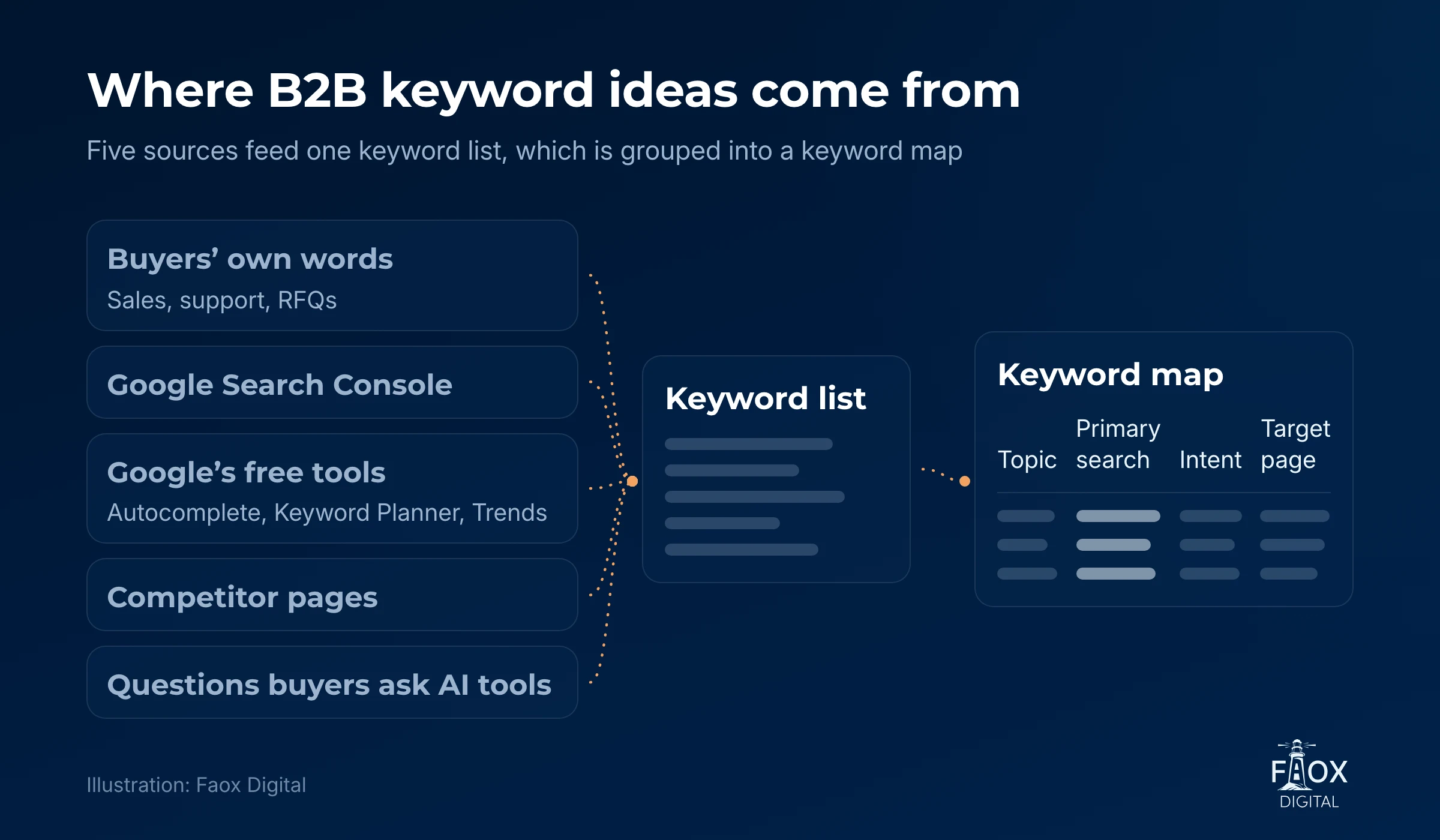
No single tool shows B2B demand. Combine five sources:
- Buyers’ own words: enquiry forms, RFQs, sales and support emails, trade show conversations and your site’s internal search.
- Google Search Console: the queries for which your site already appears, with clicks, impressions and average position. Queries with many impressions and few clicks can point to demand your pages only partly meet. Switching the Performance report between queries, pages and countries shows which searches each page and market brings.
- Google’s free tools: Autocomplete predictions reflect real searches, shaped by language and location and filtered by Google’s policies; Keyword Planner gives monthly volume estimates; Trends shows seasonal and regional interest.
- Competitors’ pages: the topics and terms they target, covered in the next section.
- Questions buyers ask AI tools, covered further below.
Our guide to free keyword research tools shows how to use Google’s own tools step by step.
Competitor analysis: finding the searches others win
Competitor analysis shows which searches other companies already rank for and which topics they cover that you do not. Two points matter in B2B.
First, your search competitors are not always your business competitors. Results for technical searches can include distributors, marketplaces, trade publications and standards bodies. They compete for the same attention even if they never bid against you for a contract.
Second, the gaps are more useful than the overlaps. Comparing the searches a competitor’s pages rank for with your own shows topics you have not covered yet; our guide to keyword gap analysis walks through the method. Third-party SEO tools make this faster, as long as you treat their figures as estimates.
Competitor research also shows how others position themselves: which claims they lead with and which buyer problems they leave unanswered. A brand positioning map helps you choose the searches where you can genuinely stand apart.
Questions buyers ask AI tools
Buyers can now research in AI tools such as ChatGPT, Claude, Gemini and Google’s AI Mode as well as in search, and they ask longer questions there. In May 2026 Google reported that the average AI Mode search is three times the length of a traditional Search query. A buyer might ask an AI tool to compare two valve types for a specific medium, name suppliers that meet a standard or explain a regulation.
You cannot look these questions up the way you check search volumes. Google counts clicks from AI Overviews and AI Mode in Search Console’s Performance report, within web search. Since August 31, 2026, all sites have also had a Generative AI performance report that shows impressions in these features by page, country, device and date, but not the questions behind them. For other AI tools, the best source is your own buyers: sales conversations and RFQs contain the same detailed questions. Test the important ones yourself in AI tools to see which sources and companies the answers mention. Pages that answer specific questions clearly, with the facts, figures and specifications a buyer needs, serve both search results and AI answers.
Markets and languages: research each market separately
Each market has its own search vocabulary, and translating a keyword list is not the same as researching it. A term that is standard in one country can be rare in another, and the same product may have different names in British and American English, let alone in German, Arabic or Turkish. Research your markets and languages one by one, in the local language and location settings of each tool, with native speakers who know the industry. Our article on multi-language SEO covers how language versions should be built so that each market finds its own pages.
How to prioritize the searches you find
Research usually produces far more searches than you can target at once. Judge each one on five criteria, in this order:
| Criterion | Question to ask | Why it matters in B2B |
|---|---|---|
| Business value | Would this searcher buy what we sell, in a market we serve? | A few searches from the right buyers are worth more than many from the wrong ones |
| Intent | Does the searcher want information, a comparison or a supplier? | It decides the type of page and how close the searcher is to an enquiry |
| Fit | Can we give the best answer, with real expertise and data? | A page that answers better than the current results has a reason to rank |
| Competition | Who ranks now, and could our page be more useful than theirs? | Some results are held by marketplaces or publishers with far more pages |
| Volume | Roughly how many people search for it, and is interest growing? | It helps to choose between options of similar value |
A simple method works well: score the first four criteria from 1 to 3, start with the highest totals, and use volume only to break ties. A search with low volume but high value, clear commercial intent and a good fit belongs near the top of the list.
From keyword list to keyword map
A keyword map assigns each search topic to one page. It stops two of your pages from competing for the same search and shows which topics have no page yet. If two existing pages already compete for one search, merge them or give one of them a different focus. Group the searches by topic and intent first, then give each group one target page:
| Topic | Primary search | Intent | Target page |
|---|---|---|---|
| Stainless steel ball valves | stainless steel ball valve | Commercial | Product category page |
| One specific product | ball valve DN50 PN40 316 | Transactional | Product page |
| Valve selection | ball valve vs butterfly valve | Commercial | Comparison guide |
| A process problem | what causes valve cavitation | Informational | Article |
Each target page then uses its primary search in the title and main heading, covers related searches in the subheadings and text, and receives links from related pages. Our guide to keyword mapping goes through the method in detail. The map only pays off if search engines can crawl and index those pages, which our technical SEO guide explains.
Common B2B keyword research mistakes
Most weak keyword plans fail in one of six ways:
- Starting from a tool instead of from buyers. A tool can only expand the terms you give it; the right starting terms come from sales, support and customers.
- Chasing the biggest generic terms. A one-word search such as "valves" mixes every possible intent and brings many visitors who will never buy.
- Writing in internal language. Product family names, internal codes and slogans are rarely what anyone types.
- Mixing intents on one page. A product page that also tries to be a beginner’s guide serves neither searcher well; give each intent its own page.
- Translating keyword lists. A translated term may be correct and still not be the one buyers in that market use.
- Treating research as a one-off. New products, markets and buyer questions change the map, so the research needs regular updates.
How to do keyword research: a step-by-step process
- List your products, applications and markets. Start from what you sell, where and to whom, not from a tool.
- Interview the people closest to buyers. Collect the terms, questions and objections that sales, application engineers and support hear every week.
- Map the buying group. Note what the engineer, purchaser, manager and user each need to find.
- Check your existing data. Export queries from Search Console and look for pages with many impressions but few clicks.
- Expand with Google’s tools. Use Autocomplete, Keyword Planner and Trends for variations, rough volumes and seasonality in each market.
- Study the results and the competitors. For each important search, look at what ranks, which intent it shows and which topics competitors cover that you do not.
- Judge by fit, not only by volume. Score each search for business value, intent and your ability to give the best answer.
- Build the keyword map. Assign each group of searches to one page and list the pages you need to create.
- Review it regularly. Revisit the research when you launch products, enter markets or see new queries in Search Console.
How Faox Digital does keyword research
At Faox Digital, keyword research is the strategy and keyword map step of an SEO project: we map what buyers search market by market, with commercial and informational searches side by side, including the questions they ask AI tools. It follows the audit and baseline, so the map starts from what the site already ranks for and who it competes with.
Key takeaways
- B2B keyword research starts with the buying group and its vocabulary, then checks it against real search data.
- Search volume is a rough guide: tools hide low-volume searches, which are often the most valuable in B2B.
- Judge every search by intent, informational, commercial, transactional or navigational, and match it to the right type of page.
- Use buyers’ own words from sales, support and RFQs, and research each market in its own language.
- Turn the research into a keyword map with one clear search target per page.
Frequently asked questions
How do I do keyword research for free?
Start with Google Search Console to see the searches your site already appears for. Then use Google Autocomplete, Google Trends and Keyword Planner, which needs a Google Ads account with billing details, and add the questions your sales and support teams hear. These are enough to start before you pay for any tool.
Is keyword research for SEO different from keyword research for Google Ads?
The sources are similar, but the goals differ. With Google Ads you usually pay per click, so research concentrates on commercial and transactional searches likely to lead to an enquiry. For SEO you build pages that rank over time, so research also covers informational searches earlier in the buying process.
How is keyword research different from B2B market research?
B2B market research studies a market as a whole: its size, customers, competitors and buying behavior, often through surveys and interviews. Keyword research studies one part of that behavior, the searches people make, and turns it into decisions about pages. Market research tells you whom to reach; keyword research tells you how they search.
How often should B2B keyword research be updated?
Review it when something changes: a product launch, a new market, a website redesign or new queries in Search Console. Otherwise, a yearly review of your most important searches keeps the keyword map current, because buyer language and search results change over time.
Sources
Let’s talk
Where do you want to be found?
Tell us the searches that matter to your business. We will review your site and tell you plainly what to fix first, including what you can do yourself.