
How to Do Keyword Research for Free With Google’s Own Tools
A practical order for researching keywords with Google’s free tools, and how to read their numbers when B2B searches are small.

Here is how to do keyword research for free with Google’s own tools: start with the queries Search Console shows for your site, collect buyers’ wording from Autocomplete and "People also ask", check rough volumes in Keyword Planner and compare seasons and regions in Google Trends. Read every number as a range or a comparison, because the B2B searches that bring enquiries often show little or no volume.
Keyword research does not have to start with a subscription. Google’s free tools draw on its own data, but each shows only part of the picture, and each has numbers that are easy to misread. This guide takes them in a practical order and explains how to read what they show. It builds on our guide to B2B keyword research, and its examples come from a hypothetical valve manufacturer.
How to do keyword research for free: what each Google tool shows
Five free sources cover most of a first round of research:
| Tool | What it shows | Use it for | Main limit |
|---|---|---|---|
| Search Console | Queries your site appeared for, with clicks, impressions and position | Demand you already partly meet | Only searches where your site appeared; rare queries hidden |
| Autocomplete | Predictions drawn from real searches | Buyers’ wording and variations | No numbers; shaped by location and your own history |
| "People also ask" and related searches | Questions and searches linked to your query | Questions to answer on a page | No numbers |
| Keyword Planner | Monthly searches, ad competition and bids | Rough volumes and new ideas | Needs billing details; often ranges; hides very low volumes |
| Google Trends | Interest from 0 to 100 over time and by region | Seasons, markets and wordings | No search counts; low volumes show as 0 |
Google links the tools itself: its guide to Trends suggests the Search Console Performance report when you are unsure which keywords to start with (Google Search Central, 2025).
Start with Search Console: the searches you already appear for
Search Console is the only free source of real Google queries for your own site, including specific searches that volume tools never show. In the Performance report, choose a long date range and the Queries tab, then look for:
- Searches just below the first page. Google already connects your site with them, so they are practical candidates for a better page or section.
- Searches you did not plan for. Product names, applications or markets missing from your list.
- New wording. Compare recent months with the same months last year.
Read the figures with care. Search Console Help says an impression is generally counted when your link appears on the results page the searcher loads, even if they never scroll to it, and position is an average: 12 can hide strong results in one country and weak ones in another. Rare queries are hidden for privacy, and many specific B2B searches fall into that group.
On sites with many queries, the Insights report groups similar queries with AI, a feature Google introduced in October 2025. A niche B2B site with fewer queries sees a simple list, which is normal.
Collect buyers’ wording from Autocomplete and "People also ask"
The simplest keyword research on Google needs only the search box. Autocomplete predictions reflect real searches, and Google Search Help says they also depend on the query’s language and location, trending interest and your own past searches. To collect them:
- Type the start of a search as a buyer would: "ball valve for", "ball valve manufacturer", "ball valve vs".
- Add question words: how, what, which, why.
- Use a private window so your history matters less, and repeat the searches in each market’s language and region.
Predictions are not a popularity list: Google removes some under its policies and says Autocomplete should not be compared with Google Trends.
"People also ask" and the related searches lower on the page show the questions and neighbouring topics behind a search. Google says site owners cannot control what appears there, but that these searches are worth noting when choosing topics (Google Search Central, 2026). A question that keeps coming back can become a heading, a table row or an FAQ.
How to use Google Keyword Planner for SEO
Keyword Planner is built for advertisers, but its estimates come from Google’s own search data. At the time of writing (November 2026), Google Ads Help says you must complete your account setup with billing information before you can get keyword ideas. A practical sequence for SEO:
- Set the market first. Choose the location, language and network "Google" before reading any figure; volumes depend on the location and network.
- Discover new keywords. Start from buyers’ words or from a page, such as one of your product pages.
- Remove meanings you do not serve. The refine panel groups ideas by theme, so you can untick unrelated uses of your product name.
- Check your own list. Paste the searches from Search Console and Autocomplete into "Get search volume and forecasts".
- Look for seasons. Change the date range, then download the list and note your settings.
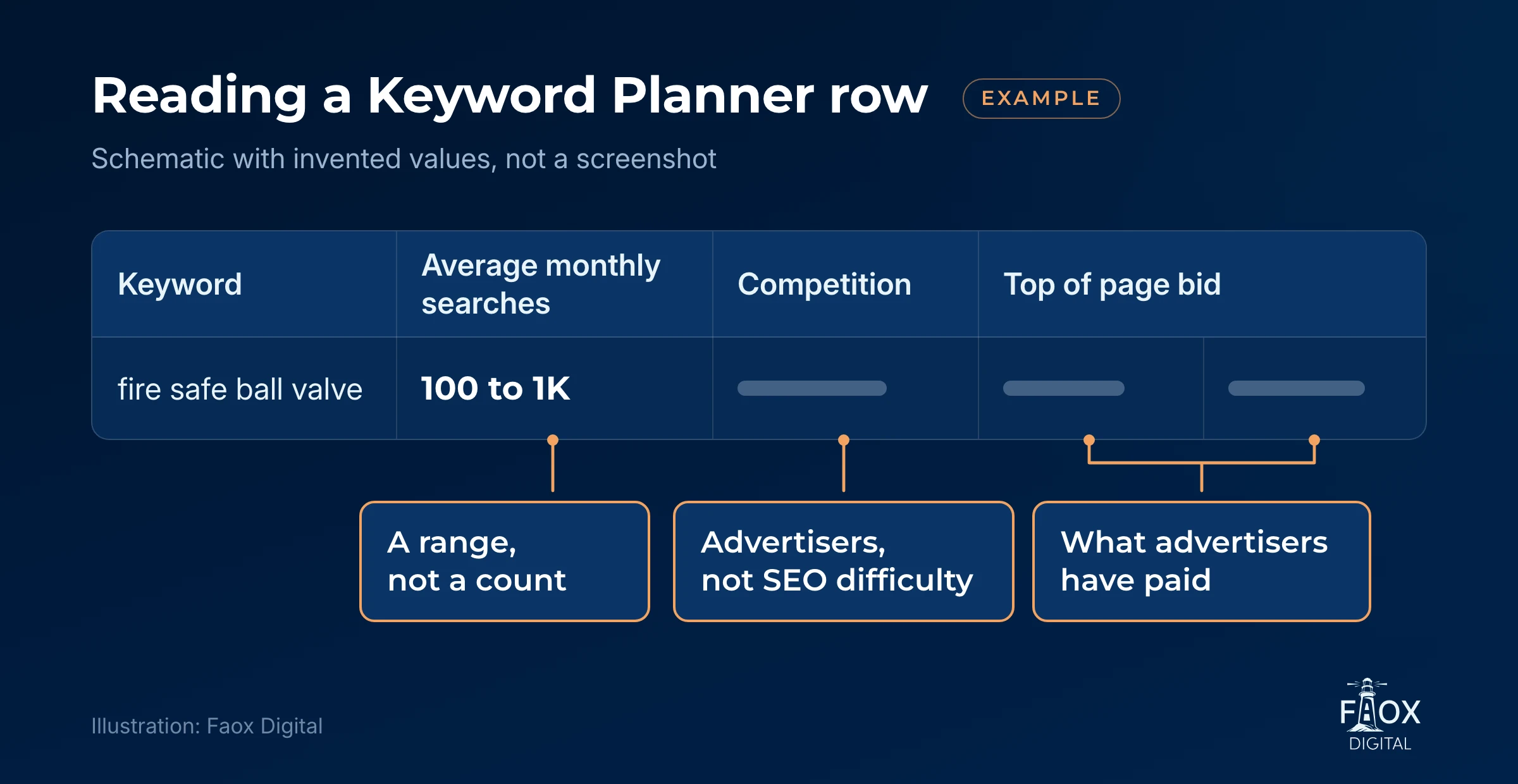
Google Ads Help defines average monthly searches as a rounded average for a keyword and its close variants, over 12 months by default, for your chosen location and network. Competition counts the advertisers that showed on a keyword relative to all keywords on Google: it describes the ad auction, not how hard it is to rank organically. The top of page bid columns show what advertisers have historically paid, a rough sign of commercial value.
Very low-volume keywords and sensitive ones, such as some in health or finance, are not shown at all, which matters if you supply medical or financial customers.
Keyword Planner volume ranges and how to read them
Unless your account spends enough on ads, Keyword Planner usually shows a range instead of a figure. Google announced this limited data view for lower-spending advertisers in 2016, with ranges such as 1 to 100, 100 to 1K and 1K to 10K, so a keyword searched 500 times a month shows as 100 to 1K (Search Engine Journal, 2016). Google gave no spending threshold. The ranges are wide: in Ahrefs’ 2024 guide to the tool, two keywords shared the range 1K to 10K, yet one had more than twice the searches of the other by Ahrefs’ own estimate.
Treat a range as an order of magnitude: it separates a search a handful of buyers type from one that thousands type, which is often all a B2B decision needs. When two important searches share a range, compare them in Google Trends, if both have enough searches to register. Where your site already appears, Search Console impressions are better evidence than any range.
Google Trends: seasons, regions and the words each market uses
Google Trends shows relative interest, not search counts: Trends Help says each data point is divided by all searches in its place and time, then scaled from 0 to 100. Use it for three questions:
- When do buyers search? Look at several years for peaks before a season or budget cycle; Google suggests publishing a little before people start to search.
- Where do they search? Interest by region compares countries, so check export markets one by one.
- Which words do they use? Compare alternatives such as "PTFE ball valve" and "Teflon ball valve". A search term excludes spelling variants, plurals and synonyms, so enter each version; a topic groups related searches across spellings and languages.
Under the chart, related searches list top and rising searches, and "Breakout" means growth of more than 5,000% (Trends Help). Google’s guide says rising terms can be less known and less competitive, as long as they fit your business.
Two limits matter in B2B. Searches made by very few people show as 0, and Google adds statistical noise that is most visible on low-interest queries, so a one-off spike on a niche term may not be real. Compare a niche term with a broader one rather than reading it alone.
The low search volume problem in B2B
Every free Google tool loses detail at the low end, where many B2B searches sit: Keyword Planner leaves out very low volumes, Trends shows them as 0 and Search Console hides rare queries. A specification such as "fire safe ball valve DN50 PN40" can bring a real enquiry and appear in none of them. Three habits help:
- Research the parent term. Judge demand and seasons on the broader product or application, then cover the variants on that page.
- Treat buyers’ words as evidence. An RFQ that uses a phrase shows it is real, whatever a tool reports.
- Let Search Console confirm it. Once the page exists, impressions show which variants Google connects with it.
Free tools vs paid keyword research tools
Paid tools such as Semrush and Ahrefs estimate volumes from their own keyword databases, including searches your site has never appeared for. Their bigger advantages lie elsewhere: they show which searches a competitor’s site ranks for, score how hard each search is to rank for and keep a history of rankings and results pages. Google’s free tools offer none of this, apart from Keyword Planner’s option to start from a competitor’s page.
Google’s 2026 guidance on third-party tools notes that they have no access to its internal ranking data and that their predictions are their own, so treat their figures as estimates. Only Search Console shows your site’s real queries. A paid tool earns its cost when you research many markets, analyse competitors regularly or track rankings at scale; for a first keyword map of one market, the free tools are usually enough.
Reading the results: a checklist before you trust a number
Before a search goes into your plan, check:
- Location, language and network match the market
- A Keyword Planner range is read as an order of magnitude
- Competition is read as advertiser competition, not ranking difficulty
- A zero or a missing keyword means no data, not no demand
- Trends figures are compared, never read as search counts
- Search Console positions are checked by country
- The results page shows which kind of page Google ranks
- Your buyers would really use the search
From a list of searches to a plan
Free tools give you a list; the decisions come next. Give each group of searches one target page in a keyword map, so two pages do not compete for the same search, and compare your list with what other sites win through keyword gap analysis. None of these tools shows what buyers ask AI assistants; our guide to ChatGPT SEO explains how those tools find and describe companies.
The next question is usually which searches are worth the most. Our guide to searches that bring quote requests shows how to find those closest to an enquiry.
How Faox Digital sizes keyword research to a company’s stage
Faox Digital, a digital growth partner for B2B companies in complex and international markets, builds the keyword map after an audit of what a site already ranks for, who it competes with and what its buyers search. For an early-stage company, a smaller budget or a test of one market, we start with an honest audit and a first step sized to that stage, even if the team does part of the work itself.
Key takeaways
- Start with Search Console, the only free source of real queries for your own site.
- Autocomplete and "People also ask" give buyers’ wording and questions, without numbers.
- Keyword Planner needs billing details and often shows ranges; its Competition column describes advertisers, not SEO difficulty.
- Google Trends compares interest on a 0 to 100 scale and never gives search counts.
- In B2B, a zero means no data, not no demand.
Frequently asked questions
Can I use Keyword Planner without running ads?
Yes. Google asks for billing information before it shows keyword ideas, but you can finish the Google Ads setup without launching a campaign. Without ad spend, expect ranges rather than exact figures.
How do I do keyword research for YouTube for free?
Google Trends can show interest in YouTube searches specifically. If you run a channel, the Trends tab in YouTube Studio’s analytics showed at the time of writing (November 2026) what viewers search for, though YouTube says some insights are limited to certain countries, languages and devices.
Can keyword research be automated?
Partly. The Search Console API can pull your query data on a schedule, and the Google Ads API can generate keyword ideas and historical metrics for long lists, with some technical setup. Judging whether a search fits your buyers, and which page should answer it, still needs a person.
Do I need a paid tool such as Semrush?
Not to start: Google’s free tools are enough for a first keyword map of one market. A paid tool becomes worth it when you analyse competitors regularly, research many markets or track rankings at scale.
Sources
Let’s talk
Where do you want to be found?
Tell us the searches that matter to your business. We will review your site and tell you plainly what to fix first, including what you can do yourself.