
Competitor Keyword Analysis: Finding the Searches Your Competitors Win
A method for finding who you really compete with in Google, which searches they win, and which of those gaps deserve your time.

Competitor keyword analysis shows which searches other sites win in Google and which of those your own site misses. Start with the sites that actually appear for your important searches, not only the companies you meet in tenders, and compare their searches with your own Search Console data. Then read the pages and results behind each gap, and rank the gaps by business value, intent and whether you can give a better answer.
Ask a B2B sales team who the competition is and you get the companies they meet in tenders and at trade fairs. Search for one of your products in Google and you often see a different list: distributors, marketplaces, trade magazines and standards bodies. This analysis starts from that second list. It builds on keyword research for B2B: research tells you what buyers search for, and this tells you who holds those searches today and where there is room for you. The examples come from a hypothetical valve manufacturer.
What is competitor keyword analysis?
Competitor keyword analysis, also called competitor keyword research, means finding the searches other sites rank for, comparing them with your own and deciding which differences are worth acting on. It is one part of a wider SEO competitor analysis. Competitor backlink analysis is a job of its own, so we leave it out here.
It shows you who you compete with in search, which searches others win, what kind of page wins them and where nobody does a good job. It cannot show you what a search is worth. No tool knows who enquired from a competitor’s page or what they ordered, so treat the output as a list of questions, not a to-do list.
Search competitors and business competitors
Business competitors sell what you sell to the same buyers. Search competitors are the sites that appear for the searches you want, whatever they sell. The two lists overlap but rarely match, and the type of site decides what you do next:
| Who ranks | Why it appears | What to do |
|---|---|---|
| Direct competitor | Sells the same product to the same buyers | Compare closely, because buyers will compare you too |
| Distributor or marketplace | Large catalog with a page for almost every product | If it sells your products, that click may still reach you; if not, compete on technical detail |
| Trade publication | Articles and news on the topic | Note the questions it answers, then answer them from first-hand experience |
| Standards body or association | It publishes the standard or definition | Do not try to outrank it; explain what the standard means for your product |
To build your list, take the searches that matter, by product line and market, and write down every site on the first page of results. The sites that keep coming back are your search competitors. Three to five per market is enough to start, and it is worth including one or two direct rivals even if they rank weakly.
Tools can suggest competitors too, with one blind spot. At the time of writing (November 2026), Ahrefs’ Organic competitors report lists sites in the top 10 for the keywords your site gets the most traffic from, so it can miss sites holding searches you do not yet appear for.
How to do competitor keyword analysis, step by step
- List the searches that matter. Work by product line and market.
- Write down who appears. Note every site on the first page of results.
- Choose your search competitors. Keep three to five per market.
- Export your own queries. Use Search Console, country by country, without brand searches.
- Collect the searches competitors rank for. Use a paid tool or work by hand.
- Compare the lists. Label each difference, such as missing or weak.
- Read the pages and the results. Note page type, content depth and results page features.
- Score and decide. Add the gaps you keep to your keyword map.
The sections below explain steps 4 to 8.
Start with your own queries in Search Console
Search Console shows only your own site, but it is the one source here that comes directly from Google. Open the Performance report, choose the Queries tab and build your baseline with three things in mind:
- Set brand searches aside. People who type your name are not part of the comparison. Google’s branded queries filter separates them, but its 2025 announcement limits it to top-level properties with enough queries and impressions. Otherwise, exclude your name by hand.
- Work country by country. The Countries dimension groups data by where the search began, so each market gets its own baseline.
- Know what is hidden. Google’s 2022 note on this data says queries not issued by more than a few dozen users over two to three months stay out of the tables, and the interface exports at most 1,000 rows. Add the rare searches your sales team hears.
Searches where you already appear but sit low are usually cheaper to improve than those you have no page for.
Find the searches your competitors rank for
Google offers no report of another site’s queries, so everything here is a manual check or an estimate. You have two routes.
By hand. Run your list of searches and record each competitor’s position. Then read their sites: navigation, category names, product pages, blog topics and, where public, the XML sitemap. A query such as site:example.com hydrogen valves shows which pages of a site can appear for a topic, though Google warns that the operator does not necessarily return every indexed URL. For a small product range, this is often enough.
Google Ads Help (accessed November 2026) says Keyword Planner can also start from a website and suggest keywords related to its content. It needs billing details, hides very low-volume keywords and gives ideas rather than rankings. Our guide to keyword research for free covers Google’s tools.
With a paid tool. Tools such as Semrush and Ahrefs keep databases of Google results and report the keywords a site ranks for. Choose the country, remove the competitor’s brand name and start with the first two pages of results. Treat the figures as estimates:
- Tools do not see Google’s data. Google’s June 2026 guidance on third-party SEO tools says they have no access to its internal ranking data, and it encourages using Search Console whether or not you use anything else.
- Traffic is modeled. Ahrefs’ help pages, dated September 2026, call its traffic figures estimations that work well for comparison. When Ahrefs tested itself in 2022 against Search Console data for 1,635 websites, the median deviation of its U.S. traffic estimates was 49.52%.
- Coverage has limits. Semrush’s knowledge base (accessed November 2026) says it collects results for hundreds of millions of the most popular keywords, and that updates for smaller databases can take longer. A rare search in a small market may be missing or out of date.
Use tool data to compare sites and find ideas, not to forecast traffic.
Keyword gap analysis: comparing their searches with yours
Keyword gap analysis puts your searches and your competitors’ searches side by side. As documented in November 2026, Semrush’s Keyword Gap compares up to five domains, including your own, and Ahrefs’ Content Gap takes up to 10 competitors. A spreadsheet does the same job on a smaller scale: one row per search, one column per site and the position in each cell. Semrush’s labels are a useful way to read the result, whichever method you use:
| Label | What it means | What it usually calls for |
|---|---|---|
| Missing | All competitors rank and you do not | Look here first: buyers seem to expect this topic from suppliers like you |
| Untapped | At least one competitor ranks and you do not | Check the fit, because it may be that site’s specialty |
| Weak | You rank below all competitors | Improve the page, starting with searches where you are on page two |
| Shared | Every site ranks | Compare the pages to see who answers better |
| Strong | You rank above all competitors | Keep the page current |
| Unique | Only you rank | Keep it, and check that the search brings enquiries |
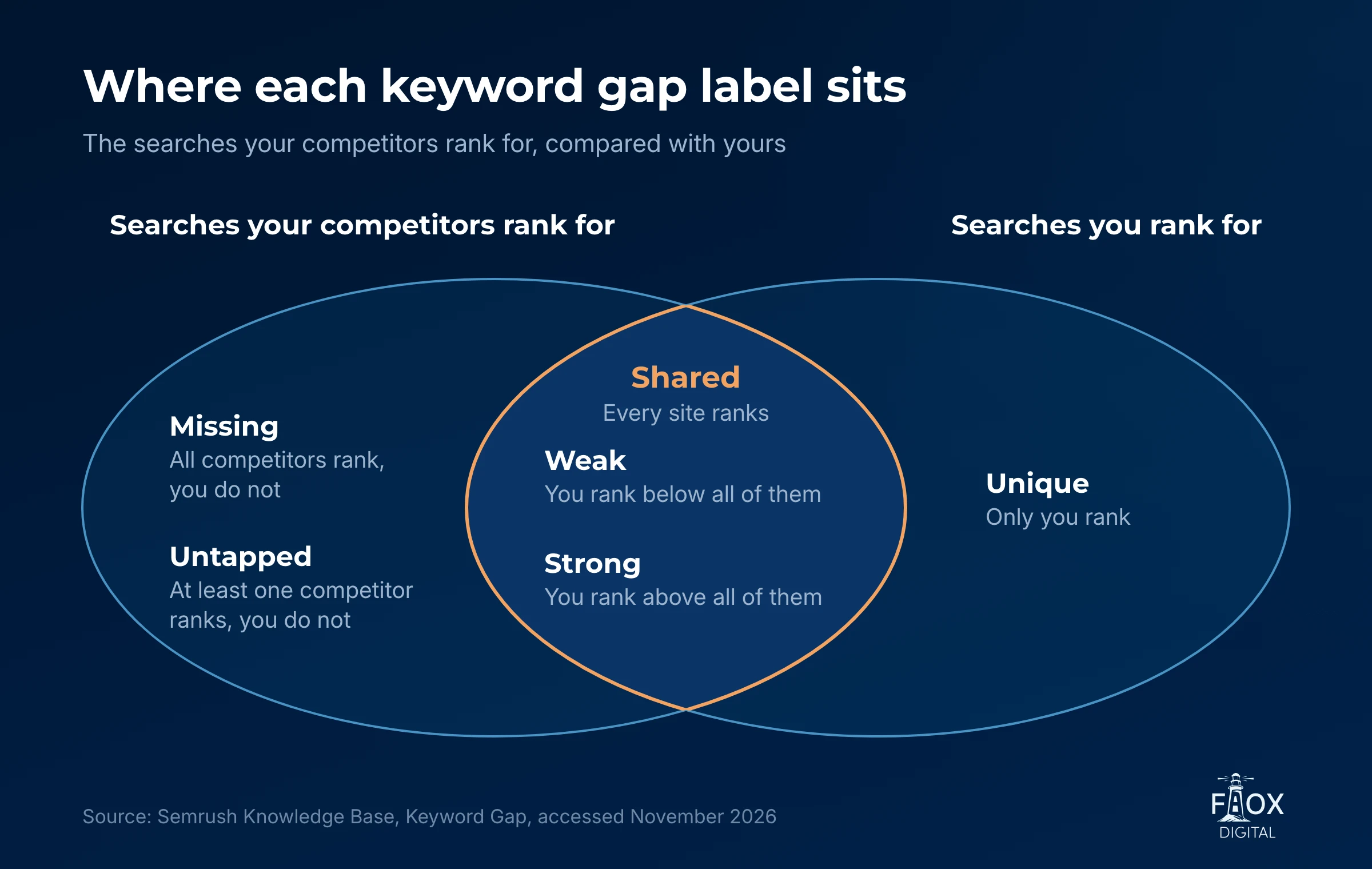
A label is not a decision: a search marked missing may be for a product you do not sell.
Read the pages behind each gap
For each search you still care about, open the page that wins. Start with page types: is it a category page, a product page, a guide, a comparison, a calculator or a PDF? The answer tells you which of three gaps you have:
- Topic gap: you have no page on this. Decide whether to create one.
- Page type gap: you have a page, but not the kind that wins. If category pages fill the results and you have a blog post, a better blog post will not help much.
- Depth gap: you have the right kind of page, but it says less. Improve it.
Content depth is not word count. Google’s guidance on helpful content, updated in October 2026, says it has no preferred word count. It asks instead whether a page provides substantial value compared with other pages in the results, and whether it avoids simply copying or rewriting its sources. For a B2B product, depth usually means the facts a buyer needs to decide: specifications and tolerances, materials and certificates, where the product is not suitable, how it compares with alternatives, and datasheets or drawings to download.
Look hardest at what the winning page leaves out. A distributor’s page may list sizes and say nothing about chemical compatibility, and that is your opening.
Read the results page features
The results page shows what kind of answer Google expects and how much room is left for a click. Results page features change from one search to the next, and Google’s 2025 guide to AI features says AI Overviews often do not trigger, so look at each important search yourself:
| What you see | What it suggests | What to do |
|---|---|---|
| AI Overview | Google summarizes the answer and links to sources. Pew Research Center’s 2025 study found people clicked traditional results less often when a summary appeared | Check which sites it cites, and expect fewer clicks |
| Featured snippet | One page’s passage is shown first | Give a short, direct answer under a clear heading |
| Related questions ("People also ask") | What else searchers want to know. Google says these can help you choose topics | Use them as sub-questions for your page |
| Image or video results | Searchers want to see the product or process | Add real photos, drawings or a demonstration video |
| Map results | Google reads the search as local | A page aimed at export buyers may not fit |
| Ads above the results | Someone pays for this search | Read it as a sign of commercial value, and note what the ads promise |
Competitors change from market to market
Competitors by market are rarely the same: a local distributor may hold a search in Germany while a US manufacturer holds it in the United States. Search Console Help says results are specific to the time, place, device and recent history of the person searching, so a search from your office says little about another country. Google’s Search settings let you select another region (Google Search Help, accessed November 2026), and keyword tools let you choose a country. Search in the local language too.
The page itself can differ as well. Google’s documentation on regional differences, updated in November 2026, lists features that appear only in some regions, including aggregator and supplier units on product searches in the European Economic Area. So run the analysis separately for each market and follow the results in your international SEO reporting.
Prioritizing opportunities: which gaps to act on first
Most analyses produce more gaps than a team can handle. Use the same method as in keyword research: score business value, intent, fit and competition from 1 to 3, start with the highest totals and use volume only to break ties. Competitor data makes the last two easier to judge, because you have read the pages you need to beat. Treat business value as a gate: if you do not sell it, the score does not matter. These example scores are for our hypothetical manufacturer:
| Search | What wins now | Gap | Score (4 to 12) | Decision |
|---|---|---|---|---|
| PTFE seat ball valve for chlorine service | Distributor listing with sizes only | Topic | 11 | New application page, first |
| ball valve manufacturer ISO 9001 | Two rivals’ category pages | Depth | 10 | Improve the category page |
| floating vs trunnion ball valve | Trade magazine guides | Page type | 7 | Comparison guide, later |
| pneumatic actuator price | Marketplaces | Topic | 6 | Skip: not in the range |
| what is a ball valve | Reference sites and an AI Overview | Topic | 5 | Leave for now |
Before a gap goes on the plan, check it:
- We sell this, or plan to, in a market we serve
- A buyer typing this could become a customer
- We can add facts or experience the current pages lack
- No existing page could take this search with some work
- The results page leaves room for a page like ours
Each gap you keep becomes a row in your keyword mapping sheet, with its target page and action. A gap list is not a publishing plan, though. Google’s spam policies, updated in August 2026, treat generating many pages mainly to manipulate rankings, with little value to users, as scaled content abuse, however the pages are made. Build fewer pages, each with something the current results lack.
Repeat the analysis when you launch a product, enter a market or see new names in your results. Not every gap brings enquiries, so the next question is which of these searches lead to quote requests. Our guide to commercial search intent answers it.
How Faox Digital looks at competitors
When Faox Digital starts an SEO project, the audit and baseline includes who the site competes with in search, alongside what it ranks for and what buyers search. Those findings feed the keyword map, which we build market by market because competitors change from one market to the next.
Key takeaways
- Competitor keyword analysis starts from who appears in search, not only from who you meet in tenders.
- Use Search Console for your own queries and treat third-party tool figures as estimates.
- A keyword gap is a question, not a task: check the page type, content depth and results page before you act.
- Run the analysis separately for each market, in its own language.
- Score gaps by business value, intent, fit and competition, and add only the ones you keep to your keyword map.
Frequently asked questions
What is keyword analysis, and how is it different from keyword research?
Keyword research finds the searches your buyers use. Keyword analysis judges them: what each one means, who ranks for it and what it would take to compete. The two overlap in practice, and competitor keyword analysis is the part that looks at other sites.
How can I do competitor keyword research for free?
Run your important searches in Google and note who ranks. Read those sites, using the site: operator for specific topics, and compare what you find with your Search Console queries in a spreadsheet. If you have a Google Ads account with billing details, Keyword Planner can also suggest ideas from a competitor’s URL.
How do I run a keyword gap analysis in Semrush?
At the time of writing (November 2026), open Keyword Gap, enter your domain in the first field and your competitors in the others, choose a keyword type such as organic and a regional database, then click Compare. The table at the bottom sorts keywords into the labels above. Filter by position or intent, then export the list.
Sources
- Google Search Central: Guidance on using third-party SEO tools, services, and advice, 2026
- Search Console Help: Performance report, overview and basic setup, accessed November 2026
- Semrush Knowledge Base: Keyword Gap, accessed November 2026
- Ahrefs: How accurate are the search traffic estimations in Ahrefs?, 2022
Let’s talk
Where do you want to be found?
Tell us the searches that matter to your business. We will review your site and tell you plainly what to fix first, including what you can do yourself.