
B2B Social Media Content: How to Plan, Make and Repurpose It
How a B2B company plans its social media content, chooses formats, makes posts with its experts and turns one piece of content into many.

B2B social media content works when it is planned from a few content pillars, made in formats your team can produce every week and reused across channels. Plan a month ahead in a publishing calendar, build posts from your products, processes and experts, keep them recognisable with one brand voice and a set of templates, agree a quick approval process, and turn each strong piece, such as an article or a video, into several posts.
A B2B company usually has more to say than it posts: engineers who solve problems every day, products with real stories behind them and customers who keep asking the same good questions. What is often missing is a way to turn that knowledge into posts week after week, without the work landing on one person at the last minute.
This guide covers the whole production line for B2B social media content: planning, choosing formats, making posts with your team, keeping them consistent, approving them quickly and reusing each piece in several forms. It opens our series on content creation; you can find all Social Media articles on the category page.
Plan: from content pillars to a publishing calendar
Planning starts with content pillars: the three to five themes you return to every month, such as applications and know-how, proof and capability, your point of view and the people behind the product. Each post should belong to one pillar. That keeps the feed coherent and turns a blank page into a narrower question: what can we say about this pillar this month?
Fill the pillars from sources you already have:
- Questions your sales team and engineers answer every week
- Product launches, certifications, trade fairs and projects you are allowed to show
- Articles, presentations and videos made for other purposes
- Your experts’ views on changes in your industry
Then put the posts into a publishing calendar: a monthly plan that lists each post’s date, platform, pillar, format, language, writer and approver. Plan a month ahead, leave a few open slots for news and set the rhythm by what you can sustain; two or three company posts a week plus regular posts from your experts is a realistic start for many teams. Our list of B2B social media content ideas helps when a pillar runs dry.
One pillar can carry a whole month in different formats. An invented pump maker with a pillar on applications and know-how might plan it like this: in week one, a text post on the most common sizing mistake its engineers see; in week two, a document carousel with the sizing steps; in week three, a short video of an engineer checking a seal; in week four, a photo from an installation, shown with the site owner’s permission. That makes four posts on one theme, in four formats.
Choose the format: text, design, photos, documents and video
Each format suits a different job, and the right mix depends on what your team can make well:
| Format | What it does well | What it takes |
|---|---|---|
| Text | Opinions, lessons and short explanations | A clear writer and an expert to check the facts |
| Design (graphics and diagrams) | Data, processes and comparisons at a glance | Templates and someone who can use them |
| Photography | Real products, plants and people | A good phone or camera, and good light |
| Carousel and document posts | Step-by-step guides, checklists and summaries of longer content | A slide template and a tight structure |
| Short video | Products at work, processes and quick explanations | Filming, simple editing and subtitles |
Platform data favours visual and document formats on LinkedIn. In Socialinsider’s tracking of 2.45 million posts from about 26,000 LinkedIn company pages, native documents and multi-image posts were the most engaging formats in the third quarter of 2026, both averaging a 6.40% engagement rate by impressions. Video followed at 5.25%, images at 4.70% and text posts at 3.50%, with link posts lowest. Socialinsider sells analytics software, and averages hide large differences between pages, so test formats with your own audience.
A few practical notes for each format:
- Carousel and document posts. On LinkedIn, a document post is an uploaded PDF, PowerPoint or Word file of up to 100 MB and 300 pages, at the time of writing (November 2026). You cannot change the file after posting, and readers can download it as a PDF, so check every page first. Our guide to the LinkedIn carousel post covers format, size and structure.
- Short video. Vertical clips of a few minutes now have a place on most platforms; YouTube, for example, has treated square or vertical uploads of up to three minutes as Shorts since October 15, 2024. Add subtitles so the video works with the sound off. Our guide to manufacturing video production covers planning and filming.
- Photography. Real photos of your products, plant and team show buyers what stock images cannot. Our guide to product photography for B2B explains when a professional shoot is worth it.
- Text. Put the point in the first lines, because feeds show only the start of a post, and keep to one idea per post.
Make it: products, processes, team and experts
The strongest raw material in B2B is what your company knows and does. Three sources deserve a place in every calendar.
Product and process storytelling. Show how a product is designed, tested, made or installed, and why a detail matters to the buyer. A post on why every weld is inspected twice says more about quality than the word "quality". Good B2B storytelling turns specifications into reasons to choose you.
Team and experts. Engineers, product managers and service technicians answer the questions buyers actually ask. Interview them for twenty minutes, turn the answers into posts and let them publish under their own names where they are willing. Over time, the most willing can build thought leadership on LinkedIn.
Five questions get most experts talking:
- What do customers most often get wrong about this product or process?
- Which question do you answer every week?
- What has changed in your field in the past year?
- What would you check first if this went wrong?
- What problem did you solve recently, and how?
Proof. Certificates explained, test results, before-and-after photos and projects you may show. Ask permission before showing a customer’s site or product, and leave out anything confidential.
To keep material flowing, make capture a habit. One person collects photos, short clips and notes from the plant floor, trade fairs and service visits into a shared folder every week. A post is far easier to write from a real photo and a two-line note than from a blank page.
Keep it recognisable: brand voice, visual identity and templates
Readers scroll fast, and consistency lets them recognise you before they read your name.
Brand voice is how your company sounds: plain or formal, direct or reserved, and the words you use and avoid. Write it down on one page with examples, so that a new writer or an agency can match it; our guide to brand voice shows how to define it. A description can be as short as three pairs, for example: clear but not simplistic, confident but not boastful, technical where it helps but free of jargon. Add a list of preferred terms, such as product names and units, so that every writer spells them the same way.
Visual identity on social media means the same colours, fonts, logo placement and photo style on every post. Social media templates make that affordable: a small set of layouts for quotes, data, announcements, carousel slides and video covers, built once and reused every week. Templates also let people outside the design team make a decent post without breaking the brand.
Make posts accessible as well. Add alternative text to images, which LinkedIn lets you write for each image you post, and subtitles to every video.
Set up an approval process that does not stall
In B2B, posts often need a technical check and sometimes a legal one. Without a clear approval process, a good post can wait weeks and lose its moment. Agree four things:
- Who checks what: the expert checks facts, marketing checks voice and visuals, legal checks only regulated claims
- A deadline for each check, for example two working days
- What can go out without approval, such as replies, reposts and event photos
- Approval of the monthly plan in advance, so individual posts need only a quick check
Approving the plan rather than every post moves the hard decisions into one meeting a month and keeps the week’s work moving.
Name one owner for the calendar as well. That person keeps the plan, chases late checks and decides what moves when news breaks. A one-page style sheet for experts, covering length, tone and what must not be shared, cuts the number of rewrites.
Repurpose one piece of content into many
Content repurposing means turning one substantial piece, such as a blog article, a webinar, a podcast episode or a video, into several smaller posts for different platforms and formats. It saves time, and it lets each audience meet the same idea where they already are.
| Source | What it can become |
|---|---|
| A technical blog article | A LinkedIn text post with the key finding, a document carousel of the steps, a short video of the expert explaining one point, a newsletter item |
| A webinar or podcast episode | Short video clips, quote graphics, a summary post and a blog article written from the transcript |
| A product or process video | Short vertical cuts, still photos for posts and a step-by-step carousel |
| A trade fair | Photos and clips of the stand and demonstrations, posts with people you met (with their permission) and a recap article |
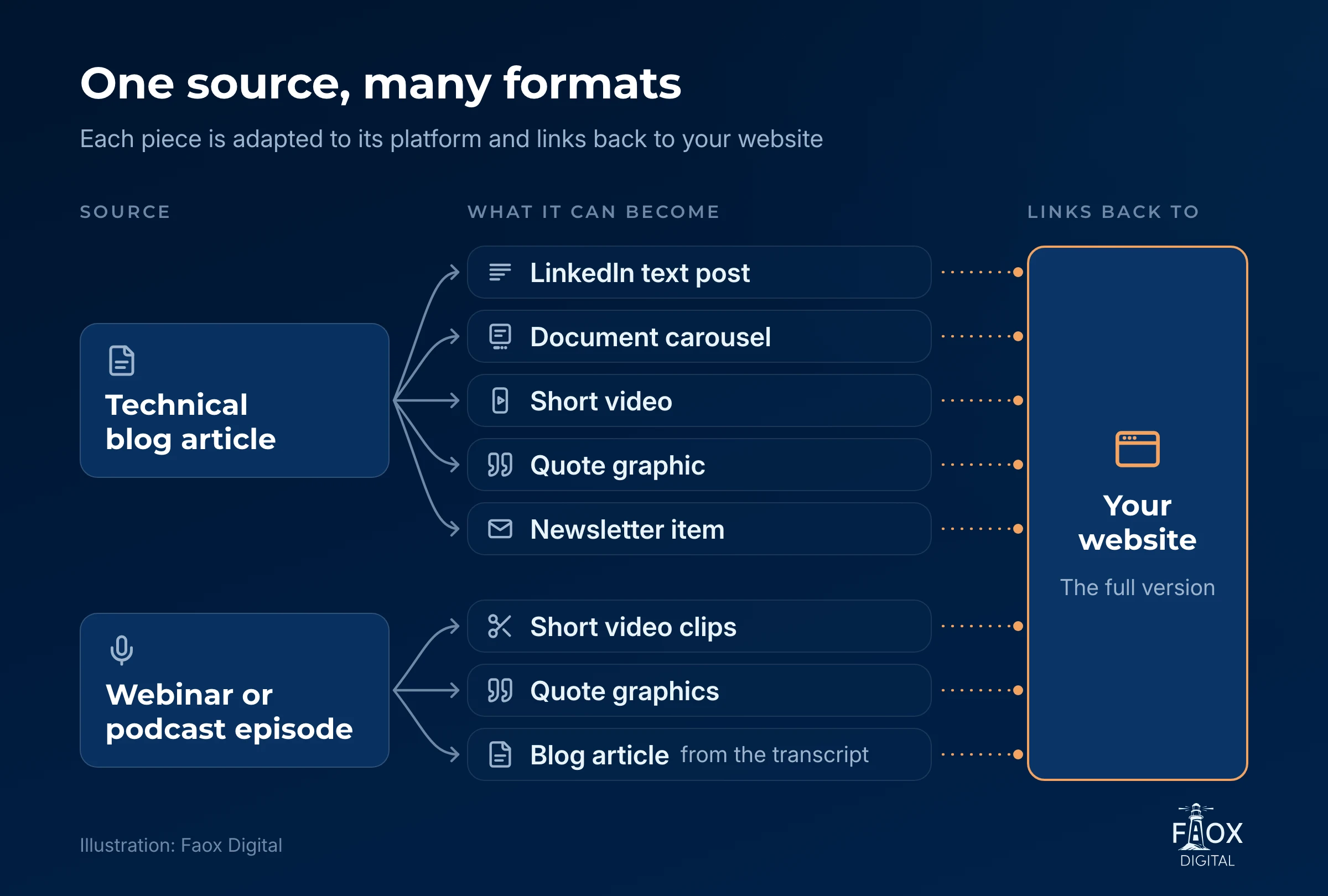
Your blog is often the richest source, because a good article already holds research, examples and expert input. Our guide to B2B content strategy covers how to plan articles that are worth reusing.
Not every piece is worth reusing. Choose those with something concrete at their core: data, a clear set of steps, a strong opinion or an expert explaining a problem well. A piece that drew questions from customers is usually a good candidate, because the questions show what people want to know.
Three rules keep repurposing from turning into repetition: adapt each piece to its platform rather than pasting the same text everywhere, spread the posts over several weeks, and always link back to the full version on your website.
Multilingual content: adapt, do not just translate
If you sell in several countries, multilingual content adds a step to every post. Machine translation can give you a first draft, but a post written for buyers in Germany and one for buyers in Brazil rarely need the same example, unit or reference. Plan the language versions in the same calendar, let a native speaker write or review each one, and adapt the substance: local standards, trade fairs, questions and holidays.
Not every post needs every language. A product launch or a new certification may go to all markets, adapted for each, while a local trade fair, a national standard or a question from one region belongs only in that market’s language. Mark each post in the calendar as global or local, so that nobody translates a post no other market needs.
Decide whether each language gets its own posts or one Page publishes in several languages. At the time of writing, LinkedIn’s targeted posts can show each version to the followers who use that language, as long as the audience includes at least 300 followers. Keep templates flexible as well, because translated text can run longer or shorter than the original.
Review what works every month
Once a month, look at what each format and pillar achieved, not only at the single post that did well. For each post, note its reach, engagement rate, comments from people in your target roles and clicks to your site. After a few months, patterns appear: document posts on applications may draw engineers, while plant photos draw future employees. Keep what works, change what does not and drop formats that cost more effort than they return.
The review also feeds the next month’s plan. A post that drew questions is a candidate for a longer article or a carousel, and a format that never lands with your buyers can give its slot to one that does.
Frequently asked questions
How do you create social media content for a business?
Start from three to five content pillars and the questions your customers ask. Plan a month of posts in a calendar, collect real photos and notes from your team, write each post around one idea, use templates for the design and have an expert check the facts before anything is published.
What is a B2B social media content strategy?
It is the part of your social media strategy that decides what you publish: the content pillars, the formats, the voice, the rhythm and how each piece is reused. It turns your decisions about whom to reach and why into a monthly plan of posts.
How do you get more engagement on LinkedIn with B2B content?
Post useful, specific content from real experts, in formats that suit the platform. In Socialinsider’s data for the third quarter of 2026, document and multi-image posts had the highest engagement rates on LinkedIn company pages, and link posts the lowest. Reply to comments quickly, because conversation is part of what people see.
How can a small business make social media content with little time?
Choose one platform and two or three pillars, collect photos and notes on your phone as you work, and set aside one block of time each week to write and schedule. Reuse each good piece in several formats, and keep a few templates so that design takes minutes rather than hours.
Sources
- Socialinsider: LinkedIn Organic Benchmarks 2026, accessed November 2026 (Q3 2026 data)
- LinkedIn Help: Upload and share documents on LinkedIn, accessed November 2026
- YouTube Help: Understand three-minute YouTube Shorts, accessed November 2026
Let’s talk
Want social media that reaches the right people?
Tell us who you want to reach. We will look at your channels and suggest a plan your team can keep up with.