
What Is Marketing Automation? A Practical Guide for B2B Companies
What marketing automation is, how it works on top of the CRM in a B2B company, and which work to automate and which to keep in human hands.
Marketing automation is software that sends emails, updates records and alerts your sales team automatically when a contact does something, such as filling in a form, downloading a guide or returning to a pricing page. In a B2B company it runs on the CRM: triggers start automated email sequences, lead scoring shows who is ready for a conversation, and notifications hand those contacts to a person. Automate the routine follow-up, and keep quotes, technical questions and relationships human.
B2B buyers do much of their research before they talk to anyone. In the 2026 State of Marketing to Engineers survey by GlobalSpec and TREW Marketing, technical buyers said 62% of the buying process happens online before they contact a vendor. During that time, a company needs to stay useful and present without a salesperson chasing every contact by hand. Marketing automation is how small B2B teams do that.
This guide explains what marketing automation is, how it works, which triggers and sequences matter most in B2B, how lead scoring and sales notifications connect marketing to sales, and which work should stay in human hands. It opens our series on automation and funnels; you can find all Email & CRM articles on the category page.
What is marketing automation?
Marketing automation is the use of software to carry out marketing tasks automatically, based on rules you set and on what each contact does. Instead of someone remembering to send a follow-up email a few days after a download, the system sends it, records it and stops if the person replies.
In B2B, marketing automation mostly means:
- Automated email sequences that follow a trigger, such as a download, a trade fair visit or a quote
- Record updates in the CRM, such as changing a contact’s stage or adding them to a segment
- Lead scoring that adds up signals of fit and interest
- Internal notifications and tasks that tell sales when a contact needs a person
It differs from a one-off campaign, which you plan and send to a list on a set date. Automation runs continuously, for each contact at the moment they qualify. Our B2B email marketing guide shows how newsletters, campaigns and automated sequences fit together.
Why B2B companies use marketing automation
For a B2B company, the case for automation is less about volume than about consistency:
- Every lead gets a follow-up. Trade fair contacts, downloads and enquiries are followed up the same way every time, not only when someone has time.
- Timing fits the buyer. Emails go out when a contact acts, not when the next campaign happens to be scheduled.
- Long cycles stay covered. A contact who is not ready this quarter keeps receiving useful content until they are.
- Sales sees intent. Scores and alerts show which contacts are active, so salespeople call the right people.
- Results become measurable. Each flow shows how many contacts entered, clicked, replied and became conversations.
It is not always the first step. If your list has a few hundred contacts and one person who knows each of them, a well-kept CRM and a regular newsletter may do more. Automation pays off once there are more contacts than people can follow up by hand.
Marketing automation in the CRM
Automation needs data, and in B2B that data lives in the CRM. CRM integration means the automation tool and the CRM share the same contacts, companies, stages and activities, or the automation runs inside the CRM itself. That is what people usually mean by marketing automation in a CRM:
- Triggers can use CRM data, such as a deal moving to "quote sent" or a customer’s renewal date.
- Actions can change CRM data, such as creating a task for the account owner or updating a contact’s stage.
- Both teams see the same record: sales sees what marketing sent, and marketing sees what sales did.
Without that link, automation works from a separate list that drifts away from reality, and customers get emails about things they discussed with a salesperson yesterday.
How marketing automation works
Every automation follows the same pattern: a trigger, conditions, actions, delays and exit rules.
| Part | What it is | Example |
|---|---|---|
| Trigger | The event that starts the automation | A contact downloads a pump selection guide |
| Conditions | Rules that decide who continues and which path they take | Only contacts not already in an open deal; engineers get the technical path |
| Actions | What the system does | Sends a follow-up email and adds the contact to a segment |
| Delays | The pauses between actions | Waits a few days before the next email |
| Exit rules | When a contact leaves the automation | They reply, request a quote, unsubscribe or become a customer |
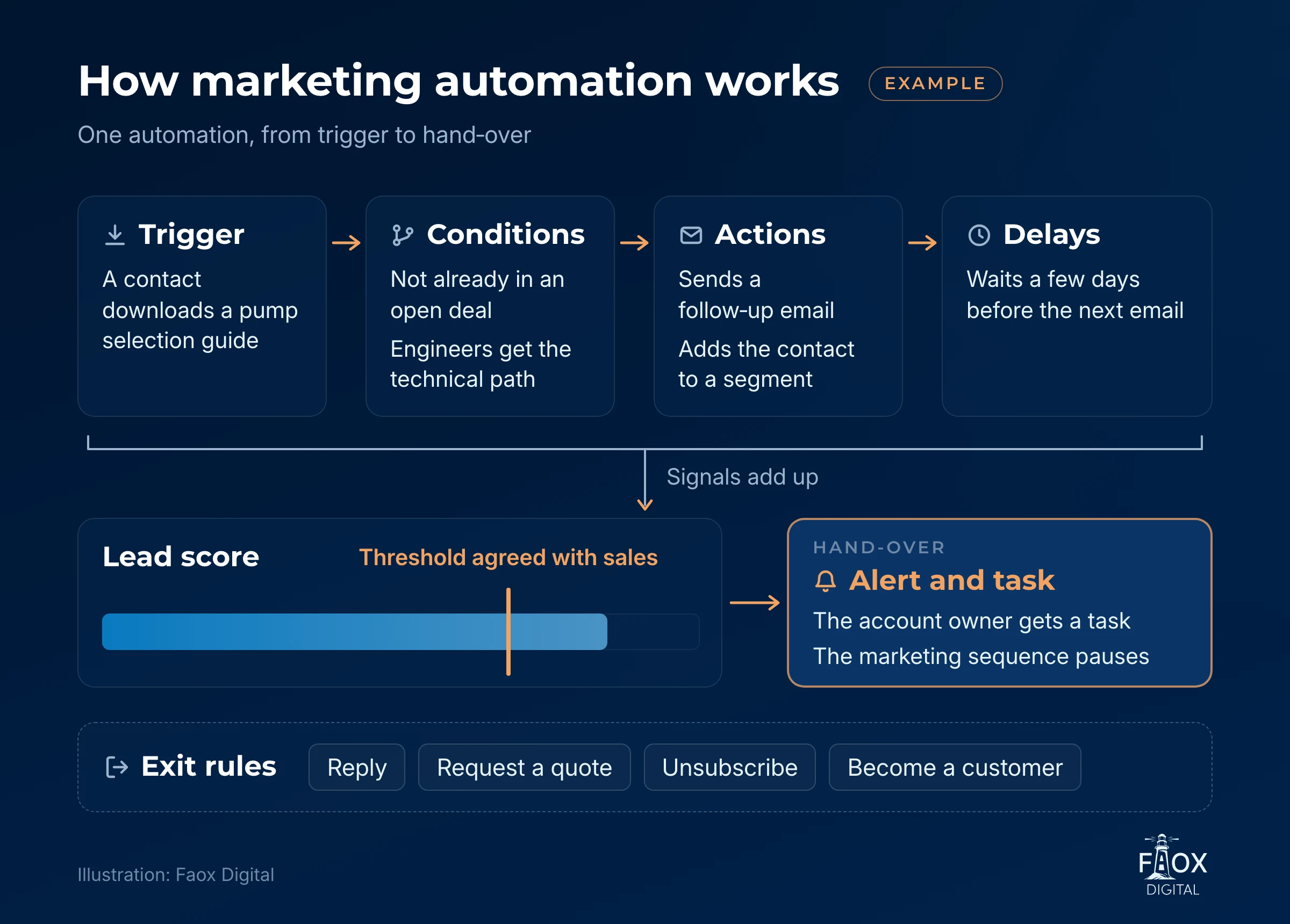
Exit rules matter as much as the emails. An automation that keeps writing to someone who has already asked for a quote makes the company look as if nobody is listening.
An example: following up a data sheet download
Here is how one automation might run for a manufacturer of industrial valves:
- Trigger: an engineer downloads the data sheet for a control valve. The form asks for role and country, and the CRM records the source.
- Straight away: an email with the data sheet, a related installation guide and the name of the application engineer for their market.
- A few days later: if the contact clicked, an application note for their industry; if not, a shorter email with one useful link.
- Signals add up: a visit to the price request page and a second download raise the lead score.
- Hand-over: when the score passes the agreed threshold, the account owner gets a task with the contact’s downloads and clicks, and the marketing sequence pauses.
- No response: contacts who do not engage move into the regular newsletter, so they stay in touch without being chased.
Each step is simple. What makes it work is that it happens for every download, in every market, without anyone having to remember it.
Triggers: what starts an automation
A trigger is the event that starts an automation. The useful ones in B2B are:
- Forms: a newsletter sign-up, a guide download, a quote request, a webinar registration
- Website behavior: visits to pricing, product or contact pages, or a return visit after a long gap
- Email engagement: a click on a specific product link, or no clicks for a long time
- CRM changes: a new contact from a trade fair import, a deal entering a new stage, a quote sent, an order won or lost
- Dates: a service interval, a contract renewal, the anniversary of an installation
A form is the most reliable trigger, because the person tells you what they want. Website behavior is useful but less certain: a visit to a pricing page may come from a buyer or from a competitor. Treat it as a signal, not a decision.
Website tracking has rules of its own. In the EU, Article 5(3) of the ePrivacy Directive allows information to be stored on or read from a visitor’s device, which is what tracking cookies do, only with the visitor’s consent, unless it is strictly necessary for a service they asked for. Check how your cookie banner and tracking settings handle this in each market; this is general information, not legal advice.
Automated email sequences
An automated email sequence, also called a flow or workflow, is a short series of emails sent after a trigger. Common B2B sequences:
- Welcome sequence: two or three emails after a newsletter sign-up that set expectations and point to your most useful content. Our article on a B2B welcome sequence gives examples.
- Download follow-up: related content after a guide or data sheet download, then an offer to talk.
- Trade fair follow-up: a thank-you, the documents promised at the stand and an invitation to the next step.
- Quote follow-up: reminders to the salesperson, and useful information for the buyer while the quote is open.
- New customer onboarding: contacts, documentation and service information after the first order.
- Re-engagement: a short check-in with contacts who have stopped clicking.
Keep sequences short, write each email for one action and give every sequence exit rules. Our guide to email automation workflows shows how to set up triggers and your first workflows step by step.
Lead scoring: who is ready for sales?
Lead scoring adds up signals to estimate how ready a contact is for a sales conversation. Most models combine fit and behavior:
| Signal | Examples | Weight |
|---|---|---|
| Fit | Role, industry, company size and country match your customers | High for a strong match, none for a poor one |
| High-intent behavior | A quote request, a pricing page visit, a reply asking a question | High |
| Medium-intent behavior | Several product page visits, a technical guide download | Medium |
| Low-intent behavior | A newsletter click, a blog visit | Low |
| Negative signals | A student, a competitor, an unsubscribe | Lower the score or exclude |
When a contact passes a threshold agreed with sales, the system alerts the account owner. Keep the model simple, review it with sales every few months and let scores fade when people stop engaging. A quote request should go straight to sales, whatever the score.
Sales notifications and the hand-over
Automation earns its keep at the hand-over from marketing to sales. A sales notification should reach the right person when a contact needs one, with enough context to act: who the contact is, what they did, what they received before and what the next step should be. Create a task with a due date, not just an email that gets lost.
Speed matters. In a study published in Harvard Business Review in 2011, covering 1.25 million sales leads at 42 US companies, 13 of them B2B, firms that tried to contact a lead within an hour were nearly seven times as likely to qualify it as those that waited even one hour longer. The same authors’ audit of 2,241 US companies found an average response time of 42 hours among the companies that responded within 30 days. The data is old, but the lesson holds: an alert that sits unread wastes the automation that produced it.
When sales takes over, pause the marketing sequences for that contact, and agree which contacts return to marketing if the conversation stalls. Our guide to lead generation for manufacturers covers how to capture and follow up every lead.
Segments and personalization in automated emails
Automated emails use the same segments as the rest of your email program: role, country and language, buying stage and product interest decide which path a contact takes and which version they receive.
Personalization in automation means more than a name in the greeting: the right language, the products the contact looked at and the salesperson who knows the account. Set a fallback for every personalized field, so that a missing role or company name does not produce an awkward sentence.
What to automate and what to keep human
The human touch still decides most B2B sales. Forrester’s State of Business Buying 2026 notes that human interactions remain essential: buyers who find AI-generated answers incomplete look for validation from trusted sources. Automation should make room for those conversations, not replace them.
| Task | Automate | Keep human |
|---|---|---|
| Follow-up after a download or sign-up | The emails, the timing and the record update | Answers to the questions people reply with |
| Trade fair follow-up | The thank-you, the documents and the reminders | The personal note about the conversation at the stand |
| Lead qualification | Scoring and the alert to sales | The call that confirms the need |
| Quotes | Reminders and expiry alerts | The quote itself, pricing and negotiation |
| Technical questions | Routing to the right expert | The answer |
| Customer relationships | Service reminders and renewal dates | Visits, problem solving and account reviews |
A simple rule: automate what should happen the same way every time, and keep a person wherever judgment, trust or a commercial decision is involved.
Measuring marketing automation
Judge each automation by what it leads to, not by how many emails it sends. For every flow, track:
- Entries: how many contacts started the flow, and from which sources
- Clicks and replies on each email, rather than opens: Apple’s Mail Privacy Protection, for example, hides whether a message was opened
- Conversions: quote requests, meeting requests and the other actions the flow aims for
- Hand-over speed: how long sales takes to act on an alert
- Opportunities and revenue in the CRM that started with contacts in the flow
- Unsubscribes and complaints, which show where a flow is too frequent or not relevant
Compare each flow with how the same kind of contact was handled before, and review it a few months after launch.
How to start with marketing automation
- Pick one process that is repeated often and handled badly today, such as downloads or trade fair contacts.
- Map it on paper: the trigger, the emails, the delays, the conditions, the exit rules and the hand-over to sales.
- Check the data and consent the process needs: source, role, language and what each contact agreed to receive.
- Write the emails and ask a salesperson to read them.
- Build and test with internal addresses, including every exit rule.
- Add the sales notification, and agree who acts on it and how fast.
- Measure clicks, replies and conversations for a few months, then add the next process.
Many email tools include basic automation. When you need lead scoring, triggers from CRM data or several connected flows, read our article on outgrowing your email tool.
Common mistakes with marketing automation
- Automating a process that does not work by hand, which only makes the problem faster
- Long sequences without exit rules, so that customers and active deals keep receiving prospect emails
- Scoring models nobody in sales trusts, so that the alerts are ignored
- Alerts without an owner or a deadline
- Sending without checking consent for each contact and market
- Treating every website visit as buying intent
How Faox Digital approaches marketing automation
Faox Digital builds marketing automation in the client’s own tools as part of its email, CRM and funnel work: emails go out on a steady rhythm, automatic follow-up starts once each contact is ready, and the client signs off what we build. Segments are planned by behavior and stage, and the automations are judged by replies, qualified conversations and pipeline.
Key takeaways
- Marketing automation runs marketing tasks automatically, based on rules and on what each contact does.
- In B2B it works on CRM data: triggers start sequences, lead scoring shows readiness and notifications hand contacts to sales.
- Forms are the most reliable triggers; treat website behavior as a signal, and respect consent rules for tracking.
- Every automation needs exit rules, and every sales alert needs an owner who acts quickly.
- Automate what should happen the same way every time; keep quotes, technical answers and relationships human.
Frequently asked questions
What is marketing automation, with examples?
Marketing automation is software that runs marketing tasks automatically, based on rules and on what contacts do. In B2B, examples include a welcome sequence after a newsletter sign-up, a follow-up after a guide download, a reminder when a quote is about to expire and an alert to sales when a contact asks for pricing.
What is marketing automation in a CRM?
It is automation that uses CRM data as triggers and conditions and writes its results back to the CRM: a deal stage can start a sequence, and a contact’s behavior can create a task for the account owner. It keeps marketing and sales working from the same records.
What is marketing automation in HubSpot?
In HubSpot, automation is built with workflows: an enrollment trigger, such as a form submission, starts a series of actions, such as sending an email, updating a record or creating a task. At the time of writing (November 2026), HubSpot’s knowledge base lists workflows for its Professional and Enterprise subscriptions.
What does a marketing automation manager do?
A marketing automation manager designs and maintains the automated flows: triggers, segments, scoring, emails and the hand-over to sales. The role also keeps the data clean, checks the consent rules, tests every change and reports which automations lead to conversations.
Sources
- GlobalSpec and TREW Marketing: 2026 State of Marketing to Engineers, 2026
- Harvard Business Review: The Short Life of Online Sales Leads (Oldroyd, McElheran and Elkington), March 2011
- Forrester: The State Of Business Buying, 2026 (press release), January 2026
- EUR-Lex: Directive 2002/58/EC (ePrivacy Directive), consolidated text, Article 5(3), consolidated version of December 2009
Let’s talk
Have contacts you never follow up with?
Tell us about the list you already have. We will show you how email and CRM can turn it into conversations.