
Marketing Automation Software: Signs You Have Outgrown Your Email Tool
The signs a B2B company has outgrown its email tool, the three routes from there, what marketing automation software costs and how to plan the move.
You need marketing automation software when your email tool can no longer run the work you ask of it: several follow-up flows with branches, lead scoring for sales, website tracking of known contacts and a two-way link to your CRM. If you send a newsletter and a few simple sequences, a higher plan of your email tool or the automation features in your CRM may be enough. Decide by the workflows you need, who will run them, setup time and license cost.
Most B2B companies start with an email tool for the newsletter, then add a welcome series, a download follow-up and a sequence after each trade fair. Then the tool starts to push back: flows cannot branch, sales cannot see who is ready to talk, and someone exports contacts from the CRM by hand every week.
Below are the signs that you have outgrown your email tool, the routes open to you, their cost at the time of writing (November 2026) and how to plan the move. We set up email tools and automations as part of our B2B email marketing services, so we have a stake in this decision; we work in whichever tools a client already uses, and the signs below show when a bigger platform is worth it and when it is not. For the basics of what marketing automation is, start with our guide.
What marketing automation software does that an email tool does not
An email tool is built to send campaigns, such as newsletters and offers, plus simple automated series. Most now include some automation, but limit the flows, steps or branches on each plan.
A marketing automation platform is built around the contact rather than the campaign. It records what each person does (clicks, forms, page visits), turns that into a score, runs workflows that react to it and passes ready contacts to sales through the CRM. Marketing automation software, tools and platforms are near synonyms; what matters is whether the product does these four things.
Signs you have outgrown your email tool
Look for these signs in your daily work, not in a feature list. One sign alone can often be solved in your current tool; several together point to different software.
You need multiple workflows with branches
A download follow-up, a trade fair sequence, a quote follow-up and customer onboarding are four workflows, each with a branch for people who click or reply. Email tools often cap this by plan: Mailchimp’s pricing page in November 2026 lists up to 200 Marketing Automation Flows (called Customer Journey Builder until June 2025) on Standard and Premium, flows of up to 4 steps on Essentials and none on Free, and its help center puts conditional splits on Standard or higher. If running multiple workflows means constant workarounds, the tool is setting your process.
Sales wants to know who is ready
When sales asks which contacts are worth a call, the answer is lead scoring: points for fit and behavior, added up against a threshold agreed with sales. Email tools rarely offer it below their top plans. HubSpot’s knowledge base (updated November 16, 2026) lists its lead scoring tool with the Professional and Enterprise plans of Marketing Hub or Sales Hub, and Brevo’s pricing page puts contact scoring in its Professional plan.
You want to see which known contacts visit your website
Website tracking ties visits to known contacts: an engineer who downloaded a data sheet returns to the product page, and sales is told. In the EU, Article 5(3) of the ePrivacy Directive, as amended in 2009, allows storing or reading information on a visitor’s device only with consent, unless strictly necessary for a service they explicitly asked for. Expect visit data only from people who accept your cookies.
Data integration takes manual work
If someone exports contacts from the CRM into a spreadsheet and then into the email tool, or copies unsubscribes back by hand, you have a data integration problem: lost hours, duplicates and the risk of emailing someone who opted out. The same gap means nobody can say which emails led to meetings, quotes or orders. A two-way CRM sync, in a platform or between your current tools, removes the manual step and puts email activity next to each deal. If you have no CRM yet, choosing a CRM comes first, because automation runs on its data.
Signs you have not outgrown it yet
A bigger platform will not fix a missing process. Stay with your current tool, perhaps on a higher plan, if:
- You send a newsletter and two or three simple sequences, and they work
- Sales and marketing have not agreed what makes a contact ready, so scores would mean nothing
- Your list or CRM is full of duplicates and old contacts, which a new tool would inherit
- Nobody has time to build and maintain flows
If your tool is the wrong one rather than too small, our guide to choosing a B2B email marketing platform covers what to compare.
Three routes: a higher plan, automation in your CRM or a platform
Outgrowing an email tool does not always mean buying a new system:
| Higher plan of your email tool | Automation features in the CRM | Marketing automation platform | |
|---|---|---|---|
| Multiple workflows | Limited by plan | Usually upper tiers | Core feature |
| Lead scoring | Often top plan only | Upper tiers | Usually included |
| Website tracking | Limited | Depends on the CRM | Usually included, with consent |
| Data integration | CRM sync needed | One database | Sync needed unless it shares the CRM’s database |
| Setup time | Shortest | Medium | Longest |
| License cost | Lowest | Rises with seats and tier | Highest, often with onboarding fees |
Examples of marketing automation platforms include HubSpot Marketing Hub, which shares a database with HubSpot’s CRM; Salesforce’s Marketing Cloud Account Engagement, sold separately from its CRM; Adobe Marketo Engage; and Zoho Marketing Automation. They are examples, not recommendations: the right one depends on the CRM you already run.
Example: connecting your CRM and email tool for automated flows
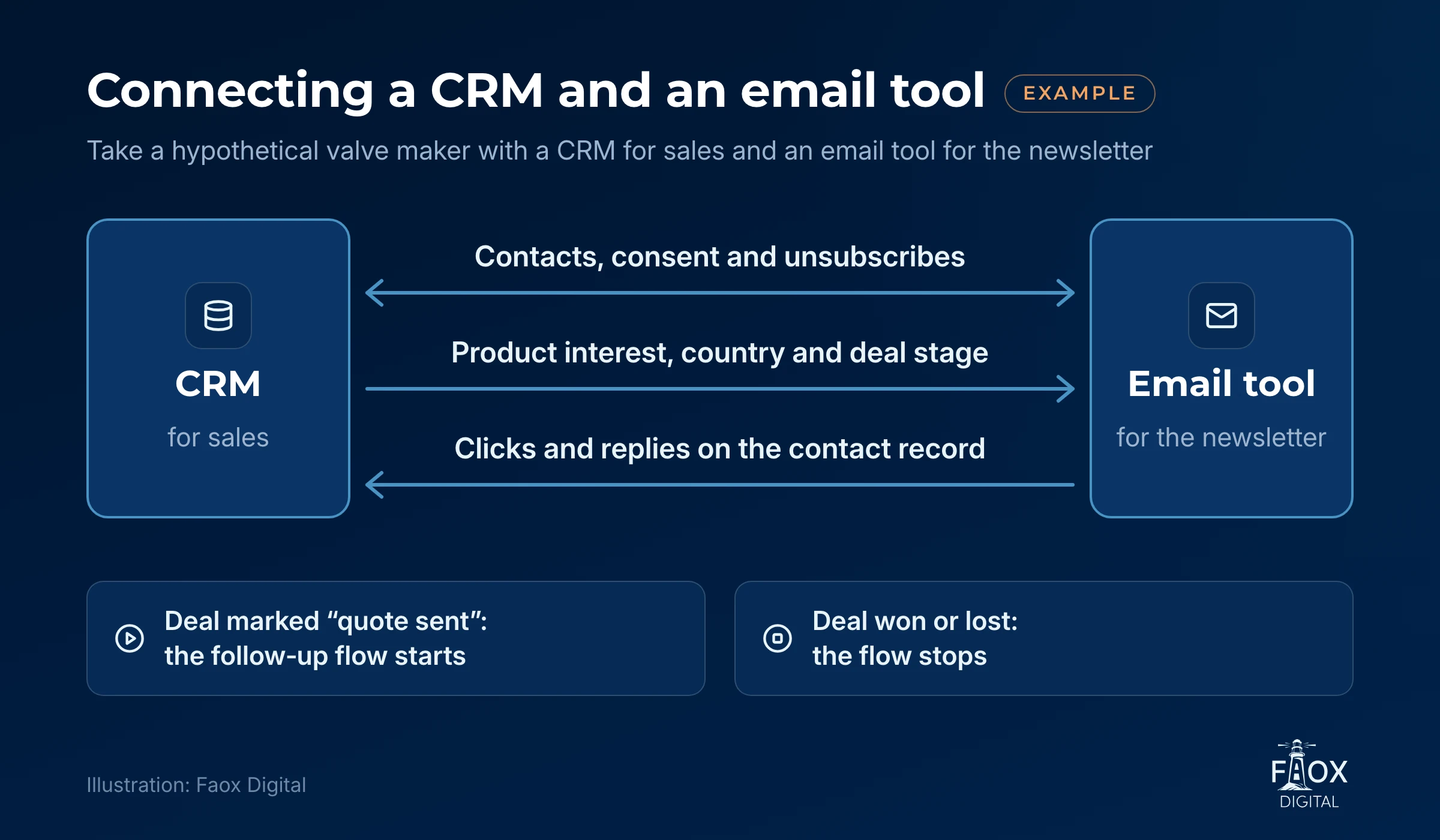
Before buying a platform, test whether connecting the tools you have solves the problem. Take a hypothetical valve maker with a CRM for sales and an email tool for the newsletter:
- Connect the two tools. A native integration or connector syncs contacts, consent and unsubscribes both ways.
- Choose the fields the CRM sends. Product interest, country and deal stage are enough to start.
- Start a flow from a CRM change. If the email tool can start flows from a tag or field, a deal marked "quote sent" starts a three-email follow-up.
- Send activity back. Clicks and replies appear on the contact’s CRM record before sales calls.
- Stop the flow when the deal moves on. An exit rule on the same field ends it once the deal is won or lost.
If this covers what sales and marketing need, you have saved a platform’s license. If it breaks on volume, branching or scoring, you know which features to pay for.
License cost and setup time
License cost rises steeply from one route to the next. These are starting prices in US dollars, as published on the vendors’ pages on 17 November 2026 (HubSpot’s on its US pricing page); most rise with contacts or email volume:
| Tool | Automation features | Published starting price |
|---|---|---|
| Mailchimp | Up to 200 flows on Standard and Premium; 4-step flows on Essentials | Standard from $20 a month |
| Brevo | Unlimited multi-step workflows from Standard; contact scoring in Professional | Standard $18 a month; Professional $499 |
| HubSpot Marketing Hub | Workflows and lead scoring from Professional | Professional from $800 a month billed annually ($890 monthly), 3 core seats, 2,000 marketing contacts, plus $3,000 required onboarding; Enterprise from $3,600 plus $7,000 |
| Salesforce Marketing Cloud Account Engagement | Lead scoring and grading from Growth+ | Growth+ $1,250 per organization a month, annual contract, 10,000 contacts; Premium+ $15,000 |
Setup time adds to the bill: cleaning and mapping data, connecting the CRM, authenticating the sending domain, rebuilding templates and flows, agreeing scoring with sales and training the team. HubSpot’s required onboarding fee on Professional and Enterprise shows how much setup the vendor expects. Ask each vendor what onboarding includes and who does the work, and compare costs over three years. If both are on your list, see our article comparing HubSpot and Salesforce.
Team capacity: who will run it
Software does not write emails, agree scores with sales or clean data. Before you buy, name the person who will own the platform and check their team capacity for building and testing flows, keeping data tidy, reviewing reports and agreeing the hand-over with sales. Without that time, a bigger platform runs the same few flows at a higher price. If the real gap is prospecting rather than software, compare lead generation companies with building your own pipeline first.
A migration plan for the move
Once you decide to move, a written migration plan protects contacts, consent and your sending reputation:
- List what you have. Contacts, fields, segments, forms, flows, templates and suppression lists.
- Clean before you move. Remove duplicates and contacts without consent or activity, so the new license does not pay for dead records.
- Map the fields. Decide which system owns each field and how they sync.
- Move consent and unsubscribes first. Nobody who opted out should hear from the new tool.
- Authenticate the sending domain. Set up SPF, DKIM and DMARC before the first send.
- Rebuild the key flows first. Start with welcome and download follow-ups, test with real records and switch off each old flow when its replacement goes live.
- Agree scoring with sales, then train the team. Turn scoring on only when both sides know what a score means.
Questions to ask vendors before you buy
- Which plan includes the workflows, branches and lead scoring we need, and what will renewal cost?
- How are contacts counted, and what happens above the limit?
- Is onboarding required, and what does it include?
- Which CRM integration exists, does it sync both ways, and who maintains it?
- How does website tracking handle consent in our markets?
- Can we export contacts, activity, flows and templates if we leave?
How Faox Digital approaches a move to marketing automation
Faox Digital, a digital growth partner for B2B companies in complex and international markets, starts with an audit of the list, the CRM and past sends, because the audit shows whether the problem lies in the tool, the data or the process. We plan segments by behavior and stage, then build the CRM, the emails and the automations in the client’s own tools, and the client signs them off. We suggest first steps that fit the company’s budget and stage, even when that means staying with the current email tool for a while. We judge the result by replies, qualified conversations and pipeline.
Key takeaways
- Marketing automation software is worth it when you need multiple workflows, lead scoring, website tracking and a two-way CRM link.
- One sign alone can often be solved with a higher plan, CRM automation or a connection between your current tools.
- A platform will not fix a missing process: agree what makes a contact ready, clean the data and name an owner.
- Compare license cost, onboarding fees and setup time over three years.
- Move with a written migration plan, consent and unsubscribes first.
Frequently asked questions
What is marketing automation software?
Software that sends emails, updates records, scores contacts and alerts sales automatically, based on rules and on what each contact does. In B2B it usually runs on CRM data, so marketing and sales see the same history.
What is the difference between an email tool and a marketing automation platform?
An email tool sends campaigns and simple automated series. A marketing automation platform is built around each contact: it records behavior, scores it, runs workflows with branches and hands ready contacts to sales.
Do we need separate marketing automation software if our CRM has automation?
Not always. If your CRM plan includes workflows, email sending and lead scoring, it may be enough, with one database and no sync. Check the tier: HubSpot, for example, keeps workflows for Professional and Enterprise.
How much does marketing automation software cost?
On the vendors’ pages in November 2026, automation with many flows started at $18 to $20 a month in email tools such as Brevo and Mailchimp (their Standard plans), $800 a month plus a $3,000 onboarding fee for HubSpot Marketing Hub Professional on HubSpot’s US pricing page, and $1,250 a month on an annual contract for Salesforce’s Account Engagement Growth+. Add setup and the time of the person who runs it.
Sources
- HubSpot: Marketing Hub pricing, accessed November 2026
- Salesforce: Marketing Cloud Account Engagement pricing, accessed November 2026
- Mailchimp: Marketing pricing, accessed November 2026
- Brevo: Pricing, accessed November 2026
Let’s talk
Have contacts you never follow up with?
Tell us about the list you already have. We will show you how email and CRM can turn it into conversations.