
Agentic Browsing: A Checklist for Websites AI Agents Can Use
How AI agents use a B2B website, and a practical checklist for the audit, the code, your quote form and the firewall settings that can stop them.
Agentic browsing is when AI agents open and use websites on a person’s behalf: reading pages, comparing suppliers and filling in forms. On a B2B site they work from screenshots, the HTML and the accessibility tree, so check your semantic HTML, button and link names, labeled forms, content that works without JavaScript and any firewall rules that block them by accident. Start with the agentic browsing audit in PageSpeed Insights or Lighthouse, then try your quote form yourself; WebMCP can wait.
Picture a purchasing engineer who asks an AI assistant to check lead times at three valve suppliers and request a quote from the best fit. The agent opens each site. One has a clear product table and a labeled form. Another hides its menu behind a hover effect, and a third turns the agent away at the firewall. The agent moves on, and those two suppliers never find out.
This checklist shows how AI agents use a B2B site and what to check so they can read and use yours. It sits at the practical end of generative engine optimization, and most of it helps human visitors too. The audits and standards here are new, so all details reflect November 2026.
What is agentic browsing?
Agentic browsing means software that acts for a person on the web: it opens pages, clicks, types and reports back. Google describes AI agents as autonomous systems that perform tasks on behalf of people, such as booking a reservation or comparing product specifications. For AI agents and websites, three kinds of visitor matter, and they behave differently:
| Visitor | Examples | What it does | Runs JavaScript? |
|---|---|---|---|
| Crawlers | OAI-SearchBot, GPTBot, PerplexityBot | Collect pages in advance for search or training | No, in the 2024 test below |
| Fetchers | ChatGPT-User, Perplexity-User | Fetch a page when a person asks a question | No, in the same test for ChatGPT-User |
| Browser agents | ChatGPT’s cloud browser, Google-Agent | Use a real browser to click, type and fill in forms | Yes |
A note on names: OpenAI has retired ChatGPT agent. Its browser work now runs in ChatGPT Work’s cloud browser, which can read pages, click buttons and enter information into forms. OpenAI lists requesting quotes from businesses among its example tasks.
How much does this matter today? Use is growing fast, and forecasts run far ahead of the measurements:
- Cloudflare says daily requests from AI agents on its network grew by more than 1,700% in the year to September 2026, though it counts chat fetchers as agents.
- Leadinfo, which tracks visitors to B2B websites, saw non-human traffic rise from 4.3% to 12.6% between the first and third quarters of 2026, including crawlers and scrapers.
- Gartner predicted in October 2025 that 90% of B2B buying will be AI agent intermediated by 2028. That is a forecast, not a measurement.
Google’s own advice is modest: look into this if it is relevant to your business and you have extra time. We would do the basic checks now, because they cost little and also help people who use assistive technology.
How AI agents read a B2B site
Google’s web.dev guide (updated April 2026) lists three ways agents view a page, and says modern agents combine them:
- Screenshots: a vision model identifies elements on the rendered page. This helps with layout, but it is slow and expensive.
- HTML: the agent reads how elements are nested. A button inside a product container is taken to belong to that product.
- The accessibility tree: the browser’s summary of a page, built for assistive technology, with the role, name and state of each element. Chrome’s Lighthouse documentation calls it the primary data model for agents.
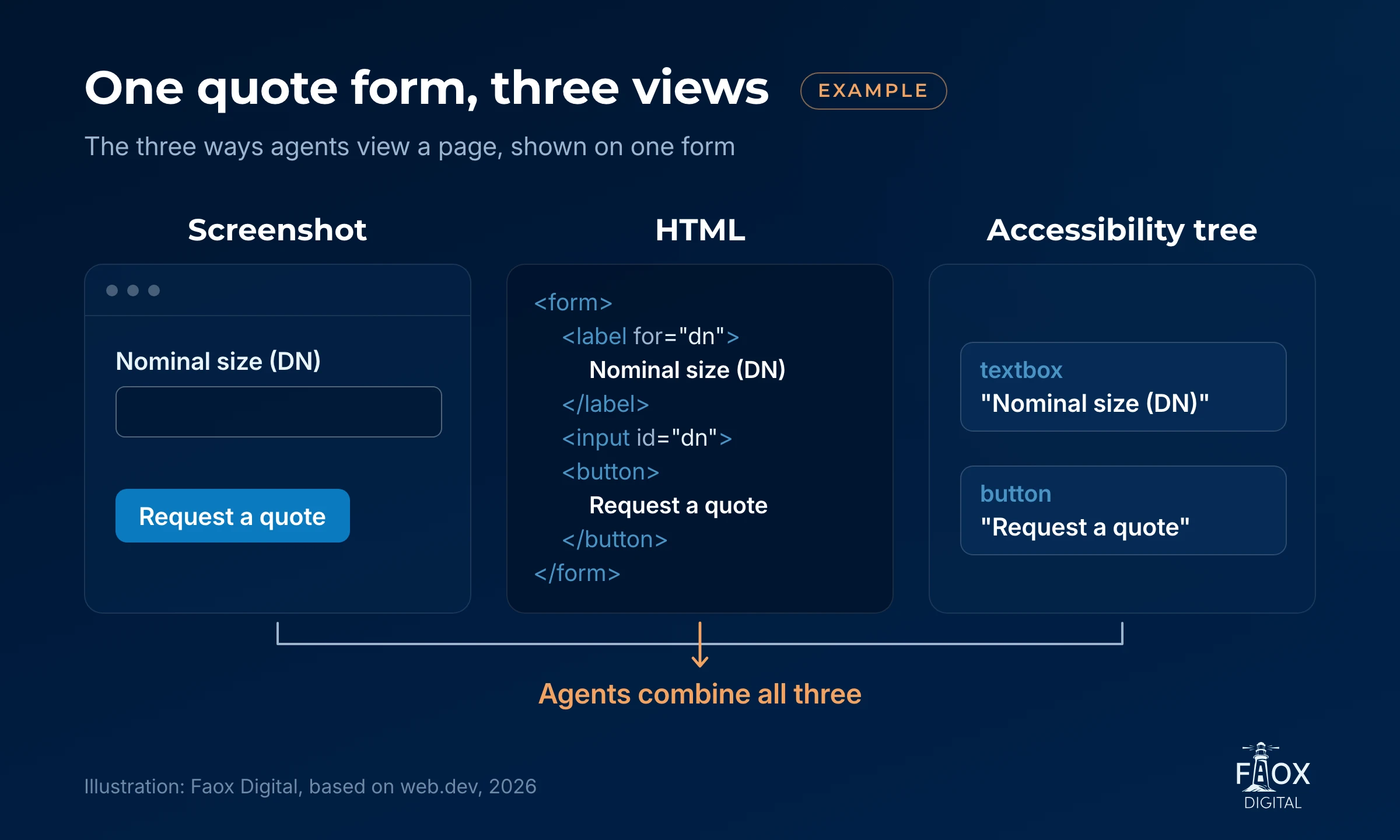
So a styled box can look like a button in a screenshot and mean nothing in the tree. Agents also read your text, and clear, self-contained statements help them as they help other AI tools; our guide to answer engine optimization shows how to write them.
Run the Lighthouse agentic browsing audit
Start with a free test. Lighthouse added an Agentic Browsing category in May 2026, and PageSpeed Insights runs the same audits: a test we ran on 5 November 2026 returned them from Lighthouse 13.6.0. Chrome calls the category experimental. It gives no score from 0 to 100, only a count of the checks passed. The agentic browsing audit has seven checks at the time of writing:
| Audit | What it checks | For most B2B sites |
|---|---|---|
| Accessibility tree | Names and labels, valid roles, nothing interactive hidden from the tree | Fix first |
| Layout stability | Cumulative Layout Shift: elements moving before an agent can use them | Fix |
| llms.txt | Whether the file follows basic recommendations, such as having an H1; a missing file counts as not applicable | Optional |
| ard.json | A manifest of MCP servers, agents and skills on your domain | Skip unless you run them |
| WebMCP form coverage | Forms with a tool name and description; informational for now | Watch |
| Registered WebMCP tools | Tools the page registers | Watch |
| WebMCP schema validity | Whether registered tools are valid | Only if you adopt WebMCP |
Do not read a pass as proof. The audit looks at the structure of one page, and it cannot tell you whether an agent can finish your form. That takes the checks below.
The agent-ready website checklist
An agent-ready website is mostly a well-built one. Work through these on your home page, a product page and your quote form:
- Buttons and links are real
<button>and<a>elements - Every button and link has a name that says what it does
- Every form field has a label tied to it with
for - The quote form can be completed with a keyboard alone
- Errors and confirmations appear as text, not only as color or icons
- Product facts, specifications and contact details are in the initial HTML
- Nothing important appears only on hover or inside an image
- The layout does not shift after the page loads
- No overlay or pop-up covers the main action
- Firewall and CDN rules match what you decided for AI agents
Labeled forms and your quote form
Labeled forms matter most in B2B, because the form is where the enquiry happens. WebAIM found missing form labels on 51% of home pages, and 33.1% of all form inputs had no proper label. web.dev advises tying each label to its field with the for attribute, so that the agent knows what the field is for.
Your quote form deserves a test by hand:
- Say what each field wants: "Nominal size (DN)" rather than "Size", with units and accepted values.
- Prefer standard inputs and dropdowns to custom widgets, which agents and keyboards handle less reliably.
- Mark required fields in text, and show each error beside its field.
- Show a plain confirmation that says what happens next.
- Keep file uploads optional, because a buyer’s agent may not have the drawing to hand.
OpenAI says its cloud browser asks for confirmation before actions that create a real-world commitment, so the person behind an agent may read your wording too. Bots also fill in forms, so keep your spam protection, and check that it does not stop a genuine request. How the page should look and sell to people is a separate question, covered in our guide to the request-a-quote page.
JavaScript dependence
JavaScript dependence hits crawlers and fetchers hardest. In a December 2024 study by Vercel and MERJ, crawlers from OpenAI (including ChatGPT-User), Anthropic, Meta, ByteDance and Perplexity did not render JavaScript. Browser agents do, because they run a real browser, but they still depend on what loads reliably.
Test it yourself: turn JavaScript off in your browser and reload a key product page. The product name, specifications and contact details should still be there. Publish key specifications as page text as well, not only in PDF datasheets.
robots.txt and agent access
robots.txt is a request, not a lock, and it does little for agents. OpenAI says its rules may not apply to ChatGPT-User, because a person starts those actions. Google says its user-triggered fetchers generally ignore them, and Perplexity says much the same of Perplexity-User. Cloudflare’s documentation calls robots.txt directives voluntary.
So keep three decisions apart: search crawlers, which you allow if you want to be found; training crawlers, which are a business decision; and agents, which you control elsewhere. A blanket block does the most damage to the first. OpenAI says sites that opt out of OAI-SearchBot are not shown in ChatGPT search answers, except as navigational links.
Firewall (WAF) settings
Firewall rules are where an agent can be stopped outright. OpenAI says some sites restrict automated browser agents, so a task can fail even though the site works in your own browser. A WAF setting chosen by IT can do this without marketing knowing. At the time of writing:
- Cloudflare replaced its single AI bot switch with separate Search, Agent and Training controls in July 2026. Agent covers chat fetchers and browser agents. It says fewer than 1% of its sites block search crawlers, while 17% block training.
- OpenAI signs cloud browser requests with Web Bot Auth (RFC 9421) and publishes allowlisting steps for Akamai, Cloudflare, HUMAN and Vercel. Those lists may still show the old name, ChatGPT Agent.
- Google warns that user agent strings can be spoofed, and it is experimenting with Web Bot Auth too. Verify signatures rather than trusting a name.
Decide by page type. We would allow agents on public product and contact pages, and keep limits on logins, customer areas and form submissions. Then ask IT to check the logs for blocked agents.
Markdown versions and WebMCP: what can wait
Markdown versions give agents clean text. Cloudflare can convert pages on request when a client asks for text/markdown, on its paid plans. Google says you do not need Markdown to appear in Google Search. If it is one setting at your CDN, it costs little to try. Do not maintain a second set of pages that can drift from the first. The same reasoning applies to the llms.txt file.
WebMCP is a proposed standard that lets a page declare its tools, so that an agent does not have to guess. A form can gain toolname and tooldescription attributes, and JavaScript can register other tools. Chrome offers it through an origin trial from Chrome 149. The specification is a community group draft dated 13 November 2026, and it says it is not a W3C Standard or on the standards track. web.dev warns that it may change, and Chrome’s documentation says it is designed mainly for local browser workflows with a human in the loop.
Most B2B companies can watch this for now. If you have developers and one high-value form, annotating it in a test is a small job, but it will not help any agent that does not support the API.
Track what agents do on your site
Agents can distort your numbers. Leadinfo points out that an agent in a real browser looks like a visitor in analytics, which inflates sessions and can lower your conversion rate. Check your server or CDN logs for named agents such as ChatGPT-User and Google-Agent, and for signed requests, and compare them with real enquiries. Our article on tracking AI referrals sets out a method, and it will always be partial.
Most of this needs time rather than budget: the audit, the form test and a conversation with whoever runs your firewall. If you also want help with wider AI visibility, our guide to choosing a GEO agency covers what to ask.
How Faox Digital checks a site for AI agents
At Faox Digital, the audit at the start of an SEO project checks whether AI tools can read the site, and the foundations step fixes architecture, speed, structured data and crawler access. Much of what an AI agent needs to use a page, such as readable pages and crawler access, is covered there.
Key takeaways
- Agentic browsing means software acting for a person on your site. Use is growing, and forecasts run far ahead of the measurements.
- Agents read screenshots, HTML and the accessibility tree, so semantic HTML and clear names matter most.
- Run the audit in PageSpeed Insights or Lighthouse, then test your quote form by hand, because a pass does not prove an agent can finish it.
- robots.txt does not control agents. Check your firewall, and decide separately for search, training and agents.
- Markdown versions and WebMCP can wait for most B2B companies.
Frequently asked questions
Does the agentic browsing audit affect Google rankings?
We found no statement from Google that it does. Chrome describes the category as experimental, with no score from 0 to 100, and says its focus is on gathering data. The accessibility and stability work it points to is worth doing for people anyway.
How do you use generative engine optimization for AI agents?
Generative engine optimization is mostly about being found and described correctly. Agent readiness is the next step: once an agent reaches your site, can it finish the task? Treat this checklist as what follows crawler access, company facts and useful content.
Should a B2B company block AI agents?
On public pages, usually not, in our view, because there is often a buyer behind the agent. Keep limits on logins, customer areas and form submissions. It is a business decision, and your firewall is where you carry it out.
Do I need WebMCP now?
Not yet, for most companies. It is a draft in an origin trial, and it may change. Fix your labels, names and forms first, since those help every agent and every visitor. Revisit WebMCP when browsers ship it to all users.
Sources
- Chrome for Developers: Lighthouse agentic browsing scoring, updated May 2026
- web.dev: Build agent-friendly websites, updated April 2026
- OpenAI Help Center: Using cloud browser in ChatGPT, accessed November 2026
- WebAIM: The WebAIM Million, 2026 report, February 2026 data
Let’s talk
Where do you want to be found?
Tell us the searches that matter to your business. We will review your site and tell you plainly what to fix first, including what you can do yourself.