
Request a Quote Page: Designing an RFQ Page That Buyers Will Use
Where a request a quote page belongs on a B2B website, what it should ask, and how file uploads, contact options, reply promises and privacy notices make buyers willing to use it.
A request a quote page is where a buyer tells you what they need and asks for a price. Link it from the main navigation and every product page, carry the product into a short form, let buyers attach drawings or their own RFQ, and offer email and phone beside it. Then say who will reply and by when, and state plainly what happens to their data.
Many quote pages are contact forms with a new title: a long list of fields, no way to attach a drawing and no word on what happens next. Yet buyers are willing to ask. In the 2026 State of Marketing to Engineers survey, only 15% of technical buyers said they will never fill out a form, and only 10% said they prefer not to talk to salespeople.
This article covers request for quote page design: where the page sits, what it offers and what it promises. For the wider picture, see our B2B website design guide.
What a request a quote page has to do
A request a quote page, or RFQ page, turns interest into an enquiry your team can price. It is not the same as a formal request for quotation, which CIPS defines as an invitation to suppliers to bid on specific products or services. A procurement team may already have that document, so your page should accept it as readily as a short note from an engineer.
The page has three jobs: make asking easy, collect enough for a useful first answer and reassure the buyer that a person will reply. It also differs from a contact page, which serves everyone from job seekers to suppliers. Keep the two apart, and link one to the other.
Where the page should sit on your site
Give the page one stable address, such as /request-a-quote/, and make it reachable wherever a buyer decides to ask. GlobalSpec’s advice to industrial companies is a contact link on every page (2020).
| Place | Call to action | Why |
|---|---|---|
| Main navigation | Request a quote | Visible from any page, not hidden under Contact |
| Product page | Request a quote for [model] | Carries the product into the form |
| Application page | Ask about this application | Carries the application into the message |
| Contact page | Need a price? Request a quote | Sends buyers to the right form |
The call to action (CTA) should say what happens, in the same words everywhere. "Request a quote" passes that test, and "Submit" does not. Our article on product pages for buyers covers the button on the product page, and these industrial website examples show how a quote route fits into a whole site.
Product-based quotes
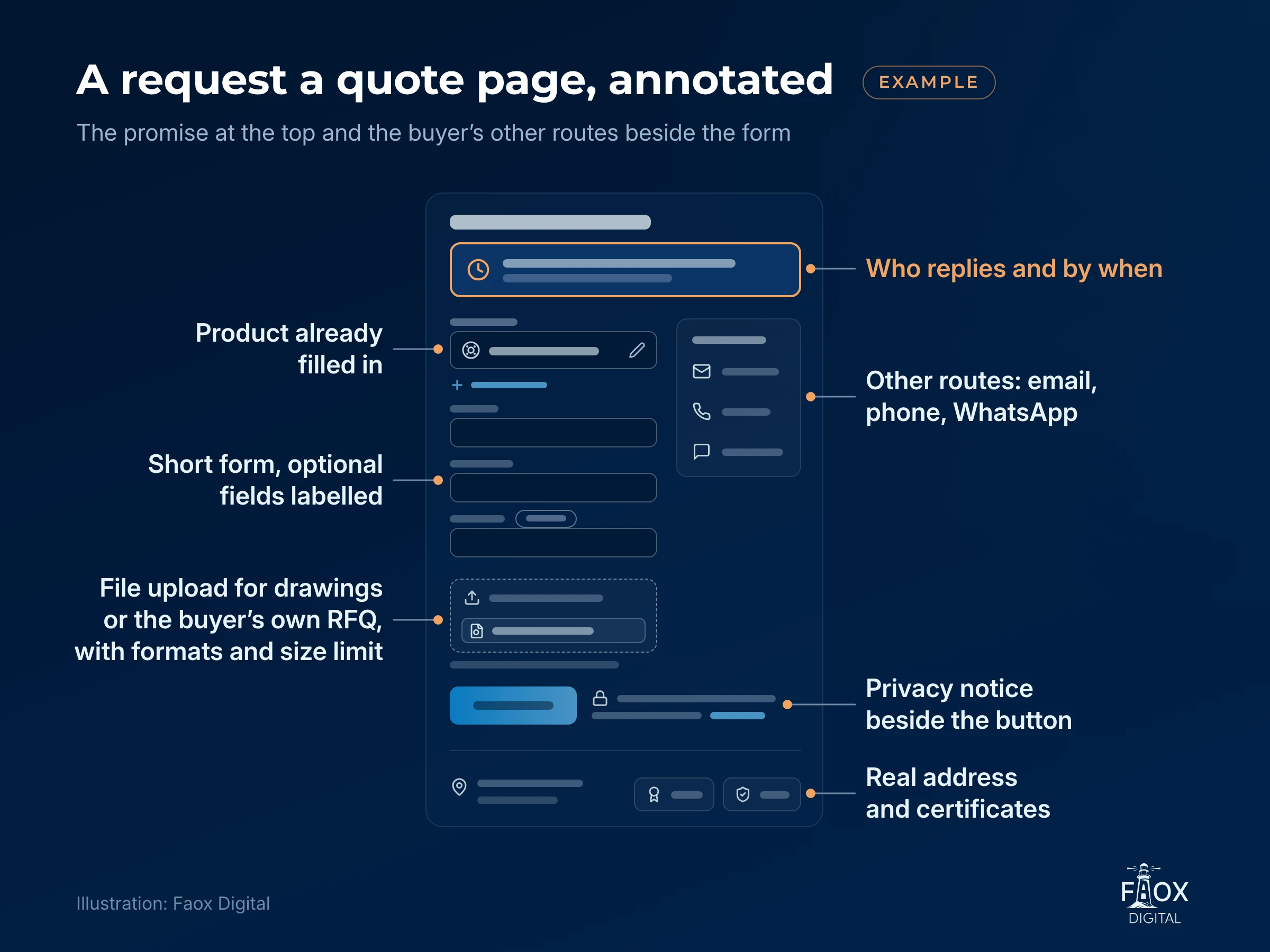
Product-based quotes save the buyer from retyping what they were looking at. When someone arrives from a product page, show the name and model number already filled in, with a way to edit them and add more items. When they arrive from the menu, ask in plain words what they need. Either way, let them say "not sure yet", since many enquiries start with a problem and not a model.
What to ask and what to leave out
Ask only what a useful first answer needs: usually name, company, email, country, the product or need, and the quantity. The W3C’s forms tutorial warns that people are more likely to abandon a form that asks for excessive data. Nielsen Norman Group advises removing any field you can collect later or simply omit, and clearly labelling the few optional ones (2016).
How the form is built matters as much. In a 2014 study cited by Nielsen Norman Group, 78% of submissions on forms that followed usability guidelines were error-free on the first try, against 42% on forms that broke them. So put visible labels above the fields, state any required format and keep what the buyer typed when an error appears. Avoid image puzzles for spam too: the W3C’s note on CAPTCHA calls the traditional kind largely inaccessible and insecure, and it describes alternatives.
File uploads
File upload separates a quote page from a contact form, because many enquiries start with a drawing, a specification or the buyer’s own RFQ.
- State the formats and the limit beside the button. Protolabs’ help page, for example, lists its accepted CAD types and a 150 MB limit.
- Allow several files, and keep them attached if the form shows an error.
- Offer a way round the limit, such as a sharing link in the message box.
- Keep it optional, because not every buyer has a drawing yet.
- Build it safely. OWASP’s guidance calls for a list of allowed extensions, a size limit, storage outside the web root, generated file names and, where available, a malware scan.
- Say how drawings are treated. They are often confidential, so say who sees them, and offer an NDA if you can.
Contact options beside the form
Not everyone wants a form. Asked how they prefer to speak with a vendor salesperson for the first time, technical buyers in the 2026 survey chose email (59%) well ahead of a phone call (22%), online chat (5%) and text messages (3%). So show contact options beside the form, each with its own job:
| Option | Suits | Watch for |
|---|---|---|
| Form | New enquiries with details and files | Length and lost attachments |
| Buyers who want a record or have a formal RFQ | A shared, monitored address | |
| Phone | Urgent or complex cases | Hours and time zone shown |
| Markets where it is part of everyday work | Someone to answer, and a record of the request |
WhatsApp depends heavily on the market. Pew Research Center’s 2023 surveys found it used by 50% of adults in India and 90% in Brazil, against 29% in the US. Those figures cover all adults and not buyers, so check your own enquiries first. WhatsApp’s click to chat links to a chat using wa.me and your number in international format, and it can add a pre-filled message that names the product.
Add it only if someone will answer during stated hours, and treat it as an extra route and not as a replacement for the form. Copy each request into your CRM, so it does not stay on one person’s phone.
Say who will reply, and by when
Response time is a promise the page has to make. GlobalSpec’s 2020 article lists getting no response after contacting a company among the things that erode engineers’ trust. So say near the button who replies and when, as in "An application engineer will reply within one working day." Promise only what your team can keep, including during holidays and trade fairs, and say what the first reply will contain: a price, a question or a date for a full quote.
After sending, show a confirmation page with the same promise, and email the buyer a copy of the request. Who picks up each request and how it reaches sales are covered in our guide to lead generation for manufacturers.
Trust signals next to the form
A buyer is about to hand over contact details and perhaps a confidential drawing, so the page needs trust signals. Keep them factual and close to the button: a real address, a named team, the certificates purchasers ask for and one or two references you have permission to name. Do not let them push the form down on a phone. Our article on building trust on your website covers what buyers check.
Multilingual quote pages
If you sell abroad, a multilingual quote page needs more than translated labels. Google recommends a different URL for each language version, and it advises against redirecting people automatically by language. Translate everything a buyer sees: help text, error messages, the confirmation page and the automatic email.
Adapt the fields too. The W3C asks whether you really need separate given and family name fields, and advises against requiring a family name. Offer a language only if someone can reply in it; otherwise, say which language you will reply in, or route the request to a local distributor.
The privacy notice
A quote form collects personal data, so it needs a privacy notice at that point. Under the EU’s GDPR (Article 13), you must tell people when you obtain their data who you are, why you are processing it, on what legal basis and who receives it, among other things. Turkey’s KVKK (Law No. 6698, Article 10) sets a similar duty to inform.
- Put a short line beside the button, with a link to the full notice.
- Name the kinds of tool that receive the data, such as your CRM or WhatsApp, in the full notice.
- Keep marketing consent apart from the request, in a box that is not ticked in advance. The GDPR says pre-ticked boxes do not count as consent (Recital 32).
This describes how the rules shape your page; it is not legal advice, so have your legal adviser review the final text.
How to build or fix your quote page
- Read your recent enquiries. What did sales have to ask before they could reply? Those are your fields.
- Cut the form to what a first answer needs, and label what is optional.
- Connect the buttons in the main navigation and on product and application pages, each passing its product or page name.
- Add file upload, with formats, a size limit and safe storage.
- Write the promise: who replies, by when and what happens next.
- Add the notice and the other routes: the privacy notice, email, phone and, where it suits the market, WhatsApp.
- Test and measure. Send a real request from a phone, with a large file, in each language. Then compare starts with submissions, using the
form_startandform_submitevents in Google Analytics.
If your site cannot pass a product into a form, or every small change needs a developer, the next question is website redesign or refresh.
How Faox Digital builds quote pages
At Faox Digital, the route to an inquiry is mapped along with the site’s structure, so we know how a visitor reaches the quote page before any design begins. We design that page for the phone screen first, and we test it in every language and on every device before anyone outside sees it.
Key takeaways
- A request a quote page needs one stable address, linked from the main navigation and every product page.
- Ask only what a first answer needs, carry the product into the form and let buyers attach files or their own RFQ.
- Offer email and phone beside the form, and add WhatsApp where your market uses it and someone will answer.
- Say who will reply and by when, and promise only what your team can keep.
- Translate the whole process for each language, and give a privacy notice where the data is collected.
Frequently asked questions
What is an RFQ page?
An RFQ page, or request a quote page, is the page of a website where a buyer describes what they need and asks for a price. Unlike a general contact page, it is built for that one task, with the product filled in, a place for files and a promise about the reply.
What should a request a quote page include?
It needs a short form, optional file upload, other routes such as email and phone, a statement of who replies and by when, a few trust signals and a privacy notice. If the buyer came from a product page, the product should already be filled in.
How many fields should a quote form have?
There is no fixed number. Keep only what your team needs for a useful first answer, which is usually name, company, email, country, the product or need, and the quantity. Ask for everything else in the first conversation.
Should a quote page offer WhatsApp?
Offer it if buyers in your markets use it and someone will answer during stated hours. Technical buyers worldwide still prefer email for a first conversation, so treat WhatsApp as an extra route and copy each request into your CRM.
Sources
Let’s talk
Planning a new website or a fix?
Send us your current site and what you need it to do. We will tell you whether it needs a rebuild or a few focused changes.