
What Is a B2B Portal? Dealer and Customer Portals Explained
What a B2B portal is, how customer, dealer and supplier portals differ, what each one does and when a B2B company is ready for one.
A B2B portal is a secure website where a company’s customers, dealers or suppliers log in to do routine business themselves: check their own prices and stock, place and track orders, download documents or confirm purchase orders. It takes its data from the company’s ERP, and each user sees only what their account allows. A company needs one when partners ask for the same information so often that answering by phone and email costs more than a portal would.
The words "B2B portal" and "B2B site" are used for quite different things: a private ordering system for a manufacturer’s dealers, an online marketplace where many suppliers list their products, or a company’s public website for business buyers. The same words cover very different projects, which makes it hard to brief anyone.
This guide is about the first meaning: a portal your company runs for the customers, dealers or suppliers it already works with. It explains what each type does, how it connects to your systems and when it is worth building. It belongs to our series on applications for when a website isn’t enough, which covers data, security and how to start in more depth.
What is a B2B portal?
A B2B portal is a part of your website, or a separate site, that only approved business users can enter. Three things set it apart from your public pages:
- Known users. Each person belongs to a company account that you have approved.
- Their own data. Each account sees its own prices, orders, invoices and documents, and nothing that belongs to another company.
- Real work. Users order, confirm or upload, instead of only reading.
The term is used loosely, so it helps to separate it from its neighbors:
| Aspect | B2B portal | B2B website | B2B marketplace |
|---|---|---|---|
| Run by | Your company | Your company | A third party |
| Used by | Customers, dealers or suppliers you already work with | Anyone researching your products | Buyers and many competing sellers |
| Login | Required | Not needed | Usually needed to trade |
| Main job | Repeat business: ordering, tracking, documents | Being found and winning enquiries | Matching buyers with sellers |
| Prices | Each account’s own | None, or list prices | Each seller’s listed prices |
An online shop that shows prices only after login is a portal in practice, whatever it is called. The label also varies between markets and companies, so when someone asks for a "B2B site", ask whether they mean a public website or an ordering system. A portal serves partners you already have and will not bring new buyers. If your public site is the weak point, start with why sites get no enquiries.
Customer, dealer and supplier portals
Most B2B portals serve one of three groups, and some serve all three:
| Portal | Who logs in | Typical tasks |
|---|---|---|
| Customer portal | Direct customers: buyers, engineers, maintenance teams | Reorder, check prices and lead times, track orders, download invoices and certificates, request service |
| Dealer portal | Distributors, dealers and resellers | Order for stock or for their own customers, check net prices and availability, get sales material |
| Supplier portal | Your suppliers | Receive purchase orders and forecasts, confirm orders, send invoices, share drawings and certificates |
The examples below are public, as they stood in November 2026, and none is a Faox project.
Customer portal. Mettler-Toledo’s Customer Portal shows each customer a personalized catalog with availability, lead times and prices. Customers track orders, reorder from past orders and accept quotes online, and they can see their installed devices with calibration dates and download certificates.
Dealer portal. A dealer portal adds what a reseller needs: net prices, stock to sell from and material to sell with. Barksdale, a maker of instrumentation and controls, gives its distributors pricing and lead times, order entry and status, invoices, and a way to upload their own available inventory.
Supplier portal. A supplier portal works in the other direction, because there you are the buyer. Barksdale’s suppliers check forecasts, view drawings, read order acknowledgements and track how their consignment stock is used. Large buyers often run theirs on a shared platform: Bosch uses SupplyOn for purchasing indirect materials and services, with the goal of handling order receipt, order response and invoicing with its suppliers electronically. So a manufacturer may run a portal for its dealers while working inside its customers’ supplier portals.
What a B2B portal does
A portal for customers or dealers combines some or all of these features:
- B2B ordering system. Business orders are often repeats and long lists, so a portal offers quick order by part number, reorder from history, list upload and orders against a contract or quote, with approval steps if the buyer’s company needs them.
- Customer-specific pricing. Each account sees the price it will be invoiced: its contract prices, volume discounts or the price list for its country or dealer level.
- Stock visibility. Available quantity or a delivery date for each item, sometimes by warehouse. Decide how exact to be, because a reliable date can help a buyer more than a number that changes by the hour.
- Order tracking. Status from confirmation to dispatch and delivery, including partial deliveries, delivery notes and carrier tracking.
- Document center. Invoices, delivery notes, certificates, declarations of conformity, safety data sheets, manuals, drawings and CAD files, filed by account, order or product.
- Self-service. Users manage their own colleagues and addresses and send requests, such as returns, service visits or quotes, without waiting for office hours.
How B2B orders arrive: EDI, portals and email
Ordering online between businesses is not new. Large customers often order by EDI (electronic data interchange), which Eurostat describes as the structured transmission of data between organizations, in messages suited to automatic processing. A portal does a similar job for the accounts that will never set up EDI.
Eurostat’s 2025 survey of EU enterprises with 10 or more persons employed shows the balance. In 2024, e-commerce brought in 19.5% of their turnover. More than half of it, 11.1% of turnover, came from EDI-type sales, while 8.4% came through websites, apps and marketplaces, the route a portal belongs to. Only 13.8% of the enterprises sold to other businesses or the public sector through the web. Eurostat does not count orders typed into an email as e-commerce, so those do not appear in the figures at all.
A portal does not have to replace EDI: it can serve the accounts that EDI does not reach.
ERP integration: where the data comes from
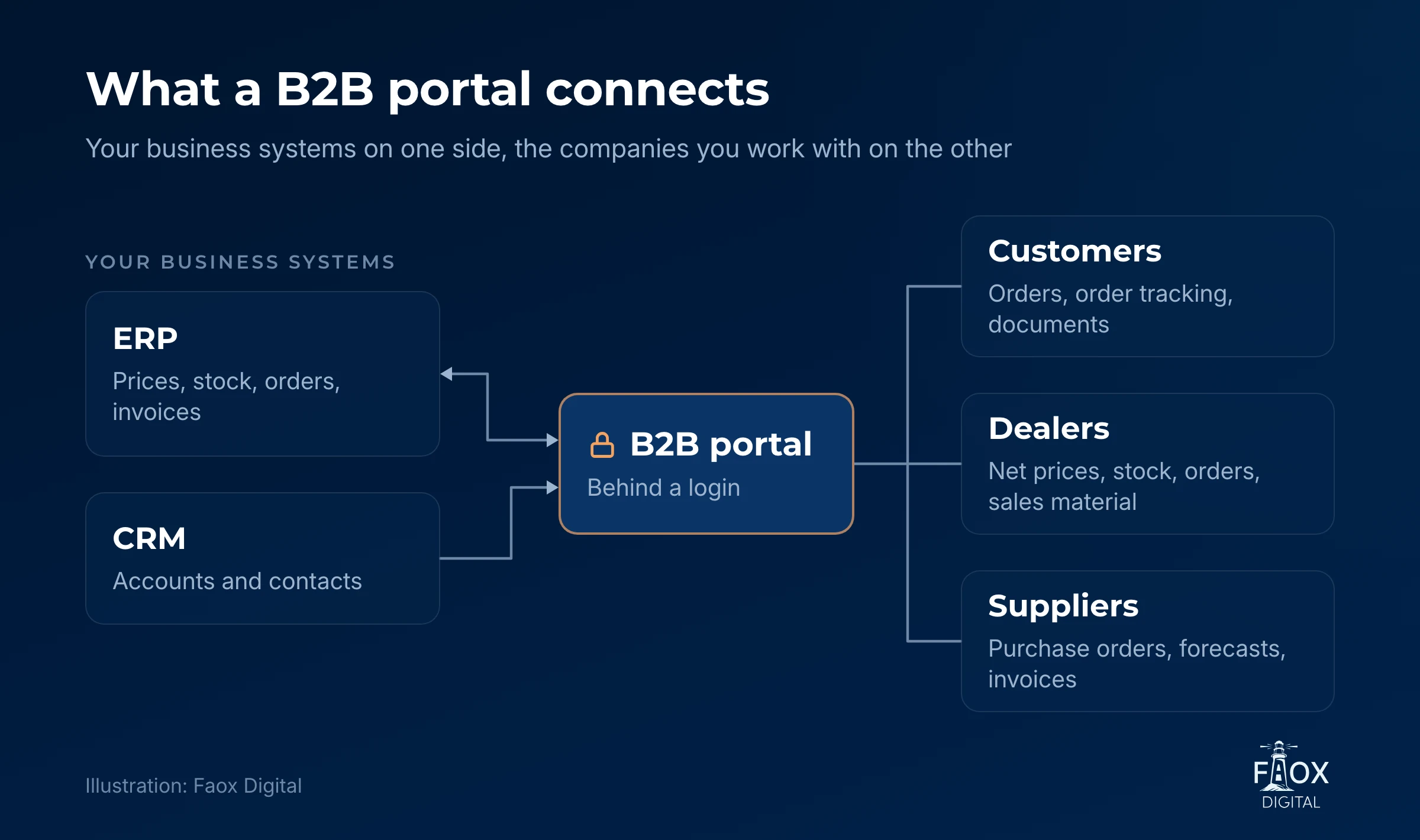
A portal is a window onto your business systems. Prices, stock, orders and invoices live in your ERP, while accounts and contacts often live in your CRM. ERP integration means the portal reads from the ERP and sends orders back, so that nobody types them in again. If the line between the two systems is unclear in your company, our article on CRM vs ERP explains it.
Most companies that need a portal already have the data source. In Eurostat’s 2025 survey, 70% of medium-sized EU enterprises (50 to 249 persons employed) and 89% of large ones used ERP software. The harder question is whether that data is ready to be shown to customers. A price on screen must match the invoice, so it has to come from the ERP and not from a copy someone keeps by hand. Our guide to web applications covers who owns each type of data and how fresh it must be.
Permissions: who sees what
Permissions decide what each user can see and do, and in a portal they work at two levels, the company account and the person:
- Roles inside an account. A buyer orders, a manager approves orders above a limit, finance sees invoices, and a technician sees manuals and certificates but no prices.
- Levels between accounts. Dealers on different levels or in different countries see different prices, products and material.
- Joining and leaving. Someone approves new accounts and removes people who leave a customer or dealer, on the day they leave.
The first rule is that one company never sees another’s data. Test it before launch with two test accounts from different companies, and read the security section of our web application guide.
When a company needs a B2B portal
A portal earns its keep when the same requests arrive every day. These signs point to one:
- Customers or dealers ask for prices, stock or order status by phone or email every day
- Staff retype orders from emails and PDFs into the ERP
- Dealers need prices, stock and sales material outside your office hours
- Requests for invoices, certificates and manuals keep landing in the same inboxes
- Your ERP holds clean prices, stock and order data, or can be made to
It can wait when a few large accounts already order by EDI, when volumes are low enough for a good form and a shared inbox, or when your ERP or e-commerce platform includes a portal you have not switched on.
If your dealers work in several countries, plan for their languages, currencies, units and delivery terms from the start. That is a question of localization vs translation, not only of translated labels.
Starting a portal project
Start with one user group and one task, as our web application guide describes, and add the rest when users ask for it. AI tools can speed up design and code, but your price rules, permissions and ERP connections have to come from your business, and someone has to check what the tools produce. Our article on website redesign with AI covers what these tools can and can’t do.
If your products come with many options, the next question is often a B2B product configurator, which helps buyers specify them correctly before they order.
How Faox Digital plans a B2B portal
Faox Digital starts a portal project by learning what the company sells, who buys it and which markets matter, then maps what each screen has to do for customers, dealers or suppliers. We scope web applications to what people will use, and we test the portal in every language and on every device before any customer or dealer logs in.
Key takeaways
- A B2B portal is a secure site where known business users work on their own data: prices, orders and documents.
- It is not the same as a public B2B website or a marketplace, though the words are often mixed up.
- Customer and dealer portals serve the companies that buy from you; supplier portals serve the companies you buy from.
- A portal shows what your ERP holds, so integration and data quality decide whether people trust it.
- Build one when the same requests arrive every day, and start with one group and one task.
Frequently asked questions
What is a dealer portal?
A dealer portal is a secure site where your distributors, dealers or resellers check their net prices and stock, place and track orders and get sales material such as product data, images and training. It saves both sides routine calls and emails, and dealers can use it outside your office hours.
What is a supplier portal?
A supplier portal is run by a buying company for the companies that supply it. Suppliers receive purchase orders and forecasts there, confirm them, send invoices and share drawings or certificates. If you supply large manufacturers, you may be asked to use theirs, as Bosch’s suppliers are with SupplyOn.
Is a B2B portal the same as B2B e-commerce?
They overlap. B2B e-commerce means selling to businesses online, through an open shop, a marketplace or a portal. A portal is the version behind a login, where each account sees its own prices, terms and documents, and it often covers more than ordering.
Does a B2B portal replace sales reps?
No. It takes routine work such as reorders, order status and documents off your sales and service teams, so they have more time for new customers and complex requests, where many buyers still want a person.
Sources
- Eurostat: Value of e-commerce sales by size class of enterprise, 2025 survey, updated February 2026
- Mettler-Toledo: Customer Portal, accessed November 2026
- Barksdale: Partner Portal, accessed November 2026
- SupplyOn: Supplier Info Portal of Bosch P2P, accessed November 2026
Let’s talk
Planning a new website or a fix?
Send us your current site and what you need it to do. We will tell you whether it needs a rebuild or a few focused changes.