
Product Configurator for B2B: How It Helps Buyers Specify Complex Products
How a product configurator and a quote calculator turn many options into a valid specification and a complete quote request, and how to plan one.

A product configurator guides a buyer through a product’s options and allows only the combinations that work, so the result is a valid specification with an order code, a drawing or a price instead of a guess. A quote calculator does the same for the price, turning inputs such as size, material and quantity into an estimate. Both should end in a complete quote request that your sales team can answer without rounds of questions.
Some products cannot be bought from a list. A pump, an enclosure, a conveyor or a cylinder with its accessories comes in more combinations than any price list can show, and only some of them work. Buyers guess, sales asks follow-up questions, engineering corrects the specification, and a quote that should take a day takes a week.
A product configurator shortens that loop by putting your rules where the buyer can use them. This article explains how one works, what it should produce and how to plan it. For the wider picture of building software for buyers, see our web application development guide.
What is a product configurator?
A product configurator builds one product from options and checks every choice against your rules. It is often confused with three neighbors:
| Tool | Who uses it | What goes in | What comes out |
|---|---|---|---|
| Catalog filter | Anyone browsing | Required values, such as size or rating | A list of products that already exist |
| Product configurator | Buyers, engineers, dealers | Choices about one product | A valid specification: order code, drawing, CAD, parts list |
| Quote calculator | Buyers, sales staff | Size, material, quantity and similar inputs | An estimate or a price, often with a lead time |
| CPQ | Your sales team | A configuration plus the customer, discounts and terms | A formal quote, often with approvals |
A filter in a searchable product catalog finds products you already make. A configurator defines one that may not exist until you build it. CPQ (configure, price, quote) is the sales team’s version: software that configures, prices and produces a formal quote with discounts and approval steps, often working alongside the CRM. Ideally the buyer’s configurator and the sales team’s CPQ use the same rules, so that what a buyer configures online is what sales would quote.
What a configurator changes for buyers and sales
For buyers, a configurator means answers outside office hours and a specification they can trust. For sales and engineering, it means requests that arrive complete, with fewer impossible combinations to correct.
The clearest evidence concerns speed. In a 2011 study of 14 engineering-oriented companies, Haug, Hvam and Mortensen found that configurators were estimated to cut the time needed to produce a quote by 85.5% on average, and by up to 99.9%. These were the companies’ own estimates, from firms that had already chosen to build configurators, so read them as what is possible and not as a forecast.
There is a warning in the same research. In a 2010 paper, Anders Haug notes that defining what should go into a configurator is much more complex than anticipated in many projects, and that in the worst case the configurator is never fully developed or fails to support its users in a satisfactory manner.
Product configurator examples
Three public examples show the range. We describe them as they stood in November 2026; none is a Faox project, and they illustrate a method, not software to buy.
- Festo Design Tool 3D starts with a pneumatic cylinder, adds validated accessories such as mountings, throttles and sensors, and generates a native 3D CAD assembly. The finished solution gets one order code and can be ordered as separate components or pre-assembled, although Festo notes that ordering complete modules with one order code is not available in all countries.
- Blum’s Product Configurator helps furniture makers find the right fittings for a design and returns parts lists, CAD data and planning information. A parts list can be exported as PDF or Excel, or sent to the online cart of a participating distributor, where the buyer checks pricing and availability and completes the order.
- Protolabs’ online quoting for sheet metal works as a quote calculator for custom parts. The buyer uploads a 3D CAD file and gets design feedback, with price and lead time that update instantly as material and finish change. Most parts are analyzed within minutes, and quotes expire after 30 days but can be re-priced.
How a product configurator works
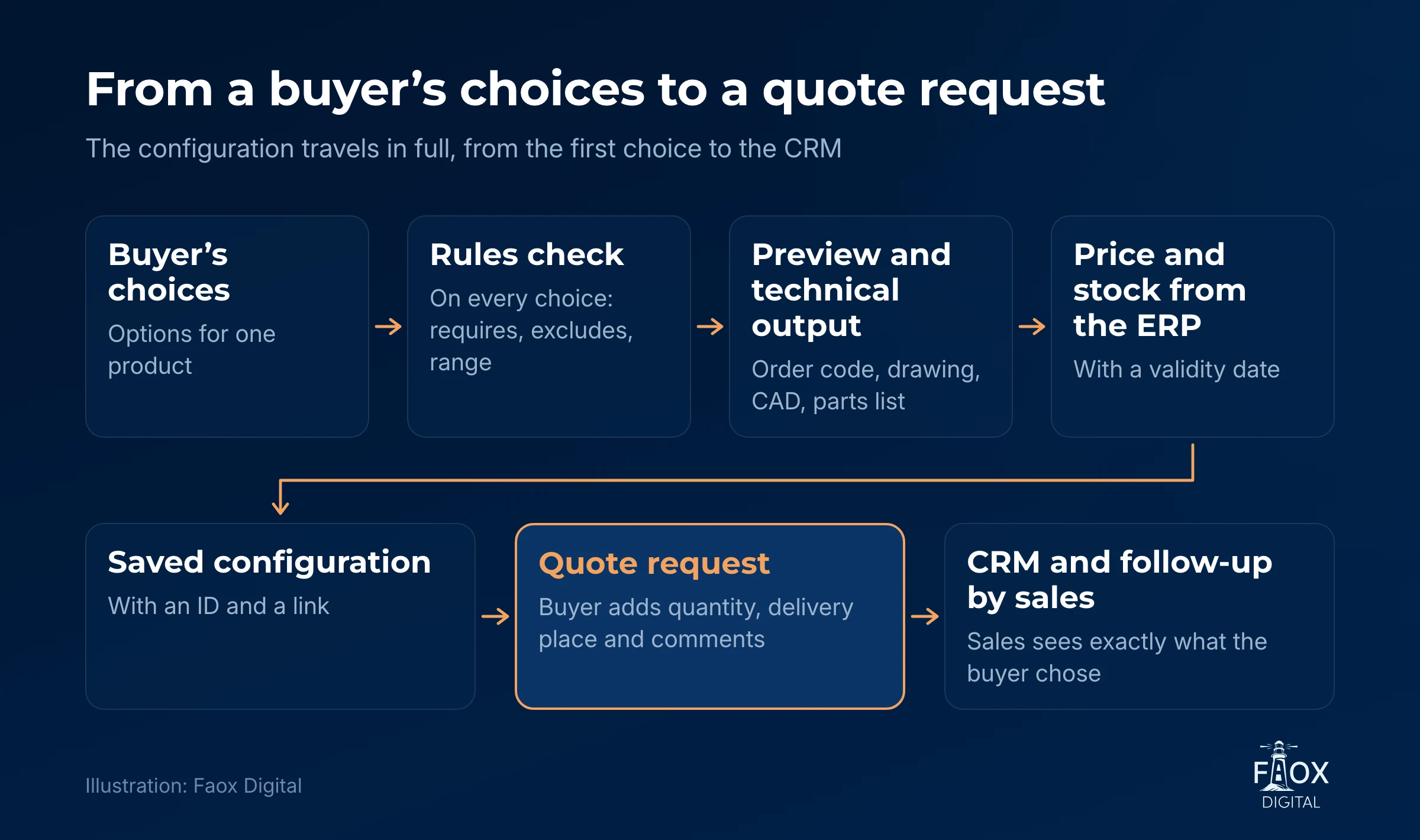
Every configurator, simple or advanced, rests on the same six parts.
Variant and option rules
Variant and option rules decide which choices are allowed and how they depend on each other. Most rules fall into a few types:
| Rule type | What it does | Example |
|---|---|---|
| Requires | One choice needs another | A stainless housing needs stainless fittings |
| Excludes | Two choices cannot go together | A ventilated door cannot be combined with a sealed, waterproof rating |
| Range | A value must stay within limits | A length between the shortest and longest the machine can make |
| Derived | One input sets another | The motor size follows from the load and speed entered |
| Default | A sensible starting point | The usual voltage in the buyer’s country |
The rules come from your engineers, and writing them down is where many projects stall. Keep them as data that engineers can read and approve, not hidden in code that only a developer understands.
Compatibility check
A compatibility check runs while the buyer chooses, not at the end. Grey out what no longer fits, say why in plain words and offer the nearest valid option. The same check should cover accessories and spare parts, as Festo’s tool does with its validated accessories.
Visual preview
A visual preview shows the product changing as the options change: a dimensioned drawing, a 3D model or a photo of each variant. It helps most where size, layout or appearance matter, and it catches mistakes that a string of codes hides. It also costs the most to build and to keep up to date, so for many components a dimensioned drawing is enough.
Technical output
Technical output is what the buyer takes away: an order code, a data sheet, a drawing, CAD files in common formats, a parts list or a specification summary. It has to match exactly what production will build, so generate it from the same rules and product data, never by hand. Engineers often need the CAD file before they can decide, and our article on product pages for buyers explains why such files work better without a form in front of them.
Price and stock data from the ERP
A price turns a design aid into a sales tool. Price and stock data from the ERP keeps it honest: list or customer prices, surcharges for options, availability of standard parts and a lead time. Decide what to show to whom. An anonymous visitor might see a list price or a range, while a logged-in customer sees their own price. For products engineered to order, a reliable lead time and a complete specification can matter more than an instant price. Whatever you show, give it a validity date, as Protolabs does.
Handoff to the quote request
The last step is the handoff to the quote request. Save the configuration with an ID and a link, then carry it into the quote form with the order code, options and drawing attached, so the buyer only adds quantity, delivery place and comments. Our article on RFQ page design covers the form itself.
On your side, the request should reach your CRM with the full configuration, so sales sees exactly what the buyer chose. If you have yet to settle on a system, see our article on choosing a CRM. Who replies, and how fast, is covered in our article on what should happen after a form submission.
Quote calculator: when a price can follow rules
A quote calculator fits when the price follows rules you can write down: dimensions, material, finish, quantity and delivery terms. It gives buyers a figure early, which helps them get budget approval, and it spares sales the requests that only needed a rough number.
When the price depends on engineering judgment, current material costs or factory capacity, show a range or "price on request" and collect a complete specification instead. Either way, state what the price includes and how long it is valid, and send anything outside the rules to a person.
How to plan a product configurator
- Pick one product family. Choose the one where quotes take longest or errors cost most, and measure both today.
- Write down the rules with engineering. List each option, its allowed values and what it requires or excludes, and agree who signs them off.
- Decide the output. Order code, drawing, CAD, parts list, price or estimate: whatever sales and production need to act without asking again.
- Connect the data. Take product data from your catalog or product information system, and prices and stock from the ERP.
- Design the questions. Ask in the order buyers think, use their units and language, and explain each option in a line.
- Test with buyers and sales. Try to build impossible products; every attempt should stop with a clear message.
- Connect the handoff. Link saved configurations, the quote form, the CRM and a named person who replies.
- Name an owner for the rules. Products change, and the configurator has to change with them.
Four mistakes undo many projects:
- Designing screens before the rules are agreed
- Showing a price the ERP would not invoice
- Letting the configurator and the price list drift apart
- Ending at a PDF with no route to a person
Whether to buy configurator software or build your own is the next question. Our article on off-the-shelf or custom software helps you weigh it.
How Faox Digital approaches product configurators
Faox Digital begins by learning what a company sells, who buys it and which markets matter, then maps what each step of a configurator has to do on the way to an enquiry. We build only the parts that buyers and sales will use, and we test the configurator in every language and on every device before anyone outside sees it.
Key takeaways
- A product configurator lets buyers choose options and allows only the combinations that work.
- The rules come from engineering, and defining them is often the hardest part of the project.
- Plan the output first: order code, drawing, CAD, parts list or price.
- Take prices and stock from the ERP, and give every price a validity date.
- End every configuration in a quote request that carries the full specification to sales.
Frequently asked questions
What is a product configurator?
It is a tool that walks a buyer through a product’s options, checks each choice against your rules and produces a valid specification, such as an order code, drawing, CAD file or price. It suits products that come in many variants or are built to order.
What is the difference between a product configurator and CPQ?
A configurator is usually for buyers and engineers and ends in a specification or a quote request. CPQ is for your sales team: it adds customer prices, discounts, terms and approvals and produces the formal quote. Both should use the same product rules.
Can you add a product configurator to an online shop?
Yes. Common shop platforms offer plugins or apps for products with options, which suit simple choices. Products with many dependent rules, drawings or CAD output usually need a dedicated configurator that passes the result to the shop’s cart, as Blum’s does with its distributors.
Does our ERP already include a product configurator?
It might. Some ERP and product lifecycle systems include configuration modules for sales or engineering. Check them first, because they can hold the rules, and a configurator for buyers on your website can then use the same rules through an integration instead of copying them.
Sources
- Haug, Hvam and Mortensen: The impact of product configurators on lead times in engineering-oriented companies, 2011
- Festo: Festo Design Tool 3D, accessed November 2026
- Blum: Product Configurator, accessed November 2026
- Protolabs: Sheet metal quoting and DFM, accessed November 2026
Let’s talk
Planning a new website or a fix?
Send us your current site and what you need it to do. We will tell you whether it needs a rebuild or a few focused changes.