
Lead Capture Forms for B2B: What to Collect and What Should Happen Next
What a B2B lead capture form should collect, and the steps after each submission: automatic reply, CRM record, owner, routing, response time, qualification, hand-over to sales and lost reasons.
A lead capture form should ask only what a useful first answer needs, plus two or three qualifying questions and hidden source data. Each submission should then trigger the same steps: an automatic reply email at once, a CRM record, assignment to an owner by country, language and product, and a personal reply, within an hour in working hours where you can. Qualify the request against a definition agreed with sales, hand qualified leads to sales as tasks with context, and record a reason for every request you lose.
A quote request is one of the most valuable things a B2B website produces: a buyer has done their research, chosen to contact you and said what they need. Yet many requests land in a shared inbox, wait for someone to notice them and get an answer from whoever has time.
The request is often the buyer’s own first move. In 6sense’s 2026 B2B Buyer Experience Report, the buyer’s team initiated 82% of first contacts with vendors; 6sense sells account-based marketing software, and its survey covers software, services and physical goods. This guide covers what a lead capture form should collect and what should happen after someone sends it, from the automatic reply to the hand-over to sales. It belongs to our series on capturing and following up leads.
What a lead capture form should collect
A lead capture form turns a visitor’s interest into a record your team can act on. From the point of view of follow-up, every field should help the first answer, help route the request or feed the CRM. Ask for little, and collect the rest automatically:
| Form data | Why you need it | Where it goes in the CRM |
|---|---|---|
| Name, company, business email | To reply and to find the company | Contact and company record |
| Country | To route the request and choose the language | Contact field, fixed list |
| Product or application | To route by product line and prepare the answer | Contact field, fixed list |
| Quantity and timing (optional) | To judge size and urgency | Qualification fields |
| Message and attachments | The buyer’s description, drawings or RFQ | Activity on the record |
| Newsletter opt-in, separate from the request | To send anything beyond the answer | Consent field with date and source |
| Hidden: page, form name, site language, campaign | To see where requests come from | Source fields, set once |
Form data is only as useful as the fields it lands in. Map each form field to a CRM field with the same fixed values, so that "Deutschland" and "Germany" end up as one country. How to design the form itself, from file uploads to the privacy notice, is covered in our article on the request a quote page.
Lead capture form examples for B2B
Different requests need different forms. Four common lead capture form examples:
- Quote request: name, company, business email, country, product, quantity and date needed, message, file upload.
- Sample request: the same, plus the application and a delivery address.
- Question to an engineer: name, email, country, the question and an optional drawing.
- Data sheet download: name, company, email and country, with the product taken from the page.
Qualifying questions: ask a few, ask the rest later
Qualifying questions help you route and prioritize a request before anyone replies. Two or three are enough, and they should be optional or quick to answer:
- What is the application or the problem to solve?
- What quantity, and by when?
- What is your role in the project: specifying, buying or researching?
Budget and decision authority are better asked in the conversation than on a form. Remember too that the person on the form is not always the decision maker. In 6sense’s 2026 report, only 35.2% of buyers used their own contact information when completing a form: 31.6% had a colleague fill it in and 19.3% used a personal or secondary email address. A personal address alone is no reason to ignore a request.
What happens next: from form to first reply
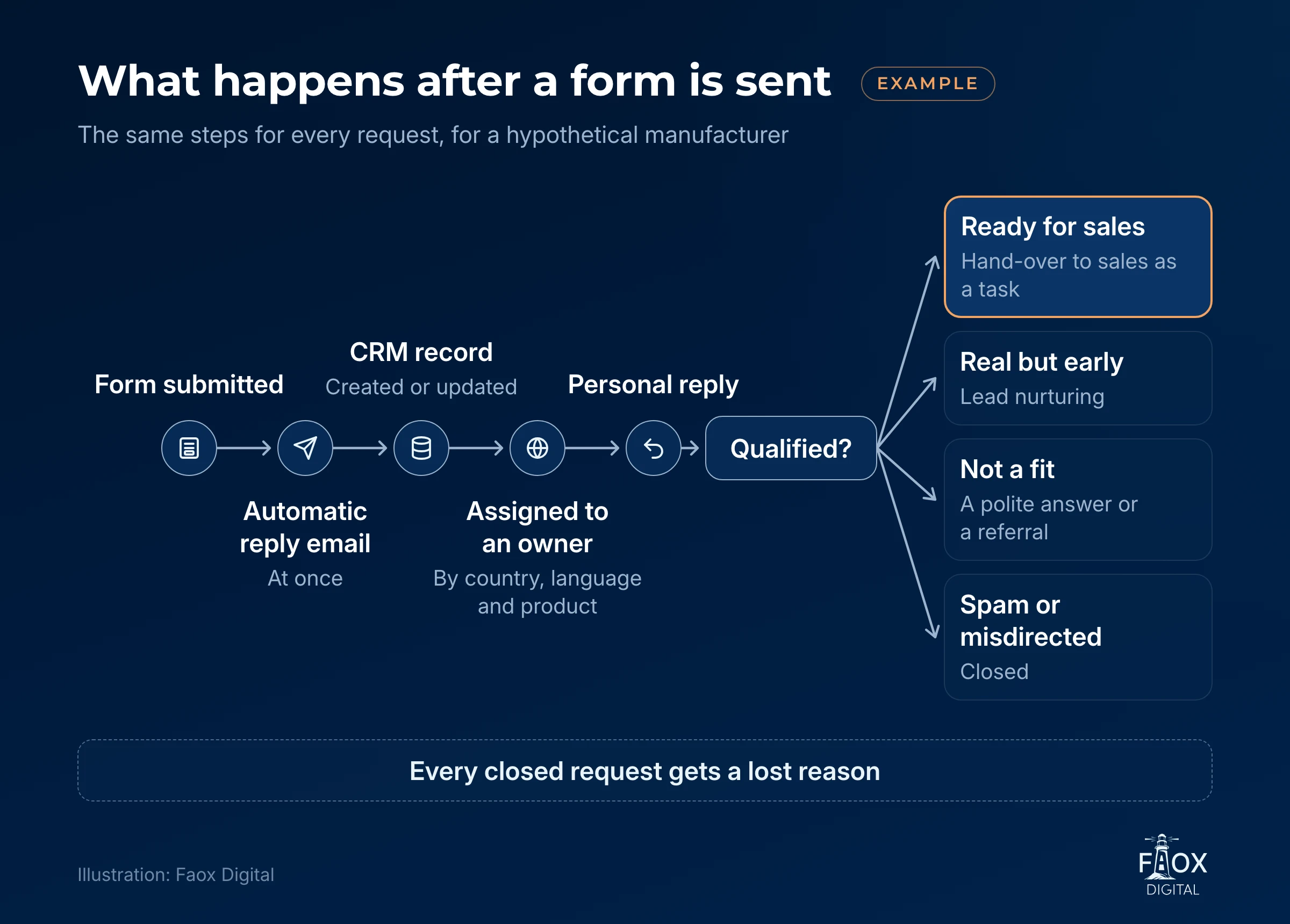
Write down what happens after every submission, and automate what does not need a person:
- Send the automatic reply email at once. Confirm receipt, repeat the request, say who will answer and by when, and give a direct contact.
- Create or update the CRM record. Match the email and company against existing records, so a returning customer is not added twice, and log the request with its source.
- Assign the request to an owner. Rules on country, language, product and existing account decide who; the owner gets a task with a due time, not just an email.
- Reply personally. Answer the question, or ask what is missing for a quote, in the buyer’s language where you can.
- Qualify the request against the definition agreed with sales.
- Hand over or follow up. Qualified requests go to sales with context; the others get an answer, a referral or nurturing.
- Close with a reason. Every request that does not become a quote or an order gets a lost reason.
The form can reach the CRM through the form tool’s own integration or through a connector. When a request must also reach an ERP or a dealer portal, the integration section of our web application development guide covers the technical side.
The automatic reply email
The automatic reply email is the buyer’s proof that the request arrived, so write it like a message from a person:
- Subject line: Your quote request for [product]: we will reply by [time]
- Body: thanks, a copy of what they sent, the name of the person who will reply and when, a direct phone number or email, and anything you may need from them, such as drawings or quantities.
- Sender: the team or the owner, with a reply address someone reads.
An automatic reply buys a little time; it does not replace the answer.
Recording and assigning: one owner for every request
Every request needs a CRM record and an owner within minutes of arriving; a shared inbox where requests wait until someone has time is where they get lost. Write the rules for assignment to an owner down:
- Existing customers go to their account owner.
- New companies go to the person responsible for that country or product line.
- Absences are covered: a named back-up for holidays, trade fair weeks and requests outside working hours.
Harvard Business Review’s 2011 study named, among the reasons companies answer slowly, retrieving leads from the CRM daily rather than continuously, and rules for sharing leads among salespeople and partners by geography and "fairness". Assign automatically, as requests arrive, and keep the rules short enough for everyone to know. Our guide to everyday CRM habits covers record ownership in daily use.
Routing by country and language
For exporters, routing by country and language decides whether a request reaches someone who can answer it. Set the rules in advance, for example:
| Request | Routed to | Note |
|---|---|---|
| Existing customer | Account owner | Copy to the regional manager when the owner is away |
| New company, home market | Sales team for the region | Reply in the local language |
| Country served by a distributor | Distributor, with a copy to the export manager | Agree response times in the distributor contract |
| Language nobody speaks in-house | Export manager | Reply in English, and say so politely |
| Spare parts or service | Service team | Check the installed equipment first |
Take the country from the form, not from the visitor’s location, and the language from the version of the site the buyer used. Record the route on each request, so you can see later which countries bring requests and how fast each route answers.
Lead response time: how fast is fast enough
Response time runs from the submission to the first personal reply, not to the automatic email. Harvard Business Review’s study of 1.25 million leads at 29 B2C and 13 B2B US companies (March 2011) found that firms which tried to contact a lead within an hour were more than 60 times as likely to qualify it, meaning a meaningful conversation with a key decision maker, as firms that waited 24 hours or longer. The data is old and from the United States, but the direction is clear.
Practical targets for a B2B manufacturer:
- Quote requests and direct questions: a personal reply within an hour in working hours, the same working day at the latest.
- Requests outside working hours: first thing the next working morning, with the automatic reply saying so.
- Downloads and sign-ups: an automatic email at once, and a personal contact only when there is a sign of real interest.
Contacts from a trade fair arrive in batches and follow their own rhythm; our article on after-show follow-up emails covers them. Track lead response time every week, by owner and by country, and look at the slowest requests rather than the average.
Agree a qualified lead definition with sales
Without a written qualified lead definition, marketing passes on everything and sales ignores half of it. Agree one sentence, for example: a request is qualified when it comes from a company in a market and industry we serve, names a product or application we supply, has a project or a quantity, and comes from someone who specifies or buys, or can introduce us to who does.
Each request then takes one of four paths:
- Ready for sales: hand it over.
- Real but early: answer it, then keep in touch through lead nurturing.
- Not a fit: a polite answer, and a referral to a distributor or partner where you can.
- Spam or misdirected: close it, and pass job applications or supplier offers to the right team.
The lead handoff to sales
The hand-over to sales is where a well-handled request can still be lost. Make the lead handoff to sales explicit:
- The salesperson receives a task with a due date, not a forwarded email
- The task carries the form data, the source page, the answers to the qualifying questions and the reply already sent
- Sales accepts or returns each lead within an agreed time, with a reason if returned
- Returned leads go back to marketing for nurturing, not into a drawer
- Both teams review accepted and returned leads together every month
Some companies write these rules into a short agreement between marketing and sales. What matters is that both teams have agreed them and look at the same numbers.
Record why requests are lost
A required lost reason on every closed request turns lost business into information. Use a fixed list, for example: no response from the buyer, not a fit for our products, price, lead time, technical requirements not met, chose a competitor, project postponed or cancelled, duplicate or spam. Free text alone cannot be counted.
Review the reasons every month. Many "price" losses on one product line point to positioning; many "no response" losses point to slow replies or the wrong contact; "postponed" requests belong in nurturing, with a date to come back.
Common mistakes
- Requests sent to a shared inbox that nobody owns
- An automatic reply that promises a time nobody keeps
- Long forms that ask for budget and authority before you have said anything useful
- Routing rules that send requests to people on leave
- No lost reasons, so the same losses repeat
- Counting form submissions instead of the replies and quotes that follow
If your forms bring in too few requests to follow up, the next question is whether lead generation companies can fill the gap or whether to build your own pipeline.
How Faox Digital handles lead capture and follow-up
Faox Digital, a digital growth partner for B2B companies in complex and international markets, builds the CRM, the follow-up emails and the automations behind a form in the client’s own tools, and the client signs them off. Each request then gets a steady follow-up, automatic once each person is ready, and we read the results in replies, qualified conversations and pipeline.
Key takeaways
- A lead capture form should ask only what the first answer needs, plus a few optional qualifying questions and hidden source data.
- Every submission should trigger an automatic reply, a CRM record and assignment to an owner within minutes.
- Route requests by country, language, product and existing account, with cover for absences.
- Reply personally within an hour in working hours where you can, and track response time every week.
- Agree a qualified lead definition, hand over leads as tasks with context and record a lost reason for every closed request.
Frequently asked questions
What is a lead capture form?
A form on a website that collects a visitor’s contact details and request, such as a quote, a sample or a download, so that the company can follow up. In B2B it should also feed the CRM, so that every request has a record, an owner and a next step.
What should a B2B lead capture form include?
Name, company, business email, country, the product or application, and a message or file upload, plus two or three optional qualifying questions such as quantity and timing. Add hidden fields for the page and campaign, and a newsletter opt-in kept separate from the request.
How fast should you respond to a lead from a form?
Send an automatic reply at once and a personal reply within an hour in working hours where you can, the same working day at the latest. Harvard Business Review’s 2011 study found that contacting a lead within an hour made qualifying it far more likely than waiting a day.
Can you create a lead capture form in HubSpot for free?
Yes. At the time of writing (November 2026), HubSpot offers a free form builder, and people who complete its forms are added to its CRM automatically. Whatever tool you use, test that each submission creates a record with an owner and a source.
Sources
Let’s talk
Have contacts you never follow up with?
Tell us about the list you already have. We will show you how email and CRM can turn it into conversations.