
Executive LinkedIn Profile: A Checklist for B2B Leaders
How a B2B CEO or senior leader sets up a LinkedIn profile that buyers trust, section by section, and keeps it consistent with the company page.
An executive LinkedIn profile that buyers trust has a recent photo, a cover image that shows the business, a headline that says what you help with and for whom, an About section in your own voice, experience linked to the company page and a Featured section with your best work. Choose Follow or Connect as your main button, decide whom you connect with, and keep the profile consistent with the company page.
Before a first meeting, a buyer may well look up the people they will meet. An executive LinkedIn profile is often the first thing they find, and it answers three questions quickly: who is this, what do they know, and can I trust their company?
This checklist covers each section of the profile, in the order a visitor sees it. What to post once the profile is ready is covered in our guide to thought leadership on LinkedIn.
What buyers look for in an executive LinkedIn profile
Buyers rarely read a profile from top to bottom. They glance at the photo and headline, skim the About section, check the current position and look at a few recent posts. A strong executive LinkedIn profile makes those few seconds count: it is current, specific about the business and written in a voice that matches the person they will meet.
The table sums up each section:
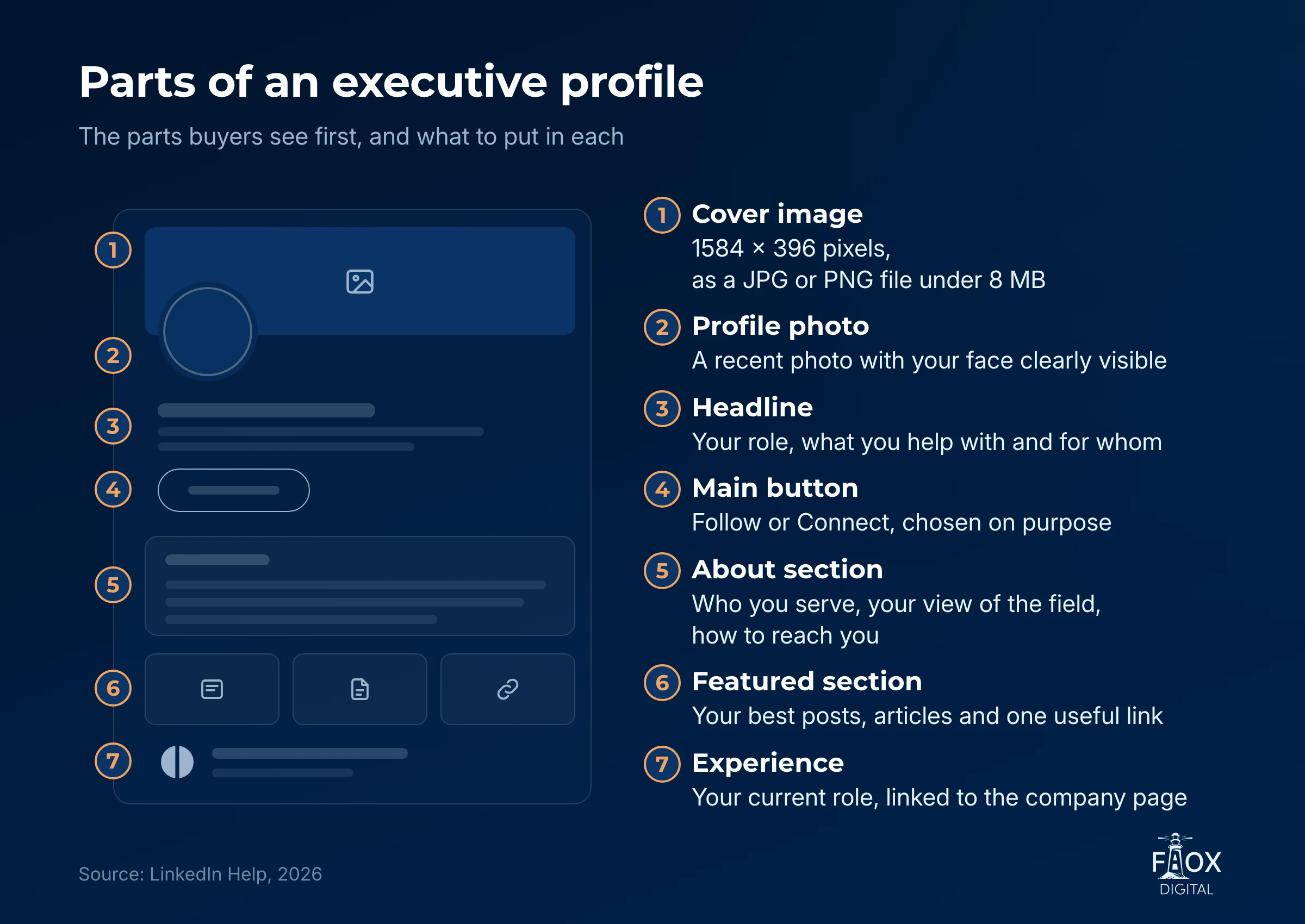
| Section | What to put there | What to avoid |
|---|---|---|
| Profile photo | A recent photo with your face clearly visible | Old photos, group shots, logos |
| Cover image | A photo of your plant, products or team | Slogans and dense text |
| Headline | Your role, what you help with and for whom | A title alone, or a list of buzzwords |
| About section | Who you serve, your view of the field, how to reach you | A third-person biography |
| Experience | Your current role, linked to the company page | Unlinked company names, confidential figures |
| Featured section | Your best posts, articles and one useful link | Outdated news and sales brochures |
| Skills | The few skills you want to be known for | Long lists of unrelated skills |
| Main button | Follow or Connect, chosen on purpose | Leaving it to chance |
Profile photo
An executive LinkedIn photo should look like the person a buyer will meet. Use a recent photo, with your face clearly visible and lit evenly, against a plain or work background. A professional photographer helps, but a good phone photo in daylight is better than an old studio portrait.
Keep the style consistent with the photos on your company’s website and team pages, so that the leader a buyer sees online matches the company they are about to visit.
Cover image
The cover image is the wide banner behind your photo, and it is the most underused part of most executive profiles. At the time of writing (November 2026), LinkedIn’s Help Center recommends 1584 x 396 pixels, as a JPG or PNG file under 8 MB, and notes that photos look better than images with logos.
An executive LinkedIn banner works best when it shows the business: the production hall, a product in use, the team at a trade fair. Keep text to a few words at most, and check how the image looks on a phone, where the profile photo covers part of it.
Headline
The headline sits under your name everywhere you appear: in comments, in search results and in people’s feeds. A title alone, such as "CEO", wastes it. A useful headline says your role, what you help with and for whom, for example "CEO, [company] | Hydraulic systems for mobile machinery makers in Europe".
Write it for the buyers you want to reach, using the words they search for. Skip claims such as "visionary" or "industry leader"; your posts and experience should show that, not your headline.
About section
The About section is where an executive speaks in their own voice. Write it in the first person, in a few short paragraphs:
- Who you serve and what problems your company solves for them.
- Your view of the field: what you believe about your industry, and why.
- Proof from experience: the kinds of projects, markets or turnarounds you have led, without confidential figures.
- How to reach you: whether buyers, partners or candidates should message you or contact the company.
The first lines matter most, because visitors see them before they choose to read more. Start with the reader’s world, not with your career history.
Experience and the link to the company page
List your current role and select your company from the list as you type it, so the company logo appears and the position links to the company page. LinkedIn shows members on a company page only when they choose it from that list.
Describe what you are responsible for in plain words, for example markets, product lines or plants. Earlier roles matter where they explain your expertise; a short line each is enough.
Featured section
The Featured section sits near the top of the profile and shows the content you choose. At the time of writing, LinkedIn’s Help Center lists posts you have written or reshared, articles published on LinkedIn, and external media, documents and links among what you can feature.
Choose three or four items: your most useful recent post, a longer article, a short company video and, if you have one, an article you wrote for a trade publication. If you are deciding where to publish a longer piece, our guide to choosing a publishing format compares bylines, op-eds and sponsored content. Review the section every quarter, so it never shows old news.
Skills
Skills help people find you and show what you are known for. Choose the skills that match the theme you want to be recognized for, such as a technology, an industry or a market, and put the most important at the top. A long list of loosely related skills dilutes the message.
A profile in a second language
If your buyers work in another language, create a profile in a second language. LinkedIn lets you add profiles in other languages from the desktop site, though not from the mobile app, and visitors generally see the version that matches the language they use LinkedIn in. LinkedIn does not translate your profile for you, so write or review each language with a native speaker who knows your industry.
Consistency with the company page
An executive profile and the company page should tell the same story in two voices. The page carries the facts about the company; your profile carries your view and experience. Check that both use the same company name, describe the business in compatible words and share a visual style.
A verification badge adds a further signal of trust. Members at companies where workplace verification is available can verify their current employer with their work email, and the badge then appears next to their name.
From profile to posts
With the profile in place, look at what strong leaders post in our thought leadership examples. If the company page itself still needs work, our LinkedIn page setup checklist covers it, and if your plant and team are good visual material, our guide to Instagram for B2B shows when a second channel helps.
The next question for most executives is time: who writes the posts? Our guide to help with founder-led content explains when leaders write themselves and when to get support.
How Faox Digital works with executive profiles
Faox Digital includes executives’ expertise content in its organic social media work for B2B companies, next to the company page. We start by looking at how the company and its leaders already appear, who follows them and what buyers care about, then agree topics and a monthly calendar before anything goes live.
Key takeaways
- An executive LinkedIn profile answers three questions fast: who you are, what you know and whether buyers can trust your company.
- Use a recent photo, a cover image of the business at 1584 x 396 pixels, and a headline with role, focus and audience.
- Write the About section in the first person, link your role to the company page and feature three or four current items.
- Choose Follow or Connect as your main button on purpose and keep a simple connection policy.
- Add a second-language profile where buyers need it, and keep the profile consistent with the company page.
Frequently asked questions
How do you create an executive LinkedIn profile?
Start with a recent photo, a cover image that shows your business and a headline with your role, focus and audience. Then write a first-person About section, link your current role to the company page, add three or four Featured items and decide on your main button and connection policy.
What are LinkedIn best practices for executives?
Keep the profile current, post on one or two themes you know well, reply to comments, connect with people you can identify and keep your profile consistent with the company page. Review the Featured section and headline every quarter.
What makes a good CEO LinkedIn profile picture?
A recent photo with the face clearly visible, even light and a plain or work background, cropped from the shoulders up. It should look like the person a buyer will meet, not a portrait from ten years ago.
Should an executive accept every connection request?
No. Accept people you can identify, such as customers, partners, colleagues and people from your industry, and let others follow you instead. Choosing Follow as the main profile button makes that easy.
Sources
- LinkedIn Help: Add or change the cover image on your profile, accessed November 2026
- LinkedIn Help: Create or delete a profile in another language, accessed November 2026
- LinkedIn Help: Updates to Creator Mode, accessed November 2026
- LinkedIn Help: Featured section on your profile, FAQs, accessed November 2026
Let’s talk
Want social media that reaches the right people?
Tell us who you want to reach. We will look at your channels and suggest a plan your team can keep up with.