
Instagram for B2B: What to Post and When It Is Worth the Effort
When Instagram earns a place next to LinkedIn for a B2B company, how to set up the account and profile, what to post in which format, and how to handle messages and judge the results.
Instagram for B2B works best as a supporting channel next to LinkedIn: it shows your products at work, your plant, your people and your trade fairs to customers, partners and future employees. Set up a business account with a clear bio, links and highlights, post Reels, carousels and Stories from real work, answer messages quickly, and keep the channel only if it brings the right followers, visits or applicants.
For most B2B companies, LinkedIn is the main social channel, and our guide to LinkedIn strategy for B2B covers how to run it. Instagram raises a different question: is a visual network built for phones worth your team’s time at all?
This article answers that question, then shows how to set up the account, what to post in which format, and how to handle messages and judge the results.
Instagram’s role in B2B
Buyers do use Instagram. Forrester’s 2026 report on the social media preferences of more than 17,000 business buyers found that Facebook was the platform they most often cited as meaningful in their purchase journey, followed by Instagram and YouTube, with LinkedIn next. Most marketers, by contrast, see the biggest impact from LinkedIn, and Forrester asks whether the result simply reflects the size of each platform.
Age matters too. Pew Research Center’s fact sheet of October 2026, based on a survey from January to June 2026, shows that 79% of US adults aged 18 to 29 use Instagram, against 41% of those aged 50 to 64 and 21% of those 65 and older. Instagram is therefore more likely to reach younger engineers, technicians and job candidates than senior decision makers.
So Instagram’s role in B2B is usually a supporting one: visual proof of what you make and how, a window into the company for future employees, and a way to stay visible around trade fairs and in your local community.
When Instagram for B2B is worth the effort
An account earns its place when most of these are true:
- You have something visual every week: products in use, production, testing, installations or projects
- You hire, and want younger candidates to see what working for you looks like
- Customers, partners or distributors in your markets use Instagram (ask your sales team)
- You exhibit at trade fairs or host visits and events
- Someone can post every week and reply to messages within a working day
If only one or two apply, a well-run LinkedIn page and a YouTube channel for your videos will probably serve you better. An abandoned account with a last post from two years ago sends the wrong signal to anyone who finds it.
How Instagram differs from LinkedIn
The two networks reward different content, so do not simply copy posts from one to the other:
| Main job in B2B | Reach buyers and decision makers with expertise and company news | Show products, processes, people and events |
| Content that works | Text posts, documents and expert views | Reels, carousels, photos and Stories |
| Company presence | A company page, separate from personal profiles | A business account, one of Instagram’s professional accounts |
| Links | In posts and on the page | Up to five on the profile, plus link stickers in Stories |
| Audience | Professionals in their working role | A broad audience, younger on average |
One filming session can feed both. The same machine cycle becomes a short vertical Reel on Instagram and, on LinkedIn, a post in which an engineer explains why the step matters.
Set up a business account
Instagram’s professional accounts come in two types. At the time of writing (November 2026), Instagram’s Help Center recommends business accounts for brands, organizations and service providers, and creator accounts for public figures and content producers, so a B2B company chooses Business. In the app:
- Open your settings. Go to your profile and tap More to open Settings and activity.
- Find the professional tools. Under For professionals, tap Account type and tools, then Switch to professional account.
- Choose a category that describes what you do; it does not decide the account type.
- Choose Business and tap Next.
- Add contact details, which people see when they tap the Contact button on your profile.
- Connect your Facebook Page if you have one; this step is optional.
A professional account cannot be private, and it gives you insights, the Contact button, a category label under the profile photo and tools for messages. Create it with a company email address rather than one employee’s personal account, so the company keeps access when people change jobs.
Profile, bio and highlights
Your profile is what people check after they see one of your posts, so make each part work:
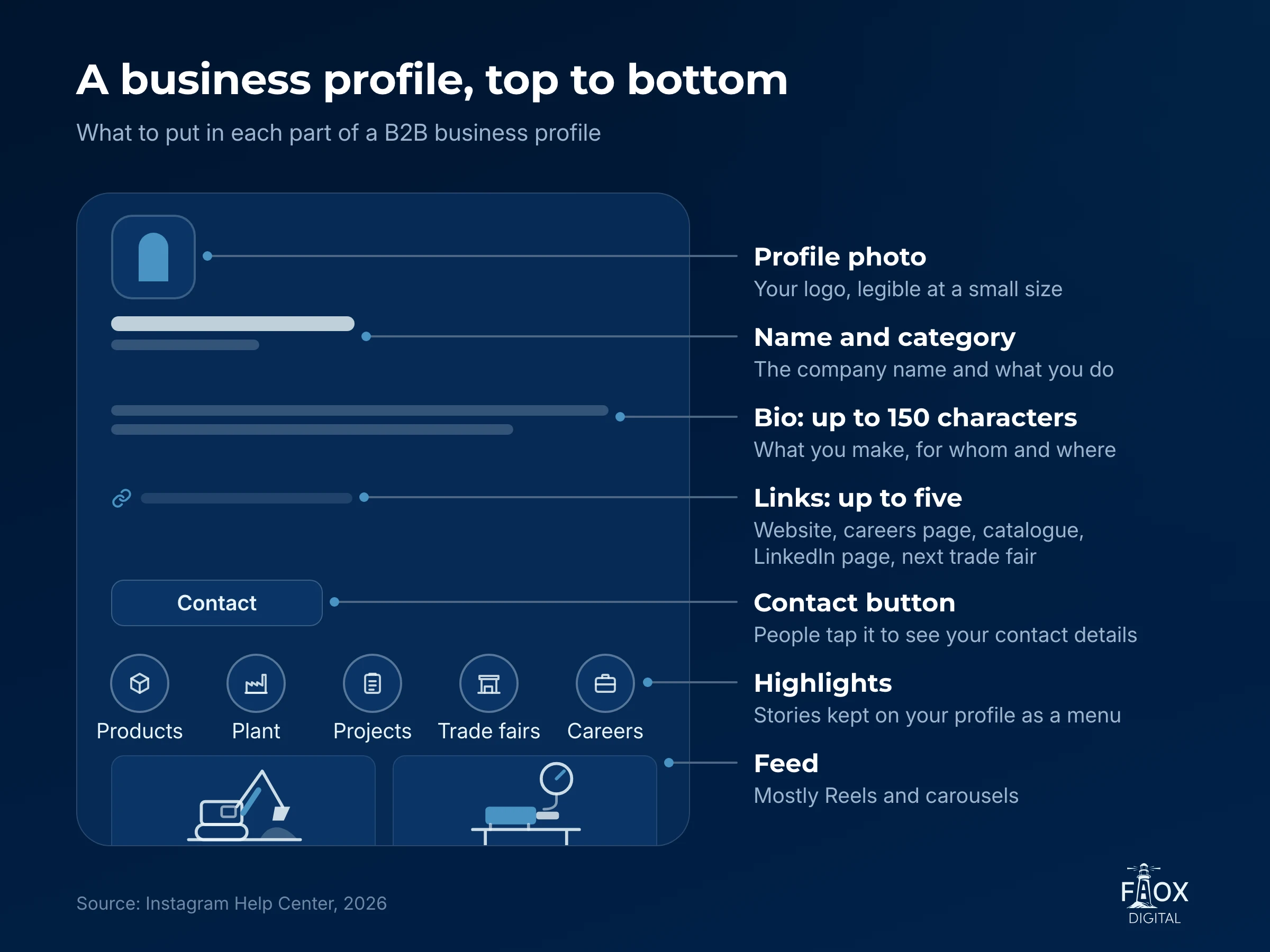
- Name and username: the company name as on your website and LinkedIn page, so people recognize you.
- Profile photo: your logo, legible at a small size.
- Bio: up to 150 characters, according to Instagram’s Help Center. Say what you make, for whom and where, for example "Hydraulic cylinders for mobile machinery, built to order and shipped across Europe".
- Links: up to five, such as your website, careers page, catalogue, LinkedIn page and next trade fair.
- Highlights: Stories disappear after 24 hours, but highlights keep them on your profile with a cover and a name. Use them as a menu: Products, Plant, Projects, Trade fairs, Careers.
What to post: products, processes, people and fairs
B2B companies on Instagram usually have more material than they think: real work, shown honestly. Three themes cover most accounts.
Product and process visuals. A product working in its application, a machine cycle, a test on the bench, an installation from start to finish. Explain one point per post in the caption, and check customer permissions and confidential details before you film on site.
Team and employer brand. Introduce the people behind the product: an engineer running a test, an apprentice’s first project, the quality team at work. Ask for consent before you show or name anyone, and link open positions to your careers page.
Trade fairs and events. Before a fair, a professional account can publish a post with an event reminder: people tap the bell to be reminded, and the post must go up between one hour and three months before the event. During the fair, use Stories for the stand and demonstrations. Afterwards, post a carousel recap, or a collaborative post with the organizer or a partner, which appears on both profiles and reaches both sets of followers.
Reels, carousels and Stories
Each format suits a different kind of material:
- Reels are vertical videos. At the time of writing, Instagram lets you record and edit reels of up to 20 minutes, but reels longer than 3 minutes are not recommended to new audiences, so keep most of them short. One clear moment, such as a machine cycle or a test, works better than a full tour.
- Carousels hold up to 20 photos and videos in one post, all in the same orientation. They suit step-by-step processes and project stories. Videos inside a carousel do not count as reels.
- Stories last 24 hours unless you save them to highlights. Stickers such as links, polls, questions and countdowns, where available, make them useful at fairs and for quick questions to followers.
You can schedule reels, photos and carousels in the app from a public account, up to 25 posts a day and up to 30 days ahead; collaborative posts cannot be scheduled.
Managing messages and comments
Messages and comments are where an account turns into conversations, so decide who answers before you start:
- Frequently asked questions: business and creator accounts can show up to four questions to people who start a chat, each with an optional automated answer. Messages sent this way arrive in your Requests, so check them.
- Comment controls: by default, everyone can comment. You can limit who comments, hide offensive comments and spam, and keep your own list of hidden words. Hidden comments still count in the total, and their authors are not told.
- Response time: reply within a working day, let a named expert answer technical questions, and move prices, orders and complaints to email or a call.
A weekly rhythm and how to judge it
Start with a rhythm you can keep: two or three feed posts a week, mostly Reels and carousels, plus Stories when something happens on the shop floor or at a fair. Capture material once a week rather than every day, and plan the month in the same calendar as your other channels.
Instagram’s free insights for public accounts show views, interactions, new followers and the content you shared, for periods within the past 90 days, plus views and interactions for each post. Look past the totals: are customers, partners, distributors or applicants among your new followers, and do visits to your website or careers page come from Instagram? If the account brings none of these after two quarters, put the effort into LinkedIn or YouTube instead.
How Instagram fits with your other channels
Longer product demonstrations and how-to videos belong on a B2B YouTube channel, with short clips on Instagram pointing to them. Your leaders’ expertise belongs on LinkedIn, and our thought leadership examples show what strong B2B executives do there. To compare channels on the same terms, track a short list of social media KPIs for each one.
If Instagram turns out not to fit, or you already run it and wonder what else could help, our article on Quora and Pinterest for B2B looks at when those secondary channels earn their place.
How Faox Digital runs Instagram for B2B companies
Faox Digital manages Instagram as one of the organic channels in a B2B company’s social media, next to LinkedIn, X, YouTube and Facebook. We plan its point of view and rhythm market by market, create the writing, graphics and video in the company’s own voice, and the client approves a monthly calendar, not every post, before anything goes live. Once the account runs, we reply to comments and messages and check whether it reaches the right people and starts conversations.
Key takeaways
- Instagram for B2B is a supporting channel for products, processes, people and trade fairs; LinkedIn stays the main channel for most companies.
- It is worth the effort when you have weekly visual material, hire younger people, meet customers there or exhibit at fairs, and someone can post and reply.
- Set up a business account, write a clear bio, add up to five links and organize Stories into highlights.
- Use Reels for single moments, carousels for processes and projects, and Stories for fairs and quick updates.
- Judge the account after two quarters by who follows, writes and visits, not by likes alone.
Frequently asked questions
Is Instagram good for B2B marketing?
It can be, as a supporting channel. Buyers in Forrester’s 2026 research cited Instagram among the platforms that mattered in their purchase journey, and it is strong for visual proof and hiring. It works when you have visual material and the time to post and reply; otherwise LinkedIn and YouTube usually deserve the effort first.
What is the best social media platform for B2B marketing?
There is no single best platform. For most B2B companies, LinkedIn is the main channel, with one or two supporting channels such as YouTube or Instagram, chosen by where their buyers, partners and future employees actually are, market by market.
Should a B2B company use a business or a creator account?
A business account. Instagram recommends business accounts for brands, organizations and service providers, and creator accounts for public figures and content producers. Both are professional accounts with insights and message tools, and you can switch the type later.
What do B2B companies post on Instagram?
Real work: products in use, production and testing, installations and projects, the people behind them, and trade fairs. Short Reels show single moments, carousels tell a process step by step, and Stories cover events as they happen.
Sources
- Instagram Help Center: About professional accounts on Instagram, accessed November 2026
- Instagram Help Center: Record a reel on Instagram, accessed November 2026
- Pew Research Center: Americans’ Use of Social Media in 2026, October 2026
- Forrester: Social Media Takes Center Stage In B2B Buying, Even In The AI Era, January 2026
Let’s talk
Want social media that reaches the right people?
Tell us who you want to reach. We will look at your channels and suggest a plan your team can keep up with.