
How to Create a B2B Newsletter Your Buyers Will Read
A step-by-step way to plan, write, design and send a B2B newsletter that buyers open on purpose, and the routine that keeps it going issue after issue.
To create a B2B newsletter your buyers will read, start with the reader: decide who it is for and what useful thing every issue gives them. Then choose a frequency you can keep, plan the content a quarter ahead, use the same sections in every issue and send it from a recognizable sender in a simple template that works on a phone. Grow the list from people who asked for it, make unsubscribing easy and judge each issue by clicks and replies.
Most B2B companies have tried a newsletter, and many gave up or kept sending one that recipients ignore. In the Content Marketing Institute’s benchmarks report for 2025, published in October 2024 and based on a survey of 980 B2B marketers, 71% used email newsletters to distribute content, but only 37% counted them among their most effective channels.
The difference is rarely the software. It is whether each issue gives buyers something they would miss. This article shows how to create a newsletter step by step and keep it going. It builds on our guide to email marketing for B2B, which covers the list, consent rules and getting into the inbox.
Choose a frequency you can keep
Frequency matters less than consistency. A monthly newsletter that arrives on the same day for years builds more trust than a weekly one that stops in its third month. Choose a rhythm your current team can keep, state it on the sign-up page and keep the send day fixed.
| Frequency | Fits when | Watch out for |
|---|---|---|
| Every week | You have real news each week, for example for distributors who follow prices and stock | Hard to fill with useful content; quality drops first |
| Every two weeks | A content team or several product lines supply material | Needs a steady supply of topics and reviewers |
| Every month | A good default for most B2B companies: one main guide and short news | A skipped month breaks the habit |
| Every quarter | A small team and products that change slowly | Readers may forget you between issues, so each one must be strong |
If you are unsure, start monthly: it is easier to add issues once the content plan can fill them than to explain a missed one.
Plan the content a quarter ahead
A content plan keeps the newsletter from depending on last-minute ideas. Keep a running list of topics and fill the next three issues at a time. Good B2B newsletter ideas are close at hand:
- Questions from sales and support: every question buyers ask twice deserves an answer
- Application notes and guides: how to choose a material, size a component or extend service life
- Product changes: new datasheets, discontinued items and their replacements, new certificates
- Standards and regulations that change what buyers must specify
- Events: trade fairs, webinars and plant visits
- People: a short interview with an engineer or a service technician
For each issue, the plan names the main story, the short items, who drafts, who checks and the send date. If your team already keeps a social media content calendar, plan both in one place, so that one guide can feed a LinkedIn post and a newsletter issue in the same month.
Give every issue the same section structure
A fixed section structure helps readers find what they want and makes each issue faster to produce. This one suits most B2B newsletters:
| Section | What goes in | Length |
|---|---|---|
| Opening line | What this issue covers and why it matters now | One or two sentences |
| Main story | One useful piece: a guide, an application note or a standards change | A short summary and a link to the full piece |
| Short items | Two or three news items, such as a new datasheet or a trade fair date | One or two sentences each |
| From the team | A named expert answering a question buyers ask | Optional, one short paragraph |
| One action | The step you want readers to take: read the guide, register, book a call | One button |
| Footer | Who sends the newsletter and why the reader gets it, the company address, the preferences page and the unsubscribe link | A few lines |
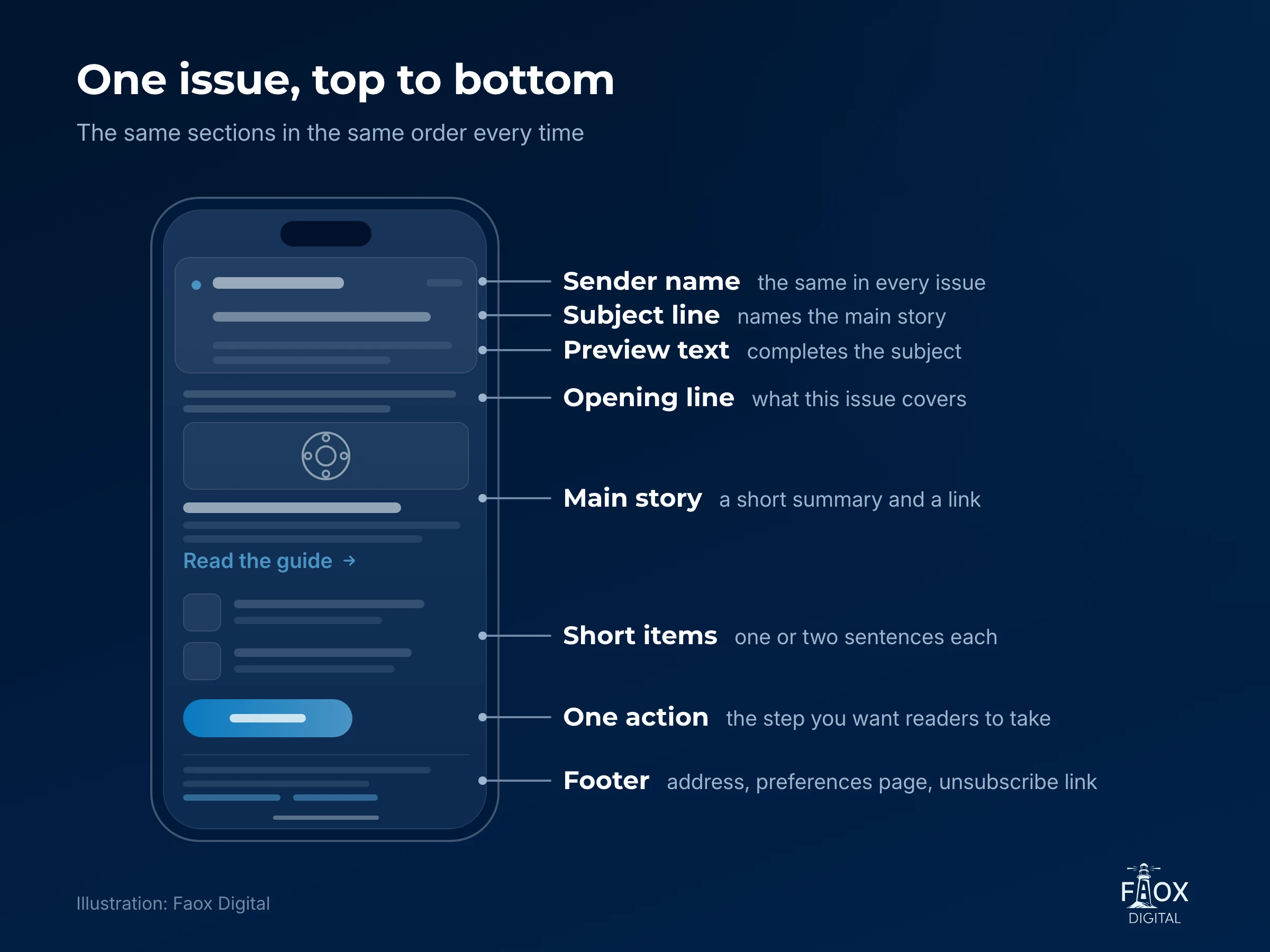
Keep the order the same, and leave a section out rather than fill it with weak material. Our examples of good newsletters show these sections arranged in three example issues for hypothetical companies.
Sender name, subject line and preview text
The sender name should be one readers recognize and should stay the same in every issue: the company, the newsletter’s name with the company, or a named editor. Replies should reach a person, never a no-reply address, because a reply is one of the most valuable things a newsletter can produce.
The subject line should name the main story, not the issue number. "Choosing seals for food-grade lines: three questions to ask" tells readers what they will get; "Newsletter, issue 14" does not.
The preview text is the line email apps show with the subject. At the time of writing (November 2026), Apple’s iPhone User Guide says Mail shows two lines of text for each message by default. If you do not set it, the first words of the email take its place, so write it to complete the subject. Our guide to marketing email structure covers subject lines and calls to action in more detail.
Set up your email marketing tool and grow the list
Your email marketing tool may be part of your CRM or connected to it. For a newsletter, it should record each subscriber’s source and consent, send a confirmation email before adding them, store your template, send tests, add one-click unsubscribe headers and report clicks by link and by contact. Keep the newsletter as its own list: Gmail’s FAQ for senders explains that one-click unsubscribe removes a recipient only from the mailing list associated with the message, so a reader can leave the newsletter and still receive, say, event invitations.
Subscriber sources are usually the contacts you already meet:
- A sign-up box on blog articles and resource pages
- An unticked checkbox on quote, contact and download forms
- Trade fairs and visits, where you ask and record the answer
- New customers, invited when their account is set up
- Webinar registrations and your team’s email signatures
Keep the sign-up form short, and see our guide to B2B email marketing for the consent rules in each market. Two habits from the large mailbox providers are worth copying: Gmail’s sender guidelines ask senders to confirm each recipient’s address before subscribing them, and Yahoo’s sender best practices ask them to tell new subscribers what mail to expect, how often and what it will look like. Then send a welcome email at once, with the promise and one useful link; our welcome email examples show a simple sequence.
Make unsubscribing easy
Easy unsubscribing protects the list: a reader who cannot leave tends to report the newsletter as spam, and complaints hurt every email your domain sends.
At the time of writing (November 2026), Gmail’s sender guidelines require senders of 5,000 or more messages a day to Gmail accounts to support one-click unsubscribe in marketing and subscribed messages, using the List-Unsubscribe headers of the RFC 8058 standard (2017), and to show a visible unsubscribe link in the message. Google’s FAQ recommends fulfilling unsubscribe requests within 48 hours; Yahoo’s sender best practices ask for them to be processed within two days, without a login.
Follow the same rules even for a small list, and add a preferences page where readers can choose topics, editions or a lower frequency instead of leaving.
Measure clicks and replies, not opens
Open rates are a weak guide. Opens are counted with an invisible tracking image, but Apple’s Mail Privacy Protection prevents senders from seeing whether a message was opened, and classic Outlook blocks images by default. Apple notes that the protection does not extend to links, which is one reason clicks are the firmer measure. Track these for every issue:
- Clicks by link: which topics readers choose, and who chose them
- Replies: end some issues with a direct question to invite them
- Repeat clicks on product or pricing content, flagged in the CRM for sales
- New subscribers, unsubscribes and spam complaints, month by month
Compare each issue with your own earlier issues, not with published averages. After a few months, the pattern of clicks and replies shows which sections to keep and which topics deserve a campaign email of their own.
Keep it going: a routine for every issue
Most newsletters stop because nobody owns them, not because ideas run out. Give the newsletter an owner who plans issues, chases drafts and sends on time, and agree who supplies content, who checks technical accuracy and who answers replies.
For a monthly issue, a simple routine is enough: choose the stories in the first week, draft in the second, have an expert check the facts in the third, and build, test and send in the fourth. Every quarter, review clicks and replies, refresh the content plan and drop what nobody reads.
Use this checklist of B2B newsletter best practices before every send:
- The main story is useful to a reader who never buys from you
- The subject line names the main story, and the preview text completes it
- The sender name is the same as last time, and replies reach a person
- Every link works, and every image has alt text
- The issue reads well on a phone and with images turned off
- The footer has the address, the preferences page and a working unsubscribe link
- Someone is assigned to answer replies and follow up interested contacts
If your team does not have the people for this routine, our guide to email marketing for manufacturers explains what a managed program includes.
Frequently asked questions
What is a B2B newsletter?
A B2B newsletter is a regular email that a company sends on a fixed schedule to customers, prospects and partners who agreed to receive it. Each issue combines a few useful items, such as a guide, product news or an event, to keep the company in view across a long buying cycle.
What are good B2B newsletter ideas?
Start with the questions your sales and support teams hear most often. Application notes, buying and maintenance guides, standards changes, new datasheets, trade fair dates and short interviews with your engineers all work, if each item is useful to the reader.
What is a good open rate for a B2B newsletter?
There is no reliable benchmark, because privacy features and image blocking distort how opens are counted. Compare each issue with your own earlier issues, and give more weight to clicks, replies and the conversations sales can follow up.
How should a B2B newsletter be designed?
Use one column, live text, readable contrast and buttons that are easy to tap, with the same template and section order in every issue. Test it on a phone, in the main email apps and with images turned off.
Sources
- Content Marketing Institute: B2B Content Marketing Benchmarks, Budgets, and Trends, Outlook for 2025, October 2024
- Gmail Help: Email sender guidelines, accessed November 2026
- Yahoo Sender Hub: Sender Best Practices, accessed November 2026
- W3C: Web Content Accessibility Guidelines (WCAG) 2.2, W3C Recommendation, version of 12 December 2024
Let’s talk
Have contacts you never follow up with?
Tell us about the list you already have. We will show you how email and CRM can turn it into conversations.