
Content Refresh: How to Update Old Blog Posts That Lost Traffic
A method for finding out why an old post lost traffic, deciding whether to update, merge, remove or leave it, and making the update count.
A content refresh means updating an old page so it is accurate and useful again, not just changing its date. Start in Search Console: compare the last three months with the same period a year earlier to find the pages that lost clicks, then rule out seasonality, technical problems and AI Overviews. For each page that remains, decide whether to update, merge, remove or leave it, and redirect anything you remove that has a close replacement.
Old posts rarely fail all at once. A guide that brought steady visits for three years slides a little each quarter, and nobody notices until the enquiries thin out. The usual reactions are to rewrite it or delete it, and either can be wrong, because traffic falls for many reasons that have nothing to do with the post. This guide shows how to find the reason and what to do about it, as part of your B2B content strategy. The examples come from a hypothetical pump seal manufacturer.
What is a content refresh?
A content refresh is a real update to an existing page at the same URL: its facts, examples, structure and links. Two related terms come up often. Content consolidation means merging several pages into one, and content pruning means removing pages. All three are ways to update old blog posts or take them out of the way.
For a B2B site, the case is usually strong. An old post may already have links and rankings that a new page would need years to earn, and an outdated specification costs trust with the engineer reading it.
Not every drop needs a refresh, though. Google’s guide to traffic drops says small shifts in position can happen at any time and recommends avoiding radical changes to a page that is already performing well. We also found no reliable public figure for how fast B2B posts lose traffic. The numbers that circulate trace back to old single-site analyses or to no source at all, so use your own data.
Find the decline in Search Console
Search Console shows which pages lost clicks and when. The first five steps follow Google’s own guide to debugging traffic drops; the sixth is our own addition:
- Set the date range to the last 16 months. This shows whether the same drop happens every year.
- Compare the last 3 months year over year. In B2B, that keeps trade fair seasons and holidays from misleading you.
- Open the Pages tab and sort by clicks difference. The pages that lost the most come first.
- Decide how wide the drop is. Note whether it hit the whole site, a group of pages or one important page.
- Open the queries for each page. See which searches lost clicks, and in which countries.
- Search for those queries yourself. Look at what ranks now and what the results page shows.
Then add the business view. A page that lost visits but still brings enquiries is a different problem from one that lost both, so check your analytics or CRM before you put it on the list.
Why the page lost traffic
The pattern usually points to the cause. The first five rows below come from Google’s guide, and the last is our addition:
| What you see | Likely cause | What to do |
|---|---|---|
| The whole site falls at once | A technical, security or spam issue, a site move or a broad algorithm change | Check the Page indexing, Security Issues and Manual Actions reports before you touch any post |
| The same drop appears a year earlier | Seasonality | Leave it, and plan updates before the next peak |
| Clicks and impressions fall together, position holds | Less demand for the search | Check the query in Google Trends |
| Impressions hold, clicks fall | A weak title and snippet, or a more appealing result nearby | Read the results page, then improve the title and first paragraph |
| Position falls sharply across many searches | Other pages now answer better | Refresh the page and assess the site honestly |
| Another of your pages now appears for the search | Duplicate topics | Merge or refocus the two pages |
The fourth row has become more common. Ahrefs’ 2026 study of 300,000 keywords, using December 2025 data, found that an AI Overview correlated with a 58% lower average click-through rate for the top-ranking page. A rewrite will not bring those clicks back if the post still ranks and is still correct. Judge that page by the enquiries it brings, and check whether the summary cites it.
Update, merge or remove: how to decide
Once you have ruled out the causes that a rewrite cannot fix, make one decision per page:
| Decision | When it fits | What to do |
|---|---|---|
| Leave it | It still answers its question correctly, and the drop is small or seasonal | Nothing for now; review it later |
| Update | Buyers still ask the question, but the page is outdated or thin | Refresh it at the same URL |
| Merge | Two or more pages cover duplicate topics | Combine them in the stronger page and 301 redirect the others |
| Remove | Nobody needs it, and it has no links or enquiries | Return 404 or 410 |
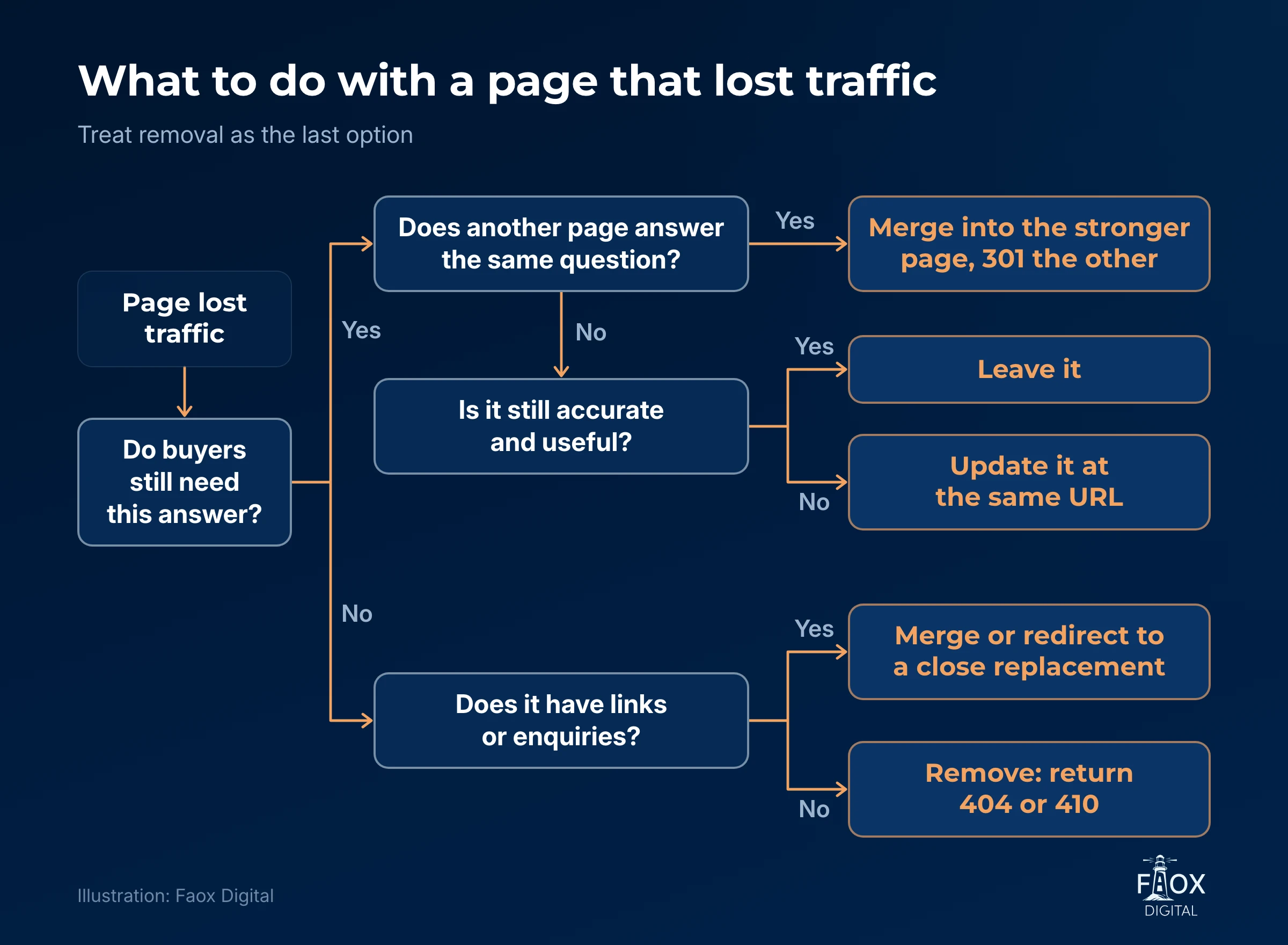
Treat removal as the last option. Google’s guide to core updates calls deleting content a last resort, for content you think cannot be salvaged. Its Search Liaison, Danny Sullivan, said in 2023 that deleting content because Google supposedly dislikes old content is not a thing, and that older content can still be helpful. A post on how a seal works can stay valid for a decade, so age alone is no reason to remove it. Low traffic is not enough either, because a page that few people read may still be the one a purchaser sends to the engineer.
Use a 301 redirect when a close replacement exists. Google’s crawling documentation (2026) calls a 301 a strong signal that the target page should be processed. Its site move guide warns against redirecting many old URLs to one irrelevant page, such as the home page, which it may treat as a soft 404. Merging several pages into one is a sound use of redirects. To choose which page survives, check its place in your pillar pages and topic clusters and which page already earns the links and enquiries.
How to refresh a page
Plan a refresh as you would a new page. Our content brief template works here too: note what the page must answer now and what has changed. Then work through this list:
- Dates and statistics: replace old figures with the latest from the primary source, or remove them
- Facts that move: check standards, product names, tools and prices
- New questions: add what buyers now ask, from Search Console queries, related questions in search results and your sales team
- Page type: if the results now favor another kind of page, a text update will not close that gap
- Opening and title: give the answer first, and make the title say what the page offers
- Experience: add a test result, a field case or an expert’s review that the old version lacked
- Internal links: fix broken ones, link out to newer pages and add links to this page from them
The last point is easy to forget. A refreshed post gains little if your newer articles never link to it. Add new questions where they belong in the page, not as a block at the end. For the writing itself, see our guide to writing for buyers and Google.
A refreshed post is also worth sharing again, because it now says something new. Our guide to making B2B social content covers how to reuse it.
The visible updated date
A visible updated date tells readers the page is current. Google recommends a user-visible date labeled "Published" or "Last updated", matching the equivalent datePublished or dateModified value in any structured data. It looks at several factors to estimate a page’s date, and it does not promise to show yours.
It also lists changing a page’s date when the content has not substantially changed as a warning sign. Our rule is simple: change the date when a returning reader would notice the difference. A corrected typo does not count, while new figures and a new section do. Treat the lastmod date in your sitemap the same way.
Freshness in AI answers
Freshness in AI answers matters, but less than it is often said to. Google’s 2026 guide says its generative AI features retrieve relevant, up-to-date pages through its core ranking systems. Ahrefs’ 2025 analysis of about 17 million cited URLs found that pages cited by AI assistants averaged 2.9 years old, against 3.9 years for organic results, and that AI Overviews stayed closer to organic results.
So newer pages have a modest edge, and pages several years old are still cited. That is a reason to keep facts correct, not to republish on a schedule. Nothing here promises a citation.
Measure the result
Note the date of each refresh, for example as an annotation in Search Console, then compare the same page and queries later. Google says some changes take effect in days and others take several months, and that nothing ensures a noticeable effect, so wait a few weeks before you judge. Look at enquiries as well as clicks.
To keep this from becoming a rescue job, set triggers: a product launch, a new edition of a standard, or a yearly look at your most important pages. If your team does not have the time for this, the next question is who should do it, and our guide to paying for SEO content compares the options.
How Faox Digital keeps content current
The last step of a Faox Digital SEO project is measuring and keeping going: our reports show rankings, organic traffic and whether AI tools start to cite the company, and what they show decides which pages need work next. The work does not stop the day a keyword moves.
Key takeaways
- A content refresh is a real update at the same URL, not a new date on old text.
- Find declines by comparing the last three months year over year in Search Console, then rule out seasonality, technical issues and AI Overviews.
- Decide per page: leave, update, merge or remove, and treat removal as the last option.
- Update figures, facts and links, add the questions buyers now ask, and add experience the old version lacked.
- Change the visible date only when a returning reader would notice the difference.
Frequently asked questions
How often should I update old blog posts?
There is no fixed schedule, and Google sets none. Review your most important pages about once a year, and update sooner when a product, standard or figure changes. Frequent updates to pages that are still correct add nothing.
Should I change the published date when I update a post?
Keep the original publication date and add a "Last updated" date. Only do this when the content has really changed, because Google lists changing dates without substantial changes as a warning sign.
Should I delete old blog posts that get no traffic?
Not automatically. First check for links and enquiries, and ask whether sales or buyers use the page. If it has value, update or merge it. Remove it only if nobody needs it, since Google calls deleting content a last resort.
Does updating content improve rankings?
It can, when the update makes the page more useful than what ranks now. Google says no change is sure to have a noticeable effect, and that better content elsewhere will keep ranking. Changing a date or adding words alone does not help.
Sources
- Google Search Central: Debugging drops in Google Search traffic, 2025
- Search Console Help: Performance report, common tasks and use cases, accessed November 2026
- Search Engine Roundtable: Google: don’t delete older content, it may be helpful content, 2023
- Ahrefs: Update: AI Overviews reduce clicks by 58%, 2026
Let’s talk
Where do you want to be found?
Tell us the searches that matter to your business. We will review your site and tell you plainly what to fix first, including what you can do yourself.