
Pillar Pages and Topic Clusters: How to Plan a B2B Content Map
A step-by-step way to turn what you sell and what buyers ask into a content map: clusters, page roles, linking rules, URLs and publishing order.
Pillar pages are broad guides on one subject, linked to supporting articles that each answer one question in depth. Together they form a topic cluster. To plan a B2B content map, start from what you sell, list each cluster’s questions by buying stage, give every page one role and one search target, set internal linking rules and publish in an order that serves buyers first.
Most B2B blogs grow one post at a time. Readers land on an article with nowhere sensible to go next, and nobody can say which subjects are finished. A content map fixes that by deciding, before anyone writes, which pages exist, what each one does and how they connect. It is the practical side of B2B content that gets cited. This guide walks through the plan step by step, with an example from a hypothetical pump seal manufacturer. This blog is built the same way, so you can see the rules at work in this article’s own links.
What are pillar pages and topic clusters?
A pillar page, also called a cluster guide, covers one broad subject and sends readers on to the detail. Supporting articles each answer one question the pillar can only touch on. Internal links join them in both directions, and the whole group is a topic cluster, also known as a content cluster or a hub and spoke. A content cluster strategy is simply a plan for which clusters you build and in what order.
The model is a way of organizing content, not a Google feature. The Content Marketing Institute’s 2018 guide credits HubSpot Research with first detailing it in 2017. Google’s SEO Starter Guide (2025) does not mention pillars. It says a logical structure can help search engines and users understand how pages relate, and also that search engines will likely understand your pages as they are now.
Be careful with the claims around it. We found no independent test that isolates the effect of pillar pages. The uplift figures that circulate are mostly single-site case studies, where other things changed too, or numbers repeated without a source. The stronger case is practical: a map shows what is missing, stops your pages competing and gives every reader a next step.
Pillar page vs landing page, service page and category page
These pages are easy to confuse, and each has a different job:
| Page | Its job | Search it targets | Main links |
|---|---|---|---|
| Pillar page | Teach one subject from end to end | A broad question, such as "mechanical seals" | Every supporting article, then the service or category page |
| Supporting article | Answer one question in depth | A specific question, such as "why mechanical seals fail" | The pillar, related articles, the next stage |
| Service page | Explain and sell what you do | A commercial search, such as "pump seal repair service" | Proof, contact, quote request |
| Blog category page | List the articles in one service area | Usually none of its own | Pillar pages first, then articles |
| Landing page | Turn campaign visitors into enquiries | Often none, because visitors come from ads or email | One action, few links |
The relationship with the service page matters most. The cluster teaches and the service page sells, so keep the service’s commercial search for the service page and do not let a pillar chase it, or the two will compete. Each page in the cluster links to the service page once, where the reader is ready for it. Our guide to how a B2B website works shows how these pages fit into the wider site.
How to plan a content map, step by step
- Start from what you sell. Each service area can become a blog category, and each product family, application or buyer problem a cluster.
- List the questions. Build a topic map for each cluster from sales, support and search data.
- Sort them by buying stage. Check that each cluster answers awareness, consideration and decision questions.
- Give every page one role and one target. Mark it as a pillar, a supporting article or an existing commercial page.
- Check what you already have. Keep, improve, merge or retire existing posts before you plan new ones.
- Write the linking rules into the map. Decide which page links to which before anyone writes.
- Set the publishing order. Finish one cluster before you open the next.
- Brief and write. Give each page a brief, an expert and an owner.
The next sections explain the decisions behind these steps. For step 8, a content brief template passes each page’s role, target and links to the writer, and our guide to writing for buyers and Google covers the writing itself.
A content map example
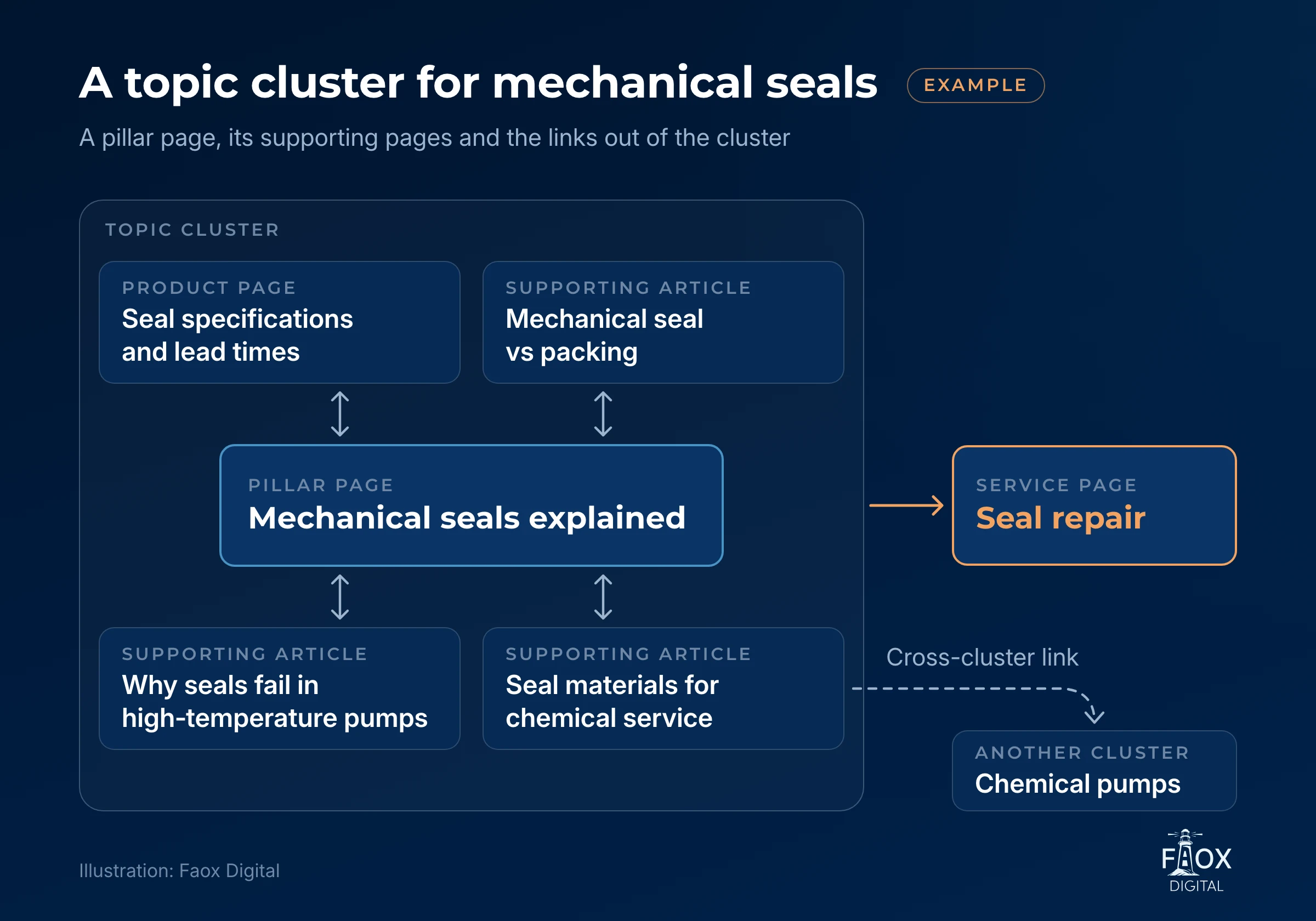
A topic map lists what a subject contains. A content map adds the decisions: role, stage, order and links. Some SEOs call the result a topical authority map. For the hypothetical manufacturer, one cluster looks like this:
| Order | Page | Role | Stage | Links to |
|---|---|---|---|---|
| Before the cluster | Seal repair service and product category | Commercial pages | Decision | Contact and quote request |
| 1 | Mechanical seals explained | Pillar | Awareness | All the pages below, service page |
| 2 | Seal specifications and lead times | Product page | Decision | Pillar, quote request |
| 3 | Mechanical seal vs packing | Supporting article | Consideration | Pillar, specifications page |
| 4 | Seal materials for chemical service | Supporting article | Consideration | Pillar, chemical pump cluster |
| 5 | Why seals fail in high-temperature pumps | Supporting article | Awareness | Pillar, materials page |
Check the map against the buyer journey. A cluster of awareness articles alone brings readers with no way forward, and one of product pages alone misses buyers still defining the problem. Every awareness article should point to a next step.
Resist splitting one answer across many pages. Google’s 2026 guide to generative AI features warns against creating separate content for every variation of a search, and says a high quantity of pages does not make a site higher quality. If two questions share one answer, they share one page.
Fitting an existing blog into clusters
Most B2B companies do not start from zero. If you already have a blog, build the map from it before you plan anything new. Our guide to updating old blog posts shows how to judge each one.
- List every post in a spreadsheet, with its main search and the visits or enquiries it brings.
- Assign each post to a cluster. The leftovers show what no longer fits, so decide whether each one still serves buyers or should be retired.
- Merge posts that answer the same question, and 301 redirect the weaker one to the stronger.
- Look for a pillar among what you have. A broad post that already earns links and visits may only need expanding.
- Link before you write. Connect what exists first, because the real gaps are easier to see once the old posts are in place.
Internal linking rules and anchor text
Write internal linking rules into the plan, so they do not depend on each writer’s memory. These are the rules we use on this blog. They are our own, not Google’s:
| Link | Where it goes | Rule |
|---|---|---|
| Supporting article to pillar | The introduction | Always |
| Pillar to supporting article | The section on that question | Every supporting article, once |
| Between supporting articles | Where the topic comes up | Only when a reader would need it |
| To the next stage | The conclusion, as the reader’s next question | One link |
| To the service page | The call to action | Once per page |
| To another cluster | Where the topic comes up | One link, when the subjects really connect |
Google gives the principle behind them. Its link guidance (2025) says every page you care about should have a link from at least one other page, and that there is no ideal number of links. Zyppy’s 2022 study of 23 million internal links across 1,800 sites found that pages with 40 to 44 internal links got four times the Google clicks of pages with 0 to 4, and that the effect reversed at about 45 to 50 links, which it linked mainly to sitewide navigation links. It is a correlation study, so do not chase a number.
Anchor text is the visible wording of a link. Google says good anchor text is descriptive, reasonably concise and relevant to both pages. A simple test is to read the link text alone and ask whether it says what is on the other side. Write it to fit the sentence, not as a repeated formula, and keep a service page’s search phrase for links to that service page.
Cross-cluster links connect subjects that really overlap. An article on seal materials can point to a cluster on chemical pumps, because a buyer choosing materials may need it. Do not add them to fill a quota.
Category pages and URL structure
Category pages group the clusters in one service area. They are lists, not guides, so keep them short: a sentence or two on what the area covers, the pillar pages first, then the articles. A long guide on a category page does the pillar’s job and competes with it.
URL structure should be simple and stable. A pattern such as /blog/seals/mechanical-seal-failure/, with pillars and supporting articles side by side in one folder, is enough. Google’s URL guidance (updated October 2026) asks for URLs that are logical and intelligible to people. Its starter guide says grouping topics in folders can affect crawling on sites with more than a few thousand URLs. Beyond that, John Mueller said in 2017 that hierarchy in URLs is not that important for Google search, and in 2018, as reported by Search Engine Journal, that Google does not count slashes and that how many clicks a page sits from the home page matters more.
Two things follow. Keep pillars close to the home page through navigation and category pages. And do not nest supporting articles under a pillar’s URL, because clusters change and URLs should not.
Do not move old posts just to fit the map either. Google’s starter guide advises against dropping everything to reorganize, and its site move guide (2026) warns of temporary ranking fluctuations after significant changes. Link old posts into the new clusters first, and change a URL only with a good reason and a 301 redirect.
Publishing order
Publishing order should follow the buyer, not the calendar:
- Commercial pages first. The service, category and product pages a cluster points to must exist and be good, or every link leads nowhere useful.
- Then the pillar. It defines the terms and sets out the map. The Content Marketing Institute’s guide suggests writing it last, because you do not yet know how detailed each article will be. Either works, as long as you update the pillar when supporting pages go live.
- Then the supporting articles closest to a decision, along with those that answer what sales hears most.
- Finish before you open the next cluster. A half-built cluster leaves readers without the next answer.
If articles go out one at a time, go back and add links to earlier pages as each new one goes live. Publishing a cluster as one batch avoids that work and avoids dead links.
Once the map exists, the next question is who will produce it. Our guide to B2B content writing services compares paying per article with paying for a strategy.
How Faox Digital plans a content map
At Faox Digital, the content map grows out of the keyword map, which we build market by market with commercial and informational intent side by side. Pages are then written to rank and to be quoted by AI tools, in the content and authority step that follows the foundations.
Key takeaways
- A pillar page teaches one subject, supporting articles answer one question each, and links join them in both directions.
- Clusters are a planning tool, not a Google feature, and we found no independent test of their effect.
- Give every page one role and one target, and keep commercial searches for service and category pages.
- Write the linking rules and the publishing order into the map before anyone writes.
- Keep URLs simple and stable, and do not move old posts just to fit a new structure.
Frequently asked questions
What is the difference between a pillar page and a cluster page?
A pillar page covers a broad subject and links out to the detail. A cluster page, which we call a supporting article, answers one specific question and links back. Readers can land on either from search, so both need to make sense alone.
Do pillar pages help SEO?
They can help indirectly, by making your coverage clear and giving readers a path through it. Google has no pillar page feature, and we found no independent test of the effect, so judge a cluster by its searches, visits and enquiries.
How long should a pillar page be?
As long as the subject needs. Google says it has no preferred word count. A pillar should explain the subject, answer the main questions briefly and send readers on for the depth.
How many supporting articles does a cluster need?
There is no set number, so let buyers’ questions decide. Our example has four pages under its pillar. Ahrefs’ 2026 guide offers 15 to 20 well-connected pieces as a rough figure for a whole specialized niche, which may mean several clusters.
Sources
Let’s talk
Where do you want to be found?
Tell us the searches that matter to your business. We will review your site and tell you plainly what to fix first, including what you can do yourself.