
Website Speed Optimization: Practical Ways to Improve Core Web Vitals
How to improve LCP, INP and CLS in a sensible order, with what to do about images, caching, CDN, scripts and fonts, and which tempting fixes to avoid.

Website speed optimization means removing what holds back a page’s main content, its response to clicks and its stability, in order of business value. To improve Core Web Vitals, start with the measure real users fail on: for LCP, fix the server and the main image first; for INP, remove and split up JavaScript; for CLS, reserve space for images, banners and fonts. Work on the templates that bring enquiries, change one thing at a time and judge the result on real-user data.
A failed Core Web Vitals assessment usually arrives with a long list of suggestions, and it is tempting to work from the top. Much of that list will not change what your buyers experience.
This guide covers the fixes that do, measure by measure, and what to do first. It is the practical follow-up to our guide to page speed and performance. If the terms are new, start with Core Web Vitals explained.
Website speed optimization: what to fix first
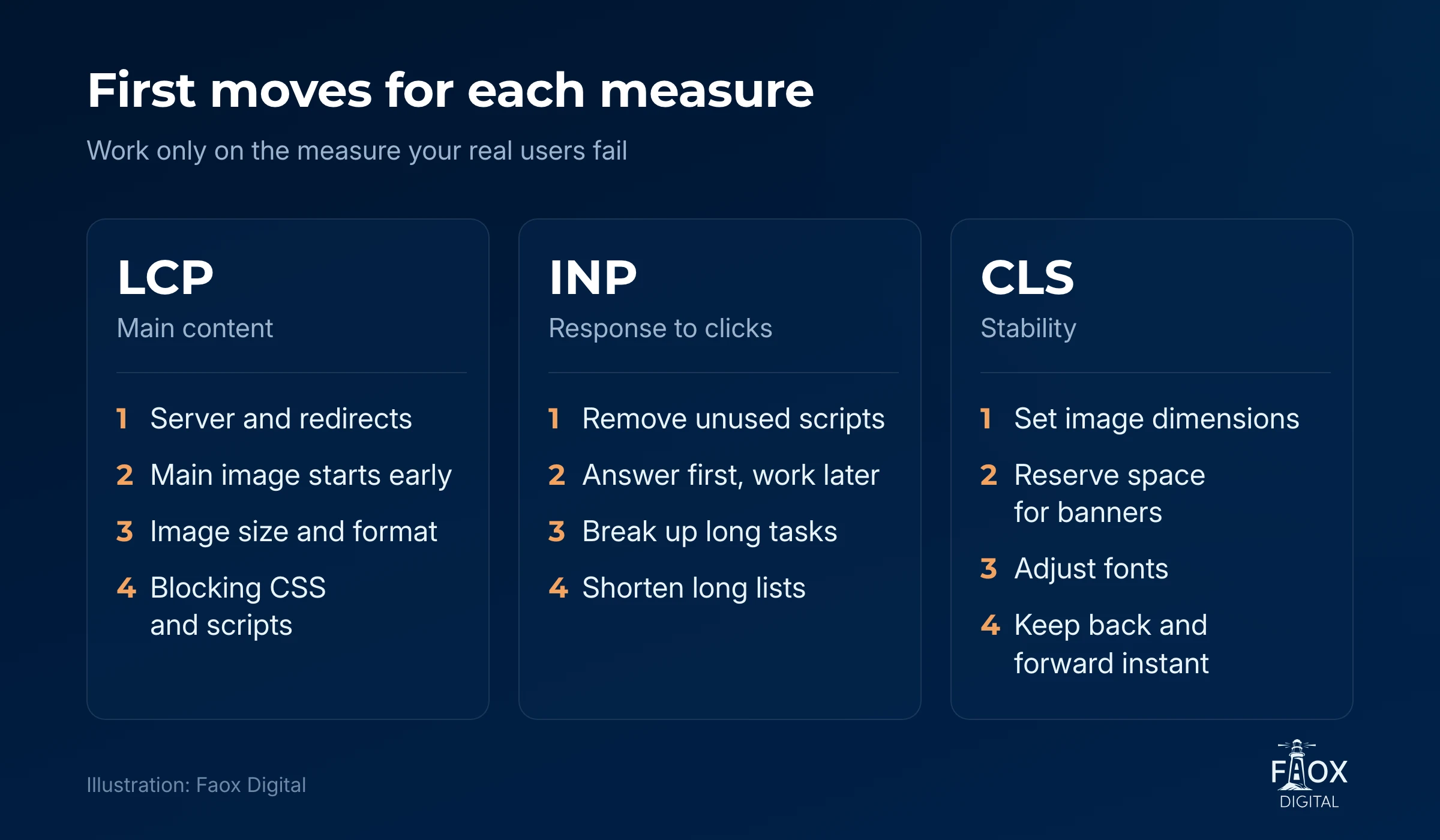
Before you change anything, know which measure fails with real users, on which device and on which template. Our articles on slow website causes and how to use PageSpeed Insights show how to find out. Then work in this order, which is our judgment, based on effort and on how directly each fix touches the measure:
| If real users fail on | First moves | Next | Leave for later |
|---|---|---|---|
| LCP | Server, redirects, main image priority | Image size and format, blocking CSS and scripts | Critical CSS |
| INP | Remove unused scripts, answer clicks at once | Break up long tasks, shorten long lists | A framework change |
| CLS | Set image dimensions | Reserve space for banners, adjust fonts | Fine-tuning animations |
The work can pay off, though clean evidence is rare. The closest B2B case we found on web.dev is Agrofy, a Latin American marketplace for farm machinery and equipment. In Q3 2020 it improved LCP by 70% and CLS by 72%, and load abandonment on product pages fell from 3.8% to 0.9%. It moved to a newer framework at the same time, so not all of that came from tuning.
Improving LCP: get the main content on screen sooner
Start with the server. Web.dev’s advice is to minimize the redirects a visitor must wait through, and old chains are worth clearing anyway, because they also affect crawling, as our guide to technical SEO basics explains. Then look at page caching, covered below.
Start the main image early. Never lazy-load it, though about 16% to 17% of pages did in the 2025 Web Almanac. Add fetchpriority="high" to it, on one or two images at most, because web.dev warns that more makes the setting unhelpful. Web.dev (updated 2023) reports a Google Flights test where this moved LCP from 2.6 to 1.9 seconds. The image should also appear in the page’s HTML and not be added later by a script. If it is a CSS background, preload it. In a slider, set fetchpriority="low" on the hidden slides.
Clear what blocks display. Remove unused CSS and minify the rest. Web.dev says it is almost never necessary to put synchronous scripts in the page head, so use defer or async.
Treat critical CSS as a last resort. Critical CSS means placing the styles for the first screen directly in the page. Web.dev calls it an advanced technique that can cause bugs, and says most sites can reach all the targets without it. It also stops that CSS from being cached. Consider it only if First Contentful Paint is poor and render-blocking files are flagged, and keep the first screen’s content, critical CSS included, under 14 KB compressed.
Check what the largest element is. It may not be an image. If it is text, such as a cookie banner, the render delay comes from scripts and stylesheets, and that is where to work.
Image optimization
Image optimization often will not rescue LCP by itself, since web.dev’s research shows that download time tends not to be the main bottleneck. It is still worth doing, because it is cheap, it lasts and it lowers the weight of every page.
- Size. Serve images at the size they are shown, using
srcsetfor different screens. A product photo straight from the photographer has no place in a small slot. - WebP and AVIF. MDN says lossy WebP is on average 25% to 35% smaller than JPEG at similar quality, and lossy AVIF around 50% smaller. Can I use puts support at 97.32% of global browser usage for WebP and 96.71% for AVIF (October 2026). MDN still advises a fallback in the
pictureelement for AVIF. Many sites have yet to move: in the 2025 Web Almanac, 57% of desktop pages used JPG for the main image, 11% WebP and under 2% AVIF. - Lazy loading. Use
loading="lazy"only for images outside the first screen, as web.dev advises, and always with set dimensions. - Uploads. Give editors a simple rule, or have the CMS or an image service convert and resize automatically. Otherwise the problem comes back with the next catalog update.
Caching and CDN
Caching reuses work that has already been done. There are three layers to check:
| Layer | What it saves | What to do |
|---|---|---|
| Browser cache | Downloading files again on repeat visits | Long lifetimes on versioned images, CSS and scripts |
| Page cache on the server | Building each page from scratch | Serve ready-made HTML for pages that do not change per visitor |
| CDN | Distance between server and buyer | Serve static files, and HTML where it is safe, from nearby |
WordPress’s documentation warns that without a caching solution, performance will slow to a halt as page requests stack up. One trap affects campaigns: web.dev lists query parameters that prevent the use of cached content among the causes of a slow first byte, so the tracking tags on ad links may send visitors past your cache. Ask whoever runs the cache whether it ignores them.
A CDN matters most when buyers are far from your server. In the 2025 Web Almanac, CDN adoption on mobile was 35% across the top 10 million sites and 71% among the top 1,000. Web.dev adds that critical files are best kept on the same origin as your HTML where possible, because they can reuse the existing connection. Test from your buyers’ region before and after.
Improving INP: make every click answer quickly
Reducing JavaScript comes first. Web.dev defines a long task as work that takes over 50 milliseconds, and during one the page cannot respond. List every script on the template and remove what nobody uses. Load chat, video and map embeds only when someone needs them.
Answer first, work later. INP ends when the next frame appears, so a click should change the screen at once, even if the full result takes longer. Web.dev’s guidance is to update the interface first and yield to the main thread often, leaving saving and other background work until afterwards. On a catalog, that means showing the filter as selected right away.
Do less per click. RedBus, a bus ticket site, cut INP from 870 to 900 ms down to 350 to 370 ms by fetching 10 results at a time in place of 30, and improved the same page’s INP by 72% when people typed in its input fields, by updating shared state less often. Web.dev (2023) reports about 7% more sales afterwards. It is a consumer site, but B2B catalogs, specification tables and quote forms carry the same kind of load.
Keep pages small. Web.dev advises minimizing DOM size, meaning the number of elements on the page. Split a table of thousands of rows into pages or load rows on request, and use content-visibility for long sections that start off screen.
Improving CLS: keep the page still
Set image dimensions. Add width and height, or CSS aspect-ratio, to every image and video. In the 2025 Web Almanac, 62% of mobile pages had at least one image without dimensions. Keep the same proportions across srcset versions.
Reserve space. Give embeds, banners and consent notices a set area with min-height, or show them over the content and not above it. Do not insert new content above what someone is reading, and put late-loading items lower down.
Animate with care. Use transform for movement, because it cannot affect other elements, and avoid animating top or left.
Keep back and forward instant. Web.dev calls the back/forward cache highly effective for keeping CLS low, and says 1 in 10 navigations on desktop and 1 in 5 on mobile are back or forward. Avoid unload handlers, and avoid Cache-Control: no-store on pages without sensitive data.
Font loading
Font loading affects both LCP and CLS. Web.dev’s main recommendations:
- Use fewer files, in WOFF2, and consider system fonts for body text.
- Choose a
font-displayvalue.optionaldelays text by no more than 100 ms and avoids a later jump, but the web font is not used if it arrives late.swapshows text at once, but it can shift when the font arrives. - Match the fallback. Use
size-adjustso that the fallback font takes up the same space. - Connect early. Use
preconnectfor fonts on another host. Self-hosting helps much less without a CDN and HTTP/2. - Subset where the license allows, with
unicode-range.
Language versions add font files for other scripts, so test each one. Our article on multilingual website design covers font support.
Fixes that look good and do not help
| Tempting fix | Why to be careful |
|---|---|
| Delaying every script until the first click | The score rises, but the delay returns when a buyer first clicks |
| Lazy-loading every image | It holds back the main image |
| High priority on many images | Web.dev says it makes the setting unhelpful |
| Stacking several speed plugins | They overlap, and problems get harder to trace |
| Inlining all your CSS | It cannot be cached |
| Chasing a score of 100 | Lighthouse says 99 to 100 takes as much as 90 to 94, and 100 is not expected |
How to roll out a fix and check it
- Record a baseline. Note real-user results and the median of several lab runs.
- Change one thing on one template, on a staging copy.
- Compare lab medians before and after.
- Check what it may break: forms, tracking, consent and language versions.
- Release it, then check real-user data once the 28-day window has moved on.
- Keep it fixed. Set an upload rule, name an owner for new scripts and test before each release.
If every fix runs into the limits of your theme or platform, the next question is how far tuning can go. Our article on fixing a slow website helps you decide.
How Faox Digital approaches website speed optimization
Faox Digital treats speed as part of a site’s foundations: in SEO work it sits alongside architecture, structured data and crawler access, and on websites we build, keeping the site fast and healthy is part of support after launch. We tell a company plainly whether a few focused changes are enough or a rebuild is needed.
Key takeaways
- Work only on the measure real users fail, starting with the templates that bring enquiries.
- For LCP, fix the server and start the main image early, and treat critical CSS as a last resort.
- For INP, remove scripts first, then make every click change the screen at once.
- For CLS, set image dimensions and reserve space for anything that loads late.
- Change one thing at a time, compare medians and confirm the result on real-user data.
Frequently asked questions
What is website speed optimization?
It is the work of making pages load, respond and settle faster for real visitors. That usually covers server response, images, caching, scripts and fonts. The aim is good Core Web Vitals on the pages that bring enquiries, not a perfect lab score.
How do I improve website speed and performance?
Find which measure fails with real users, then work on that one, on your most valuable template. Most sites gain the most from server response, the main image and fewer scripts. Change one thing at a time and measure after each change.
How do I pass a failed Core Web Vitals assessment?
All three measures must be good at the 75th percentile, so start with the one that fails. Fix it on the templates with the most traffic, then wait for the 28-day real-user window to move on. A better lab score alone will not change the assessment.
Can I do this without a developer?
Partly. Editors can compress and resize images, remove old tags with whoever runs the tag manager, and question each plugin. Script changes, image priority, caching rules and layout fixes usually need a developer, so hand over a note naming the template, the measure and the evidence.
Sources
- web.dev: Optimize Largest Contentful Paint, updated March 2025
- MDN: Image file type and format guide, updated November 2026
- HTTP Archive: Web Almanac 2025, Performance, 2026
- Can I use: AVIF, StatCounter data for October 2026
Let’s talk
Planning a new website or a fix?
Send us your current site and what you need it to do. We will tell you whether it needs a rebuild or a few focused changes.