
Email Segmentation for B2B Lists: A Complete Guide
What email segmentation is, which criteria work for B2B lists, how to build and maintain segments in your CRM, and how to personalize without overdoing it.
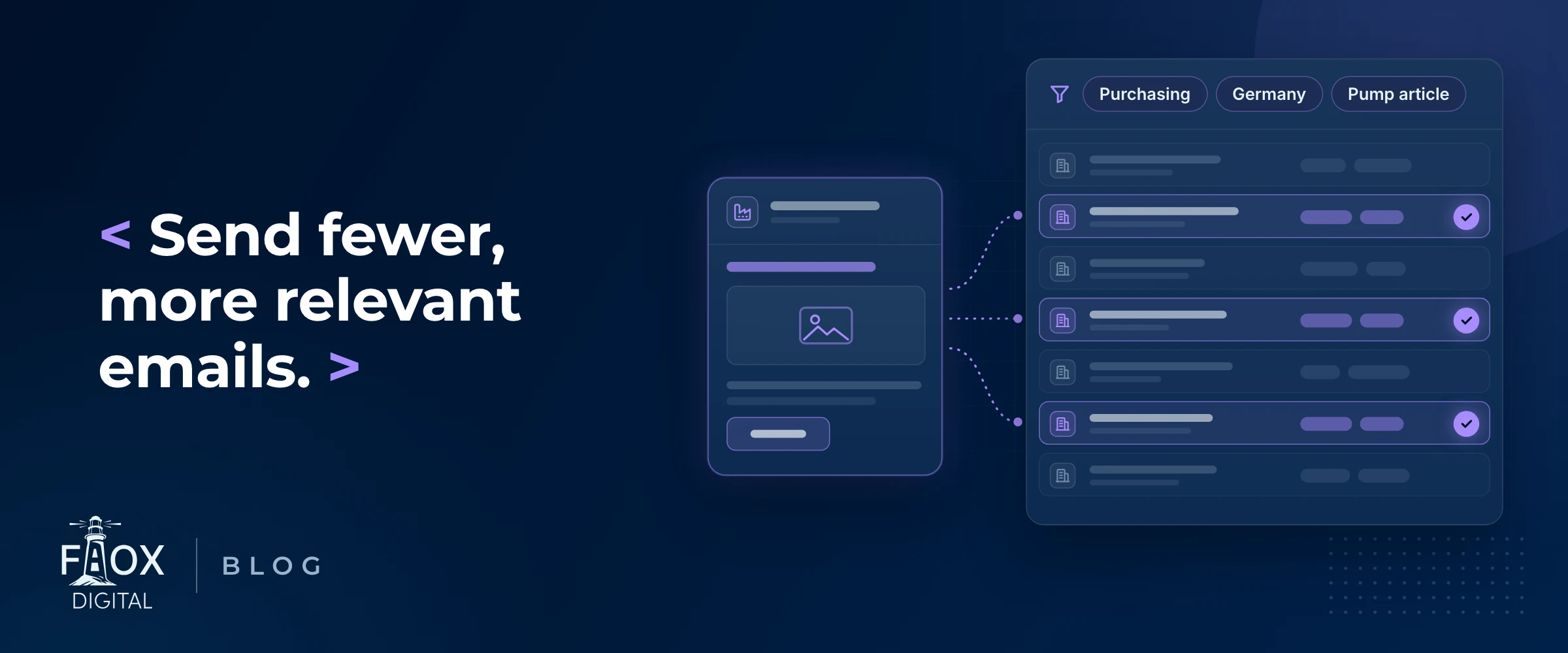
Email segmentation is dividing your email list into groups of contacts who share something that changes what you should send them, such as industry, company size, country and language, role, buying stage or product interest. In B2B, it lets a small team send fewer, more relevant emails across a long sales cycle. Build segments from fields in your CRM, keep them dynamic so that they update themselves, and judge each segment by clicks and replies.
Most B2B email lists start as one big list: customers, prospects, trade fair contacts and distributors, all receiving the same newsletter. The engineer gets the purchasing update, the German distributor gets the English version and the customer of ten years gets an introduction to the company. Each mismatch teaches people to ignore the next email.
This guide explains what email segmentation is, which criteria work for B2B lists, how to build segments in your CRM, how to personalize without overdoing it and which practices keep segments useful. It opens our series on list segmentation; you can find all Email & CRM articles on the category page.
What is email list segmentation?
Email segmentation, or email list segmentation, means dividing your email list into groups of contacts who share characteristics that matter for what you send them. Each group, or segment, receives emails written for it, or the same email with the parts that differ for it.
The term overlaps with customer segmentation in general. Market segmentation, deciding which industries, regions and customer groups a company targets, is a strategy question that comes first. Email segmentation is the practical side: using the data you hold on each contact to send the right email.
Three terms often get mixed up:
- A list is a set of contacts, often a fixed one, such as the visitors to one trade fair.
- A segment is a group defined by rules, such as purchasing contacts in Germany who clicked a pump article this year.
- A field or tag is a piece of data on a contact that segments are built from.
Why segmentation matters in B2B
In B2B, one email rarely suits everyone on the list. An engineer, a buyer and a managing director at the same customer need different information, and so do a new prospect and a customer of twenty years. Segmentation lets you:
- Send fewer emails to each person, because each one receives only what concerns them
- Write in the reader’s language and terms, for each market and role
- Follow the buying stage, with introductions for new contacts and service news for customers
- Learn more from results, because clicks and replies by segment show what each group values
The effect shows in the numbers. Mailchimp compared about 11,000 segmented campaigns with the same senders’ non-segmented campaigns, in an analysis last updated in 2017: segmented campaigns received 100.95% more clicks and 9.37% fewer unsubscribes. The data is old and the analysis does not say which industries or company sizes the senders came from, but the mechanism is the same: relevant emails get more clicks.
Mailbox providers watch engagement too. Gmail’s sender guidelines suggest periodically checking that recipients want to stay subscribed and considering unsubscribing those who do not open or read your messages, which is easier when engagement is a segment of its own.
Segmentation criteria for B2B lists
Most B2B segments combine a few criteria. The table shows the common ones, what they change in your emails and where the data usually comes from:
| Criterion | Example values | What it changes | Where the data comes from |
|---|---|---|---|
| Industry | Food processing, automotive, chemicals | Applications, examples and standards you mention | Company record, sign-up form, sales |
| Company size | Small, medium, large | Depth of the message and which offer fits | Company record, public company data |
| Country and language | Germany in German, Türkiye in Turkish | Language, local rules, events and contacts | Form, CRM, distributor |
| Job and role | Engineer, purchasing, management, maintenance | Technical depth and type of content | Form, sales, email signature |
| Buying stage | New contact, active prospect, customer, former customer | The aim: introduce, help decide, support, win back | Pipeline and orders |
| Product interest | Product lines or applications | Which products and cases you show | Clicks, downloads, quote requests, sales notes |
| Engagement history | Recent clicks and replies, or none for a long time | Frequency and re-engagement | Email tool |
| Contact source | Trade fair, website download, quote request, distributor | First emails and recorded consent | Source field in the CRM |
Start with two or three criteria that really change the message, usually role, country and language, and buying stage. Our article on B2B segmentation criteria gives examples by industry, role and stage.
What to send at each buying stage
The buying stage changes the purpose of every email, so it is often the first segment worth building:
| Buying stage | What they need | Example email |
|---|---|---|
| New contact | To understand who you are and what you solve | A short introduction with one useful guide |
| Active prospect | Help to decide: specifications, comparisons, proof | An application note or a technical comparison for their industry |
| Customer | Support, new products, service and renewal dates | Maintenance advice or a new accessory for what they bought |
| Former customer | A reason to come back | What has changed since their last order |
The stage comes from the CRM: the pipeline shows who is an active prospect, and orders show who is a customer. Update it automatically where you can, so that a first order moves the contact into the customer segment the same day.
Contact source and the first emails
The contact source says where a contact came from, and it shapes both the first emails and what you may send. A visitor who scanned a badge at a trade fair expects a follow-up on the conversation at the stand; someone who downloaded a guide expects more on that topic; a contact passed on by a distributor may need an introduction that explains how you work with that distributor.
Record the source on every contact with fixed values, such as the event name or the form, together with what the person agreed to receive. After the first weeks, the source matters less than role, stage and interest, but it stays useful for measuring which sources bring real opportunities.
Company, person and behavior data
Segmentation criteria come from three kinds of data:
- Company data: industry, company size, country and customer status. It sits on the company record and applies to everyone there.
- Person data: role, language, stated interests and consent. It belongs to the individual.
- Behavior data: emails clicked, pages visited, guides downloaded, quotes requested. It changes all the time and shows current interest.
Company and person data tell you who someone is; behavior data tells you what they care about now. The best segments combine both, such as maintenance managers in food plants who downloaded a cleaning guide.
Collect the data gradually rather than with long forms. Ask one or two useful questions at each step: role on a guide download, product interest on a newsletter sign-up, language at the first contact. Technical buyers are willing to make that trade: in the 2026 State of Marketing to Engineers survey by GlobalSpec and TREW Marketing, 85% said they would share their information for technical content they find valuable.
Keep the segment data in your CRM
Segments are only as good as the data behind them, and that data belongs in the CRM, not in a separate spreadsheet for each campaign. The CRM holds the company and person data and the sales stage; the email tool adds engagement and sends the emails. Keep the fields that segments rely on as fixed lists, so that "Germany", "DE" and "Deutschland" do not become three segments.
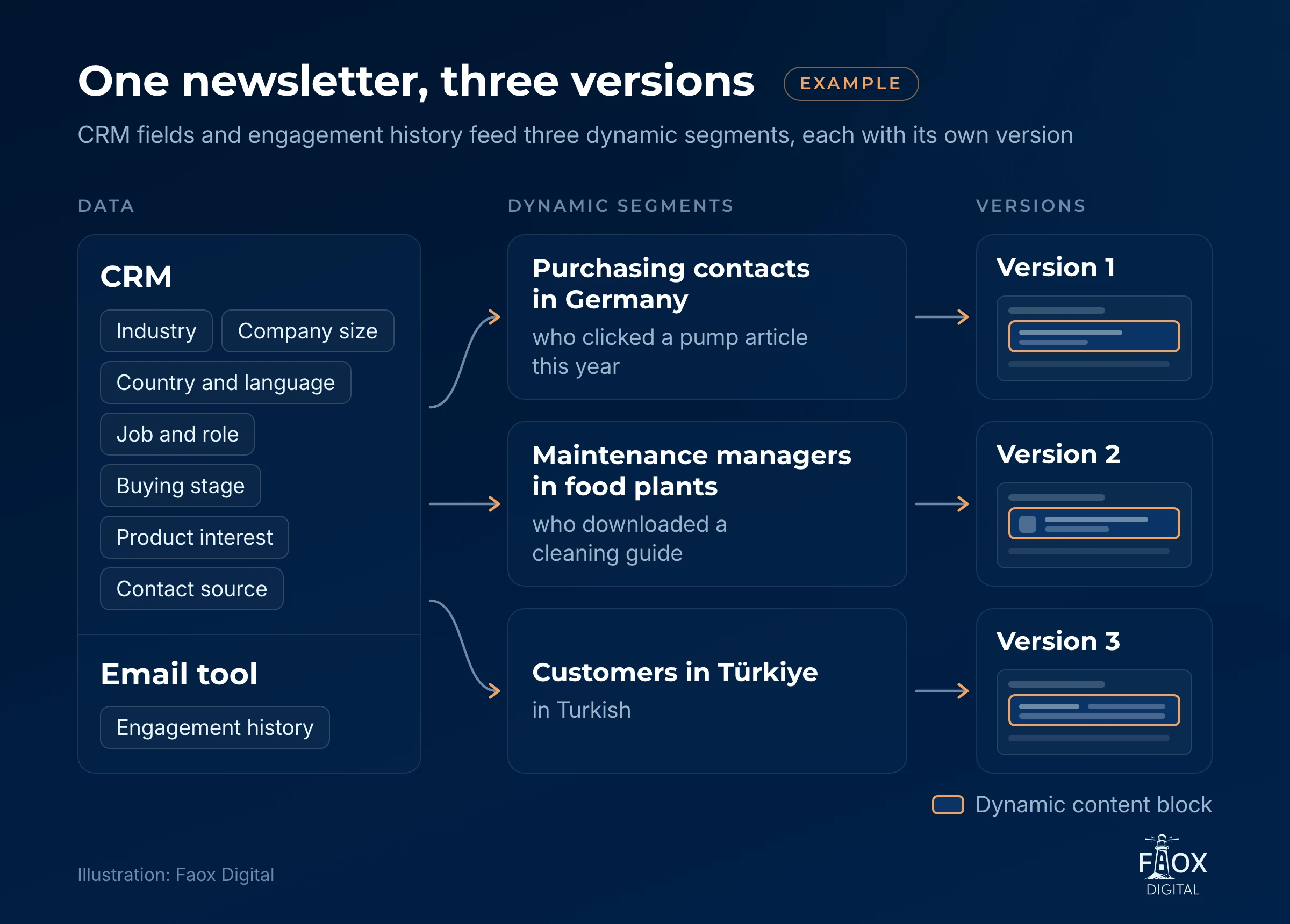
Decide who updates what: sales keeps stages and roles current, marketing keeps sources and consent, and the email tool records engagement automatically. Our B2B CRM guide explains how these records fit together.
Static lists and dynamic segments
Segments come in two kinds:
| Static list | Dynamic segment | |
|---|---|---|
| How it works | A fixed set of contacts saved at one moment | A rule that adds and removes contacts as their data changes |
| Good for | One-off sends, such as visitors to one trade fair | Newsletters, stage-based emails and anything that runs over time |
| Watch out for | It goes out of date | The rule must use reliable fields |
Tools name these differently. At the time of writing (November 2026), HubSpot calls them static and active segments, and its help center says active segments add and remove records automatically as they meet or stop meeting the criteria. Mailchimp’s help center says its segments update every time an email is sent.
For a B2B list, make the dynamic segment the default. A contact who moves from prospect to customer then stops receiving introductions without anyone touching the list.
Engagement segments and re-engagement
Engagement history deserves segments of its own. Base them on clicks and replies rather than opens: Apple’s Mail Privacy Protection, for example, prevents senders from seeing whether a message was opened. A simple split works for most lists:
- Engaged: clicked or replied recently
- Quiet: received emails for some months without clicking
- Inactive: no clicks or replies for a long period, such as a year
Send engaged contacts your regular emails, send quiet contacts fewer and more selective ones, and send inactive contacts a short re-engagement email asking whether they still want to hear from you. Those who do not respond leave the main segments. This keeps the list healthy and follows Gmail’s advice to confirm that recipients want to stay subscribed.
Account-level segments
In B2B, some segments belong at the company level. Key accounts, the customers of one distributor or every company with an open quote can form segments that include all the contacts at those companies. That lets marketing support sales, for example by sending a technical guide to the engineers at companies where a quote is open while the salesperson talks to the buyer. Agree with sales which account segments marketing may email, so that no newsletter arrives in the middle of a negotiation by surprise.
How to segment an email list
- Start from what you will send differently. A segment is worth building only if it gets a different email, or a different part of one.
- Choose two or three criteria that change the message most, usually role, country and language, and buying stage.
- Check your data. Count how many contacts have each field filled in; a criterion that is empty for most contacts cannot drive a segment yet.
- Fill the gaps: add a field to your forms, ask sales to complete roles and stages, and let contacts choose their interests on a preferences page.
- Build dynamic segments in your CRM or email tool from those fields.
- Plan content for each segment, reusing the same core piece with different examples, language or calls to action.
- Measure clicks and replies by segment, then adjust the rules and the content.
Segmentation is one part of email marketing for B2B, alongside the list, consent, inbox placement and measurement.
Personalization: using segments well
Personalization is what segments make possible. In the Content Marketing Institute’s research for 2026, a survey of 1,015 B2B marketers, 89% said their organizations personalize content and 85% named email campaigns when asked where they use it, but 59% of those whose organizations personalize described it as basic: one or two channels with minimal integration. A first name in the greeting is not much on its own.
Useful personalization in B2B email means:
- The right language and market, with local examples, standards and events
- Content for the role: technical detail for engineers, terms and delivery for purchasing
- The right products, based on what the contact has shown interest in
- The right sender, such as the salesperson who knows the customer
- Dynamic content blocks that change one section of an email for each segment, instead of building separate emails
Keep it natural. Personalization that reveals more than the contact expects, such as the pages they visited yesterday, can feel intrusive.
Keep segments clean
Segments decay as people change jobs, companies merge and addresses stop working. Clean the list regularly: remove hard bounces, update departed contacts, merge duplicates and review contacts who have not engaged for a long time. Our guide to cleaning your email list shows how to do it without losing good contacts, and our article on when to use an email list cleaning service explains what such services can and cannot fix.
Segmentation and data protection
Segmentation uses personal data, so the rules that apply to your emails apply to it as well. Under Article 21 of the GDPR (2016), people can object at any time to the processing of their personal data for direct marketing, including profiling related to it, and after an objection their data may no longer be processed for that purpose. Record consent and objections in the CRM so that every segment respects them, use only the data you need, and check the rules of each market you send to. This is general information, not legal advice.
Email segmentation best practices
- Every segment exists because it receives a different email
- Segments are built from CRM fields with fixed values, not from free text
- Dynamic segments are the default; static lists are for one-off sends
- New contacts get a source, a language and a role from the start
- Consent and unsubscribes apply across all segments
- Contacts who have not engaged for a long time get a re-engagement email, then leave the main segments
- Results are compared by segment: clicks, replies and conversations for sales
The common mistakes are the reverse: so many small segments that nobody has time to write for them, segments built on fields that are empty for most contacts, static lists that drift out of date, and sending everything to everyone just in case.
How Faox Digital approaches email segmentation
Faox Digital segments email lists by behavior and stage rather than sending one message to everyone, after an audit that cleans the list, the CRM and past sends and removes dead and duplicate contacts. The segments live in the client’s own CRM and tools, and the results are read in replies, qualified conversations and pipeline.
Key takeaways
- Email segmentation divides a list into groups that share something that changes what you send them.
- In B2B, the most useful criteria are usually role, country and language, buying stage and product interest.
- Keep the segment data in the CRM as fixed fields, and make dynamic segments the default.
- Personalize beyond the first name: language, role, products and the right sender.
- Clean segments regularly, respect objections and consent, and judge each segment by clicks and replies.
Frequently asked questions
What is email list segmentation?
It is dividing an email list into groups of contacts who share characteristics, such as industry, role, country, buying stage or interests, so that each group receives emails that fit it. In B2B, segments are usually built from fields in the CRM.
How do you segment an email list?
Decide what you will send differently, pick two or three criteria that change the message, check that your CRM holds that data, fill the gaps, build dynamic segments and measure clicks and replies by segment.
How do you send an email to a segment in HubSpot or Mailchimp?
In both tools you build the segment from conditions on contact data and choose it as the recipients of the email. At the time of writing, HubSpot offers active segments that update themselves and static ones that do not, and Mailchimp allows up to 10 conditions per segment on its Free and Essentials plans, with an advanced builder on Standard and higher plans.
How many segments does a B2B list need?
Fewer than most teams expect. Start with the two or three criteria that change your message, such as role, language and buying stage, and add more only when you have the content to send. A segment without its own email adds work without adding relevance.
Sources
- Mailchimp: Effects of List Segmentation on Email Marketing Stats, updated February 2017
- Content Marketing Institute: B2B Content and Marketing Trends, Insights for 2026, 2025
- GlobalSpec and TREW Marketing: 2026 State of Marketing to Engineers, 2026
- EUR-Lex: Regulation (EU) 2016/679 (GDPR), Article 21, 2016
Let’s talk
Have contacts you never follow up with?
Tell us about the list you already have. We will show you how email and CRM can turn it into conversations.