
Email Open Rate: Why It Misleads and What B2B Teams Should Track Instead
What the email open rate measures, why Apple Mail Privacy Protection, image blocking and bots make it unreliable, what it can still tell you and which metrics B2B teams should report instead.
The email open rate is the share of delivered emails that registered an open, and it is no longer a reliable measure. Opens are counted through a tiny image that loads when an email is displayed: Apple’s Mail Privacy Protection can load it whether or not anyone reads the message, and email apps that block images never load it. Judge B2B emails instead by clicks, replies, bounces, complaints and unsubscribes, and by the qualified conversations and sales opportunities they lead to, compared with your own past sends.
The open rate is usually the first number in an email report, and often the one quoted in meetings. It is also the least reliable. Since 2021 it has said as much about which email apps your readers use as about whether anyone read your email.
This guide explains what the email open rate means and how it is measured, why it is inflated and sometimes deflated, what it can still tell you and which metrics B2B teams should track instead. For the wider question of how emails reach the inbox at all, see our email deliverability guide.
What the email open rate means and how it is measured
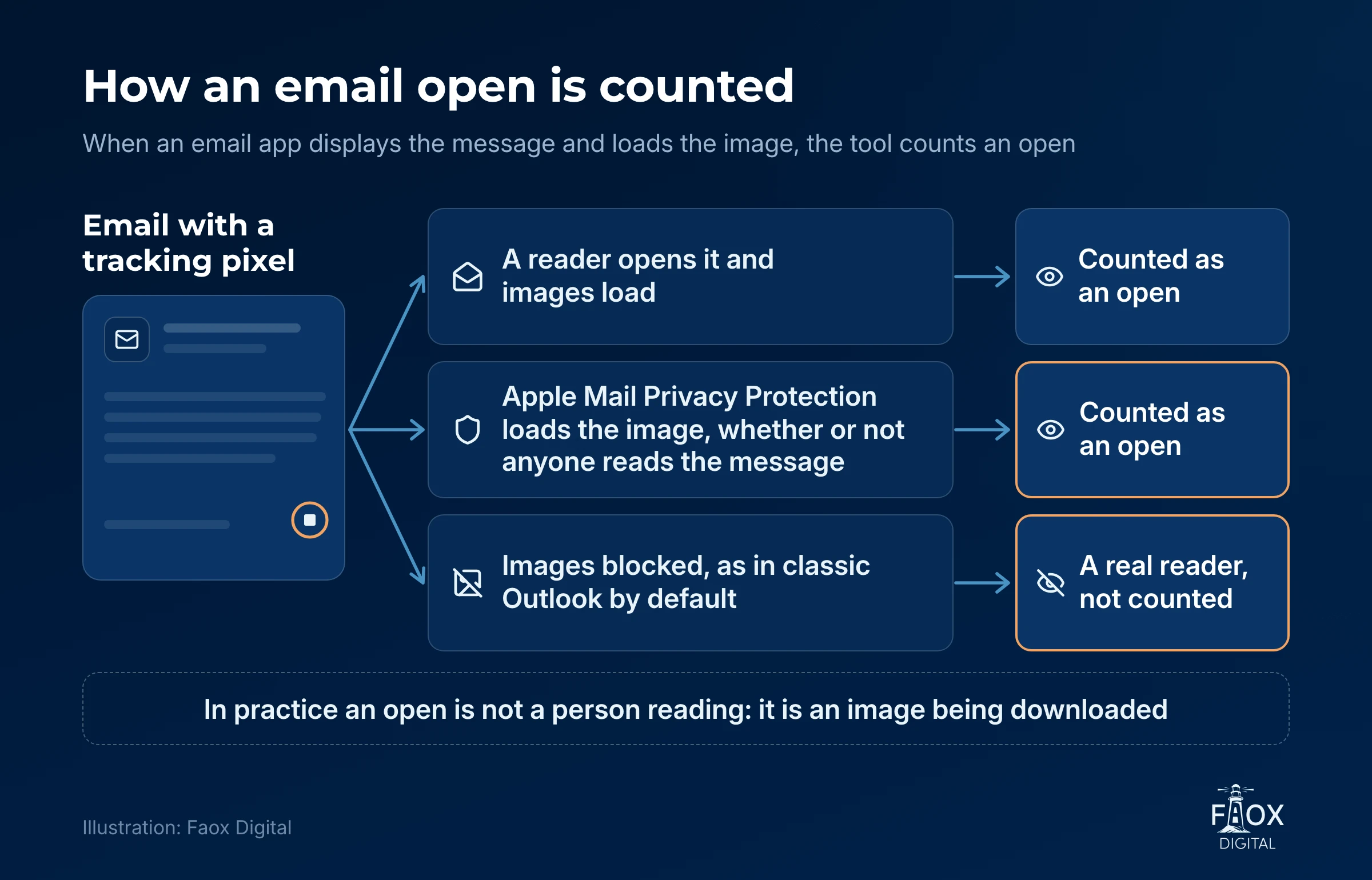
The open rate is the share of delivered emails that registered at least one open. Mailchimp’s help center describes how it is measured there: the tool loads a tiny, transparent image into each email and counts how often that image is downloaded. This image is the tracking pixel. When an email app displays the message and loads the image, the tool counts an open.
Mailchimp also counts a click as an open, because a reader has to open an email to click a link in it. Most email tools work in a similar way, so in practice an open is not a person reading: it is an image being downloaded. Two things break the link between the two.
Why email open rates are inflated
In June 2021, Apple announced Apple Mail Privacy Protection for its Mail app. In Apple’s words, it stops senders from using invisible pixels to collect information about the user and helps users prevent senders from knowing when they open an email. Apple’s support pages describe it the same way today: it hides the reader’s IP address and prevents senders from seeing whether a message was opened.
For senders, the result is that emails delivered to readers who use the feature can show up as opened whether or not anyone read them. Apple is not the only cause. Mailchimp’s help center describes bot activity as non-human interaction that usually comes from automated security services, including anti-spam checks by email providers, Apple’s Mail Privacy Protection and link preview generators, which often open emails and click links before the reader does. Because these tools click as well as open, clicks can be inflated too.
Why opens are also undercounted
The tracking pixel fails in the other direction as well. Microsoft’s support page says classic Outlook is configured by default to block automatic picture downloads from the internet, and Mailchimp notes that when a reader’s email app has images turned off, the tracking image does not load and the email is not counted as opened. A buyer who reads your email in Outlook without downloading pictures does not appear in your open rate unless they click.
So the open rate mixes machine opens that were never reads with real reads that were never counted. It cannot tell you how many people read your email, and it cannot tell you who did.
What the open rate can still tell you
The open rate is not useless if you use it carefully:
- Make a comparison with your own past sends, to the same list and type of email, not with industry averages. A sudden fall across all mailbox providers can point to a deliverability problem, such as emails going to spam; if that happens, check that your SPF, DKIM and DMARC records are in order.
- Filter out machine opens where your tool allows it. Mailchimp, for example, offers bot filtering, with filtered data for Mail Privacy Protection opens from July 2024 onwards.
- Treat it as one signal among several, never as the goal of a campaign or the deciding measure in a subject line test.
Published averages are best ignored: they mix industries, audiences and tools, and the same machine opens inflate them. If your concern is that people do not open your emails at all, our article on why nobody opens your emails covers sender names, subject lines and timing.
What B2B teams should track instead
Replace the open rate with three groups of metrics: whether the email arrived, whether people acted on it, and whether it led to sales.
| Metric | What it shows | What to watch |
|---|---|---|
| Delivery rate | Share of sent emails accepted by receiving servers | Drops after a list import or a change to your sending setup |
| Bounces | Addresses that could not receive the email | Remove hard bounces at once |
| Complaints | Readers who marked the email as spam | Any rise; complaints damage your reputation with mailbox providers |
| Unsubscribes | Readers who no longer want your emails | A spike after one send points to that send |
| Click rate | Share of delivered emails with at least one click | Machine clicks from security scanners |
| Replies | People who answered the email | The clearest sign of interest |
| Qualified conversations | Calls or meetings that sales counts as real | Recorded in the CRM, with the email as source |
| Sales opportunities | Deals that started from or were helped by email | Pipeline value, not only the number of deals |
Delivery: delivery rate, bounces, complaints and unsubscribes
The delivery rate, bounces, complaints and unsubscribes tell you whether your list and sending setup are healthy. Read them after every send. A drop in the delivery rate or a rise in any of the others matters more than a change in opens, because it affects whether your next emails reach the inbox at all.
Engagement: click rate and replies
The click rate shows who did something with the email, but read it with care: filter machine clicks where your tool allows (Mailchimp’s bot filtering covers email clicks from August 2025) and look at which links were clicked, not only how many. Replies are the strongest engagement signal a B2B email can produce, so make replying easy: send from a person, ask one clear question and make sure someone reads the answers, as in a B2B welcome sequence. For a newsletter, compare clicks per article over several issues; our B2B newsletter guide covers what to put in it.
Results: qualified conversations and sales opportunities
Qualified conversations and sales opportunities connect email to sales. Record in the CRM which campaign or sequence each contact came from, and count the meetings, quotes and deals that follow. How email fits into the measurement of marketing as a whole, including attribution, is covered in our guide to B2B marketing metrics.
Reading a sudden change in opens
When the open rate moves sharply, look further before you celebrate or worry:
- A sudden jump often comes from machine opens, for example when a security service starts checking your emails, or from a change in how your tool counts opens. Check whether clicks and replies rose too.
- A fall at one mailbox provider points to a deliverability problem with that provider. Send test emails to accounts there and check whether they land in spam.
- A fall across all providers points to your list, your sending setup or a change in your tool’s reporting, such as turning on bot filtering.
In each case the answer lies in the other metrics, not in the open rate itself.
Testing subject lines without relying on opens
Subject line tests are the classic use of the open rate, and the one most distorted by machine opens. Test differently:
- Decide the winner by clicks or replies, not by opens.
- Test one change at a time, such as a question against a statement, on groups large enough to show a clear difference.
- Repeat a test before you adopt the result, because one send can mislead.
- Keep the subject honest: a subject line that wins opens but loses clicks is not a winner.
How to set up email reporting
- Turn on bot filtering in your email tool if it offers it, and note the date you did.
- Use a reply address someone reads, and count replies for each send.
- Tag the links in your emails, so visits and form submissions show up in your web analytics with the campaign name.
- Record the source in the CRM: which email or sequence each conversation and opportunity came from.
- Report the same few metrics every month, compared with your own recent sends, not with averages.
Common mistakes
- Reporting opens as readers, as if every open were a person who read the email.
- Choosing subject lines by open rate alone, when machine opens can decide the result.
- Comparing your open rate with an industry average, which tells you little about your own list.
- Cleaning the list by opens only, which keeps machine-opened addresses and can remove real readers who block images; use clicks and replies over a longer period instead.
- Stopping at clicks, without checking what happened in the CRM afterwards.
If delivery metrics keep getting worse and you cannot find the cause, the next step may be an email deliverability consultant.
How Faox Digital measures email results
Faox Digital, a digital growth partner for B2B companies in complex and international markets, judges email work by replies, qualified conversations and pipeline rather than by opens. We plan segments by behavior and stage and keep a steady sending rhythm with healthy deliverability, in the client’s own tools.
Key takeaways
- The open rate counts image downloads, not readers, so it is no longer a reliable measure.
- Apple Mail Privacy Protection and security scanners inflate opens; image blocking, as in classic Outlook, hides real readers.
- Use opens only to compare with your own past sends and to spot sudden deliverability problems.
- Track delivery rate, bounces, complaints, unsubscribes, clicks and replies after every send.
- Connect email to qualified conversations and sales opportunities in the CRM.
Frequently asked questions
What is the email open rate?
The share of delivered emails that registered at least one open. Email tools count an open when a tiny tracking image in the email loads, so the rate measures image downloads, which machines can trigger and image blocking can prevent, rather than people reading.
What is a good email open rate?
There is no reliable benchmark any more, because machine opens inflate the averages and image blocking hides real readers. Compare your open rate only with your own past sends to the same list, and judge your emails by clicks, replies and the conversations they lead to.
Why are my email open rates so high?
Usually because of machine opens. Apple’s Mail Privacy Protection can load the tracking image whether or not the reader opens the email, and security services that check emails before delivery can open them too. Turn on bot filtering if your tool offers it.
How do you measure email open rate accurately?
You cannot measure it exactly. Filter out machine opens where your tool allows, read the rate only as a trend against your own past sends, and add metrics that need a person: clicks on specific links, replies and conversations recorded in your CRM.
Sources
- Apple Newsroom: Apple advances its privacy leadership with iOS 15, iPadOS 15, macOS Monterey, and watchOS 8, June 2021
- Mailchimp Help: About bot activity and bot filtering, accessed November 2026
- Microsoft Support: Block or unblock automatic picture downloads in classic Outlook email messages, accessed November 2026
Let’s talk
Have contacts you never follow up with?
Tell us about the list you already have. We will show you how email and CRM can turn it into conversations.