
Email List Hygiene: How to Clean a B2B List Without Losing Good Contacts
Which records to fix or remove from a B2B email list, how to handle bounces, duplicates, role addresses, unsubscribes and quiet contacts, and a step-by-step way to clean without losing good contacts.
Email list hygiene means regularly fixing or removing the contacts that harm your sending and your reports: bounced addresses, invalid and duplicate records, unsubscribes, complaints and contacts who have not engaged for a long time. In B2B, clean with care: treat a bounce as a possible job change and update the CRM, try to re-engage quiet contacts before you stop emailing them, and keep unsubscribed people as suppressed records instead of deleting them.
Every B2B list decays. People change jobs, companies change domains, trade fair contacts go stale and the same buyer ends up in three spreadsheets. Sending to that list anyway costs more than wasted emails: bounces and complaints tell mailbox providers that you do not look after your list, and your reports start counting people who are no longer there.
This guide shows which records to fix or remove, how to clean a list step by step and how often, without throwing away contacts who are simply quiet. How segments depend on clean data is covered in our email segmentation guide.
Why email list hygiene matters
A clean list protects three things: whether your emails reach the inbox, whether your reports are true and whether your segments put the right people in the right group.
Mailbox providers spell out what they expect. Gmail’s sender guidelines tell senders to automatically unsubscribe recipients who have multiple bounced messages, and to keep their spam rate below 0.10% and never reach 0.30%. Our guide to email deliverability explains how bounces and complaints affect inbox placement. The lesson is the same either way: a smaller list of people who want to hear from you beats a large list full of addresses that bounce or never respond.
Which records to fix or remove
Not every problem record should be deleted. This table shows what each type means and what to do:
| Record | What it means | What to do |
|---|---|---|
| Hard bounce | The address does not exist or the server refuses it permanently | Stop emailing it now; check whether the person left the company |
| Soft bounce | A temporary problem, such as a full mailbox or a server that is down | Let the email tool retry; suppress the address after several in a row |
| Invalid address | A typo or impossible format, such as a misspelled domain | Fix it if the correct address is obvious; otherwise remove it |
| Duplicate record | The same person or company entered more than once | Merge, keeping the most complete record and its history |
| Role address | A shared mailbox such as info@ or sales@ | Keep it only where someone asked to receive email there |
| Long-term unengaged | No clicks, replies or meetings for a long period | Try a re-engagement email, then stop emailing |
| Unsubscribed | The person asked to stop receiving email | Suppress at once, and keep the record so they are never re-added |
| Complaint | The person marked your email as spam | Suppress at once, and check where the address came from |
Hard and soft bounces
A bounce is the message a receiving server sends back instead of delivering your email. RFC 3463 (2003), the standard for these status codes, sorts failures into two classes. A 5.x.x code is a permanent failure that is not likely to be resolved by resending the message in its current form: what email tools call a hard bounce. A 4.x.x code is a persistent transient failure, where sending later may succeed: a soft bounce, typically a full mailbox or a server that is temporarily unavailable.
Stop sending to hard bounces immediately. Soft bounces usually clear on their own, but an address that keeps soft-bouncing is as good as dead, which is why Gmail’s guidelines ask senders to unsubscribe recipients after multiple bounces. Old hard bounces are also a risk in themselves: Spamhaus explains that some addresses which have hard-bounced for a period, often 12 months or more, are later turned back on as spam traps.
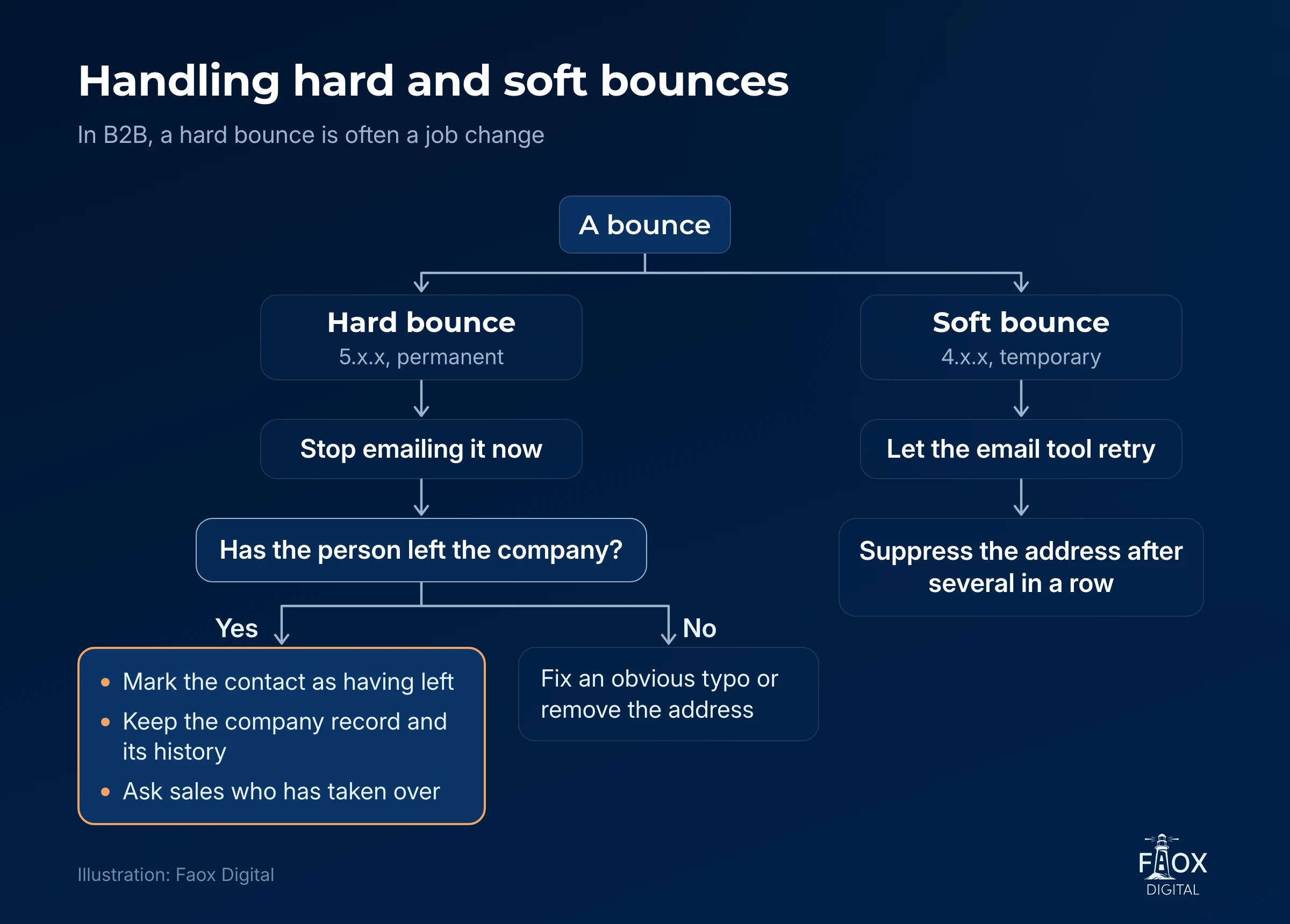
In B2B, a hard bounce often means a person has left the company. Before you delete anything, check the CRM: mark the contact as having left, keep the company record and its history, and ask sales who has taken over. A bounce can be the start of a new contact rather than the loss of an old one.
Invalid addresses and duplicate records
Invalid addresses can never work: a missing @, a space, a domain with a typo. Fix a typo only when the intended address is obvious, such as a misspelling of a customer’s domain you know, and do not guess. Spamhaus notes that some spam traps sit on typo domains that resemble common ones, such as homail.com, so mail to misspelled domains can hit them. Confirming each new address when someone subscribes, as Gmail’s guidelines recommend, prevents most typos.
Duplicate records appear when the same person arrives from a trade fair scan, a website form and a salesperson’s spreadsheet. They cause double sends and split the history of one relationship across several records. Merge them by email address for contacts and by website domain or tax number for companies, keeping the most complete record; the matching rules are set out in our CRM implementation plan.
Role addresses
Role addresses belong to a function rather than a person: info@, sales@, support@, purchasing@. RFC 2142 (1997), the standard for common mailbox names, lists several of them, from INFO, SALES and SUPPORT for business functions to ABUSE for network operations and POSTMASTER for email (SMTP).
In B2B they are not always a problem. A purchasing@ address that a customer gave you for order news is a real contact. But a role address that nobody subscribed to is read by several people, none of whom asked for your newsletter, and they are more likely to complain. Keep role addresses only where someone chose to receive email there, never add operations addresses such as abuse@ or postmaster@, and try to find the named person behind a role address.
Unsubscribes and complaints
Unsubscribes must be honored, and they must stick. The FTC’s CAN-SPAM guide requires opt-out requests to be honored within 10 business days, and most email tools process them at once. The risk in B2B is re-adding people from old spreadsheets or a salesperson’s import. Keep unsubscribed contacts on a suppression list, check every import against it, and do not delete their records: an unsubscribed buyer can still be a customer in the CRM, just not on your mailing list.
Complaints, when someone marks your email as spam, are the strongest negative signal you can give a mailbox provider. Suppress complaining contacts immediately and look for a pattern: an old list, a purchased list or a segment that did not expect your email.
Long-term unengaged contacts
Long-term unengaged contacts are the hardest call in B2B, because buying cycles are long and a quiet engineer may still buy next year. Define engagement by clicks, replies, form submissions and meetings, not by opens, which privacy features make unreliable; our article on email open rate explains why.
- Look beyond email first. A contact with an open deal, a recent order or a meeting last month is not inactive, whatever the email data says.
- Send a re-engagement email that asks plainly whether they still want to hear from you.
- Stop emailing those who still do not respond, and keep their records in the CRM.
Gmail’s guidelines go further, advising senders to periodically confirm that recipients want to stay subscribed and to consider unsubscribing those who don’t open or read their messages.
Excel and CRM records: one standard
Most B2B lists live in several places: the CRM, the email tool, a trade fair spreadsheet and a salesperson’s own file. Cleaning one copy while the others keep feeding it back does not work. Bring the Excel and CRM records into one place, usually the CRM, and keep the email tool in sync with it.
Agree a formatting standard for the fields people type:
- Names with capital initials, and no job titles in the name field
- Countries and industries from fixed lists, not free text
- One phone format, with the country code
- Company names written the same way every time
Add a source field to every record, showing where it came from: the trade fair and year, the website form, the import file. The source tells you which lists cause bounces and complaints, and it is what segmenting by source depends on; see how to segment B2B contacts.
How to clean an email list, step by step
- Export everything from the CRM, the email tool and spreadsheets into one working file, with the source of each record.
- Remove unsubscribes and complaints first, and keep them on the suppression list.
- Remove hard bounces and repeated soft bounces, and flag for sales the contacts who may have left their company.
- Fix or remove invalid addresses, correcting only obvious typos.
- Merge duplicates by email address, website domain or tax number.
- Standardize formats and fill in the source field.
- Review role addresses and keep only those that asked to be there.
- Re-engage long-term unengaged contacts, then stop emailing those who stay silent.
- Import the clean list into one system, check it against the suppression list and note the date of the cleaning.
How often to clean a B2B list
Some hygiene is continuous: your email tool should handle bounces, unsubscribes and complaints after every send. Review duplicates and new imports monthly, and run the engagement review once or twice a year, a longer window than a consumer brand would use, because B2B buyers can be quiet for months. Clean before any large campaign, before a migration to a new CRM or email tool, and after every trade fair import.
Some lists are too large or too old to clean by hand. When that is the case, the next question is when an email list cleaning service helps and what it won’t fix.
How Faox Digital cleans a B2B list
Faox Digital, a digital growth partner for B2B companies in complex and international markets, starts email work with an audit and clean-up of the list, the CRM and past sends, removing dead and duplicate contacts before anything new goes out. Starting from trade fair contacts or a spreadsheet is fine, and everything is then built in the client’s own tools, signed off by the client.
Key takeaways
- Email list hygiene fixes or removes bounced, invalid and duplicate addresses, unsubscribes, complaints and long-term unengaged contacts.
- Stop sending to hard bounces at once, and in B2B treat them as a possible job change to follow up.
- Keep unsubscribes and complaints on a suppression list, and check every import against it.
- Judge engagement by clicks, replies and meetings, and try to re-engage before you stop emailing.
- Keep one formatting standard and a source field for every record, and clean continuously.
Frequently asked questions
What is email list hygiene?
It is the regular work of keeping a mailing list accurate and wanted: removing or fixing bounced, invalid and duplicate addresses, suppressing unsubscribes and complaints, and no longer emailing people who have stopped engaging.
What are email list hygiene best practices?
Confirm new addresses when people subscribe, let your email tool handle bounces and unsubscribes automatically, check every import against a suppression list, merge duplicates, use one formatting standard and a source field, and review engagement once or twice a year.
What happens with poor email list hygiene?
Bounces and complaints rise, mailbox providers start filtering your email, old addresses can turn into spam traps, and your reports count people who are no longer there. Segments stop working too, because the data behind them is wrong.
How often should you clean a B2B email list?
Handle bounces, unsubscribes and complaints after every send, review duplicates and imports monthly, and review engagement once or twice a year. Also clean before large campaigns and migrations, and after every trade fair import.
Sources
- RFC 3463: Enhanced Mail System Status Codes, January 2003
- Gmail Help: Email sender guidelines, accessed November 2026
- Spamhaus: Spamtraps, fix the problem, not the symptom, February 2022
- Federal Trade Commission: CAN-SPAM Act, A Compliance Guide for Business, accessed November 2026
Let’s talk
Have contacts you never follow up with?
Tell us about the list you already have. We will show you how email and CRM can turn it into conversations.