
What Is a B2B CRM? A Complete Guide for Sales and Marketing Teams
What a B2B CRM is, what it does for sales and marketing, and what to set up so that your team gets real value from it.
A B2B CRM (customer relationship management system) is the shared database where a business-to-business company keeps its customer companies, contacts, sales opportunities, quotes and the history of every conversation. It gives sales and marketing one view of each customer across a long sales cycle. To get real value from it, set up clean contact and company records, pipeline stages that match how your customers buy, activity and quote tracking, email integration and a few reports people use, and keep the data accurate.
In many B2B companies, customer knowledge lives in a dozen places: a salesperson’s inbox, a spreadsheet of trade fair contacts, the ERP’s customer list and the memory of whoever has been there longest. When that person leaves, or a large quote goes quiet, nobody can see the whole picture. A CRM exists to fix that.
This guide explains what a B2B CRM is, what it does for sales and marketing, which parts matter most and what to set up so that your team actually uses it. It opens our series on CRM setup and management; you can find all Email & CRM articles on the category page.
What is a B2B CRM?
CRM stands for customer relationship management. The term covers both a way of working, in which every customer contact is recorded and followed up, and the software that supports it. A B2B CRM is that software set up for business-to-business sales: it is organized around companies rather than individual consumers, follows sales that take months and involve many people, and keeps track of quotes, distributors and repeat orders.
In practice, a B2B CRM answers questions like these in seconds: who do we know at this company, what did we last discuss, which quotes are open, which deals should close this quarter and which contacts clicked last month’s newsletter.
CRM software is common but far from universal. In Eurostat’s 2025 survey of EU enterprises with at least 10 persons employed, 25% of small companies (10 to 49 persons employed) used CRM software, against 65% of large ones (250 or more).
When a spreadsheet stops being enough
A spreadsheet can hold a contact list for years. It stops being enough when the work becomes shared:
- Several people sell to the same customers, and nobody knows who spoke to whom last
- Trade fair contacts are typed in once and never followed up
- Quotes go out, and nobody notices which ones have had no answer
- A salesperson leaves, and the customer history leaves too
- Marketing cannot build a list by industry or stage without asking around
- The manager asks for the pipeline and receives five versions
If two or three of these sound familiar, you are already paying for not having a CRM, in lost follow-ups rather than license fees.
What a B2B CRM does for sales and marketing
A CRM is only worth the effort if it changes daily work. In a B2B company, it should:
- Keep the company’s memory. Every call, visit, email and quote stays with the customer record, not in one person’s inbox.
- Make follow-up reliable. Tasks and reminders make sure an enquiry or a quote does not go quiet.
- Show the pipeline. Sales managers see which deals are at which stage and what is likely to close.
- Give marketing a clean audience. Segments by industry, role, market and stage feed newsletters and campaigns.
- Connect marketing to revenue. When the source of each lead is recorded, you can see which channels lead to real opportunities.
- Support service and repeat business. Installed products, service history and renewal dates prepare the next sale.
The value comes from the habit, not the software. A CRM that only some people update becomes one more partial list.
Who uses the CRM, and for what
A B2B CRM serves several roles, and each one records something the others need:
| Role | Uses the CRM to | Records for others |
|---|---|---|
| Salesperson | Plan calls and visits, follow up quotes and prepare meetings | Activities, next steps, stage changes and lost reasons |
| Sales manager | Review the pipeline, help with stuck deals and forecast | Account owners, targets and priorities |
| Marketing | Build segments, send campaigns and see which sources create opportunities | Lead sources, campaign responses and consent |
| Customer service | See installed products, open issues and the right contacts | Service cases and complaints |
| Management | Read the forecast and the patterns in won and lost deals | Decisions on markets and product priorities |
When each role records what the others need, the CRM pays back the time it takes.
Contact and company records
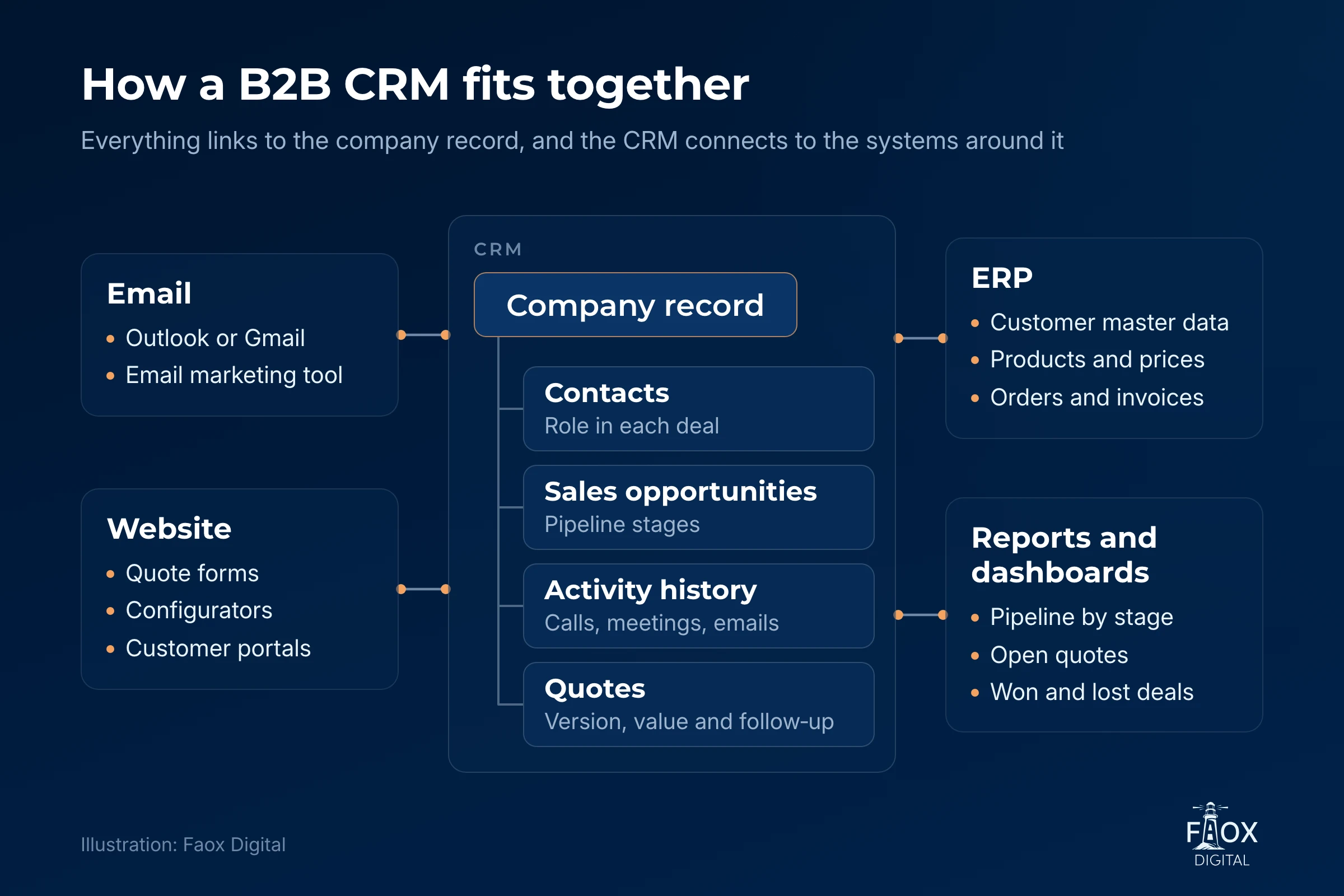
Contact and company records are the foundation. In B2B, the company, often called the account, is the main record, and people are linked to it:
- Company records hold the legal name, addresses, industry, size, country, the account owner in your team and the customer number used in the ERP.
- Contact records hold each person’s name, role, email, phone, language and consent, and link them to their company.
- Relationships link a distributor to the end customers it serves, a subsidiary to its parent group and a project to the contractor, consultant and plant involved.
Many people take part in a single purchase. Forrester’s State of Business Buying 2026 reports that the typical buying decision includes 13 internal stakeholders and nine external influencers. Record the role each contact plays in a deal, such as technical evaluator, purchaser, decision maker or user, so that sales and marketing know who needs which information.
Some CRMs keep leads as a separate record type, while others mark the stage on the contact. Either way, a lead is someone who has shown interest but has not been checked yet, such as a guide download or a badge scan at a trade fair. Once someone confirms a real need, the lead becomes a contact linked to a company, and often to an opportunity. Agree when that change happens and who makes it.
Decide early which fields are required and which lists are fixed. An "industry" field typed freely by ten people produces ten spellings; a fixed list produces a report.
Sales opportunities and pipeline stages
A sales opportunity, often called a deal, is a possible sale to a company: what they might buy, roughly what it is worth and when they might decide. The pipeline is the set of all open opportunities, and pipeline stages describe where each one stands.
Stages should follow how your customers buy, not how a sales textbook describes selling. For a manufacturer, a simple set might look like this:
| Stage | What has happened | Moves on when |
|---|---|---|
| Enquiry | A request has arrived from the website, an email, a trade fair or a distributor | Someone has checked the need and the fit |
| Qualified | The application, quantities and timing are clear enough to work on | The technical requirements are confirmed |
| Technical review | Engineers check the specification, drawings or samples | A solution is agreed |
| Quote sent | A priced offer has gone to the customer | The customer responds or asks for changes |
| Negotiation | Price, terms or delivery are under discussion | The customer decides |
| Won or lost | An order has arrived, or the customer has chosen otherwise | A reason is recorded |
Each stage needs a clear exit criterion, so that two salespeople put the same deal in the same place. Record a reason for every lost deal; after a year, those reasons show patterns in price, lead time and product fit.
Each opportunity also carries a value and an expected close date. Many teams give every stage a probability, low at enquiry and higher in negotiation, and multiply it by the value to get a weighted pipeline for the forecast. Treat those probabilities as estimates and compare them with your won and lost history once a year, because a forecast built on guessed probabilities only looks precise.
Activity history and quote tracking
The activity history is the timeline on each record: calls, meetings, site visits, emails, samples sent, tasks and notes. It lets anyone pick up a customer where a colleague left off, including after that colleague has left the company. Keep entries short and useful: "Called, discussed pump sizing, sending curves on Friday" is worth more than a page of notes nobody reads.
Quote tracking links each quote to its opportunity: the version, the date sent, the value, the validity date and the next follow-up. If quotes are created in the ERP or a spreadsheet, the CRM does not have to produce them, but it should show which quotes are open, which expire soon and which have had no reply. A quote with no follow-up task is a quote at risk.
Email integration
Email integration connects the CRM to the email your team already uses and to your email marketing tool:
- With Outlook or Gmail, emails and meetings with a contact can be logged on their record, so the history is complete without copying and pasting.
- With your email marketing tool, the CRM supplies the lists and segments and receives back who received, clicked or unsubscribed. Consent and unsubscribe status must live in one place and be respected everywhere.
- With automated follow-up, a CRM event such as a new enquiry or a sent quote can start a sequence of emails, and a reply can stop it.
Segments are only as good as the fields behind them; our email segmentation guide shows which fields matter. Sequences triggered by CRM events are covered in our marketing automation guide.
Agree what gets logged. Personal and confidential emails do not belong on a shared record, and each person should know what the team can see.
Reporting and dashboards
Reporting turns records into decisions. Start with a few reports that people will open every week:
- Pipeline by stage, with values and expected close dates
- Conversion between stages, to see where deals stall
- Open quotes, by age and next action
- Activities by account, to spot customers nobody has contacted for months
- New opportunities by source: website, trade fair, distributor, campaign or referral
- Won and lost deals, with their reasons
A dashboard should answer the questions the sales meeting asks, not show every field the CRM holds. When marketing wants to show its effect on revenue, the CRM’s source and stage data are the starting point; our article on measuring marketing’s contribution to sales explains the metrics and their limits.
Reports are only as reliable as the entries behind them. If stages are skipped or values guessed, the forecast will be wrong in a precise-looking way.
Sales and marketing alignment
A CRM is where sales and marketing alignment becomes practical. The two teams need shared answers to four questions, written down and built into the CRM:
- What counts as a lead, and what makes it qualified enough for sales
- Who follows up, and how fast, after a quote request, a download or a trade fair conversation
- What sales records about each lead, so that marketing can see which sources produce real opportunities
- What happens to leads that are not ready, so that they return to marketing’s newsletter instead of being forgotten
With these rules in place, marketing sees which campaigns lead to conversations, and sales sees which contacts have been reading about which products. Without them, each team keeps its own list.
Access rights, markets and languages
A B2B CRM often serves several countries and teams, so settle these points early:
- Access rights: who can see and edit which companies, deals and fields; prices and margins may be limited to sales management.
- Markets and currencies: the country, currency and responsible team for each account, so that reports can be read market by market.
- Languages: each contact’s preferred language, so that emails and documents go out in the right one.
- Distributors: whether partners get limited access to their own deals and customers, or your team records their leads for them.
- Field sales: visits logged from a phone right after the meeting, which keeps the history complete; check how easy this is before you choose a system.
CRM and ERP
The ERP (enterprise resource planning system) runs operations: products, prices, stock, production, orders, deliveries and invoices. The CRM runs relationships and the sales process before the order. They meet at the customer: the same company exists in both, and each needs some of the other’s data. Typical connections:
- Customer master data: a new customer created in one system appears in the other with the same number.
- Orders and invoices: sales sees in the CRM what a customer has ordered and whether invoices are open.
- Products and prices: quotes prepared in the CRM use the ERP’s current products and prices.
- Won deals: an accepted quote becomes an order in the ERP without retyping.
Decide which system owns each piece of data, so that nobody edits a customer address in two places. Our article on CRM vs ERP explains what each system does for a manufacturer. On the web side, quote forms, configurators and customer portals can feed the CRM directly; our guide to web applications shows how that data flows.
Data quality decides whether a CRM works
Data quality decides whether people trust the CRM. Once salespeople find wrong phone numbers and duplicate companies, they go back to their own spreadsheets.
Data also ages on its own. The US Bureau of Labor Statistics found that in January 2026, 20.6% of wage and salary workers had been with their current employer for a year or less, and the median worker had been there 4.1 years. Contacts change jobs, roles and email addresses, so a record that was right last year may be wrong today.
These rules keep the data usable:
- Required fields for every company and contact, kept to the few you really use
- Fixed lists for industry, country, role, source and stage
- A duplicate check before new records are saved, and a monthly merge of those that slip through
- One owner for every company record
- Bounced emails and departed contacts updated as soon as they are noticed
- A yearly review of inactive records
Data protection law points the same way. Under Article 5 of the GDPR (2016), personal data must be limited to what is necessary for its purpose, and accurate and, where necessary, kept up to date. Collect what you will use, correct what is wrong and remove what you no longer need. Our guide on how to use a CRM sets out shared daily rules for sales and marketing.
B2B CRM systems: the main types
B2B CRM systems come in a few broad types:
| Type | What it offers | Fits when |
|---|---|---|
| Sales-focused CRM | Contacts, pipeline, activities and simple reports | A small sales team wants a clear pipeline quickly |
| CRM suite | Sales, marketing, service and reporting on one platform | Sales and marketing want shared data and automation |
| CRM inside an ERP | Customer and sales functions built into the ERP | Order data matters most and the ERP already fits |
| Industry-specific CRM | Fields and processes made for one sector | Your sales process is unusual and a sector product exists |
Well-known names include HubSpot, Salesforce, Microsoft Dynamics 365 and Zoho CRM among the suites, and Pipedrive among the sales-focused tools. The right choice depends less on features than on your sales cycle, your ERP, your languages and who will maintain the system. Our guide to CRM for manufacturers lists the criteria, and our comparison of HubSpot vs Salesforce looks at two common choices for B2B teams.
How to set up a B2B CRM your team will use
Most CRM problems start at setup: too many fields, stages copied from a template and data imported without cleaning. A practical order:
- Write down the sales process as it really runs, from first enquiry to order and repeat business.
- Define the records and required fields, with fixed lists for industry, role, source and stage.
- Clean the data before importing: merge duplicates, remove dead contacts and record where consent came from.
- Set the pipeline stages and exit criteria with the people who sell.
- Connect email and the website forms, so that enquiries and conversations arrive without retyping.
- Build three or four reports for the weekly sales meeting and the monthly marketing review.
- Train with real deals, agree the shared rules and check usage after the first month.
Start small, and add fields, automations and integrations once the basics are used every day. Our CRM implementation plan walks through each step in detail.
Common mistakes with a B2B CRM
- Buying before defining the process, then bending the process to the software’s defaults
- Too many fields, so that nobody fills them in
- Importing dirty data, which destroys trust on the first day
- A CRM for sales only, while marketing works from separate lists
- No owner, so rules drift and duplicates grow
- Reports nobody reads, while decisions are still made from spreadsheets
How Faox Digital sets up a B2B CRM
Faox Digital, a digital growth partner for B2B companies in complex and international markets, starts CRM work with an audit that cleans the CRM, the contact list and past sends, removing dead and duplicate contacts. The CRM is then built in the client’s own tools and signed off by the client, segmented by behavior and stage, and judged by replies, qualified conversations and pipeline; starting from trade fair contacts or a spreadsheet is fine.
Key takeaways
- A B2B CRM is the shared record of companies, contacts, opportunities, quotes and conversations, built for long sales cycles with many people involved.
- Its value comes from daily use: reliable follow-up, a visible pipeline and clean audiences for marketing.
- Set pipeline stages that match how customers buy, with clear exit criteria and a reason for every lost deal.
- Connect email, the website and the ERP, and decide which system owns each piece of data.
- Data quality decides whether people trust the CRM, so keep fields few, lists fixed and records current.
Frequently asked questions
What is CRM in B2B marketing?
In B2B marketing, the CRM is both the source of the audience and the record of results. Marketing uses its company, role, industry and stage fields to build segments, sends campaigns to them and records who responds, so that sales can follow up and both teams can see which activities lead to opportunities.
How is a B2B CRM different from a B2C CRM?
A B2B CRM is built around companies with several contacts, long sales cycles, quotes and repeat orders, often through distributors. A B2C CRM usually tracks many individual customers making shorter purchases, so it focuses more on transactions, loyalty and high-volume campaigns.
What are examples of B2B CRM systems?
Widely used examples include CRM suites such as HubSpot, Salesforce, Microsoft Dynamics 365 and Zoho CRM, and sales-focused tools such as Pipedrive. Some ERP systems also include CRM functions. Choose by your sales process, ERP, languages and who will maintain the system, not by the length of the feature list.
What should a B2B CRM dashboard show?
Keep it to what the sales meeting needs: the pipeline by stage and value, deals expected to close this quarter, open quotes and their age, new opportunities by source, activities by account, and won and lost deals with their reasons.
Sources
Let’s talk
Have contacts you never follow up with?
Tell us about the list you already have. We will show you how email and CRM can turn it into conversations.