
LinkedIn Strategy for B2B: A Complete Guide to Running Your Company Page
How a B2B company runs its LinkedIn company page so buyers trust it: the page itself, posting rhythm, featured posts, people, followers, analytics and languages.
A LinkedIn strategy for B2B turns your company page into the place where buyers check who you are. That means a complete, findable page, a steady rhythm of useful posts, your strongest content in the Featured section, employees and executives who take part with their own views, and followers who match your buyers. Review the page analytics every month, and connect the page to your website and other channels.
When a buyer hears your company’s name at a trade fair or finds it on a supplier list, your LinkedIn page is one of the places they check. What they find there shapes their view before they ever contact you: a complete page with recent, useful posts and real people behind it, or a logo and a last post from two years ago.
This guide covers how to run a LinkedIn company page for B2B: what to put on it, what to post and how often, which features are worth using, how to involve employees and executives, how to grow the right followers and how to read the analytics. It opens our series on running social media channels; you can find all Social Media articles on the category page.
What a LinkedIn strategy for B2B covers
A LinkedIn strategy for B2B is the plan for how your company page earns the trust of buyers: what the page says, what it publishes, who takes part and how you judge progress. It sits inside your wider B2B social media strategy, which sets the goals, audiences and channels; this guide covers the LinkedIn page itself. If you do not have a page yet, start with our checklist for creating a LinkedIn company page.
In B2B, a page usually has three jobs: to be found when buyers search for your company or products, to be trusted when they check you before a meeting, and to start conversations with the people who follow you. Every decision below serves one of those jobs.
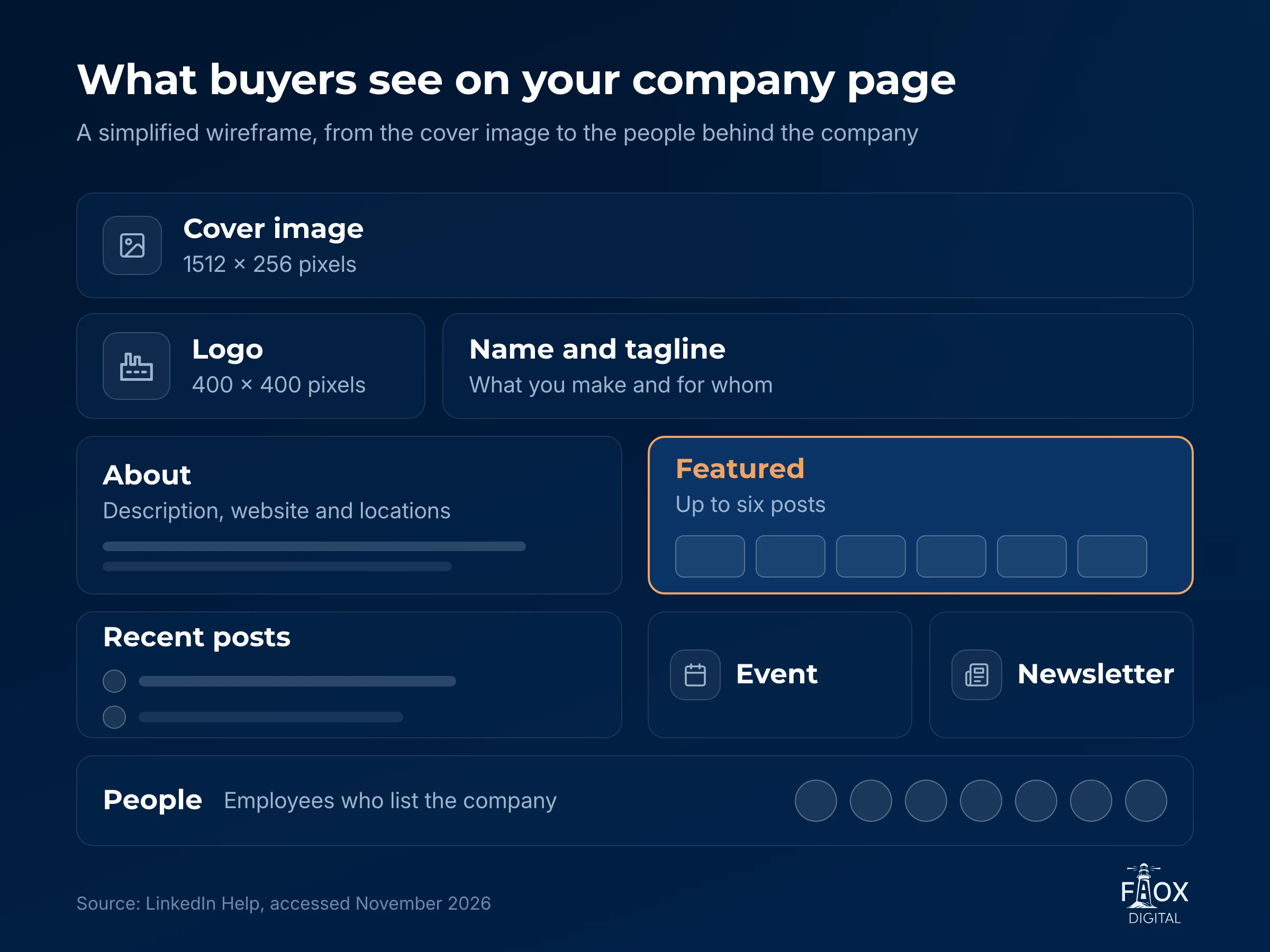
What does a LinkedIn company page look like to a visitor? These are the parts a buyer sees, and the job each one does:
| Part of the page | What a buyer looks for | What to do |
|---|---|---|
| Logo, cover image and tagline | Who you are, at a glance | A sharp logo, a cover image with one message and a tagline that says what you make and for whom |
| About section | What you do, for which industries and markets | A plain description in the words buyers use, plus website and locations |
| Featured section | Your most useful content | A few chosen posts, kept current |
| Posts | Whether the company is active and knows its field | A steady rhythm of useful posts |
| Events and newsletter | Ways to learn more | Webinars, trade fair meetings and a regular newsletter if you can sustain it |
| People | The experts behind the company | Employees who list the company and take part |
Make the page complete and findable
A complete page is the cheapest improvement you can make. At the time of writing (November 2026), LinkedIn’s Help Center says that pages with complete information, such as a logo, description and website URL, are more discoverable and potentially receive 30% more weekly views. Industry, company size and overview must also be filled in before you can use the Invite to follow feature.
About section and keywords. Write the description for a buyer, not for your own team: what you make, which problems it solves, for which industries and in which markets. Use the words buyers type when they search, such as product types, applications, materials and standards, rather than internal names. Add your website and every location that matters to buyers.
Logo and cover image. At the time of writing, LinkedIn recommends a 400 x 400 pixel logo and a 1512 x 256 pixel cover image, as PNG or JPEG files of up to 3 MB. The logo appears on light and dark backgrounds, so test both, and keep the important part of the cover away from its edges, because LinkedIn may crop it on some screens.
Call to action. A custom call-to-action button comes with the paid Premium Company Page subscription. Without it, members see your call to action when they click the page’s More button, so make sure it points somewhere useful. After every change, look at the page as a visitor would, on a phone as well as a desktop.
Page content and posting rhythm
A page that posts once a quarter tells buyers less than one that posts every week. The content comes from your content pillars, the three to five themes you return to every month, and from your experts: application know-how, proof of capability, your view of the industry and the people behind the product.
Set a rhythm you can keep for a year rather than one you can manage for a month; for many B2B companies, two or three page posts a week is a realistic start. Mix formats: documents and multi-image posts suit step-by-step content, short videos show products at work and text posts carry opinions. Reply to comments on every post, because the conversation is part of what visitors see. Answer company questions as the page and technical ones as a named expert, so readers see who stands behind the answer, and move pricing or complaints to a direct conversation.
A simple week for a manufacturer could look like this: on Monday, a document post with an application tip from an engineer; on Wednesday, a photo from production or testing with two lines on why the step matters; on Friday, a short video or a text post with a view on a change in the industry. That gives three posts, three pillars and three formats, each easy to reuse on other channels.
Use targeted posts for content meant for one market or role. At the time of writing, LinkedIn lets you aim a page post at followers by language, location, industry, function, seniority and company size, as long as the audience includes at least 300 followers.
From the pinned post to featured posts. The pinned post is on its way out: LinkedIn says the ability to pin a post on a page is being discontinued and points admins to the Featured section instead, where a super admin can feature up to six posts at the time of writing. Job posts, event posts and targeted posts cannot be featured. Treat the section as the page’s shop window: a post that explains what you do, a capabilities document, a short video of your plant or product and your most useful recent guide. Review it every quarter, so that it never shows stale news.
Showcase Pages: when a separate page makes sense
Showcase Pages are extensions of your main page for a brand, business unit or initiative with its own message and audience. At the time of writing, a super admin of the parent page can create up to 25 of them.
They help when a division sells to a clearly different audience, for example a medical device unit inside an industrial group, or when a brand is known in its market under its own name. They hurt when they split a small audience: each Showcase Page needs its own posts and followers, and a thin one looks abandoned. For most small and mid-sized B2B companies, one well-run main page is the better choice. If you do create a Showcase Page, give it a clear reason to exist in its description and post on it every week.
Employees and executive profiles
A company page works better when its people take part, and the link between employees and the page runs both ways. Employees appear on your page when they list your company in the work experience section of their profiles, so ask them to keep it current; in return, the page gives them content worth sharing with their own networks.
Employee notifications let a page admin tell employees about an important post. At the time of writing, an admin can notify employees once per day and not for targeted posts, and employees can opt out, so keep it for posts that matter. Ask, never force: one colleague’s genuine comment, or a share with a line of their own, is worth more than a dozen identical reposts.
Executive profiles need a plan of their own. The page and your leaders’ profiles work well together: the page publishes the company’s news and guides, executives share their own view of the market, and each comments on or reposts the other where it adds something. Building an executive’s presence is a subject of its own, covered in our guide to B2B thought leadership.
Grow the right followers, not just more of them
Follower numbers are easy to watch and easy to misread. A small audience of people who buy, specify or influence purchases in your industry is worth more than a large one that never will. So judge follower quality before follower count: LinkedIn’s follower analytics show your followers by location, seniority, job function, industry and company size, and the question is whether they match the buyer roles you want to reach.
Check this every month in three steps: compare the top job functions and industries among your followers with the buyer roles in your strategy, look at where new followers are based, and note which posts or events brought them. If the mix drifts away from your buyers, change what you post, not just how often.
Grow the audience deliberately:
- Invite the right people. At the time of writing, a page gets a monthly pool of invitation credits, shared by all its admins and renewed on the first day of each month; when someone accepts, the credit comes back. Invite customers, partners and industry contacts, not everyone you know.
- Give people a reason to follow. Useful posts, a newsletter and events tend to do more for growth than any request to follow.
- Link the page wherever buyers meet you: on your website, in email signatures, in trade fair materials and in proposals.
- Never buy followers. Bought accounts do not engage, and they distort every number you report.
No one can promise a follower count, and you should be wary of anyone who does. Measure instead whether the right people are arriving, month by month.
Use page analytics to steer
At the time of writing, LinkedIn’s page analytics cover your content, followers, visitors, page appearances and competitors, plus newsletters and employer brand where you use them. Review them every month with four questions:
- Content: which pillars and formats earn engagement and clicks, and which do not?
- Followers: are new followers in the job functions, industries and markets you target?
- Visitors: who looks at the page, and does that change after events or campaigns?
- Competitors: how do your followers and engagement compare with the competitors you track?
Then connect LinkedIn to your website data. Visits from unpaid LinkedIn links appear in Google Analytics 4 in the Organic Social channel, and tagging the links you share makes them easier to tell apart. A page that brings the right visitors to your product pages is doing its job, even if its reactions look modest.
Multilingual page options
For companies selling in several countries, LinkedIn offers three options that do not require Career Pages at the time of writing. The page’s name, tagline and description can be shown in more than 20 languages, so members see the version in their own language; posts can be targeted by language or location; and affiliated pages let regional teams represent their own market. For a mid-sized exporter, one global page with About sections in its main languages and targeted posts for each market can be enough to start, adding a regional page only when a market has its own team and enough to say. Whatever you choose, have a native speaker write or review each language.
Connect the page to your other channels
LinkedIn is the main channel for most B2B companies, but it should not stand alone. Link the page to your website from the About section and from relevant posts. That connection to other channels should run both ways, so link back to the page from your site, email signatures and newsletters.
Other channels then play supporting roles. A B2B YouTube channel can hold the longer product and how-to videos you share on LinkedIn, Instagram for B2B can show your plant, people and projects, and Quora and Pinterest for B2B can carry expert answers and product visuals where your buyers use them. Give each channel its own job, and let the LinkedIn page tie them together.
A monthly routine for running the page
A fixed routine keeps the page alive when everyone is busy:
- Plan the month. Fill the calendar with posts from each pillar, the events coming up and any language versions.
- Update the page. Refresh the Featured section, and check the About section and the cover for anything out of date.
- Publish and reply. Post on your agreed days and answer comments within a working day.
- Involve people. Share the month’s key posts with employees, and agree which ones your executives will comment on or share.
- Review the numbers. Check the page analytics and the website visits from LinkedIn, and note what to change next month.
What strong B2B company pages have in common
Whatever the industry, strong B2B company pages share a few traits. Use them as a checklist for your own:
- The tagline and About section say what you make, for whom and where, in buyers’ words
- The logo and cover image look sharp on every screen, and the cover carries one clear message
- The Featured section shows current, useful content rather than old news
- Posts appear every week, and most of them teach or prove something
- Real people appear: engineers, product managers and leaders, named and with their own views
- Comments get replies, usually within a working day
- The page links to the website, and the website links back
- Analytics are reviewed every month, and the plan changes when the numbers say so
How Faox Digital runs a LinkedIn company page
Faox Digital runs LinkedIn as one of the channels in a B2B company’s organic social media, alongside Instagram, X, YouTube and Facebook. We start by looking at what the page already posts, who follows it and what its buyers care about, then set its rhythm market by market and language by language, publish steadily and reply to comments and messages.
Key takeaways
- A LinkedIn strategy for B2B makes your company page the place where buyers check who you are.
- Complete the page, write the About section in buyers’ words and use the Featured section, because pinning is being phased out.
- Post useful content on a steady rhythm, and involve employees and executives without forcing them.
- Judge followers by who they are rather than how many, and spend invitation credits on the right contacts.
- Review page analytics every month, connect LinkedIn to your website and let other channels play supporting roles.
Frequently asked questions
What is the logo size for a LinkedIn company page?
At the time of writing (November 2026), LinkedIn recommends a 400 x 400 pixel logo, with a minimum of 268 x 268 pixels, and a 1512 x 256 pixel cover image, both as PNG or JPEG files of up to 3 MB. The logo appears on light and dark backgrounds, so check that it works on both.
How do you claim a LinkedIn company page?
You request admin access. List your current position at the company in the experience section of your profile, verify your work email if asked, follow the page, then choose More and Request admin access on the page. If the page is actively managed, one of its current super admins must approve the request.
How do you create a LinkedIn company page?
Create the page from your own LinkedIn account, then complete the key sections: industry, company size, overview, description, logo, website and locations. Add a cover image and a tagline before you start posting, and invite the right contacts once the page looks finished.
How do you delete a LinkedIn company page?
A super admin can deactivate it on desktop: in the page’s admin view, choose Settings and then Deactivate page. If the option does not appear, the page is not eligible for deactivation. If the problem is a duplicate page for your company, you can ask LinkedIn to remove it or merge it with your main page instead.
Sources
- LinkedIn Help: Complete your LinkedIn Page, accessed November 2026
- LinkedIn Help: Feature a post on your LinkedIn Page, accessed November 2026
- LinkedIn Help: Invitation limits for your LinkedIn Page, accessed November 2026
- Google Analytics Help: Default channel group, accessed November 2026
Let’s talk
Want social media that reaches the right people?
Tell us who you want to reach. We will look at your channels and suggest a plan your team can keep up with.