
Manufacturing Video Production for Social Media: A Practical B2B Guide
Which videos a manufacturer should make for social media, how to plan, film and subtitle them with a small team, and how to fit them to LinkedIn and YouTube.
Manufacturing video production for social media means planning, filming and editing short videos of your products, processes and people for channels such as LinkedIn and YouTube. A small team can do most of it with a phone: pick one message per video, write a short script and shot list, film with good light and clear sound, add subtitles in each market’s language, and cut the footage into the formats each platform shows best, from short vertical clips to longer demonstrations.
Factories are full of things worth watching: machines at work, parts being measured, products tested to failure. Most manufacturers still post a brochure photo instead, because video looks expensive and complicated. It need not be. This guide covers which videos to make, how to plan and film them with a small team, and how to fit them to LinkedIn and YouTube. For planning formats across your whole feed, see our guide to B2B social media content; running a YouTube channel is covered in a separate article.
What manufacturing video production covers
Manufacturing videos show what a company makes and how: a product in use, a process on the line, a test, a tour, an engineer explaining a choice. For social media they are usually short, made in-house and published often, rather than one polished company film every few years.
Video works best alongside written content, not instead of it. In GlobalSpec and TREW Marketing’s 2026 State of Marketing to Engineers, 752 engineers and technical buyers said how they prefer to learn a new technical concept: 38% chose reading an article or guide and 14% watching a video, while younger engineers leaned more towards video and hands-on labs. So give each video a written home too, such as a product page, an application note or the post text itself.
Six manufacturing videos worth making
Each type does a different job. Start with the one your buyers ask about most:
| Video type | What it shows | Typical length and shape | Where it works |
|---|---|---|---|
| Short vertical video | One moment: a machine cycle, a test, a finished part | Under a minute, vertical | LinkedIn feed, YouTube Shorts, Instagram |
| Product demo | How a product works and what it is for | One to three minutes | LinkedIn, YouTube, product page |
| Production process | How a part is made, checked or assembled | One to three minutes | LinkedIn, YouTube |
| Factory tour | The site, capacity and people | Three to ten minutes | YouTube, website, trade fair screen |
| Expert interview | An engineer explaining a choice or a mistake to avoid | Two to five minutes, or cut into clips | LinkedIn, YouTube |
| Video answer to a customer question | One common question, answered on camera | Under two minutes | LinkedIn, YouTube, sales emails |
A product demo should show the product doing the buyer’s job, not spinning on a turntable. A production process video earns trust by showing the checks: the measurement, the test, the inspection. A factory tour helps buyers who cannot visit, especially in export markets. An expert interview gives your knowledge a face, and video answers to customer questions save your sales team from explaining the same thing every week.
Plan before you film: script and shot list
Most weak manufacturing videos fail before filming starts: no single message, no plan of what to show. Write two short documents:
- A script. One message, the order of points, and what is said. For an expert interview, write the questions, not the answers, so the expert speaks naturally.
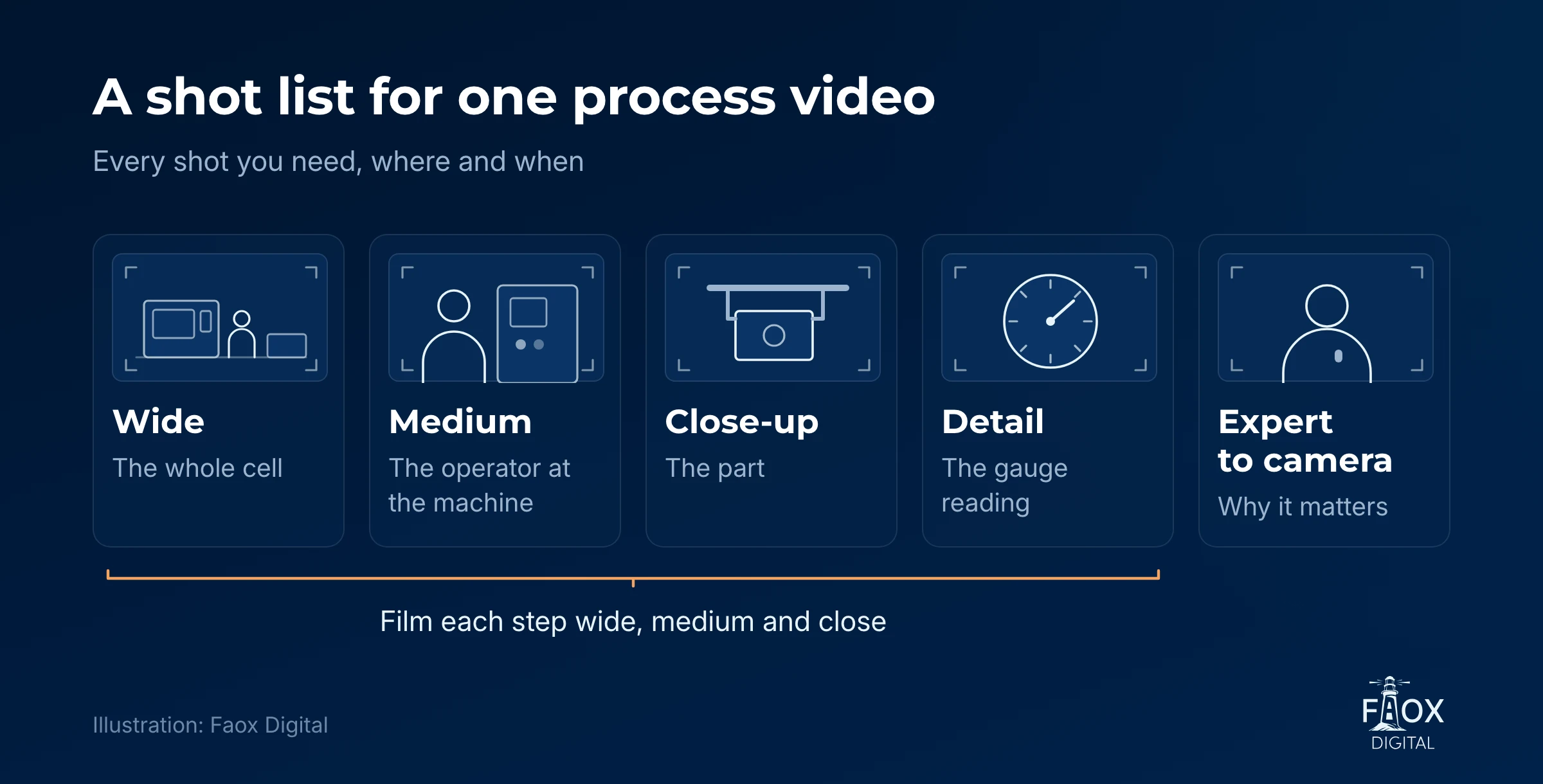
- A shot list. Every shot you need, where and when. For each step of a process, plan a wide shot (the whole cell), a medium shot (the operator at the machine) and a close-up (the part, the gauge, the detail).
Book the filming with production. Machines run on their own schedule, and the most interesting step may happen once a shift. Ask the line supervisor when the step you need will run, and who on the floor can help.
Filming with a phone
Filming with a phone is enough for most social video. What matters is how you use it:
- Decide the shape first. Vertical for short clips, horizontal for demos and tours. Filming both at once rarely works; if you need both, film each separately.
- Keep it steady. A small tripod or a phone clamp on a railing beats any stabiliser setting.
- Lock focus and exposure on the subject, so the image does not pulse when a bright light or a moving part crosses it.
- Clean the lens. Factory dust and fingerprints soften every shot.
- Leave the edges clear. LinkedIn Help advises keeping text, logos and key elements away from the edges of a video, so the app’s controls do not cover them.
Film more than you need: a few seconds before and after each action make editing far easier.
Light and sound on the factory floor
Light and sound decide whether a phone video looks deliberate or accidental.
Light. Factory lighting is often high, harsh and mixed in colour. Film with the light behind the camera, not behind the subject, and avoid standing people in front of bright windows. A small LED panel lifts faces and parts out of the shadows; keep it at the same colour as the room light.
Sound. Machines drown out voices. Clip a small wireless microphone to anyone who speaks, or record the explanation away from the noise and lay it over the footage. Keep some machine sound at a low level; it tells viewers where they are. Where hearing protection is required, film without speech there and add the explanation afterwards.
Filming permissions and safety on site
Filming permissions need sorting before the camera comes out, both in your own plant and at a customer’s site:
- People. Ask everyone who can be recognised for written permission, and explain where the video will appear. Under the EU’s General Data Protection Regulation, information about a person who can be identified, directly or indirectly, is personal data, and consent can be withdrawn at any time. Your data protection lead decides how your company handles this; this guide is not legal advice.
- Customer sites. Get permission from the site owner in writing, and agree what may be shown and named.
- Confidential details. Check screens, drawings, part numbers, whiteboards and labels in every shot.
- Safety. Follow the site’s rules on protective equipment and restricted areas, and never film in a way that distracts an operator at a running machine.
Subtitles and multilingual subtitles
Subtitles make a video work for viewers who watch without sound and for people who are deaf or hard of hearing, and they carry your technical terms exactly. Both platforms help:
- LinkedIn. LinkedIn Help says you can add automatic captions, supported in 10 languages, or upload a caption file when you post a video.
- YouTube. YouTube creates automatic captions in many languages, but its help pages warn that their quality varies and advise reviewing them. You can also upload subtitle files for each language.
For multilingual subtitles, translate from a checked transcript, not from automatic captions, and have a native speaker who knows your products review the technical terms. Caption files can be switched on and off and replaced per language; text burned into the picture cannot, so keep burned-in text for short labels only. YouTube’s multi-language audio lets eligible channels add dubbed audio tracks to one video, if you want more than subtitles.
LinkedIn and YouTube formats
LinkedIn and YouTube formats differ, so plan the cut for each:
- LinkedIn. According to LinkedIn Help, videos posted to the feed can run up to 15 minutes and 5 GB, in aspect ratios from 1:2.4 to 2.4:1. LinkedIn’s full-screen vertical video experience may show any posted video, and LinkedIn notes that videos with a different shape may be cropped or fitted to the screen, so frame the important action in the centre. LinkedIn also says video visibility depends on many factors, including relevance, quality and member feedback, and describes quality as clear, professional in tone, relevant and helpful.
- YouTube. Square or vertical videos of up to three minutes, uploaded since October 15, 2024, count as Shorts. Longer demonstrations, tours and interviews belong in horizontal long-form videos, where viewers can find them through search.
A practical routine is to film one session and cut it three ways: a horizontal long version for YouTube and your website, a one-to-two-minute version for LinkedIn and one or two short vertical clips.
Telling a story with a product video
Good manufacturing videos tell a small story: the customer’s problem, what the product or process does about it, and the proof. A pump on a test bench is footage; the same pump running a dirty, abrasive medium for hours, with the engineer explaining what wore and what did not, is a story. B2B storytelling explains why that structure helps buyers who compare specifications. Keep every claim in the video checked by the engineer, because a wrong number on film is hard to correct.
How to produce a manufacturing video, step by step
- Choose one message and one viewer. For example, a purchaser who needs to see that every part is tested.
- Write the script and shot list. Questions for the expert, and wide, medium and close shots for each step.
- Book the filming. With production, the people on camera and, if needed, the customer’s site.
- Clear permissions. Written permission from recognisable people, and checks for confidential details.
- Film with light and sound in mind. Steady phone, light behind the camera, a microphone on the speaker.
- Edit and subtitle. Cut to the message, add subtitles and have the engineer check the facts.
- Cut versions per platform. Long for YouTube, shorter for LinkedIn, vertical clips for Shorts.
Frequently asked questions
What is a manufacturing video?
A manufacturing video shows how a company makes, tests or uses its products: a production step, a quality check, a product demo, a factory tour or an engineer explaining a choice. For social media it is usually short and filmed in-house.
How do you produce videos for YouTube as a manufacturer?
Film horizontal long-form videos for demos, tours and interviews, and cut short vertical clips of up to three minutes for Shorts. Add reviewed subtitles, a clear title and a description that uses the words your buyers search for.
How do you produce videos with a small team?
Give one person the job, plan each video with a short script and shot list, film with a phone on a tripod with a clip-on microphone, and edit in a simple app. One good video a month is a realistic start.
Do we need a professional video crew?
Not for most social media videos. A crew is worth hiring for a flagship company film, a trade fair video or footage in difficult light and sound, where quality has to hold up on a large screen.
Sources
- LinkedIn Help: Share videos on LinkedIn, accessed November 2026
- YouTube Help: Understand three-minute YouTube Shorts, accessed November 2026
- GlobalSpec and TREW Marketing: 2026 State of Marketing to Engineers, 2026
- EUR-Lex: Regulation (EU) 2016/679 (General Data Protection Regulation), 2016
Let’s talk
Want social media that reaches the right people?
Tell us who you want to reach. We will look at your channels and suggest a plan your team can keep up with.