
Online Product Catalog: Moving From PDF Brochures to a Searchable System
What a searchable online product catalog gives buyers that a PDF cannot, and how to plan the data, categories, filters, search and integrations behind it.

An online product catalog stores every product as structured data, so buyers can browse a category tree, filter by the values they specify and search by name or part number instead of scrolling through a PDF. To build one, define your attribute fields, clean and centralize the data, often in a PIM system fed by the ERP, and generate pages, filters, search and data sheets from that one source.
Many manufacturers still publish their range as PDF brochures: hundreds of pages, organized for print and updated once a year. Engineers do the searching themselves, page by page, and the questions the PDF cannot answer end up in your inbox.
That matters because most of the buying work happens before anyone calls. In the 2026 State of Marketing to Engineers survey by GlobalSpec and TREW Marketing, technical buyers said 62% of the buying process happens online before they contact a vendor (n = 709). This article explains what a searchable catalog adds and how to plan the data, filters, search and integrations behind it. For the wider question of when software does more than pages, see our guide on when a website isn’t enough.
PDF catalog vs online product catalog
A PDF catalog is a document. An online product catalog is a system: the products live as data, and every page, filter and download is generated from it.
| Aspect | PDF catalog | Online product catalog |
|---|---|---|
| Finding a product | Scrolling, or the reader’s own text search | Category tree, filters and site search |
| Comparing | Two windows side by side | Filters and comparisons on shared attributes |
| Updates | A new edition, often once a year | One change in the data, visible everywhere |
| Phones | Pinch and zoom | Pages built for the screen |
| Search engines | One document for the whole range | One page per product or family |
| Languages | One file per language, translated whole | Translated field by field |
| What you learn | Downloads, if you track them | Searches, filters used, pages viewed, downloads |
Google can index PDF files, so a catalog PDF can appear in search results. But it appears as one document, and the buyer still has to find the product inside it. A digital product catalog that is only a PDF on a web page keeps every one of these limits.
A PDF still has a role, because buyers print, file and forward data sheets. The difference is where the data lives: in a searchable catalog, the data sheet comes from the same fields as the web page, so the two never disagree.
Start with a product database
The heart of the system is a product database: one record per product or variant, with the same technical attribute fields for every member of a family. Each field needs a name, a data type, a unit and, where possible, a fixed list of allowed values. For a valve family, the definitions might look like this:
| Field | Data type | Unit | Why it matters |
|---|---|---|---|
| Nominal size | Number | mm | Filters and sorting need numbers, not text |
| Operating pressure | Range | bar | Buyers filter for at least the value they need |
| Material | Fixed list | None | Free text creates spelling variants |
| Approvals | Fixed list | None | Each approval can become a filter |
| Data sheet | File for each language | None | The download stays attached to the right product |
Do not invent the structure from scratch. ETIM, which describes itself as the international classification standard for technical products, and ECLASS, an ISO/IEC-compliant data standard for products and services that publishes a new release every year (Release 16.0 at the time of writing), both define classes and attributes you can map your fields to. That also makes it easier for distributors and marketplaces to take your data.
Build the category tree the way buyers search
The category tree is the path buyers browse, from product group to family to variant. Build it around how buyers specify and what they are trying to solve, not around your internal product lines or price list structure. Keep it shallow enough that each level helps a buyer choose, give every product one main category and link it from others where it also belongs.
Category pages need more than a grid of photos: a line on what sets each family apart and the key values for each item. Our article on manufacturing website design shows how good industrial sites open their catalogs the way buyers think.
Filtering: let buyers narrow by specification
Filtering turns your attribute fields into choices. That is why the data model comes first: a filter can only be as good as the field behind it.
- Show the filters that matter for each category, not one list for the whole range.
- Use ranges for numeric values, and let buyers switch between metric and imperial units where your markets need it.
- Show how many products each choice leaves, so nobody filters down to nothing.
- Keep the chosen filters in the address, so a buyer can share the result with a colleague.
Filters also create addresses for search engines, and many of them. Google’s guidance on faceted navigation (updated December 2025) warns that filter combinations can produce a very large number of URLs, so crawlers spend time on useless pages and find new ones more slowly. If filtered pages do not need to appear in search, Google suggests blocking them in robots.txt while crawlers reach the product pages and an unfiltered listing. If some combinations deserve to be found, give them consistent URLs and return a "not found" status when a combination has no results.
When buyers need to build a product rather than find one, filters are not enough. That is the job of a product configurator or a quote calculator for buyers.
Site search that understands part numbers
Site search is how buyers who already know what they want get there. Engineers paste part numbers from drawings, old orders and competitors’ catalogs, so the search has to handle them:
- Part numbers with or without spaces, dashes and dots
- Old and superseded part numbers, leading to the current product
- Synonyms, abbreviations and the trade terms your buyers use
- Values with units, such as a size or a pressure
- Typing errors
- Results that include categories and documents, not only products
Getting this wrong costs more than a failed search. In Baymard Institute’s testing of online stores (updated April 2026), participants were quick to conclude that a site did not carry a product when a search for its model name or number failed. Even in that benchmark of more than 170 sites and apps, 12% of sites had problems with such exact searches.
Then learn from what buyers type. Google Analytics’ enhanced measurement can record site searches when the search term appears in the address, for example as a "q" parameter. Review the terms every month, and add your own event for searches that return nothing, because those show what buyers expected to find.
Data sheets and documents
Every product page should offer a data sheet download generated from the database, so the PDF matches the page. Show the language and revision date, and keep one stable address per document. What else the page itself should show is covered in our article on B2B product page design.
Downloads tell you what buyers are seriously considering. Google Analytics’ enhanced measurement records a file download event, with the file name, when someone clicks a link to a PDF or another common file type. If buyers log in, the same activity can go to your CRM, so sales sees which products an account has been looking at; our B2B CRM guide explains what a CRM holds.
Multilingual product data
Multilingual product data belongs in the database, translated field by field: product names, descriptions, attribute labels and the values in fixed lists. Numbers and units stay language-independent, so a size entered once is right in every language. Translating a fixed list once, such as the material names, also updates every product that uses it.
Each language version then needs its own pages. Google recommends different URLs for each language version of a page rather than cookies or browser settings, with hreflang annotations linking the versions.
Where the data comes from: PIM and ERP
Product data from the ERP covers what the business runs on: article numbers, variants, weights, prices and stock. It rarely holds what a buyer needs in order to choose: consistent technical attributes, descriptions, images, documents and translations.
Product information management (PIM) software holds that layer. It combines the ERP data with technical and marketing content and publishes it to the website, data sheets, distributor feeds and marketplaces.
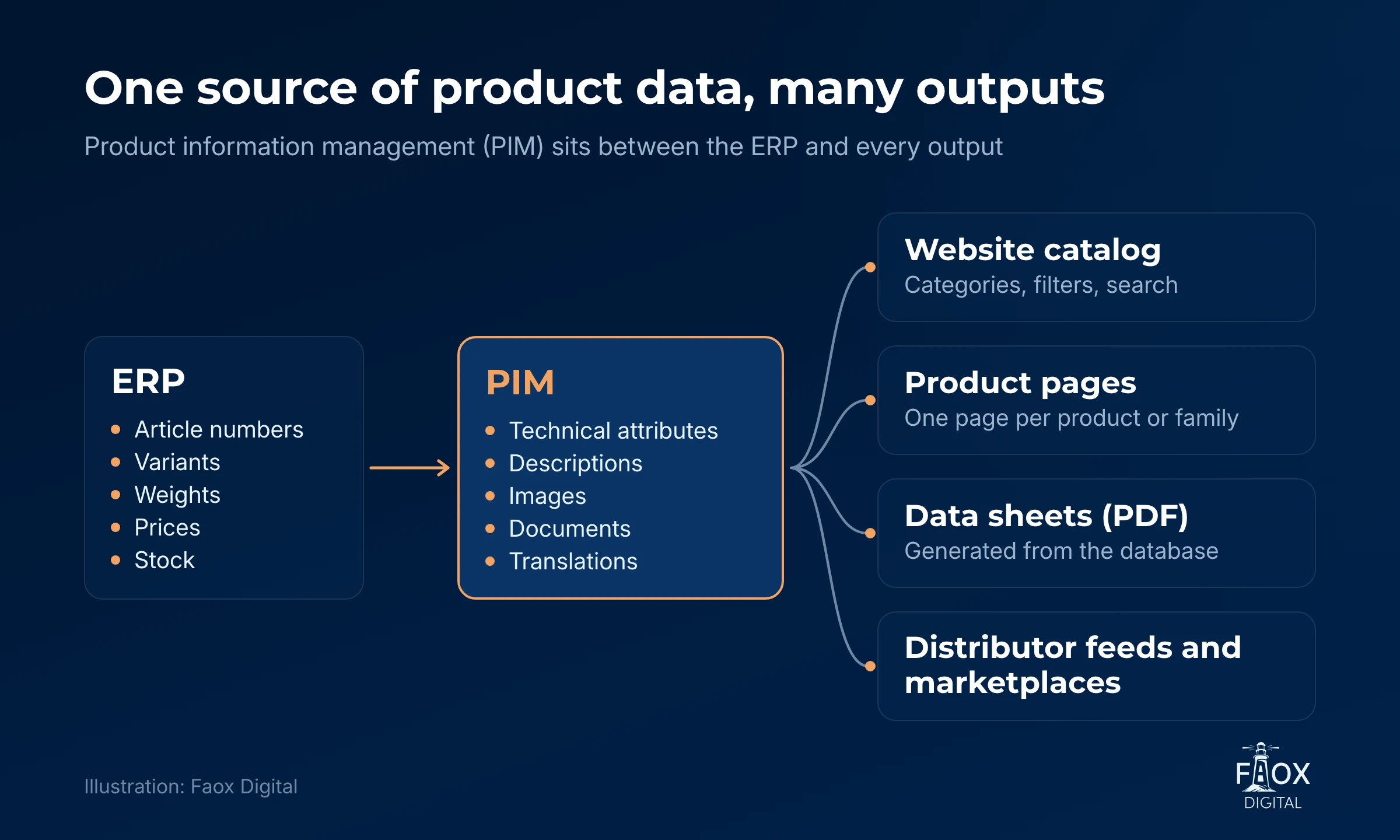
Not every company needs a PIM on day one. A few hundred products in one or two languages can live in a well-structured content management system. Thousands of variants, several languages and feeds to distributors are when a dedicated system is worth pricing. Whatever you choose, give every field one owner and one source, so nobody fixes the same value in three places.
How to move from PDF to an online product catalog
- Take stock. List your PDF catalogs, data sheets, spreadsheets and ERP fields, and note which source is most current for each product family.
- Define the attribute fields for each family, with units and allowed values, mapped to ETIM or ECLASS where you can.
- Extract and clean the data. Move the values out of PDFs and spreadsheets into the fields, and have engineers check them.
- Decide where each field lives: commercial data in the ERP, the rest in a PIM or your content management system, each with one owner.
- Design the category tree, filters and search from the fields, and test them with real part numbers and real buyer questions.
- Generate pages and data sheets from the same data, with each language on its own URLs.
- Launch one product family first. Measure searches, filters and downloads, then move the next family.
- Retire the PDF as the master. Keep printable data sheets, but generate them from the database.
The last decision is how to build it: on your content management system, on a commerce or PIM platform, or as custom web application development. That comparison is the next question once the data is in shape.
How Faox Digital builds online product catalogs
Faox Digital starts from what a company sells, who buys it and which markets matter, then maps how a buyer moves from a category to a product and on to an enquiry. Each language gets its own structure rather than a translate button, and the catalog is tested in every language and on every device before anyone outside sees it.
Key takeaways
- An online product catalog stores products as data, so buyers can browse, filter and search instead of scrolling through a PDF.
- Define the attribute fields, with units and allowed values, before you build anything; ETIM or ECLASS make a good base.
- Build filters from those fields, and decide which filtered pages search engines should crawl.
- Make site search find part numbers, old numbers and synonyms, and review what buyers search for.
- Keep one source of data, often a PIM fed by the ERP, and generate pages and data sheets from it.
Frequently asked questions
What is an online product catalog?
It is the part of a website where products are stored as structured data and shown in categories, with filters, site search and a page for each product or family. Unlike a PDF catalog, it updates in one place and lets buyers narrow the range by the values they specify.
Do we still need a PDF catalog?
Often, for trade shows, offline reading and customers who file documents. Generate it from the same data as the website, so the two always match, and keep the website as the place where the data is maintained.
Do we need a PIM system?
Not always. A small range in one or two languages can live in a well-structured content management system. A PIM is worth considering when you have many variants, several languages and other channels to feed, such as distributors and marketplaces.
Where should we start?
With one product family whose PDF causes the most questions. Define its fields, clean its data, build its filters and search, measure how buyers use them, and then move the next family.
Sources
- GlobalSpec and TREW Marketing: 2026 State of Marketing to Engineers, 2026
- Baymard Institute: Ecommerce Search UX 2026, 8 search query types, updated April 2026
- Google Crawling Infrastructure: Managing crawling of faceted navigation URLs, updated December 2025
- ECLASS: Data standard for products and services, accessed November 2026
Let’s talk
Planning a new website or a fix?
Send us your current site and what you need it to do. We will tell you whether it needs a rebuild or a few focused changes.