
Web Application Development: A Guide for When a Website Isn’t Enough
What a web application is, how it differs from a brochure website, and how a B2B company can tell whether it needs one and where to start.
Web application development is building software that people use in a browser to do work: log in, see their own data, place orders, configure products or track requests. A brochure website informs anyone who visits, while a web application serves known users and changes data. A B2B company needs one when customers, dealers or staff keep repeating a task that pages, email and spreadsheets no longer handle well.
A dealer emails to ask what is in stock. A customer calls to ask where an order is. A salesperson retypes a quote from email into the ERP, and an engineer corrects a specification that could never have been built. A better website fixes none of this, because the problem is no longer information. It is work.
A web application can take over that work, but it is a bigger commitment than a website: you take on software, users, data and upkeep for years. This guide explains what web application development involves, how an application differs from a website, which types B2B companies build and when you do not need one at all. It opens our series on web applications; you can find all Websites & Apps articles on the category page.
What is web application development?
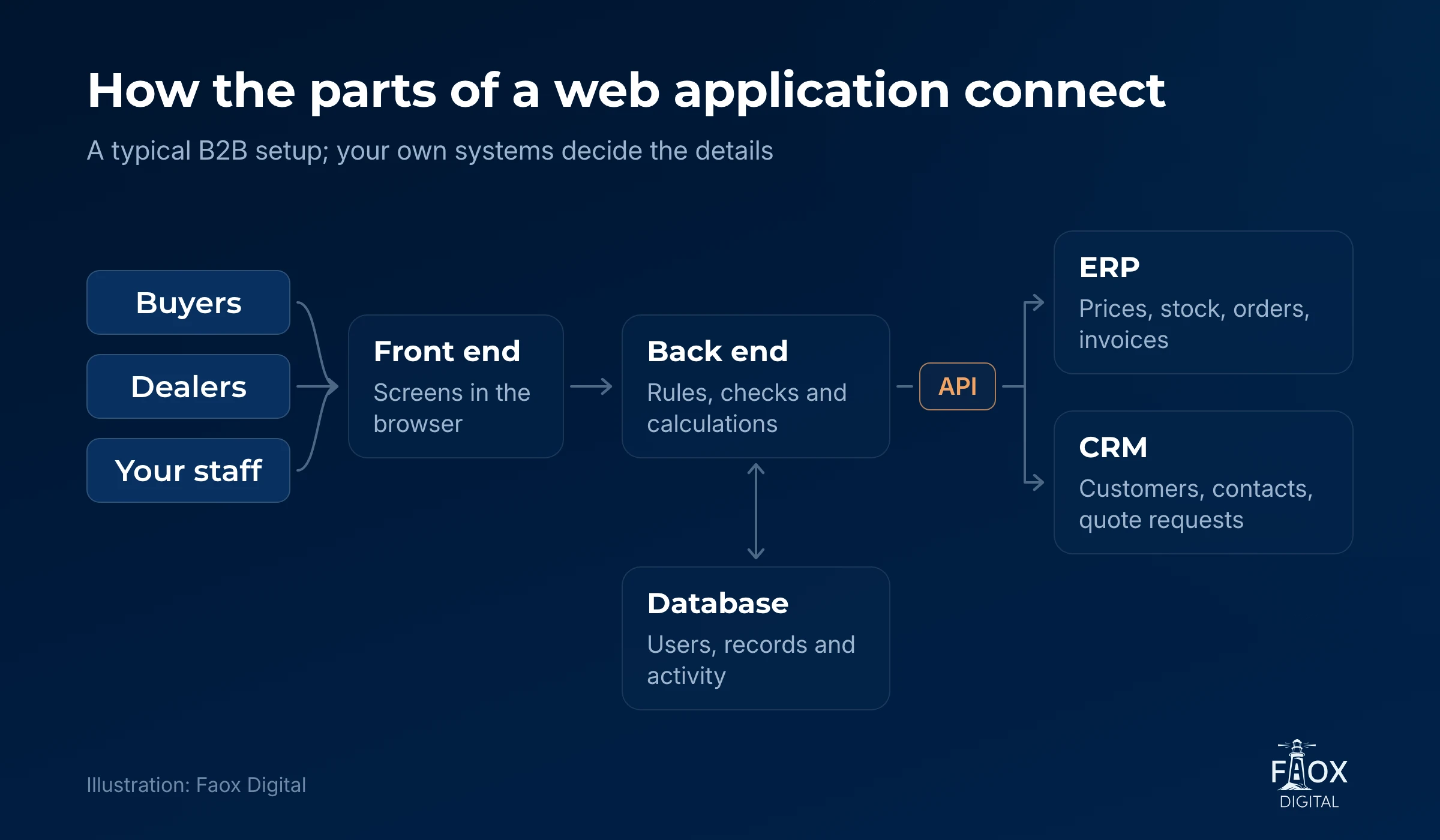
A web application is software that runs in a browser, with a back end running on a web server, as AWS defines it. There is nothing to install: users open an address and log in. Web application development is the work of planning, designing, building, testing and then maintaining that software.
Four parts do most of the work:
| Part | What it does | In a dealer portal |
|---|---|---|
| Front end | The screens people use in the browser | The order form |
| Back end | Business rules, checks and calculations | Applying this dealer’s discount |
| Database | Stores users, records and activity | Saved orders and user accounts |
| API | Lets software exchange data with other software | Fetching stock from the ERP |
The technical line between a site and an application is blurry. AWS notes that most modern websites are now complex web applications, and it counts content management systems among them. So for a business decision, ignore what runs underneath and ask what people do there. If they read, it is a website. If they log in and work on their own data, it is a web application.
Web application vs website: what is the difference?
A brochure website presents your company, products and proof to anyone who visits. A web application lets known users complete a task. The differences affect budget, risk and ownership:
| Aspect | Brochure website | Web application |
|---|---|---|
| Main job | Inform and persuade | Help people complete a task |
| Users | Anyone, usually anonymous | Known users, usually logged in |
| What people see | The same pages for everyone | Their own data, prices and permissions |
| Data | Published by your team | Created and changed by users, often shared with other systems |
| Success measure | Visits and enquiries | Tasks completed, active users, errors avoided |
| Main risks | Outdated content, weak visibility | Data leaks, wrong data, low adoption |
| After launch | Content updates and maintenance | Security fixes, monitoring, user support, new requests |
You rarely swap one for the other. Your public site still has to explain, prove and bring enquiries, as our B2B website design guide describes. The application usually sits beside it, behind a login.
That login has a search consequence. Google says password protection also keeps content out of its search results. So keep what buyers search for public, such as products and specifications, and put account-specific data such as negotiated prices, orders and invoices behind the login.
When a B2B company needs a web application
Demand for self-service is real, but so are its limits:
Gartner surveyed 646 B2B buyers in 2025. McKinsey’s survey of nearly 4,000 B2B decision makers found an even split at every stage between in-person, remote and self-serve, and 41% prefer in-person channels with a new supplier. So an application adds a route and does not replace your sales team.
The 14% comes from a Gartner survey of 5,728 customers in December 2023, not only in B2B. The most common reason for failure was that people could not find content relevant to their issue. A portal that cannot answer the real question sends people back to the phone.
The signals are usually operational, and you can count them:
| What you see | What it points to |
|---|---|
| Dealers call or email about stock, prices and order status | Dealer portal |
| Customers ask for invoices, certificates and past orders | Customer portal |
| Sales keeps correcting specifications that cannot be built | Product configurator |
| Buyers wait days for a rough price that follows fixed rules | Quote calculator |
| The PDF catalog is out of date and engineers cannot filter it | Searchable product catalog |
| Staff retype data between email, spreadsheets and the ERP | Integration, often with one of the above |
Three questions then test the case:
- How often? A task repeated daily by many people repays the effort. One done monthly by five people probably does not.
- What does it cost today? Count hours, errors and delays. Without that baseline, you cannot judge the application later.
- Will people use it? Ask real dealers or customers what they would do there, before anyone writes code.
When you do not need one
It is often wiser not to build:
- The problem is enquiries. If visitors do not understand your offer or cannot find your products, work on the website first.
- The volume is low. A shared spreadsheet or a good form can serve a small group for years.
- Better pages would answer it. Publishing specifications, lead times and documents can stop many repeat questions.
- Existing software does the job. Your ERP, your CRM or an online service may already offer a portal. Our article on custom web application development compares off-the-shelf software with a custom build.
- Nobody would own it. An application needs someone who sets priorities and answers users. Without that person, it decays.
Web application development examples in B2B
Most B2B applications fall into a few types, and many companies combine two or three over time:
| Type | Who uses it | Typical tasks |
|---|---|---|
| Dealer portal | Distributors, resellers | Check prices and stock, order, get sales material |
| Customer portal | Direct customers | Track orders, reorder, get invoices, open service requests |
| Product configurator | Buyers, sales staff | Pick valid options, produce a specification |
| Quote calculator | Buyers, sales staff | Get an estimate, send a complete request |
| Product catalog | Anyone | Search, filter and compare, download data sheets |
The tools named below come from large manufacturers with large budgets, and we describe them as they stood in November 2026. They are public examples and not Faox projects, so read them as illustrations of each type and not as a target for a first version.
Dealer and customer portals
A dealer portal gives each distributor its own prices, stock visibility and ordering. A customer portal does the same for direct customers, with order history, invoices, certificates and service requests. In Schneider Electric’s mySchneider portal, distributors and partners who order directly get real-time price and availability, a quotes interface and order tracking. Our article on dealer and customer portals explains what each one covers. Supplier portals and internal tools, such as quote approvals, follow the same logic.
Product configurators and quote calculators
A product configurator walks a buyer through options and blocks combinations that will not work, so the result is a specification your team can use. A quote calculator turns inputs such as size, material and quantity into an estimate or a complete request. Siemens’ SiePortal offers step-by-step configurators with automatic plausibility checks, and the Grundfos Product Center helps users size pumps for new or replacement projects. The rules must come from your engineers, and that is usually the hard part. See our guide to the quote calculator for buyers.
Online product catalogs
A searchable product catalog stores products as data, so buyers can filter by specification instead of scrolling through a PDF. It may need no login at all, which keeps it visible in search. Our guide to the online product catalog covers the data, filters and search behind it.
ERP and CRM integration: where the data comes from
An application is only as useful as its data. A portal showing yesterday’s stock or last year’s prices can do more harm than no portal, which makes ERP and CRM integration one of the hardest parts of many projects.
Your ERP runs orders, stock, production and invoices. Your CRM holds customers, contacts and sales activity. If you have yet to settle on a CRM, our article on CRM for manufacturers covers how to choose one.
These systems usually connect through an API, a set of rules that lets software work with other software instead of a person at a screen. MDN describes it as a contract between the application that offers it and whatever uses it.
Before any build, agree who owns each type of data, which way it flows and how fresh it must be. A common split looks like this:
| Data | Owner | Flow | How fresh |
|---|---|---|---|
| Customer prices | ERP | ERP to application | When they change |
| Stock | ERP or warehouse system | ERP to application | Near live, if people order from it |
| Orders | ERP, once accepted | Application to ERP, status back | At once |
| Invoices, documents | ERP or document system | ERP to application | On request |
| Contacts, accounts | CRM | Both ways, with clear rules | At least daily |
| Quote requests | CRM | Application to CRM | At once |
Four practical points follow:
- Check your systems first. Some older ERPs have no usable API. A scheduled file exchange can be a sound first step, if users can see when the data was last updated.
- Respect the limits. At the time of writing (November 2026), HubSpot allows privately distributed apps on its Professional and Enterprise plans 190 API requests per 10 seconds, and Microsoft’s Dynamics 365 Business Central rejects excess requests and expects the calling software to retry. So store a copy of data such as stock, instead of asking the ERP on every page view.
- Plan for failure. Your ERP will sometimes be down. Orders should wait in a queue and retry, and nobody should lose work.
- Expect to clean your data. A portal shows customers what your ERP holds, including the duplicates and old prices your staff work around.
User roles and permissions
A brochure website has visitors. An application has users, and each one must see only what applies to them. User roles and permissions define that, and they are business decisions before they are technical ones:
| Role | Can see | Can do |
|---|---|---|
| Dealer buyer | Own company’s prices, stock and orders | Place orders |
| Dealer manager | All orders of own company | Approve orders, add or remove colleagues |
| Your sales staff | Accounts in their region | Edit quotes, answer requests |
| Administrator | All accounts and settings | Manage roles and rules |
Also decide who approves a new account and what happens when someone leaves a dealer. That person’s access should end the same day, and someone has to be responsible for it.
Security: what changes when users log in
Security is where an application differs most from a website, because it now holds other companies’ prices, orders and contacts. The top risk relates directly to roles. In the OWASP Top 10:2025 list of web application risks, broken access control ranks first, and OWASP reports that 100% of the applications tested had some form of it. A typical case: a user changes an order number in the page address and sees another company’s order.
Software flaws matter too. Verizon’s 2026 Data Breach Investigations Report found that 31% of breaches started with software vulnerabilities, ahead of stolen passwords. So security is not a launch task: someone has to keep applying fixes for as long as the application runs.
Ask your developer or supplier about these points:
- Are permissions checked on the server for every request, and is access denied by default?
- Is multi-factor authentication available? OWASP recommends it wherever possible.
- Are third-party components tracked and updated?
- Are access failures logged, with alerts for repeated attempts?
- Which requirements do you build and test against? OWASP’s Application Security Verification Standard (version 5.0.0, May 2025) is a useful reference.
- Is there independent testing before launch and at regular intervals, and are backups tested by restoring them?
The law may apply as well, because business contacts are people. If the application stores personal data covered by the EU’s GDPR, Article 32 requires security appropriate to the risk, including regular testing of those measures. Article 12 of Turkey’s data protection law (KVKK) also requires technical and organizational measures. Take legal advice early. No application is free of risk, so plan how you would detect a problem and recover from it.
Scalability and everyday use
Scalability is the ability of a system to change its capacity as demand changes, as Microsoft’s Azure guidance puts it. Vertical scaling adds power to an existing resource, and horizontal scaling adds more instances.
Most B2B applications do not face consumer-scale traffic. They grow in other ways: more accounts, products, price rules and integrations, with peaks such as month-end ordering. So you rarely need heavy infrastructure on day one, but you do need a design that can grow without a rewrite. Microsoft advises load tests in an environment that mirrors production, and it warns that databases and other parts that hold state are the most common cause of performance problems as a system scales.
Speed and screen size matter because people use these tools daily. Nielsen Norman Group’s long-standing limits are a useful guide: a person’s flow of thought holds for about 1 second, and about 10 seconds is the limit for holding attention, so longer calculations should show progress. Match the design to where the work happens, too. Configuring a product suits a large screen, while checking an order in a warehouse suits a phone. Our mobile-first design guide explains how to set those priorities.
Start with a first version (MVP)
A safer way to build is to release a small first version, often called a minimum viable product (MVP), and learn from real use. Eric Ries describes an MVP as the version of a product that teaches a team the most about customers for the least effort, and he stresses that the aim is learning and not a minimal product.
Two findings explain why this matters:
- Large overruns happen often enough to plan for. Flyvbjerg and Budzier’s study of 1,471 IT projects, published in Harvard Business Review in 2011, found an average cost overrun of 27%. About one project in six overran its cost by 200% on average, and its schedule by almost 70%.
- Many features go unused. Pendo’s 2019 report on 615 subscriptions from its own customers found that 80% of features were rarely or never used. It is vendor data from software products, so treat it as a warning and not a forecast.
For a B2B application, a good first version covers one user group, one task and one integration. A dealer portal might grow like this:
| Release | Scope | Why |
|---|---|---|
| First version | A few dealers see their own prices, stock and order status | Reading data carries less risk and shows whether dealers use it |
| Second release | Online ordering into the ERP | Writing to the ERP needs more checks |
| Later releases | Sales material, more dealers, more countries | Added only when users ask for them |
Cut features from a first version, not security.
Permissions, security, backups and logging belong in the first version, because they are much harder to add later. Decide in advance how you will judge it: active users against invited users, the share of orders through the portal, fewer calls about order status or hours saved.
How web application development works, step by step
- Define the problem. Name the users and the task, then count how often it happens and what it costs today.
- Compare your options. Check what your current systems, off-the-shelf software and a custom build could each do.
- Map data and roles. Agree who owns each type of data, how it flows and who can see what.
- Prototype the main screens. Test them with real dealers or customers before building.
- Build the first version. Work in short cycles, so that people can see progress and correct it.
- Test and pilot. Check security and load, then run it with a few friendly users.
- Launch and support. Train users, name a contact and measure use against your goals.
- Maintain and extend. Apply security fixes, monitor the system and add features only when evidence supports them.
Cost and timing depend on the number of roles, the integrations and the state of their APIs, the complexity of your price and product rules, your data quality, the languages and markets you serve and your security needs. Two portals with the same name can be very different projects. Budget for the years after launch as well: hosting, monitoring, security fixes, user support and licenses.
Before you commission a web application
- The task, its users and its current cost are written down
- Real users have confirmed they would use it
- A better page, a form or an existing tool would not solve it
- A named owner sets priorities after launch
- Each type of data has an owner and a defined flow
- You know whether your ERP and CRM can connect, and their limits
- Roles, account approval and account removal are defined
- Security requirements and testing are agreed before the build
- The first version covers one user group, one task and one integration
- Success measures and an upkeep budget are set
How Faox Digital scopes web applications
At Faox Digital, a web application starts with learning the business, and we scope it honestly, building only what will be used. You sign off each step before the next one begins, and the application is tested before anyone outside sees it.
Key takeaways
- A website informs anyone; a web application lets known users do work on their own data.
- Build one when a frequent, costly task cannot be solved with better pages, simple tools or existing software.
- Decide early who owns each type of data, because integration is often the hardest part.
- Permissions and security belong in the first version, and upkeep lasts as long as the application runs.
- Start with one user group, one task and one integration, and measure whether people use it.
Frequently asked questions
What is web application development?
It is the planning, building, testing and upkeep of software that people use through a browser. Unlike a brochure website, an application usually has logged-in users, works with their own data and often connects to an ERP or a CRM.
What are some examples of web applications?
Everyday examples include webmail, online banking and online stores. In B2B, common examples are dealer and customer portals, product configurators, quote calculators and searchable product catalogs.
What is custom web application development?
It means building an application around your own processes instead of subscribing to ready-made software. You gain control over how it works and connects, but you take on the build cost and the upkeep. Check first whether existing software covers most of the need.
What is the difference between web and mobile application development?
A web application runs in a browser on any device from one codebase, with nothing to install. A mobile application is built for phone platforms and installed on the device. A progressive web app sits between the two: MDN describes it as an app built with web technologies that can be installed and can work offline. For most B2B portals, a web application is the natural place to start.
What is modern web application development?
It usually means a browser front end built with a JavaScript framework, a back end that offers APIs, cloud hosting and automated testing and release. In Stack Overflow’s 2026 developer survey, Node.js (46.4%) and React (41.5%) were the most used web technologies. For a buyer, the better question is whether your team or supplier can maintain the chosen tools for years.
Sources
Let’s talk
Planning a new website or a fix?
Send us your current site and what you need it to do. We will tell you whether it needs a rebuild or a few focused changes.