
HubSpot vs Salesforce for B2B: Which CRM Fits Your Team?
A neutral comparison of HubSpot and Salesforce for B2B companies, from sales process management, marketing tools and published prices to setup, customization, administration and total cost.
HubSpot vs Salesforce comes down to how much your sales process needs to be customized and how much administration your company can carry. HubSpot suits B2B teams that want sales and marketing on one platform with a quick start, while Salesforce suits companies with complex processes, many users or demanding integrations that justify configuration and an administrator. Compare the total cost of ownership over three years, not the price per seat.
HubSpot and Salesforce are the two CRMs most B2B companies end up comparing, and both can run a serious sales operation. The difference lies less in what they can do than in how they get there: what you pay for, how much setup each needs and who keeps the system running afterwards.
This comparison is neutral: we offer B2B email marketing services and build in whichever tools our clients already use, so we have no system to sell you. Prices and features below come from the vendors’ own pages at the time of writing (November 2026) and change often, so check them before you sign. If you are new to the topic, start with our guide to what a B2B CRM is.
HubSpot vs Salesforce at a glance
| HubSpot | Salesforce | |
|---|---|---|
| Approach | One platform for sales, marketing and service, set up quickly | A CRM built to be configured around your process |
| Free option | Free tools for up to 2 users | Free Suite |
| Paid entry point | Sales Hub Starter, per seat | Starter Suite, per user |
| Sales process management | Pipelines, deals and tasks; more automation in Professional | Leads, accounts, opportunities; quoting and forecasting from Pro Suite |
| Marketing tools | Marketing Hub on the same platform | Email marketing in the suites; B2B automation through Account Engagement, a separate product |
| Customization | Custom objects only in Enterprise plans | Sold as fully customizable, with more options in each edition |
| Setup | Required paid onboarding for Professional and Enterprise | No onboarding fee listed; setup by your administrator or a consultant |
| Administration load | Lower for standard setups | Higher, usually with a named administrator |
In a HubSpot vs Salesforce CRM decision, both can do the job; the table shows where each one asks more of you.
Sales process management
Both systems cover what a B2B sales team needs every day: companies, contacts, deals or opportunities, pipeline stages, tasks, email logging and activity history. The sales process management difference shows when the process gets complicated. Salesforce’s pricing page lists sales quoting and forecasting from Pro Suite upwards and describes its Sales Cloud editions as fully customizable sales automation. HubSpot keeps the standard objects simpler and adds automation in Professional.
For a manufacturer with distributors, technical reviews, samples and quotes in several currencies, test both with one of your real deals before deciding. Our guide to CRM for manufacturers lists the questions to put to any vendor.
Marketing tools
The biggest structural difference is in marketing tools. HubSpot’s Marketing Hub sits on the same database as its sales tools, so forms, emails, automation and the sales pipeline share one record per contact. At the time of writing, HubSpot’s pricing page lists Marketing Hub Professional from $800 a month with three core seats and a required one-time onboarding fee of $3,000, and Enterprise from $3,600 a month with a $7,000 onboarding fee.
Salesforce’s Starter Suite includes email marketing, but B2B marketing automation comes through Marketing Cloud Account Engagement, a separate product. Its pricing page lists Growth+ at $1,250 per organization a month, rising to $15,000 for Premium+, all on annual contracts. If your current email tool is holding marketing back, our guide to outgrowing your email tool shows the signs.
HubSpot vs Salesforce pricing
Both charge a per-user license, but the tiers and extras differ. These are the published starting prices in US dollars, per user or seat per month, as shown on the vendors’ pages on 17 November 2026:
| Tier | HubSpot Sales Hub | Salesforce |
|---|---|---|
| Free | Free tools, up to 2 users | Free Suite, $0 |
| Entry | Starter: $20 a seat (new customers were offered $7) | Starter Suite: $25 a user, billed monthly or annually |
| Mid | Professional: from $90 a seat billed annually, $100 monthly, plus $1,500 onboarding | Pro Suite: $100 a user, billed annually |
| Upper | Enterprise: from $150 a seat, plus $3,500 onboarding | Sales Cloud Core $195, Advanced $395, Max $550 a user, billed annually |
Each paid HubSpot plan also includes an allowance of HubSpot Credits for its AI features (500 in Starter, 3,000 in Professional, 5,000 in Enterprise), while Salesforce’s page notes that AI can be added to Core and above. Read what each tier includes, not only its price.
Setup complexity and administration load
Setup complexity shows up in the price list. HubSpot makes onboarding a required, one-time fee for Professional and Enterprise plans: $1,500 and $3,500 for Sales Hub. Salesforce lists no onboarding fee, which means the setup work is priced separately: your own administrator’s time or a consultant’s project fee.
The administration load continues after launch: users and permissions, fields, pipelines, automations, integrations and data quality. A standard HubSpot setup can often be run by a marketing or sales operations person alongside other work. A customized Salesforce setup usually needs a named administrator, in-house or bought in. If you are weighing whether to get support for either system, see our article on outside help with CRM.
Customization and integrations
Customization is where the two differ most. Salesforce’s pricing page presents Sales Cloud as fully customizable, and Pro Suite adds greater customization and automation over Starter. HubSpot can be customized too, but its knowledge base (updated November 2026) lists custom objects, records for anything beyond standard objects such as contacts, companies and deals, as an Enterprise feature only.
Both offer app marketplaces for integrations with email, calendars, accounting tools and ERPs. For a manufacturer, the ERP connection matters most: ask each vendor which connector exists for your ERP, who maintains it and what it costs. If neither system fits your process without heavy workarounds, custom web application development is the alternative to weigh, with its own costs and risks.
Reporting
Both offer standard reporting and dashboards: pipeline by stage, deals won and lost, activities and sources. The differences lie in how far you can build your own reports and combine sales and marketing data, which depends on the plan. Before you buy, write down the five reports your sales meeting and management need, and ask each vendor to show them in the plan you are considering.
Team size and total cost of ownership
Team size changes the answer more than features do. A per-user license that looks small for five people becomes a large line for fifty, and a required onboarding fee matters more to a small team than to a large one.
The total cost of ownership includes licenses, onboarding or setup, the administrator’s time, integrations, add-ons, training and data migration. As an example, here is the license cost alone for a hypothetical team of 10 sales users in the first year, at the list prices above (our arithmetic):
| Plan | Licenses for 10 users, 12 months | One-time fee | First-year license cost |
|---|---|---|---|
| HubSpot Sales Hub Professional, billed annually | $10,800 | $1,500 onboarding | $12,300 |
| Salesforce Pro Suite | $12,000 | Setup not listed | $12,000 plus setup |
| HubSpot Sales Hub Enterprise | $18,000 | $3,500 onboarding | $21,500 |
| Salesforce Sales Cloud Core | $23,400 | Setup not listed | $23,400 plus setup |
Add marketing automation if you need it, and compare over three years, because setup costs fall away while licenses and administration continue.
Which one fits your team
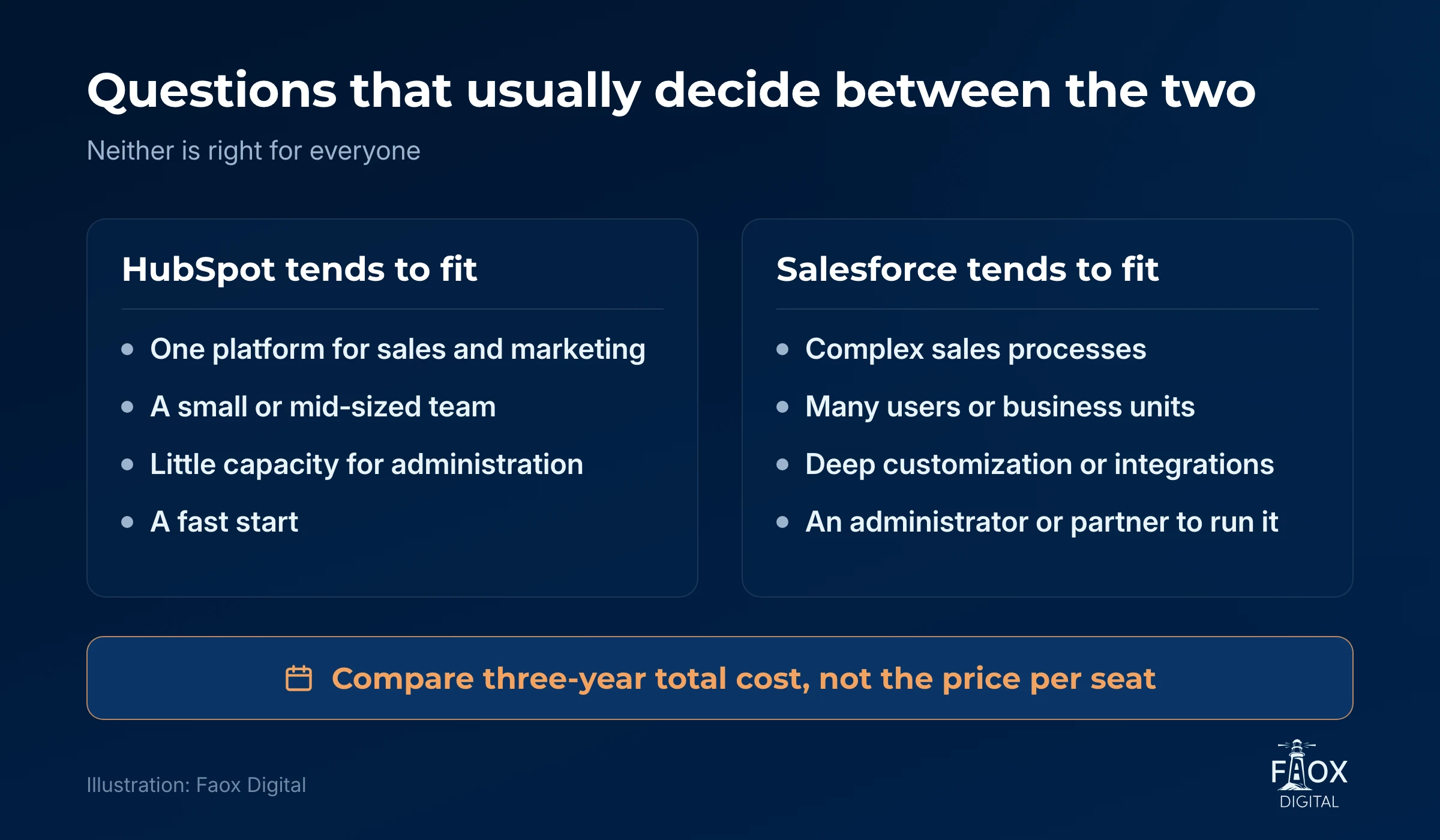
HubSpot tends to fit when you want sales and marketing on one platform, your team is small or mid-sized, nobody can spend much time on administration and you want to start quickly.
Salesforce tends to fit when your sales process is complex, you have many users or business units, you need deep customization or integrations, and you have an administrator or a partner to run it.
Consider neither if your team is a handful of people with one pipeline, where a simpler CRM or a free plan may do, or if your ERP’s own CRM module already covers what sales needs.
Questions to ask both vendors before you sign
Put the same questions to both, in writing, so the answers can be compared:
- What will the price be at renewal, and is there a minimum number of seats or a minimum contract length?
- What exactly does onboarding or setup include, and who does the work?
- Which connector exists for our ERP, who maintains it and what does it cost?
- Which plan do we need for the five reports our sales meeting uses?
- How are AI features and credits charged once the included allowance runs out?
- How do distributors or agents get access, and at what price?
- How do we export all our data if we leave?
Common mistakes when choosing between them
- Buying for features you will not use, because a demo showed them, instead of for the process you run.
- Underestimating administration, so a powerful system is configured once and then left to drift.
- Choosing the top tier before the process is clear, and paying for complexity nobody asked for.
- Comparing sales tools only, then discovering marketing automation is a separate purchase.
- Looking at the first-year offer instead of the cost at renewal and over three years.
How Faox Digital works with HubSpot, Salesforce and other CRMs
Faox Digital, a digital growth partner for B2B companies in complex and international markets, works in the client’s own tools, whether that is HubSpot, Salesforce or another system, and the client signs off everything we build. We start with an audit and clean-up of the list, the CRM and past sends, then plan segments by behavior and stage. We build the emails and automations in that system, keep a steady sending rhythm with healthy deliverability and measure replies, qualified conversations and pipeline.
Key takeaways
- HubSpot puts sales and marketing on one platform with a fast start; Salesforce is built for configuration around complex processes.
- Both charge per user; HubSpot adds required onboarding fees on Professional and Enterprise, while Salesforce setup is priced separately.
- For B2B marketing automation, HubSpot’s Marketing Hub shares the CRM’s database; Salesforce’s Account Engagement is a separate product on an annual contract.
- Team size and administration capacity often decide more than features do.
- Compare three-year total cost of ownership with your own deals and reports, not list prices alone.
Frequently asked questions
Is HubSpot better than Salesforce?
Neither is better for every company. HubSpot is usually easier to set up and run, with marketing on the same platform; Salesforce goes further in customization and complex processes but needs more administration. The better choice is the one that fits your process, team size and budget over several years.
Which costs less, HubSpot or Salesforce?
It depends on the tier and the team. At list prices in November 2026, HubSpot’s Sales Hub Professional cost $90 a seat a month billed annually plus a $1,500 onboarding fee, and Salesforce’s Pro Suite $100 a user a month billed annually, with setup priced separately. Compare the full first-year and three-year cost for your number of users.
How do HubSpot Marketing Hub and Salesforce Marketing Cloud compare for B2B?
HubSpot’s Marketing Hub works on the same database as its sales tools and is priced by seats and contacts. Salesforce’s B2B marketing automation, Marketing Cloud Account Engagement, is a separate product priced per organization on an annual contract, from $1,250 a month at the time of writing.
Can we start with HubSpot and move to Salesforce later?
Yes, companies do move between them, but a migration means mapping fields, moving records and rebuilding automations and reports. Keep your data clean and your field definitions written down from the start, and the move, in either direction, is far easier.
Sources
- HubSpot: Sales Hub pricing, accessed November 2026
- HubSpot Knowledge Base: Create and edit custom objects, updated November 2026
- Salesforce: Sales pricing, accessed November 2026
- Salesforce: Marketing Cloud Account Engagement pricing, accessed November 2026
Let’s talk
Have contacts you never follow up with?
Tell us about the list you already have. We will show you how email and CRM can turn it into conversations.