
CRM vs ERP: What Each System Does for a Manufacturer
What a CRM and an ERP each do for a manufacturer, where they meet between the quote and the order, why a company with an ERP usually still needs a CRM, and how to connect the two.
A CRM manages the customer relationship before and around a sale: customer records, contacts, sales opportunities, quotes and every conversation. An ERP runs the business once an order exists: orders, stock, production planning, purchasing and invoices. A manufacturer with an ERP usually still needs a CRM, because the ERP records what was sold, not who is about to buy or why a quote was lost; the two work best connected, with one system owning each piece of data.
CRM vs ERP is a question most manufacturers face once sales grow beyond what a few people can remember. The ERP is already in place, it holds every customer and every order, so why buy another system? The short answer is that the two answer different questions, and the gap between them is where sales opportunities get lost.
This guide explains what each system does in a manufacturing company, where they meet, whether you need both and how to connect them without entering everything twice. For the CRM itself in more depth, see our guide to what a B2B CRM is.
CRM vs ERP: the difference at a glance
The simplest way to tell them apart is to ask which part of the customer’s journey each one covers:
| CRM | ERP | |
|---|---|---|
| The question it answers | Who might buy, and what happens next? | What was ordered, and how do we deliver it? |
| Main users | Sales, marketing, customer service | Order processing, production, purchasing, warehouse, finance |
| Typical records | Contacts, companies, sales opportunities, quotes, activities | Orders, products, stock, production orders, invoices |
| Where it starts | The first contact or enquiry | The confirmed order |
| A hypothetical example | A plant engineer met at a trade fair, a quote for 40 valves sent last week | Order 4512, materials reserved, production in week 18, invoice due in 30 days |
In short, the difference between CRM and ERP is the difference between the relationship and the operation. A manufacturer needs both to work, and they need to share some of the same facts.
What a CRM does for a manufacturer
A CRM, customer relationship management system, is where the commercial side of the company keeps what it knows about customers and prospects. In manufacturing, the customer record is a company with several people in it: the engineer who specifies the product, the purchaser who negotiates, the manager who signs. The CRM records each person’s role and every conversation with them.
Its central object is the sales opportunity: a possible order, with its value, stage and next step, from the first enquiry to won or lost. Quotes, samples, technical questions and follow-up tasks hang from it, and so do the reasons a deal was lost, which an ERP never sees.
The CRM also holds what marketing knows: who subscribed to the newsletter, who clicked, who replied. Those signals are more reliable than open rates, as our article on why emails go unopened explains.
What an ERP does for a manufacturer
An ERP, enterprise resource planning system, runs the operation. Eurostat, which measures its use across EU companies, describes it as a software package that shares information between different functional areas. In a manufacturer, those areas are concrete:
- Orders: confirmed orders, prices, delivery terms and changes.
- Stock: raw materials, parts and finished goods, by location.
- Production planning: what to make, when, on which line, with which materials.
- Purchasing: what to buy from suppliers and when.
- Invoices and finance: billing, payments, credit limits and accounts.
The ERP also keeps the customer’s legal and financial master data: the registered name, tax number, billing and delivery addresses, payment terms and credit limit. It knows a customer precisely, but only as someone who has ordered or is about to.
Where the two meet: from quote to order
The data flow between the two systems follows the sale. An enquiry arrives and becomes a customer record and a sales opportunity in the CRM. The salesperson prepares a quote, ideally with prices and delivery times taken from the ERP. When the customer accepts, the order moves to the ERP, which checks stock, schedules production planning, ships the goods and raises the invoice.
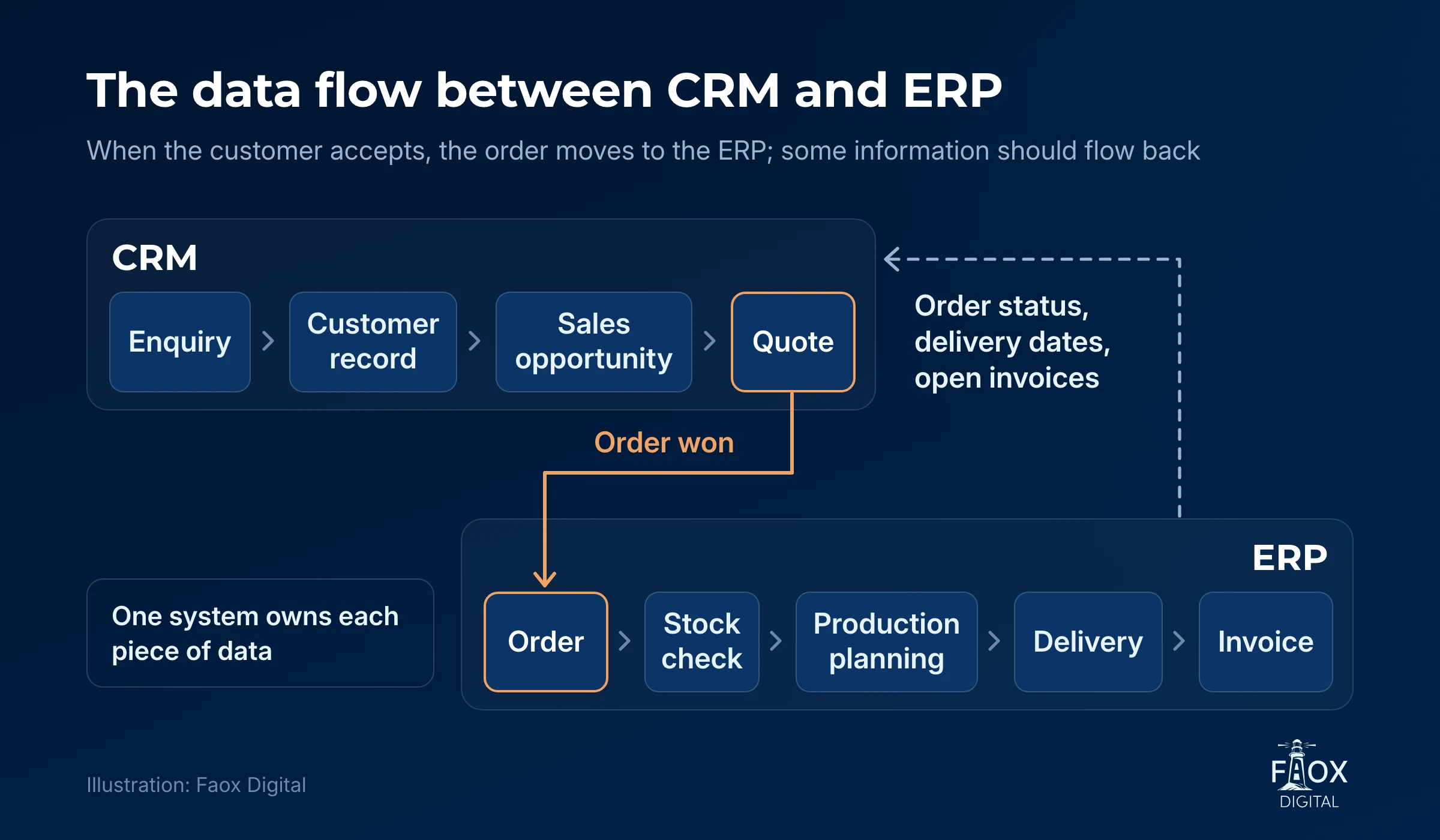
Some information should flow back. A salesperson calling a customer should see open orders, delivery dates and overdue invoices without phoning the finance department. That return flow is what makes the two systems feel like one.
Does a company with an ERP need a CRM?
Many manufacturers manage without one. Eurostat’s survey of EU enterprises with 10 or more persons employed found that in 2025, 57.6% of manufacturers used ERP software, but only 26.2% used CRM software.
The ERP covers the customers who order. What it usually does not cover:
- Prospects and new markets: people who have not ordered yet, often most of the sales effort.
- Open opportunities: quotes waiting for an answer, with the next step and the person responsible.
- Lost quotes and the reasons for them: price, delivery time, specification or a competitor.
- The buying group: who influences the decision, not only who pays the invoice.
- Marketing consent and engagement: who agreed to receive emails, and who responds.
An ERP alone can be enough for a company with a few long-standing customers, repeat orders and no plans to win new ones. Once you need to find new customers, follow up quotes or work with distributors in several markets, the gaps start to cost orders. Some ERP suites include a CRM module; judge it by how well it handles opportunities, contacts and follow-up, not by its name.
Integration and a single source of truth
Integration means the two systems exchange data automatically instead of people typing it twice. Start with a few connections:
- Customer accounts, created once and shared
- Products and prices, from the ERP to the CRM for quotes
- Orders, from a won opportunity to the ERP
- Order status, deliveries and open invoices, back to the CRM
The rule that keeps this clean is a single source of truth: one system owns each piece of data, and the other only reads it. The ERP usually owns the legal name, tax number, addresses, payment terms, prices and credit limits; the CRM owns contacts, roles, opportunities, activities and consent. When both systems can change the same field, the records drift apart and nobody trusts either.
The website side, such as a portal where customers check their own orders, stock or prices, is a separate project connected to the ERP; see what is a B2B portal for how that works.
Questions to settle before you connect them
An integration project goes faster when sales, finance and IT agree on a few answers first:
- Which system creates a new customer, and at what moment: at the first enquiry, or only at the first order?
- Where are quotes made? In the CRM with prices read from the ERP, or in the ERP with the status shown in the CRM?
- What must sales see from the ERP: open orders, delivery dates, overdue invoices, credit holds?
- Who may change prices, discounts and payment terms, and in which system?
- How often does data sync, and which system wins when the two disagree?
Write the answers down; they become the brief for whoever builds the connection.
Common mistakes when running CRM and ERP side by side
- Entering customers twice, by hand, in both systems.
- Keeping quotes in spreadsheets outside both systems, so nobody can see them.
- Using the ERP as a CRM, with sales notes squeezed into a comments field.
- Letting sales work blind to order status and open invoices.
- Connecting everything on day one, before the team uses the CRM at all.
Start with clean customer records and the CRM in daily use, then add the connections one at a time. The next step is making the CRM part of everyone’s routine, which our guide to everyday CRM habits covers.
How Faox Digital sets up the CRM side
Faox Digital, a digital growth partner for B2B companies in complex and international markets, starts CRM work with an audit and clean-up of the list and the CRM, removing dead and duplicate contacts. We then build the CRM, the emails and the automations in the client’s own tools, signed off by the client, and starting from trade fair contacts or a spreadsheet is fine.
Key takeaways
- A CRM covers the relationship up to the order; an ERP covers the operation from the order on.
- The CRM holds prospects, contacts, sales opportunities, quotes and lost reasons; the ERP holds orders, stock, production planning and invoices.
- Most manufacturers with an ERP still need a CRM to win new business and follow up quotes.
- Connect them step by step, with one system owning each piece of data.
- Start with clean customer records and daily CRM use, then add integrations.
Frequently asked questions
What is the difference between CRM and ERP?
A CRM manages relationships and sales before the order: contacts, opportunities, quotes and follow-up. An ERP manages the operation after the order: stock, production, purchasing, delivery and invoices. Both hold customer data, but for different purposes.
Can an ERP replace a CRM?
For a company with a few repeat customers, sometimes. For one that wins new customers, follows up quotes or sells through distributors, usually not: most ERPs are built around orders and invoices, not open opportunities, contacts and conversations. If your ERP has a CRM module, test it on those tasks.
What is a CRM application, with an example?
A CRM application is the software sales and marketing teams use to record customers, contacts and deals. For example, a salesperson meets a plant engineer at a trade fair, logs the contact, creates an opportunity, sends a quote and sets a reminder; when the order is won, it passes to the ERP.
Which system should own customer data?
Split it by type. The ERP usually owns legal and financial data, such as the registered name, tax number, addresses, payment terms and credit limit. The CRM owns contacts, roles, opportunities, activities and consent. Each field is changed in one system only.
Sources
- Eurostat: Integration of internal processes by NACE Rev. 2 activity (isoc_eb_iipn2), updated February 2026
Let’s talk
Have contacts you never follow up with?
Tell us about the list you already have. We will show you how email and CRM can turn it into conversations.