
Website Maintenance: What It Includes and Why It Matters After Launch
What regular website maintenance covers, what can go wrong without it, how often to do each task and which parts you can handle yourself.
Website maintenance is the regular work that keeps a site secure, working and current after launch: software and plugin updates, security scans, backups, certificate and domain renewals, hosting checks, uptime and speed monitoring, and tests of links and forms. Without it, problems build up quietly, from a hacked site to quote requests that never arrive or a domain that expires and takes your email with it. Most of the work can be scheduled or automated, but someone has to own it.
Launch feels like the end of a website project, but it is the start of the site’s working life. Software keeps changing, certificates and domains expire, and files and links move. Most of these failures are silent. A quote form can stop sending email after an update, and nobody finds out until a distributor asks why no one replied.
This guide explains what website maintenance includes, what can go wrong without it, how often to do each task and which parts you can handle yourself. It opens our series on hosting and maintenance; you can find all Websites & Apps articles on the category page.
What is website maintenance?
Website maintenance is everything you do after launch to keep a site safe, available and accurate. It keeps the site you have working, while a redesign or refresh changes it. It also differs from hosting: hosting is where the site runs, and maintenance is the upkeep of what runs there.
How much of it falls to you depends on how the site is built:
- Self-hosted CMS, such as WordPress: nearly all of it, because you run the software, the plugins and often the server settings.
- Hosted website builder: the provider handles the server and core software. You still look after the domain, forms, links and content.
- Custom or static site: there may be fewer plugins to update, but frameworks and libraries still age, and you may depend on one developer to update them.
What website maintenance includes
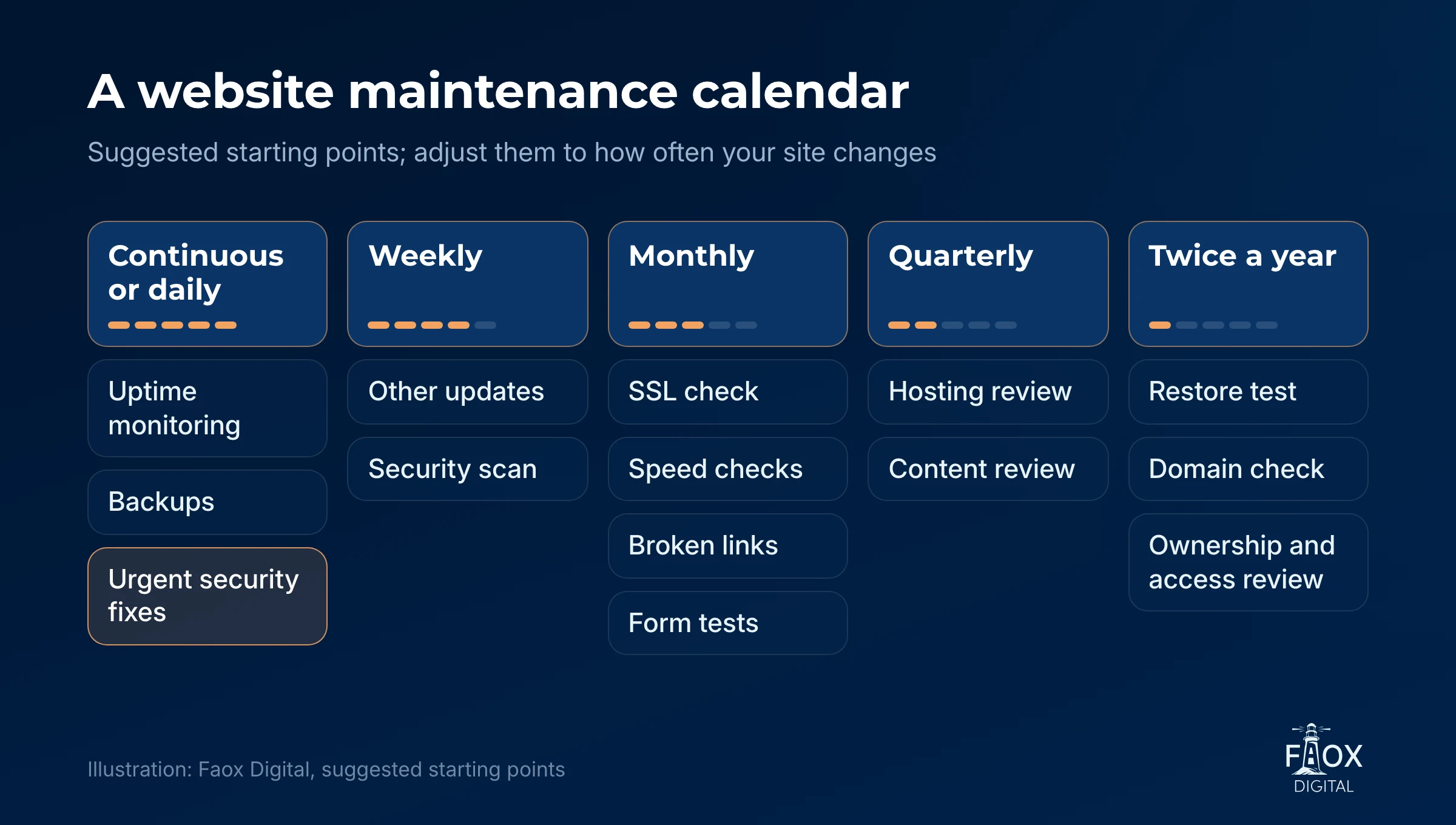
A typical schedule looks like this. These are our suggested starting points and not an industry standard: a small site that rarely changes can stretch some of them, and a site that takes orders needs shorter ones.
| Task | What it involves | How often |
|---|---|---|
| Software and plugin updates | CMS, plugins, theme, server language | Security fixes at once, the rest weekly |
| Security scan | Malware, changed files, known flaws | Weekly |
| Backups | Files and database, one copy away from the host | Daily, with a restore test twice a year |
| Uptime monitoring | Automatic checks of key pages | Continuous |
| SSL certificate | Automatic renewal and expiry alerts | Checked monthly |
| Domain renewal | Auto-renewal, payment and contact details | Checked twice a year |
| Hosting | Plan, server software, disk space, support | Quarterly |
| Speed checks | Core Web Vitals on key page templates | Monthly |
| Broken links | Internal links and document downloads | Monthly |
| Form tests | Real submissions on every form and language | Monthly and after every update |
| Content review | Specifications, quality certificates, contacts | Quarterly |
| Ownership and access | Logins, account owners, licenses | Twice a year |
Why website maintenance matters after launch
The main reason is that failures stay hidden until they cost you something:
| If you skip | What can happen | Who often notices first |
|---|---|---|
| Updates | Attackers use a known flaw to get in | Google or a visitor |
| Backups | No way back after a hack, failed update or host failure | You, when you need them |
| SSL certificate | Browsers warn visitors away from your site | Every visitor |
| Domain renewal | Website and email stop, and the name can be lost | Everyone |
| Uptime monitoring | An outage lasts until someone happens to look | A customer |
| Form tests | Quote requests disappear with no error | A buyer, or nobody |
| Broken links | Data sheets and documents go missing | A buyer |
| Ownership checks | Nobody can get into a key account | You, when it is urgent |
Most website failures are silent, so the job of maintenance is to make them visible.
The evidence is strongest on security:
Patchstack sells WordPress security, so treat its figures as vendor data. The UK figure comes from a government survey of 2,112 businesses between August and December 2025, and it covers all IT, not only websites. Verizon’s 2026 Data Breach Investigations Report points the same way: 31% of breaches started with software vulnerabilities, ahead of stolen passwords.
A hacked site also changes how buyers see you. Google says affected pages can appear with a warning label in search results, or a browser can show a warning before the page opens, and fixing only some pages does not earn a partial return. A supplier check that ends in a warning can end the conversation.
Website security: updates, scans and access
Website security is where maintenance matters most, and it comes down to three habits.
Software and plugin updates
Software and plugin updates close known holes. We use WordPress as the example because W3Techs counts it on 39.4% of all websites and its public data makes the pattern easy to see. Any platform needs the same discipline.
Most flaws are not in WordPress itself. Patchstack counted 11,334 new vulnerabilities in the WordPress ecosystem in 2025, up 42% on 2024: 91% in plugins, 9% in themes and six low-priority ones in core. For nearly half of them, the developer had no fix ready when the flaw was published. So every plugin you remove is one less thing to watch, and an abandoned plugin is a reason to replace it.
Core updates can still be urgent. On July 17, 2026, WordPress fixed a critical flaw and forced the update through its auto-update system. Patchstack’s sensors recorded the first attack attempts about 90 minutes after the release. WordPress then issued four security releases for version 7.1 between September 17 and October 28. A developer’s quarterly visit cannot keep up with that.
Automatic updates help. WordPress applies minor and security releases automatically on most sites, but plugins and themes update on their own only if you enable it, or in special cases. Automation has a cost, because an update can break a layout or a form. So back up first, try major updates on a staging copy and check your key pages afterwards.
Do not forget the server language. PHP 8.1 lost security support at the end of 2025, and 8.2 loses it on December 31, 2026. WordPress.org’s figures show about 32% of WordPress sites on versions older than 8.2, and another 23% on 8.2. Some hosts backport fixes to older versions, so ask yours. Our guide to keeping WordPress secure goes through the full routine.
Security scanning
A security scan looks for malware, changed files and software with known flaws. Scanners that work from outside see only what a visitor sees, so they can miss problems in your files and database, while tools on the server see more. Add Search Console’s free Security Issues report, which tells you when Google finds hacked content or malware. A clean scan means only that nothing known was found.
Access and accounts
An attacker needs no software flaw if an old password still works. Give each person their own login with only the rights they need, remove former staff and suppliers, and turn on multi-factor authentication, which OWASP recommends wherever possible.
A breach can also bring legal duties if your forms hold personal data. Under Article 33 of the EU’s GDPR, a controller must generally notify the authority within 72 hours of becoming aware of it, and Turkey’s data protection law (KVKK) also requires breaches to be reported. Take legal advice on what applies to you.
Backups: your way back
Backups are copies of the site’s files and database that let you return to a known good state after a hack, a failed update or a host failure. The UK’s National Cyber Security Centre recommends the 3-2-1 rule: at least three copies, on two devices, with one offsite. For a website, that usually means the live site, the host’s backup and a copy with a different provider.
Three habits make backups useful:
- Keep one copy away from your host. In March 2021, a fire mostly destroyed OVHcloud’s SBG2 data center in Strasbourg, and the company had to assess the impact on customers whose data was there. A backup kept in the same place can go with the site.
- Test the restore. The NCSC says backups should be regularly tested. We suggest restoring to a staging copy twice a year, because a backup you have never restored is only a hope.
- Keep older copies. A hack can go unnoticed for weeks, and if you keep only the last few days, every copy may be infected. We suggest at least 30 days.
Match the frequency to how often the site changes: daily if forms store data or you publish often.
SSL certificates and domain renewals
An SSL certificate (the current technology is called TLS) lets a browser confirm your site’s identity and encrypt the connection. If it expires, browsers warn visitors, for example with Chrome’s full-page "Your connection is not private" error. That is a poor first impression for a cautious buyer.
Manual renewal is on its way out, because the industry is cutting how long certificates last:
| Certificates issued | Maximum lifetime |
|---|---|
| Before March 15, 2026 | 398 days |
| From March 15, 2026 | 200 days |
| From March 15, 2027 | 100 days |
| From March 15, 2029 | 47 days |
Let’s Encrypt, a free certificate authority, plans to move its default from 90 days to 64 on February 10, 2027 and to 45 on February 16, 2028, and it advises against manual renewal. So automate renewal, and set an alert for any certificate that does not renew when expected.
Domain renewal is simpler, but the stakes are higher. ICANN says registrars send reminders about a month and a week before a generic domain such as .com expires, and notices go to the registrant’s email address. If the domain lapses, services tied to it, such as your website and email, can stop. It can then enter a 30-day redemption period and five days of pending delete, after which anyone can register it. Country-code domains such as .de or .com.tr follow their own rules.
The usual failure is a reminder sent to a former employee or an old agency. Turn on auto-renewal, keep the payment card current and use a shared mailbox that does not depend on that domain.
Hosting: check what the site runs on
Hosting is the service that keeps your site’s files and database online. It is often signed once and forgotten. Review it quarterly: the renewal date and payment method, server software versions, disk space and limits, where backups are stored and how well support responds.
A host’s uptime commitment is the provider’s promise and not a measurement of your site. Even 99.9% allows about 43 minutes of downtime in a 30-day month. Our guide to choosing a web host covers the options.
Uptime monitoring and speed checks
Uptime monitoring is an outside service that requests your pages every few minutes and alerts someone when they fail. Cover a product page and the quote page as well as the home page, and send alerts to two named people, so that a holiday does not silence them.
Planned downtime needs care too. For an urgent closure of a day or two, Google suggests returning a 503 status with an error page, and it says a full closure should last a few days at most.
Speed checks catch the slow decay that comes with new images, scripts and plugins. Each month, check Search Console’s Core Web Vitals report against Google’s targets: Largest Contentful Paint within 2.5 seconds, Interaction to Next Paint below 200 milliseconds and Cumulative Layout Shift below 0.1. Look at key pages on a phone as well, since colleagues often open shared links there. Our guide to designing for mobile buyers covers what to check.
Broken links and form tests
Broken links build up on every site. Pew Research Center reported in 2024 that 38% of web pages that existed in 2013 were no longer accessible a decade later, and that 23% of news pages and 21% of US government pages had at least one broken link. Those are not B2B figures, but they show how quickly links decay.
Google says 404 errors alone do not count against a site in search, so there is no need to chase every one. Fix them for your buyers, because a dead link to a data sheet or certificate looks careless. The free W3C Link Checker tests a page or a whole site, and Search Console’s Page indexing report lists the 404s Google finds. Redirect documents that have moved.
Form tests matter most, because forms fail silently and they are where enquiries arrive. Send a real test through every form, monthly and after every update:
- The form submits without errors, on a desktop and on a phone
- The message reaches the right inbox and not the spam folder
- The entry appears in your CRM, if the form connects to one
- The confirmation page or email works
- File uploads work, if you accept drawings
Email is a common point of failure. Since February 1, 2024, Gmail has required all senders to authenticate with SPF or DKIM, and it says other mail might be marked as spam or rejected. So ask how your form notifications are sent. If you run several languages, repeat the test for each one. Our guide to building a multilingual website explains how to keep versions in step.
Site and domain ownership: what to check
Site and domain ownership decides who can act when something goes wrong or when you change supplier. It is easy to find out too late that a domain sits in a former employee’s or an old supplier’s name. These checks apply to any provider, including us:
- Your company is the domain’s registrant, with an email address you control
- Someone at your company can log in to the registrar, DNS and hosting accounts
- The CMS has an administrator account for your company, plus a named backup person
- Search Console and analytics list your company as an owner
- Paid theme, plugin and font licenses are in your company’s name, or you know how to move them
- You know where backups are stored and how to get a copy
- A short document lists what is installed, who looks after it and when things renew
- The contract says what you receive if you change provider
ICANN’s Lookup tool shows a domain’s current registration data, such as the registrar and expiry date. Some of it is not public, so confirm the registrant with your registrar.
Who should do the work
| Option | Suits | Watch for |
|---|---|---|
| Your own team | A small site with few plugins and someone who has time | Holidays, no cover, tasks that slip |
| Managed hosting | A standard CMS with little customization | Forms, links and content are often not covered |
| Maintenance provider | Busy teams, many plugins, several languages | Scope, response times, reports |
You can do a lot yourself. Form tests, link checks, renewal dates and Search Console need little technical skill, and a small site on good managed hosting may need little more than a regular check.
Whoever does it, ask for a short monthly report: updates applied, backup status and the last restore test, uptime, scan results, forms tested and anything that needs a decision. If you buy this as a service, our article on website maintenance cost explains what drives the price and what a monthly plan should cover.
Where to start if nobody has been doing this
- List accounts and dates. Note the registrar, hosting, CMS and certificates, and when each one renews.
- Take a full backup. Store it away from your host and test that it restores.
- Check versions. Compare your CMS, plugins, theme and PHP with what is supported, and remove what you do not use.
- Update safely. Start on a staging copy, then update the live site and check key pages.
- Turn on alerts. Set up uptime monitoring and Search Console notifications.
- Test every form. Include every language, and try them on a phone.
- Name an owner. Put the schedule in a calendar, with one person responsible.
How Faox Digital looks after a website
At Faox Digital, launch and support is the last of five steps in a website project: we set up hosting, launch the site and then keep it fast and healthy. Before launch, the site is tested in every language and on every device.
Key takeaways
- Website maintenance keeps a site secure, available and accurate after launch, and it differs from both hosting and a redesign.
- Most failures are silent, so schedule tests and alerts instead of waiting for complaints.
- Updates are urgent: heavily targeted WordPress flaws can be attacked within hours, so automate what you can and back up first.
- Keep one tested backup away from your host, automate certificate renewal and protect your domain.
- Check that your company controls the domain, hosting and key accounts, whoever does the work.
Frequently asked questions
What is website maintenance?
It is the regular work that keeps a site safe, available and accurate after launch. It covers software updates, security scans, backups, renewals, monitoring and tests of links and forms. It keeps the site you have working, while a redesign changes it.
What does website maintenance include?
Usually software and plugin updates, security scans, backups, SSL certificate and domain renewals, a hosting review, uptime monitoring, speed checks, broken link checks, form tests, content reviews and a review of who has access. How much falls to you depends on your platform.
What is website hosting and maintenance?
Hosting is the service that keeps your site online, and maintenance is the upkeep of what runs there. Some providers sell both together, so read the scope. A hosting plan may cover the server and backups, but not your plugins, forms or content.
What does website maintenance cost?
It depends on your platform, the number of plugins and languages, how quickly someone must respond and whether hosting and domains are included. Compare plans by what they cover and not only by price.
What happens if you do not maintain a website?
Nothing visible at first, which is the danger. Over time, known flaws stay open, a certificate or domain can expire, forms can stop delivering enquiries and links can break. The result can be a hacked site, warnings in browsers or search results, or enquiries that never reach you.
Sources
- Patchstack: State of WordPress Security in 2026, 2026
- PHP: Supported versions, accessed November 2026
- UK government: Cyber security breaches survey 2025/2026, 2026
- ICANN: FAQs for registrants: domain name renewals and expiration, accessed November 2026
Let’s talk
Planning a new website or a fix?
Send us your current site and what you need it to do. We will tell you whether it needs a rebuild or a few focused changes.