
Fixing a Slow Website: When Tuning Is Enough and When to Rebuild
How to tell whether a slow B2B site needs tuning, a hosting upgrade or a rebuild, using real-user data, a priced fix list and a test of what the theme allows.
A slow website fix rarely starts with a new site. Tune the site when real users fail on a few templates because of images, scripts, plugins or caching; upgrade the hosting when the server is slow to answer on every page; and rebuild only when the theme, page builder or platform keeps pages slow after the targeted fixes. Price the fix list before you compare it with a rebuild quote.
A buyer opens your product page, waits, and goes back to the search results. Someone runs a speed test, sees red, and the talk turns to a new website. Sometimes that is right, but a slow website loading problem more often comes down to a few causes you can fix on the site you have.
This article helps you choose between three paths: tuning, a hosting upgrade and a rebuild. It assumes you know which measure fails; if not, start with our website speed guide. We work as a B2B website design agency, so we have a stake in the answer; the checks below apply to any provider, including us.
Slow website fix: tuning, hosting or rebuild
Each path solves a different kind of problem:
| Aspect | Tuning | Hosting upgrade | Rebuild |
|---|---|---|---|
| What changes | Images, scripts, plugins, caching and code | The server’s resources or location, sometimes with a CDN | The theme or templates, often the platform |
| Fits when | A few templates fail, and each fix holds | Pages start late on every template, even with caching on | Templates stay slow after the targeted fixes |
| What it cannot fix | A theme or platform that loads too much everywhere | Slow scripts and layout shifts in the browser (INP, CLS) | Plugins, tags and habits carried over |
| Cost | Developer hours on a priced list | A higher monthly fee and a move | A project budget, plus content, redirects and your team’s time |
| Risk | Low, and each change can be undone | Low to medium, if the move is tested | Highest, including search traffic during the switch |
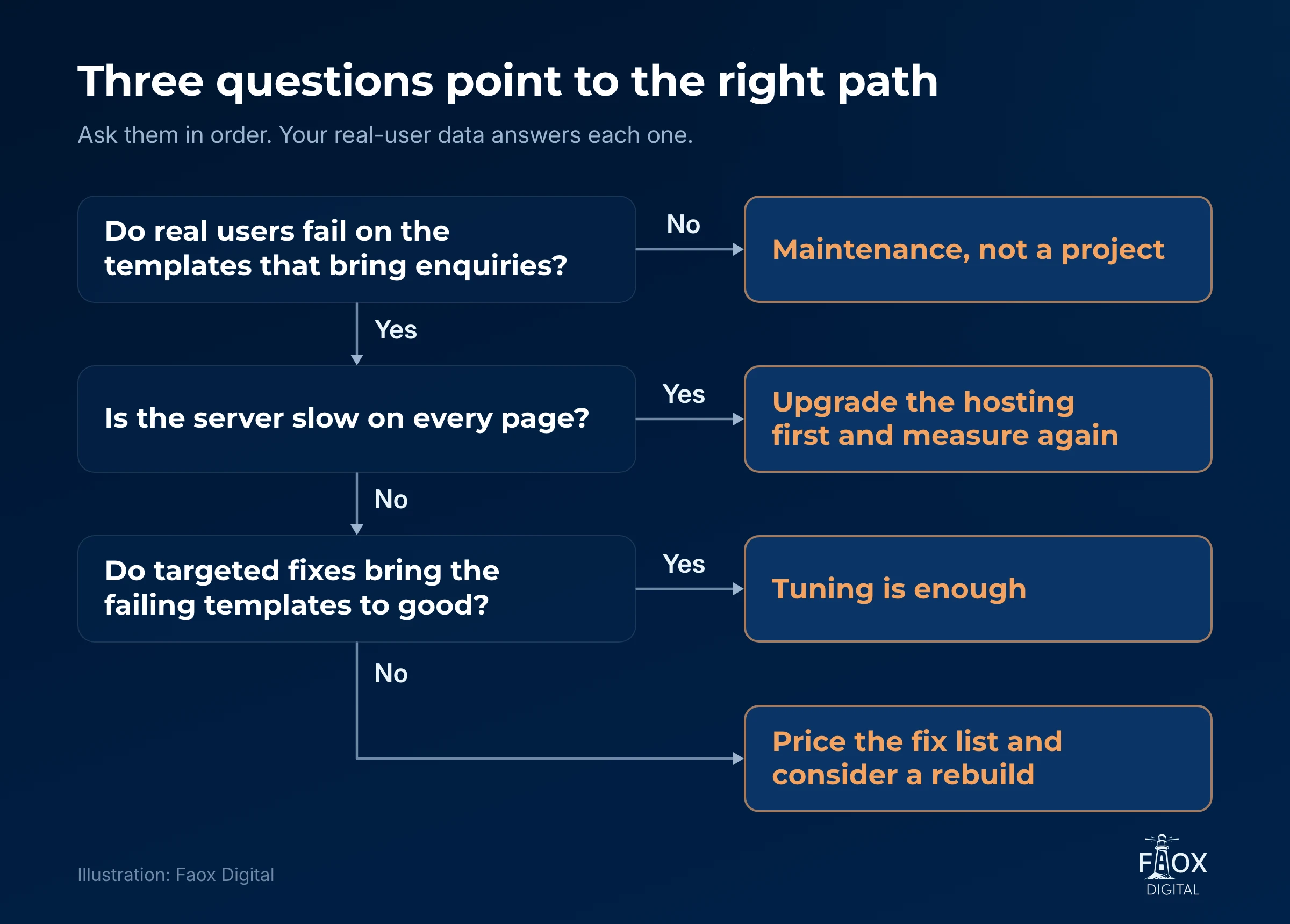
Put simply, ask three questions in order. Do real users fail on the templates that bring enquiries? If not, you need maintenance, not a project. If they do, is the server slow on every page? If so, upgrade the hosting first and measure again. If not, do targeted fixes bring the failing templates to good? If they do, tune; if they do not, price the fix list and consider a rebuild.
Set measurement targets first
Agree on what fixed means before anyone quotes for the work. Without measurement targets, a provider can point to a better lab score while buyers still wait.
Use the Core Web Vitals thresholds as targets, on real-user data. Web.dev’s article on the thresholds (updated May 2025) sets good at an LCP within 2.5 seconds, an INP of 200 milliseconds or less and a CLS of 0.1 or less, at the 75th percentile of page loads. Measure mobile and desktop separately. Time to First Byte (TTFB) is not a Core Web Vital, but it shows whether the server is part of the problem: web.dev’s TTFB guide (November 2025) treats 0.8 seconds or less as good and over 1.8 seconds as poor.
Set targets per template, not for the whole site. Search Console’s Core Web Vitals report groups similar pages, so you can see whether product pages fail while articles pass. And allow for time: PageSpeed Insights reports real users over the previous 28 days, and when you tell Search Console an issue is fixed, it starts a 28-day monitoring session.
When tuning is enough
Speed optimization, or tuning, is enough when the evidence points to named causes on named templates: an oversized header image, a slider, a chat widget, an old tracking tag. One or two measures fail, other templates pass, and each fix you test on a staging copy moves the result without breaking anything else. Then a priced fix list, worked through template by template, is the cheapest route.
Theme and plugin load
WordPress’s handbook (updated October 2026) says your theme has a huge impact on performance, since a fast, lightweight theme performs much more efficiently than a heavy one, and so do the number and performance of your plugins. Page builders add their own layer: HTTP Archive’s 2025 Web Almanac notes that they often produce more complex pages with larger CSS and JavaScript files, that older builders have created long-term maintenance and lock-in issues, and that newer builders have not fully closed the gap with more tightly controlled builds.
So measure the theme and plugin load before you blame the platform. On a staging copy, switch to a default theme, then disable plugins one at a time, and measure the failing template after each change. The page will not look right, but the differences show how much of the load the theme, the builder and each plugin bring. If the template gets much faster on a default theme, your current theme sets the floor, and the question is what moving away from it costs.
Code cleanup
Code cleanup removes what pages load but never use. The Coverage panel in Chrome DevTools shows unused JavaScript and CSS, and Chrome’s documentation adds a caution: finding unused code is relatively easy, while restructuring a site so that each page loads only what it needs can be difficult. The database counts too. The same WordPress handbook suggests keeping autoloaded options, the plugin and theme settings loaded on every page, under 800 KB.
If your developer can say what each script and style sheet does and remove it safely, cleanup is tuning. If nobody can, because the theme or builder loads everything everywhere, you have found the floor.
When a hosting upgrade is the fix
A hosting upgrade helps when pages start late everywhere: TTFB is poor in real-user data on every template, a static file such as an image is slow to arrive too, and the site slows down at busy times.
Web.dev’s guide to optimizing TTFB (updated November 2025) says hosting should be the first thing you consider, that shared hosting is generally slower, and that a host should give your site enough memory and keep its server software up to date. WordPress’s handbook adds that paying for a higher service level, with more processor power and memory or faster disks, can make a big difference. Check the software as well: at the time of writing (November 2026), WordPress recommends PHP 8.3 or greater, and PHP 8.2 receives security fixes only until December 31, 2026.
Distance matters too. Buyers far from your server wait longer for its answers, and a CDN serves files from servers closer to them. Our article on business website hosting covers how to choose a plan.
When a rebuild is worth it
A rebuild replaces the theme or templates, and often the platform. Consider it when:
- Templates still fail after the targeted fixes, and the default theme test shows the theme or builder is the floor.
- Content is locked into an old page builder, so moving to a lighter theme means rebuilding the pages anyway.
- The platform or its PHP version is out of support, and the upgrade amounts to a rebuild.
- Each fix breaks something else, and nobody can say what a change will affect.
- Speed is one of several problems that a refresh cannot solve. Our article on website redesign or refresh covers that wider decision, and our guide to fixing a B2B mobile website covers phones.
A new site is not automatically fast. The 2025 Web Almanac points to HTTP Archive findings that WordPress performance varies widely, driven more by configuration and tooling choices than by WordPress itself. So a rebuild on the same platform with a lighter theme and fewer plugins may be enough, while a new site that brings the same plugins, tags and videos across can end up just as slow. Choosing the base is its own decision, covered in our comparison of a custom or template website.
Put the targets in the rebuild brief: Core Web Vitals at the 75th percentile for each key template, checked in lab tests before launch and in real-user data after it. Then protect what the old site has earned in search: keep URLs where you can, redirect the rest and keep the content that ranks. Our technical SEO guide covers what Google needs from the new site.
Cost and benefit: compare like with like
Cost and benefit are easy to compare badly, because a rebuild arrives as one quote and tuning as a promise. Price each path the same way:
- Price the fix list, in hours per item, ranked by the template and measure each one improves.
- Price the hosting change: the new monthly fee, the move and a test period.
- Price the rebuild in full, with content migration, redirects, testing, training and your team’s time.
- Write down the benefit: which templates will pass, on which device, and what those pages bring in enquiries.
- Compare over the same period, with maintenance included for each path.
- Start with the smallest step that reaches the targets, and keep the rebuild quote for later.
We found no independent survey of what speed fixes cost; the figures we saw online come from agencies selling the work, so read them as sales estimates. Judge the benefit on enquiries more than rankings. Google says Core Web Vitals are used by its ranking systems, but also that it always seeks to show the most relevant content, even when the page experience is sub-par.
Keep it fast: maintenance after the fix
Whichever path you take, speed slips without maintenance. Pages grow heavier as images, scripts and features are added: in the 2025 Web Almanac, the median mobile home page grew 8.4% between 2024 and 2025, to 2.6 MB. Software goes out of support on a schedule as well. Name someone who approves each new script, check real-user data monthly and keep updates in the plan. Our article on website maintenance cost covers what a monthly plan should include.
How Faox Digital weighs a speed fix against a rebuild
Before recommending tuning or a rebuild, Faox Digital, a digital growth partner for B2B companies, learns what a company sells, who buys it and which markets matter, and maps what each page must do on the way to an enquiry.
If focused changes will make the key pages fast, we say so and size the first step to your budget and stage, even when your own team can do part of the work. If the platform is the obstacle, the client signs off each step of the rebuild, and the site is tested in every language and on every device before launch, with hosting and speed part of our support afterwards.
Key takeaways
- Set measurement targets first: Core Web Vitals at the 75th percentile, per template and device.
- Tune when named causes slow a few templates; upgrade the hosting when pages start late everywhere.
- Test the theme’s weight on a staging copy before you blame the platform.
- Rebuild only when the theme, builder or platform keeps pages slow after targeted fixes.
- Compare a priced fix list with the full cost of a rebuild, and keep the site fast afterwards.
Frequently asked questions
Can a slow website be fixed without a rebuild?
Usually. Images, scripts, plugins, caching and the server can all be fixed on the site you have, template by template. A rebuild is worth it when the theme, page builder or platform keeps pages slow after those fixes.
Will a new website fix slow loading?
Not by itself. A new site with a heavy theme and the same plugins, tags and videos can load just as slowly, so put Core Web Vitals targets for each key template in the brief.
Why is my website slow only in Chrome?
Rule out your own setup first: try another browser, network and device. PageSpeed Insights takes its real-user data from Chrome users, so if it shows good results for your pages, the cause is probably local, such as an extension or your connection.
How much does it cost to fix a slow website?
It depends on the cause: tuning is priced in developer hours, a hosting upgrade as a monthly fee and a rebuild as a project. Ask for a priced fix list and compare it with the full cost of a rebuild.
Sources
- web.dev: How the Core Web Vitals metrics thresholds were defined, updated May 2025
- HTTP Archive: Web Almanac 2025, CMS, 2026
- WordPress: Optimization, updated October 2026
- Google Search Central: Understanding page experience, updated September 2026
Let’s talk
Planning a new website or a fix?
Send us your current site and what you need it to do. We will tell you whether it needs a rebuild or a few focused changes.