
Business Website Hosting: How to Choose the Right Setup
What hosting is, which type suits a business website, and what to check in a plan: uptime terms, backups, SSL, email, DNS, server location and how to move safely.

Business website hosting is the service that keeps your site’s files and database on a server connected to the internet. For most company sites, the choice is between shared hosting, a virtual or cloud server and managed hosting, and the right one depends less on the first price than on who runs the server, what the plan includes and what happens when something fails. Check the backups, SSL, support, server location and the provider’s uptime terms before you sign.
Hosting is easy to buy and easy to forget. The plan is chosen once, usually on price, and nobody looks at it again until the site goes down or the renewal invoice arrives at several times the first year’s price.
This guide explains the options and what to check in a plan. Hosting is one part of keeping a site running; for the rest, see what website maintenance includes.
What is business web hosting?
Hosting rents you space and computing power on a server that is always connected to the internet. Business web hosting is not a separate technology. It is the same products bought with a business’s needs in mind: support when something breaks, backups you can rely on and terms you can hold the provider to.
Four things are often bought together but are separate services:
- Domain: your address, registered through a registrar.
- DNS: the records that tell the internet where your site and your email live.
- Web hosting: the server that holds and runs the site.
- Email hosting: the service that holds your mailboxes.
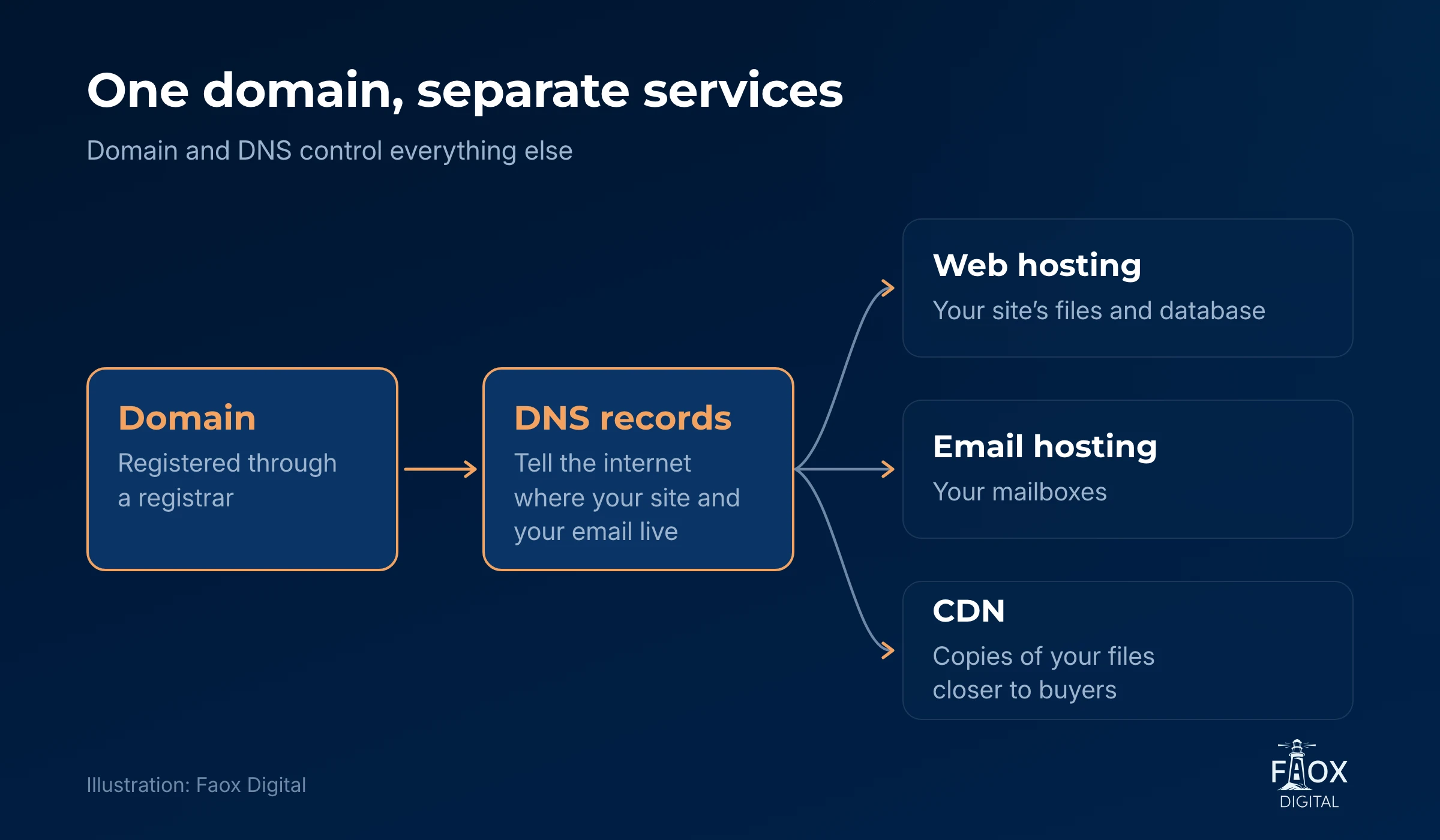
Knowing who holds each one makes it much easier to change one without breaking the others.
Business website hosting: four types compared
| Type | What you get | Who runs the server | Fits when |
|---|---|---|---|
| Shared hosting | Space on a server shared with many other sites | The host | A small brochure site with modest traffic |
| VPS | A virtual server with its own set resources | You, or a provider you pay for it | You need more control or resources |
| Cloud server | A virtual server on a provider’s cloud, resized on demand | You, or a provider you pay for it | Traffic varies, or you need to scale |
| Managed hosting | A platform run for one system, such as WordPress | The host, including updates and backups | You want the platform handled and have the budget |
Shared hosting is the cheapest because many sites share one server’s resources, so a busy neighbor can slow yours. Shared plans often come with a control panel such as cPanel or Plesk, where you manage files, databases, email accounts and backups without server commands.
A VPS (virtual private server) and a cloud server both give you a server of your own, but someone has to install, secure and update it. If nobody in your company can, pay a provider to manage it, or choose managed hosting, where the host runs the platform and you run the site.
If you are building a new site, choose hosting as part of the project, because languages, forms and integrations shape what the server must do. Our article on how to design a website explains where that decision fits.
How much does it cost to host a business website?
Published prices from three providers show the range at the time of writing (November 2026, in US dollars):
- Shared: Hostinger’s entry plan was advertised at $1.99 a month, but only when you pay 48 months upfront, and it renews at $10.99 a month.
- Unmanaged virtual server: DigitalOcean’s smallest Basic Droplet costs $4.00 a month, and you run everything on it yourself.
- Managed WordPress: WP Engine’s Essential plan starts at $28 a month, billed annually, with daily backups and WordPress, PHP and MySQL managed for you.
The first number rarely tells you the cost. Compare the renewal price, the term you must prepay, what backups and support are included and what you will add, such as email or a staging copy.
What to check in a hosting plan
- The renewal price, and the term you must pay upfront
- Backups: how often, how long they are kept, where they are stored and whether a restore costs extra
- Free SSL certificates that renew automatically
- A server location close to your buyers, and where personal data is stored
- The PHP and database versions on offer, and how upgrades are handled
- A staging copy for testing changes
- A firewall and malware scanning
- Support hours, channels and response times
- The uptime commitment, and what you get when it is missed
- How to leave: exporting files, databases and email
Server location and CDN
Server location affects speed and data protection. A server far from your buyers adds delay to every response, so host near your main market. If your forms collect personal data from people in the EU, location matters legally too: under Article 44 of the GDPR, personal data may be transferred outside the EU only under the conditions the regulation sets. Ask where the server and the backups are, and take legal advice if they are outside the EU.
A CDN (content delivery network) keeps copies of your files on servers closer to buyers in other countries, which web.dev describes as solving the problem of distance from your origin server. Some hosting plans include one. If your site is already slow, find the cause before you move; our guide to why a website is slow shows how to tell a hosting problem from others.
Uptime commitments: what an SLA really gives you
An uptime commitment (SLA) is the provider’s promise about availability, written into a service level agreement. Read what it pays when it is missed. Amazon Lightsail’s SLA (updated May 2022), for example, gives a credit of 10% of that month’s charge when a single server’s uptime falls below 99.5% but stays at or above 99.0%, and it calls a service credit the customer’s sole and exclusive remedy. Even 99.5% allows about three and a half hours of downtime in a 30-day month.
Some providers keep their SLA for higher plans. WP Engine lists a 99.99% uptime SLA among the features of its Business plan, from $400 a month, but not among those of its Essential plan.
So treat any uptime figure as the provider’s commitment, not as your site’s availability. Watch your own site with an independent uptime monitor, and plan for outages with backups and a way to restore.
Backups, SSL and security
Backups differ more between plans than the marketing suggests. Hostinger’s entry plan lists free weekly backups and its next plan daily ones, and its help page says daily backups are kept for 7 days and weekly ones for 6 weeks. Find out how often your plan backs up, how long it keeps copies and how you restore one, and keep your own copy with another provider. If your site runs on WordPress, our WordPress maintenance checklist covers backups and updates in detail.
An SSL certificate encrypts the connection to your site, and it should cost you nothing. Let’s Encrypt, a free, automated and open certificate authority, gives anyone who owns a domain a trusted certificate at no cost, and server software can renew it automatically. A good host sets this up for you.
Ask about security too: a firewall, malware scanning and how quickly the host applies server updates.
Email hosting, domain and DNS
Email hosting is often bundled with web hosting, sometimes only for a limited time: Hostinger’s entry plan, for example, includes two mailboxes per website free for the first year. Keeping email with a separate provider means that moving the website does not move the mailboxes. Wherever email lives, set up the SPF, DKIM and DMARC records that prove your messages are genuine; our guide to SPF, DKIM and DMARC explains them.
Domain and DNS control everything else. Register the domain in your company’s name, with a company email address, and know where the DNS records are managed, because changing hosts means changing those records.
Moving to a new host without losing traffic
Hosting migration need not hurt search visibility if the addresses stay the same. Google’s guide to changing hosting (updated December 2025) sets out the order:
- Copy and test. Put the site on the new host and test it on a temporary address kept out of search with a noindex rule.
- Check access. Make sure the new host’s firewall does not block Googlebot, using Search Console’s URL Inspection tool.
- Lower the DNS TTL to a few hours at least a week before the move, so the change spreads faster.
- Keep verification working. Copy any Search Console verification file or tag to the new site.
- Switch. Remove temporary crawl blocks, then point the DNS records to the new host.
- Watch both servers. Traffic should fall on the old host and rise on the new one.
- Shut down the old host only when traffic to it has stopped.
Google notes that a temporary drop in its crawl rate right after the move is normal, followed by a steady rise over the next few days. Move email separately and check that messages still arrive before you cancel anything.
Hosting is only part of what a site costs to run. For what a plan covering upkeep should include, see our article on website maintenance cost.
How Faox Digital approaches hosting
For the websites Faox Digital builds, launch is followed by support that covers hosting and keeping the site fast and healthy. Each site is tested in every language and on every device before anyone outside sees it, and for a smaller budget we suggest a first step that fits the company’s stage, even if its own team handles part of the work.
Key takeaways
- Hosting, domain, DNS and email are separate services; know who holds each one.
- Choose between shared, VPS, cloud and managed hosting by who will run the server, not by the first price.
- Compare renewal prices, backup terms, SSL, support and how you would leave.
- An uptime SLA is the provider’s promise, and its remedy is usually a credit; monitor your own uptime.
- When you move hosts, test first, lower the DNS TTL and keep the old host until traffic to it stops.
Frequently asked questions
What is business web hosting?
It is hosting chosen for a company website: a server that holds and runs the site, bought with support, backups and clear terms in mind. The products are the same as for anyone else, so what makes it suitable for a business is the plan you pick and what it includes.
How much does it cost to host a business website?
In November 2026, published prices ran from about $2 a month for shared hosting paid years upfront, renewing at about $11, to $28 a month for an entry managed WordPress plan, while an unmanaged virtual server started at $4. Add email, backups you control and the time someone spends looking after it.
Is shared hosting good enough for a business website?
For a small site with modest traffic, often yes, if the plan includes backups, SSL and responsive support. Move up when the site slows at busy times, you need special software or more control, or nobody wants to share a server with unknown neighbors.
Can I change hosts without losing rankings?
A move need not affect rankings if the addresses stay the same and you follow a careful order: test the copy, lower the DNS TTL a week ahead, switch the DNS and watch both servers. Google says a short drop in its crawl rate after the move is normal.
Sources
- Google Search Central: Changing your hosting, updated December 2025
- Amazon Lightsail: Instance and block storage service level agreement, updated May 2022
- Hostinger: Web hosting plans, November 2026
- WP Engine: Plans and pricing, November 2026
Let’s talk
Planning a new website or a fix?
Send us your current site and what you need it to do. We will tell you whether it needs a rebuild or a few focused changes.